



What Is a VPN and How Does It Work? A Comprehensive Guide
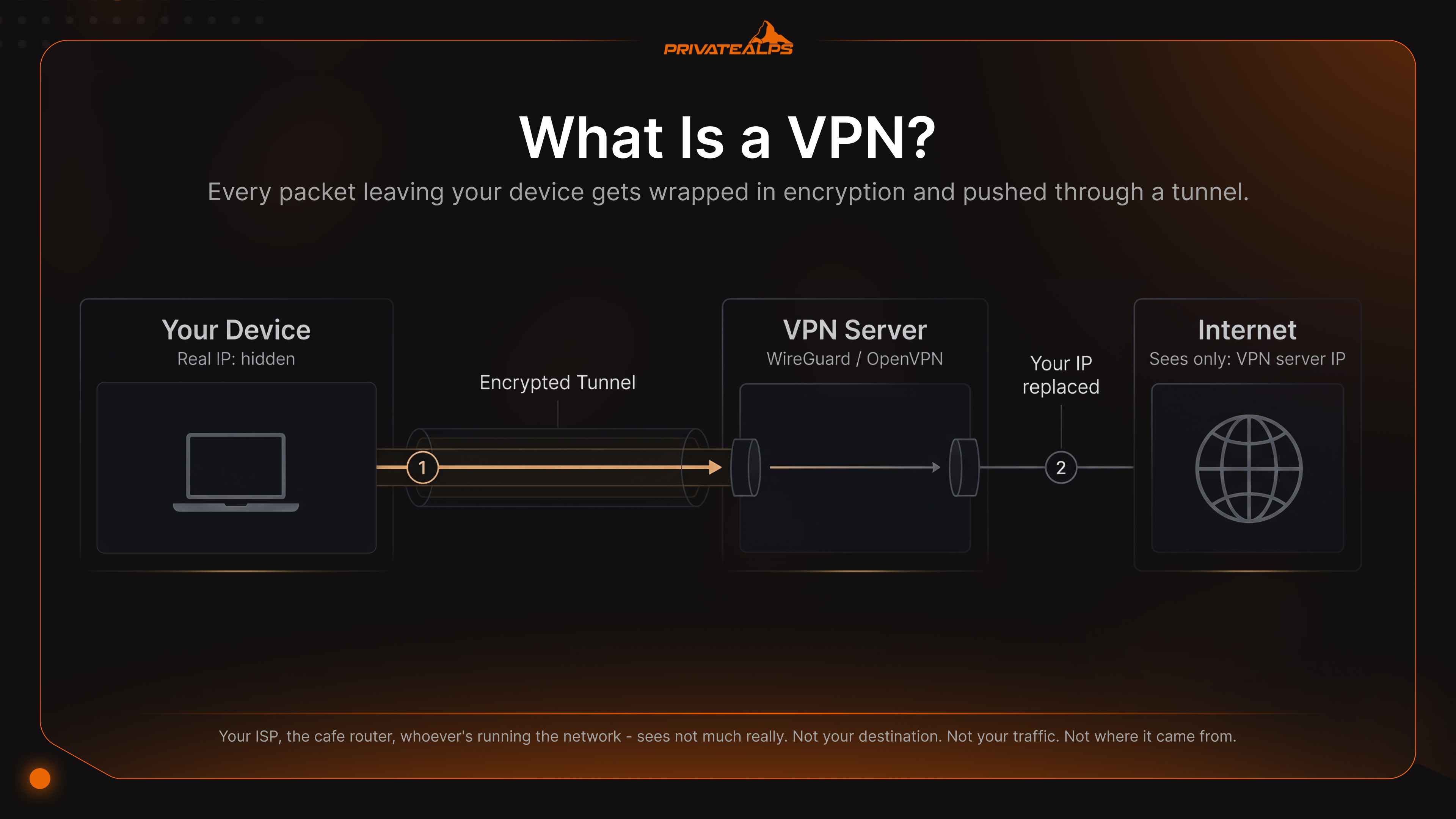
Short version up front. A VPN - Virtual Private Network - is an encrypted tunnel between your device and a remote server. It hides your IP and shields your traffic from whoever happens to be watching the network in between. As for how a VPN works: your device wraps every packet in encryption, ships it off to a VPN server, and that server forwards the unwrapped traffic onward using its own IP. So the website you're loading, your ISP, the coffee shop router - none of them sees you. They see the server.
This isn't a glossary entry. It's the kind of explainer you'd hope a colleague gave you on a whiteboard. By the end you'll know what's actually happening inside the tunnel, the differences between WireGuard and OpenVPN and IKEv2 (plus which legacy protocols should've been retired ten years ago), eight situations where a VPN solves a real problem, and - the part nearly every guide on page one skips - where it absolutely doesn't help. The global VPN market sits well into the tens of billions of dollars in 2026 and continues to grow at double-digit annual rates, driven mostly by remote work and rising privacy fatigue.
Here's the uncomfortable bit. Plenty of people who pay for a VPN every month have no real idea what they're paying for. So let me put this out there early: a VPN is one layer in a privacy stack. Just one. Skip past that and the rest of this guide can't save you from your own assumptions.
AI Summary
Quick framing. A VPN is software that encrypts your internet traffic and pushes it through a remote server, swapping your real IP for the server's. Two flavors basically - consumer VPN services you subscribe to (NordVPN, Mullvad, ProtonVPN), and corporate VPNs that companies run for remote access or for linking offices. Both lean on AES-256 or ChaCha20-Poly1305 encryption. Both still uncrackable in any practical sense in 2026.
A few things every user should know going in:
- AES-256 - industry-standard symmetric cipher. ChaCha20-Poly1305 is the modern alternative.
- WireGuard - fastest current protocol. Around 4,000 lines of code against ~70,000 for OpenVPN.
- A kill switch blocks all internet access if the VPN tunnel drops. Non-negotiable feature.
- No-logs policy means the provider keeps no connection records. Only worth something when an outside party has actually audited it.
- Split tunneling routes only the apps you choose through the VPN. Everything else stays on the open connection.
- A VPN doesn't make you anonymous - browser fingerprinting, cookies, logged-in accounts still identify you regardless.
- Self-hosted VPNs (WireGuard on your own server) take provider trust out of the picture entirely.
What Is a VPN?
A VPN is an encrypted connection between your device and a server you trust. Every packet leaving your device gets wrapped in encryption and pushed through a tunnel the local network can't read. On the other side, the server peels the encryption off, swaps your IP for its own, and sends it onto the public internet. Everyone outside the tunnel - your ISP, the cafe router, whoever's running the network - sees... not much really. Not your destination. Not your traffic. Not where it came from.
The phrase virtual private network started life describing private corporate links built over public infrastructure. RFC 2764 territory. Consumer VPNs took that same idea and pointed it at individuals on the open internet. The "virtual" part: there's no dedicated wire. The "private" part: cryptography is doing all the isolating.
People mix up VPNs, proxies, and Tor constantly. Worth a quick map of what's what:
| Tool | What It Encrypts | Hides IP | Speed | Trust Model |
|---|---|---|---|---|
| VPN | All OS-level traffic in an encrypted tunnel | Yes | Fast (5–20% loss) | Trust one provider |
| HTTP/SOCKS Proxy | Only the configured app's traffic; often unencrypted | Yes (per app) | Fast | Trust one provider |
| Tor | Three nested encryption layers across volunteer relays | Yes | Slow (high latency) | Distributed; no single party knows source + destination |
| HTTPS only | The application payload to a specific website | No | Fastest | Trust the site's TLS certificate |
A SOCKS5 proxy in your browser hides what the browser sends and nothing else. The OS keeps talking. Background apps keep talking. DNS keeps leaking right out the side. A VPN sits lower in the stack and grabs all of it. Tor goes further on anonymity with three encrypted hops, but you pay for that in speed - and pay heavily. Streaming over Tor? Don't bother even trying.
How Does a VPN Work?
Quick answer first. A VPN does a cryptographic handshake with a remote server, agrees on a shared symmetric key, builds a virtual network interface on your device, then routes every outbound packet through that interface inside an encrypted envelope. The server unwraps each packet and forwards it on. Whatever you're connecting to only ever sees the server's IP. Never yours.
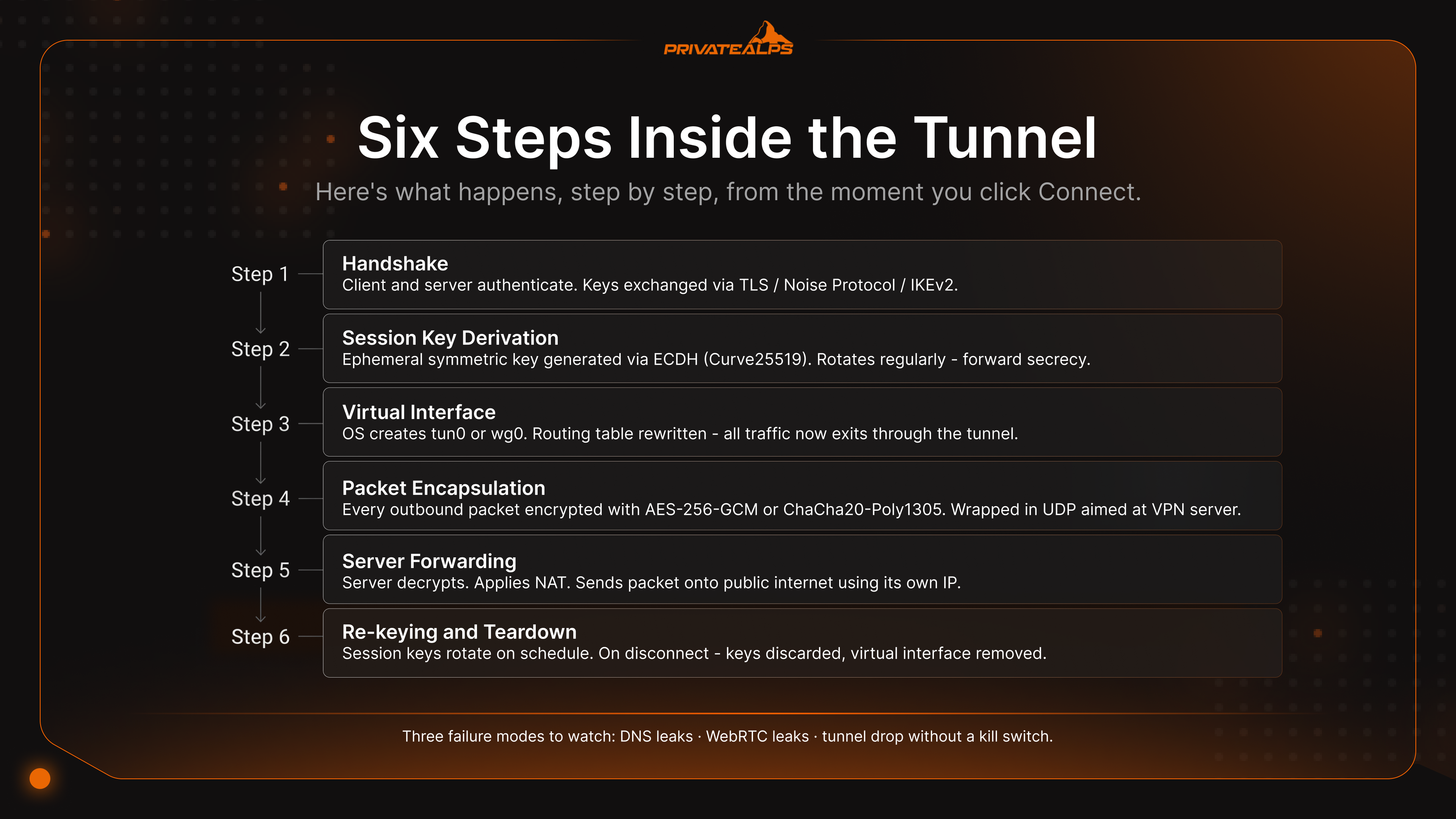
Here's what happens, step by step, from the moment you click Connect:
- Handshake. Client and server authenticate each other and exchange keys. OpenVPN uses TLS for this. WireGuard uses the Noise Protocol Framework. IKEv2 has its own mechanism. Certificates or public keys do the heavy lifting on identity.
- Session key derivation. An ephemeral symmetric key gets generated using Elliptic Curve Diffie-Hellman - usually with Curve25519. That key encrypts your actual data and rotates regularly, which is what gives you forward secrecy.
- Virtual interface. Your OS spins up a virtual network adapter (
tun0orwg0on Linux, a TAP/TUN adapter on Windows), then rewrites the routing table so the default gateway points at this new interface. - Packet encapsulation. Every outbound IP packet gets encrypted with AES-256-GCM or ChaCha20-Poly1305, then wrapped inside a UDP packet aimed at the VPN server.
- Server forwarding. Server decrypts. Applies NAT. Pushes the packet onto the public internet using its own IP. Return traffic comes back the same way in reverse.
- Re-keying and teardown. Session keys rotate on a schedule. When you disconnect, keys get thrown away and the virtual interface comes down with them.
Three failure modes matter way more than any of the protocol details. DNS leaks - your domain lookups go to the ISP's resolver instead of through the tunnel. Easy to spot at dnsleaktest.com.
WebRTC leaks - your browser hands the real IP to a remote peer even with the VPN running in the background. The kill switch is your safety net for both. Tunnel drops, firewall slams the door on all non-VPN traffic until the connection comes back. Without one, a short reconnect can be enough to expose your real IP to every active session you've got open at that moment.
What Is a VPN Protocol?
Direct definition. A VPN protocol is the ruleset for how the client and server negotiate keys, encrypt data, and frame packets. Your protocol choice maps directly to speed, security, mobile reliability, and which networks the VPN can actually punch through. Six protocols still floating around in 2026 - only three of them belong in a new deployment.
| Protocol | Released | Encryption | Speed | Compatibility | Best For |
|---|---|---|---|---|---|
| WireGuard | 2016 (kernel: 2020) | ChaCha20-Poly1305 | Fastest (~10–15% throughput loss) | All major OSes | Default choice for new setups |
| OpenVPN | 2001 | AES-256-GCM (configurable) | Moderate (~20–30% UDP, ~50%+ TCP) | Universal, including routers and firewalls | Restrictive networks; maximum compatibility |
| IKEv2/IPsec | 2005 | AES-256 | Fast | Native on iOS, macOS, Windows | Mobile devices that switch between Wi-Fi and cellular |
| L2TP/IPsec | 1999 | AES-256 (via IPsec) | Slow (double encapsulation) | Built into most OSes | Legacy systems only - avoid for new deployments |
| SSTP | 2008 | AES-256 over TLS | Moderate | Windows-focused | Corporate Windows environments |
| PPTP | 1996 | MPPE/RC4 - broken | Fast but insecure | Legacy | Do not use under any circumstances |
PPTP gets a warning that most protocol tables somehow leave out. It was cryptographically broken back in 2012, when researchers showed PPTP's MS-CHAPv2 authentication can be reduced to a single DES key - recoverable in under 24 hours on commodity hardware. Microsoft itself put out Security Advisory 2743314 the same year basically agreeing. Yet a handful of services still offer PPTP. Anyone who does is offering a tunnel an attacker can decrypt offline at their leisure. Treat it like WEP wireless - historical curiosity, never a deployment option.
For everything else the logic isn't hard. WireGuard by default. Its whitepaper-defined codebase sits around 4,000 lines - small enough that one engineer can audit the whole thing front to back. Cryptography has been formally verified. OpenVPN when WireGuard's UDP traffic gets blocked: restrictive corporate firewalls, hotel networks, high-censorship countries. OpenVPN can run over TCP on port 443 and look like ordinary HTTPS to anything inspecting the wire. IKEv2/IPsec for phones. Its fast reconnection after a network change beats every other protocol when you're hopping between Wi-Fi and cellular ten times an hour.
What Is a VPN Used For?
Eight specific things, basically. They fall into two buckets - protection on hostile networks, and getting around network-level controls. Each one has a clear "what it solves" and an equally clear "what it doesn't." That second column is missing from almost every guide on the first page of search results.
| Use Case | User Type | What VPN Solves | What VPN Does Not Solve |
|---|---|---|---|
| Public Wi-Fi protection | Travelers, remote workers | Man-in-the-middle attacks on hotel/cafe Wi-Fi | A compromised device, malicious browser extension |
| Remote work | Employees | Encrypted access to corporate intranet, internal apps | Phishing, weak passwords, leaked credentials |
| Geo-restriction bypass | Streamers | Region-locked Netflix, Disney+, BBC iPlayer libraries | Streaming providers actively ban known datacenter IPs; not all servers work |
| ISP tracking | Privacy-conscious users | ISP visibility into visited domains and DNS queries | Google, Meta, and other logged-in accounts still track you |
| Censorship circumvention | Users in restrictive regions | Deep packet inspection (DPI) and basic blocking | Aggressive DPI may detect VPN signatures; obfuscation needed |
| P2P / torrenting | File sharers | Exposes peer IP to swarm | Legal liability if content is copyrighted; account-level identification |
| Developer / sysadmin work | Engineers | Encrypts SSH and admin traffic on untrusted networks | Server misconfiguration, credential theft |
| Site-to-site connectivity | Businesses | Connects two offices over IPsec without leased lines | WAN reliability, application-layer security |
The geo-restriction row deserves a footnote that most articles glide right past. Streaming platforms run detection systems that flag known VPN datacenter IP ranges. Hit one of those flagged ranges and you get the dreaded "VPN detected" popup we've all seen at least once.
Premium consumer VPNs respond by maintaining smaller streaming-optimized server pools and rotating them constantly. Cat and mouse, basically - an arms race that never quite resolves. Why some servers work for Netflix US and others don't, even from the same provider on the same day.
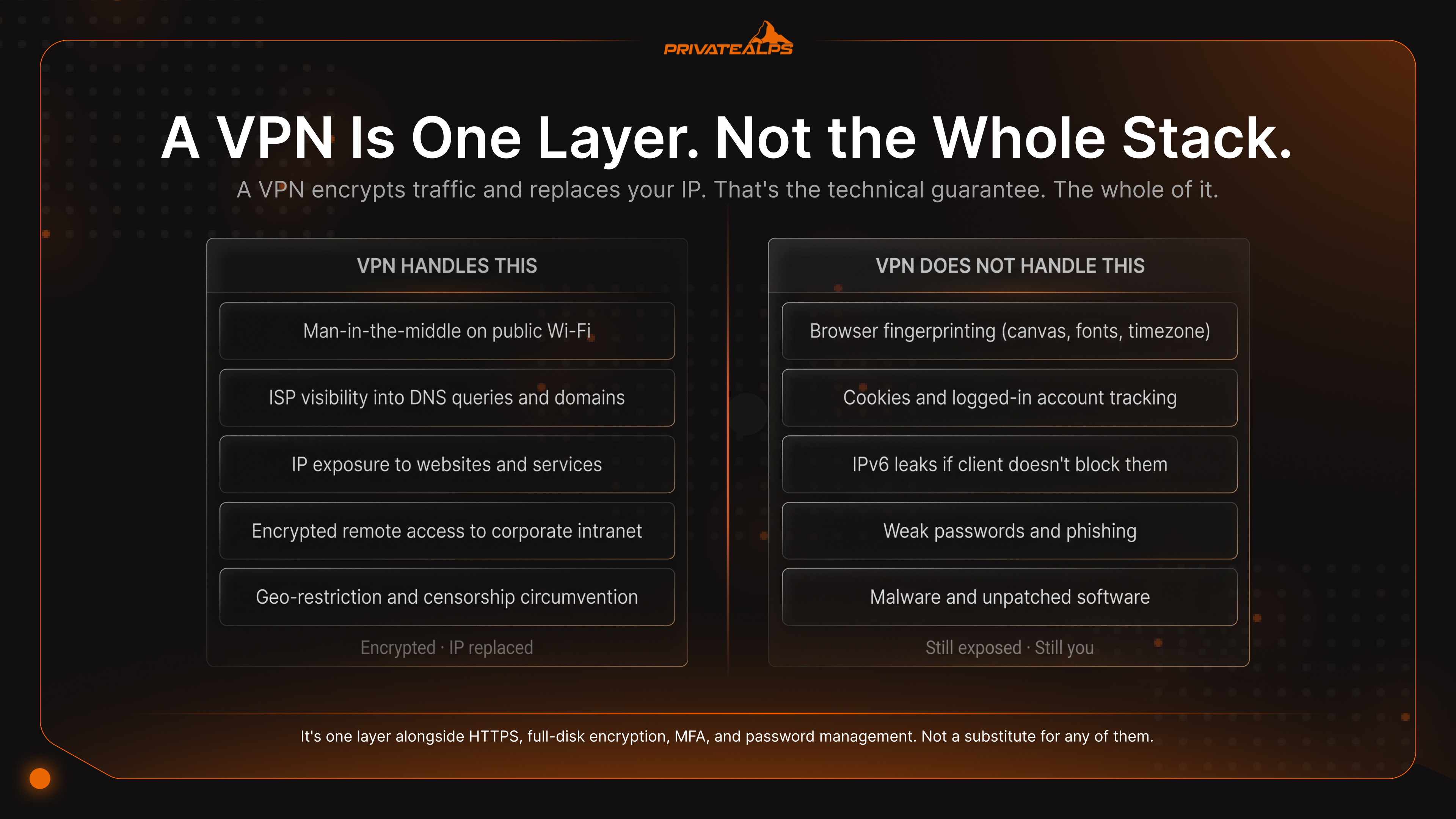
The unifying point. A VPN encrypts traffic and changes your apparent IP. That's it really. Won't patch your software. Won't manage your passwords for you. Doesn't hide the fingerprint of your browser. It's one layer alongside HTTPS, full-disk encryption, MFA, password management, patch hygiene. Treating a VPN as the whole solution? Most common privacy mistake out there. Also the most expensive one when it eventually bites.
What Is a VPN Service vs. VPN as a Service?
Four operational models all get lumped together as "VPN," and the differences matter when you're picking one. Consumer services and corporate gateways get sold to completely different buyers. VPN as a Service (VPNaaS) is the cloud-delivered model used by enterprises. Self-hosted is what technical users build when they want provider trust out of the picture for good.
| Model | Who Manages Infrastructure | Log Control | Best For |
|---|---|---|---|
| Consumer VPN | Provider (Mullvad, ProtonVPN, NordVPN) | You trust the provider's no-logs policy | Individuals, travelers, casual privacy |
| Corporate Remote Access VPN | Your IT department (Cisco AnyConnect, Palo Alto GlobalProtect) | Your organization controls all logs | Employees connecting to internal apps |
| VPNaaS (Cloud-Delivered) | Cloud vendor (AWS Client VPN, Cloudflare WARP / Zero Trust) | Vendor controls, configurable per tenant | Enterprises wanting per-API deployment |
| Self-Hosted VPN | You, on your own VPS or dedicated server | You control the logs entirely | Maximum privacy, technical users |
A consumer VPN service sells you bandwidth on shared servers the provider runs. The privacy promise lives or dies on the no-logs claim. And that claim's only worth anything when an outside party has actually audited it. The Berlin-based security firm Cure53 publishes the pentest reports it produces - Mullvad's infrastructure has been audited there multiple times, and KPMG independently audited ExpressVPN's TrustedServer architecture. A no-logs claim without an audit? That's marketing copy. Not engineering.
A corporate remote access VPN is what your company's IT team runs. You install the client - Cisco AnyConnect, Palo Alto GlobalProtect, OpenVPN Access Server, take your pick - authenticate, and you're inside the company intranet. The organization keeps logs because it has to. Incident response depends on them.
VPNaaS is the same idea, just delivered as a cloud service. AWS Client VPN. Cloudflare WARP. Zscaler Private Access. These let an enterprise spin up VPN infrastructure through APIs without bothering with gateway hardware at all. The buyer is the IT department. The end user never really sees the difference.
A self-hosted VPN runs WireGuard or OpenVPN on a server you rent or own outright. You hold the keys. You write the config. You decide what - if anything - gets logged. The only model where provider trust isn't part of the threat model. You're the provider.
How to Use a VPN
The fastest way to start using a VPN is the boring one: install a consumer app, sign in, click connect. For most people that's the entire story. Three deployment paths cover essentially every use case, plus one extra path that protects every device on your network at once. Here's how to use a VPN on each one without screwing it up.
Path 1 - Consumer VPN on Desktop
- Pick a provider that has an independent no-logs audit and a published transparency report.
- Download the official app from the provider's website only - never from a third-party download mirror.
- Before your first connection, sign in and open the app's settings.
- Turn on the kill switch (sometimes labeled "network lock" or "internet protection").
- Set the protocol to WireGuard unless your network blocks it. If it does, switch to OpenVPN over TCP/443.
- Click connect. Then verify your new IP at
ipleak.netand confirm there's no DNS leak.
Path 2 - Mobile App (iOS / Android)
- Install the official app from the App Store or Google Play, and confirm the developer name matches the provider's website.
- When prompted, grant the VPN configuration permission - that's what lets the app build a system-wide tunnel.
- In settings, turn on auto-connect on untrusted Wi-Fi. Phones jump networks constantly, and this saves you from a bare connection on some coffee-shop hotspot.
- Double-check the kill switch is on - it's called "Always-on VPN" on Android, "Connect on Demand" on iOS.
Path 3 - Self-Hosted WireGuard on a VPS
- Generate a server keypair with
wg genkey | tee privatekey | wg pubkey > publickey. - Build out
/etc/wireguard/wg0.confwith the server's private key, the listen port (default51820), and a[Peer]block per client containing each client's public key and assigned VPN IP. - Enable IPv4 forwarding (
sysctl net.ipv4.ip_forward=1), then add aniptablesNAT rule so client traffic gets masqueraded out the server's public interface. - Bring the tunnel up with
wg-quick up wg0and enable it on boot viasystemd. - Generate a client config (the WireGuard mobile app can scan it as a QR code), connect, then verify with
wg show.
Path 4 - Router-level VPN
Putting a VPN on the router protects every device on the network without per-device clients. Useful for smart TVs and IoT gear that has no native VPN support. Typical setup runs DD-WRT or OpenWRT firmware with an OpenVPN or WireGuard client. The catch: throughput gets bounded by the router's CPU. Most home routers can sustain only 50–150 Mbps over OpenVPN even on a gigabit line. Cheap routers especially.
Verifying the connection: Whatever path you take, three things to check right after connecting. Public IP at whatismyipaddress.com. DNS leaks at dnsleaktest.com. WebRTC leaks at browserleaks.com/webrtc. Any of these reveal your home ISP and the tunnel is misconfigured somewhere. A self-hosted VPN on a Swiss VPS gives you an extra jurisdictional layer too - under the revised Swiss Federal Act on Data Protection (revDSG), there's no blanket data-retention mandate forcing you to log your own customers' traffic.
VPN Limitations: What a VPN Cannot Do
A VPN encrypts traffic and replaces an IP. That's the technical guarantee. The whole of it. Pretty much every other privacy benefit attributed to VPNs is either dependent on what the provider chooses to do, or simply not real at all. This is the section most VPN marketing pages skip. And the one users need most.
A VPN isn't anonymity. Your provider sees what your ISP used to see. They log it, or get compelled to retain it, and the protection collapses on the spot. Browser fingerprinting still identifies you. Canvas, WebGL, installed fonts, screen resolution, timezone all combine into a fingerprint that survives any IP change you throw at it. Cookies and logged-in accounts ignore the VPN entirely. Once you sign into Google or Facebook, the IP doesn't matter anymore. Your account is the identifier now. IPv6 leaks bypass the tunnel. If the client doesn't block IPv6 traffic and your network supports it, the original IPv6 address can leak around the VPN. WebRTC leaks expose local IPs. Browsers can be tricked into revealing the real IP via STUN requests. Disable WebRTC or grab an extension that blocks it. Speed reduction is real and unavoidable. Independent benchmarks consistently show throughput losses of roughly 15–20% on WireGuard, 20–25% on OpenVPN over UDP, and 50%+ on OpenVPN over TCP, depending on the route and server load. Expect this on any provider. Jurisdiction is part of the threat model.* Providers in Five Eyes or Fourteen Eyes countries can be served with legal demands and gag orders. Switzerland and Iceland sit outside those alliances.
What this list adds up to: a VPN is a component, not a complete privacy solution. Anyone serious about privacy combines a VPN with a hardened browser (kill WebRTC, block third-party cookies), a separate identity for sensitive activity, and some discipline about which accounts they log into through the tunnel. The VPN handles the network layer. The rest is on you.
VPN in Networking: Corporate and Enterprise Context
In enterprise environments a VPN is a network architecture pattern. Not a privacy app. The corporate VPN exists to extend the trusted internal network out to remote endpoints, and to bridge offices that aren't in the same building. Two patterns dominate:
| Aspect | Remote Access VPN | Site-to-Site VPN |
|---|---|---|
| Who connects | Individual users from laptops/phones | Two networks (offices) connecting permanently |
| Typical protocols | OpenVPN, IKEv2/IPsec, SSL VPN | IPsec, GRE over IPsec, MPLS Layer 3 VPN |
| Management | Per-user accounts, MFA, certificates | Always-on tunnel between routers/firewalls |
| Scale | Hundreds to thousands of concurrent users | Few tunnels, high aggregate bandwidth |
| Examples | Cisco AnyConnect, Palo Alto GlobalProtect, OpenVPN Access Server | Cisco ASA-to-ASA, Fortinet FortiGate, Juniper SRX |
A third variant - SSL VPN / clientless VPN - runs entirely inside the browser. User authenticates to a portal and gets to internal web apps without installing anything at all. Cisco AnyConnect Secure Mobility Client and Pulse Secure (now Ivanti) are the historic enterprise standards here.
For carrier-grade WAN, MPLS Layer 3 VPN keeps customer traffic separated on a shared service provider backbone. How telcos deliver private connectivity at scale. Different beast from the encryption-based VPNs end users actually interact with day to day.
The real architectural shift in 2026? Migration from legacy VPN to Zero Trust Network Access (ZTNA). Traditional VPN gives an authenticated user broad access to network segments. ZTNA evaluates each request individually - identity, device posture, context - and grants access only to specific applications, not the whole subnet. Gartner has flagged this as a strategic direction for enterprise security architecture. Most of the major vendors (Cloudflare, Zscaler, Palo Alto Prisma) now sell ZTNA alongside or instead of their old VPN gateways.
How to Choose a VPN: Key Criteria
Seven criteria separate trustworthy providers from marketing fronts. The most important one almost never shows up on comparison sites: proof under legal pressure. Anyone can claim no-logs. The real question is what happened when authorities actually showed up at the door.
| Criterion | Why It Matters | Red Flag |
|---|---|---|
| Independent no-logs audit | Proves the policy matches the implementation | Self-attested "no-logs" with no external audit |
| Jurisdiction outside Five/Fourteen Eyes | Reduces exposure to intelligence-sharing demands | Provider HQ in US, UK, Australia without strong legal architecture |
| WireGuard support | Faster, more modern, smaller attack surface | Provider only offers OpenVPN or proprietary protocol |
| Kill switch | Prevents IP leaks during reconnection | App with no kill switch or one that fails open |
| DNS leak protection | Routes all DNS through the tunnel | Verifiable leaks at dnsleaktest.com |
| Open-source client | Community-auditable code, no hidden telemetry | Closed-source binary with vague privacy policy |
| Proven under legal pressure | Real subpoenas tested the no-logs claim | No publicly documented legal events |
Two events define the proof bar here. Back in 2016, Private Internet Access got subpoenaed by the FBI for user data tied to bomb threats. Their response: no logs existed. The criminal complaint itself confirms the only data PIA could provide was a coarse geographic location of the IP cluster. Then April 2023 happened. The Swedish National Operations Department executed a search warrant at Mullvad's Gothenburg office intending to seize customer data.
Police walked out empty-handed. The data didn't exist. Two events. Same result. That's the bar any serious VPN comparison should weigh above any feature checklist.
For users who want provider trust out of the equation entirely, a self-hosted VPN on a dedicated server with a privacy-respecting jurisdiction is the zero-trust alternative. You become the provider. You write the policy. There's no third party who could be compelled to hand over what they collected - because there's no third party there to compel.
Summary
A VPN is an encrypted tunnel that swaps your IP and shields traffic from ISPs and untrusted networks. Protocol choice - WireGuard for speed, OpenVPN for compatibility, IKEv2 for mobile - sets the ceiling for performance and security. A VPN is one layer in a privacy stack, not full anonymity. Cookies, fingerprints, logged-in accounts all keep identifying you regardless of what your IP looks like. For people who want the strongest control over logging and jurisdiction, a self-hosted VPN on a dedicated server is the highest-trust option going.
Get a Dedicated Server in Switzerland for Your Self-Hosted VPN
Want to run a self-hosted VPN with full root access, no shared-hosting restrictions, and a jurisdiction that gives your privacy guarantee a real legal floor underneath it? PrivateAlps provides Swiss-based dedicated servers built for exactly this. Switzerland's revDSG framework forbids passive bulk data retention. Targeted disclosure under the BÜPF surveillance act stays possible only with a court order - a much narrower legal threshold than the data-retention directives in most EU and US jurisdictions. With VPN hosting on a Swiss dedicated server you hold the keys, you control the logs, and you decide what - if anything at all - gets retained.
FAQ
What is a VPN?
A VPN is an encrypted tunnel between your device and a remote server. It masks your IP and protects your traffic from anyone watching the local network. Without one on an untrusted network, the operator can read every unencrypted packet and see the destination of every connection you make. With one running, only the encrypted tunnel to the server is visible to anyone outside.
How does a VPN work?
Short version. A VPN does an authenticated handshake with a server, derives a shared symmetric encryption key, then routes every outbound packet through an encrypted tunnel to that server. The server forwards your traffic using its own IP. DNS queries go through the tunnel too - so the ISP can't see which domains you're hitting. Whatever you're connecting to only sees the VPN server. Not you.
What is a VPN protocol?
A VPN protocol is the ruleset governing key exchange, encryption, and data transmission between client and server. Three are worth using in 2026. WireGuard - fastest, smallest codebase, modern cryptography. OpenVPN - most compatible, runs on TCP/443 to bypass restrictive firewalls. IKEv2/IPsec - best for mobile because it reconnects instantly when you switch networks. PPTP and L2TP/IPsec are obsolete.
What is the purpose of a VPN?
Three things mainly. Encrypt traffic so local network operators can't read it. Replace your IP with the server's. Secure connections on untrusted networks like public Wi-Fi. Doesn't anonymize you against logged-in services. Won't patch your software for you. Doesn't block trackers either. Treat a VPN as the network-encryption layer in a broader privacy strategy.
Does a VPN make you anonymous?
No. A VPN hides your IP from websites and your activity from the local network, but anonymity is a different beast entirely. Browser fingerprinting (canvas, fonts, timezone), tracking cookies, and any account you sign into all keep identifying you uniquely. Real anonymity needs Tor plus disciplined operational separation - different identities, different browsers, no logged-in accounts that could connect the sessions back together.
What is a VPN server?
A VPN server is the remote machine that terminates the encrypted tunnel from your device, decrypts your traffic, and forwards it onto the public internet using its own IP. Return traffic comes back through the same tunnel. The server's IP is what websites see. Its location determines your apparent geography.
What is VPN client software?
VPN client software is the program on your device that builds and manages the tunnel - handles the handshake, creates the virtual network interface, enforces the kill switch, routes DNS through the tunnel. Examples: official WireGuard app, OpenVPN Connect, the Mullvad and ProtonVPN clients. Open-source clients are auditable. Closed-source ones aren't.
Is a VPN legal?
VPNs are legal in most countries - US, UK, EU, Canada, Australia, Switzerland. They're restricted or banned in China, Russia, Iran, Belarus, Turkmenistan, and North Korea, where governments either require licensed providers or block VPN traffic outright. Using a VPN doesn't legalize otherwise illegal activity. Copyright infringement and computer fraud are still illegal whether or not you use a tunnel.
What is a no-logs VPN?
A no-logs VPN is a provider that retains no connection timestamps, source IPs, DNS queries, or browsing history. The claim is only meaningful when verified by an independent audit (Cure53, KPMG, PwC). Self-declarations? Just marketing. Jurisdictions outside Five/Fourteen Eyes - Switzerland, Iceland, Panama - face stronger legal barriers to compelled disclosure than US, UK, or EU providers.