



What Is KVM (Kernel-Based Virtual Machine)?
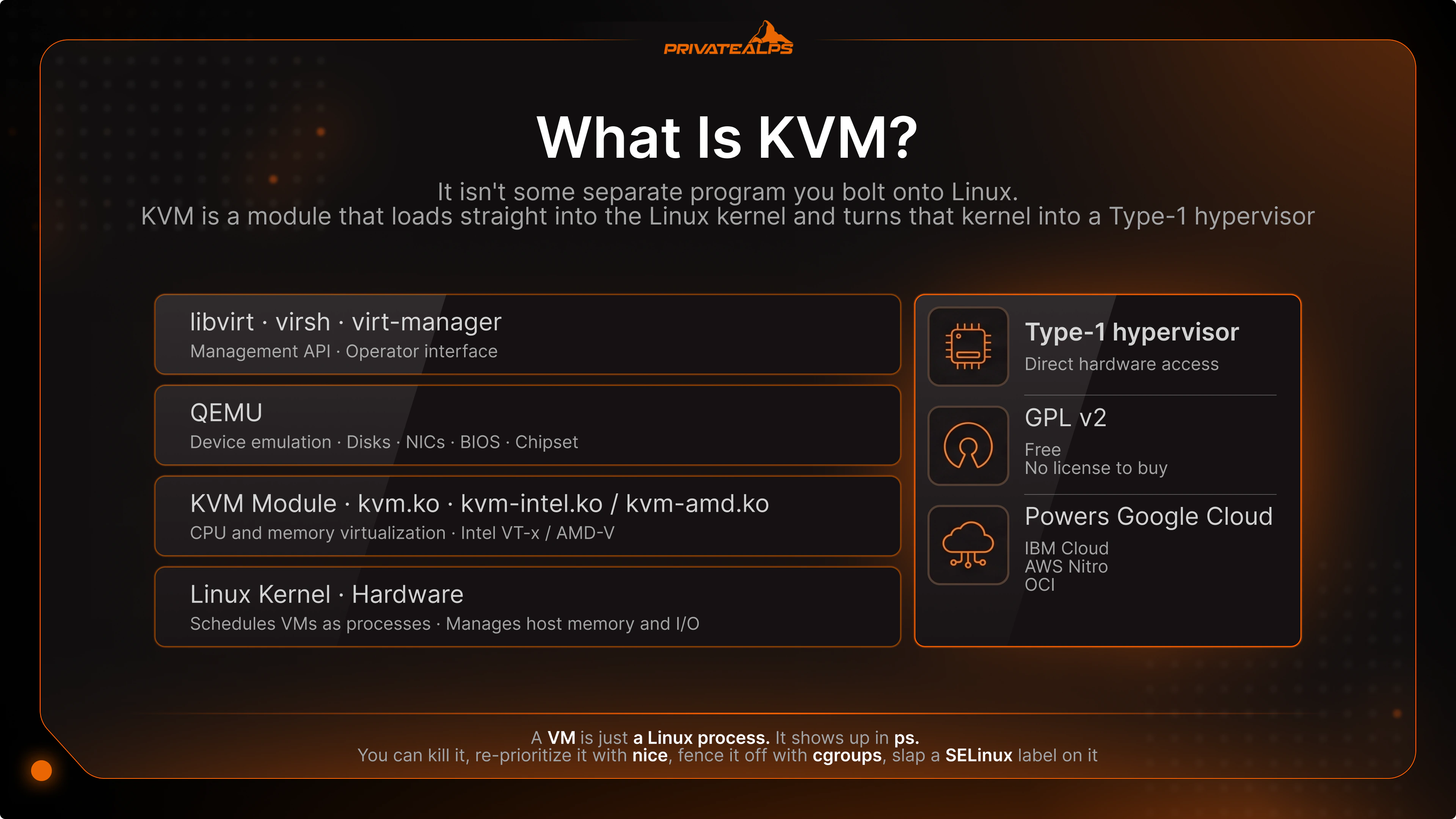
Here's the thing most explainers get backwards about what is KVM: it isn't some separate program you bolt onto Linux. The kernel-based virtual machine is a module that loads straight into the Linux kernel and turns that kernel into a Type-1 hypervisor. That's it. No second product sitting next to the OS.
Once that clicks, a lot falls into place. That KVM hypervisor you've never thought about? It's running under most of the cloud you already touch. Google Cloud. IBM Cloud. Oracle Cloud Infrastructure. Every OpenStack deployment, OVHcloud, AWS for its newer EC2 families. Independent VPS hosts, too - and why not, when there's no license to buy and nobody to call.
Anyway. This is a working primer, not a textbook entry. By the end you'll know how KVM behaves inside the machine, what sets it apart from VMware, Hyper-V, and Xen, what that Type-1 versus Type-2 fight is even about, and when KVM is the layer you actually want under production.
AI Summary
KVM (Kernel-based Virtual Machine) is an open-source virtualization technology baked into the Linux kernel that lets one physical server run several isolated virtual machines. It isn't a standalone product - it's a kernel module, merged into mainline Linux back in version 2.6.20 in February 2007. It needs hardware virtualization extensions on the host CPU, and it leans on QEMU for device emulation while it handles CPU and memory itself.
Quick-decision facts:
Licensed under GPL v2, free, shipped natively in Ubuntu, Debian, RHEL, Rocky, AlmaLinux, and SUSE. Classified as a Type-1 (bare-metal) hypervisor by Red Hat, IBM, and Oracle. Requires Intel VT-x or AMD-V; the module won't even load without them. Pairs with QEMU (device emulation) and libvirt (management API and tooling). Powers Google Cloud, IBM Cloud, OCI, OpenStack, OVHcloud, and AWS Nitro instances. Supports live migration - a running VM moves between hosts with no downtime. Secured natively through SELinux and sVirt mandatory access control. Costs nothing to license; you pay for hardware and, if you want it, support.
What Is KVM?
Built straight into the Linux kernel, KVM is the open-source virtualization module that flips a Linux host into a hypervisor - and from there one physical server can carry a whole stack of isolated virtual machines, each with its own kernel, BIOS, and carved-out resources. CPU and memory virtualization is KVM's job. QEMU and libvirt cover everything else.
Quick disambiguation first, because the acronym trips people up in search. The Linux hypervisor is not a "KVM switch" - that keyboard-video-mouse box bolted to a server rack. Same three letters, totally different gadget. We're talking hypervisor here.
The other thing worth getting straight, and it matters more day to day: KVM by itself isn't a finished virtualization product. It does the kernel-level CPU and memory part, full stop. Device emulation? That's QEMU. Management? libvirt, with virsh and virt-manager doing the actual legwork. So what does KVM stand for - Kernel-based Virtual Machine. And what does KVM mean if you trace it back: a guy named Avi Kivity wrote it at a startup called Qumranet and landed it in Linux 2.6.20 in early February 2007. That makes it one of the oldest production-grade open-source hypervisors still in daily use. Red Hat scooped up Qumranet the next year, in 2008.
Now the part most articles breeze past - the buyer angle. A host advertises a "KVM VPS." What actually lands in your account is a QEMU machine, accelerated by KVM, managed by libvirt: full hardware virtualization, its own kernel, walled-off CPU, RAM, and disk. Set that next to a container-based VPS (OpenVZ, LXC), where every guest shares the host kernel, and the difference stops being academic. It shows up in your security posture. In which operating systems you're even allowed to run. And in how badly some stranger's runaway process can wreck your Tuesday.
How Does KVM Work?
Two kernel modules do the heavy lifting in KVM: a core kvm.ko, plus a processor-specific one - kvm-intel.ko or kvm-amd.ko, depending on your CPU. Between them they expose the chip's virtualization extensions (Intel VT-x or AMD-V) to user space, and that's what lets each virtual machine run as a plain Linux process under the normal Linux scheduler.
That last bit is what competitor articles skate right past, and it's the whole game. A VM is just a Linux process. It shows up in ps. You can kill it, re-prioritize it with nice, fence it off with cgroups, slap a SELinux label on it. Nothing exotic, nothing bespoke. Which is the reason KVM virtualization gets the kernel's performance and security engineering for free, instead of badly reinventing two decades of it.
The stack breaks down into four parts:
Linux kernel - schedules VMs as processes and manages host memory and I/O. KVM module - exposes VT-x/AMD-V and handles CPU and memory virtualization. QEMU - emulates the virtual hardware: disks, NICs, BIOS, chipset. libvirt - provides the management API, the virsh CLI, and the tooling.
The mechanism has a name: trap-and-emulate. Guest tries to run a privileged CPU instruction, the hardware traps it, control snaps back to the KVM module, and KVM either deals with it right there or kicks it over to QEMU. That loop is how does KVM work and what is KVM in Linux at the level that counts. Yank out the hardware extensions and fall back to pure software emulation - now you're roughly ten times slower. So, yeah, the extensions aren't optional (Red Hat).
Is KVM a Type 1 or Type 2 Hypervisor?
Type-1. Bare-metal. That's the verdict from Red Hat, IBM, and Oracle, and the reasoning behind it is short: the moment the KVM module loads, the Linux kernel itself turns into the hypervisor. Nothing - no separate host OS - sits wedged between KVM and the hardware.
People get this wrong constantly, and the confusion is fair enough. KVM loads as a module into a Linux box that's already up and running - so at first glance it smells like a hosted, Type-2 setup. The old Goldberg-Popek framing cuts through it: the question was never where the software sits, it's whether it has direct, privileged access to the hardware. KVM has it. Ring 0, the CPU's root mode, VT-x/AMD-V driven directly. No middleman.
Contrast a real Type-2 - VirtualBox, VMware Workstation. Those run as ordinary user-space apps and have to go ask the host OS every time they want hardware. KVM never asks anybody. Structurally it's Type-1; it just ships the OS and the hypervisor stapled into one binary. (One thing worth calling out: OVHcloud's own KVM explainer labels it Type-2. That's a popular mistake, and it's simply wrong.)
| Hypervisor | Type | How it runs |
|---|---|---|
| KVM | Type-1 | Kernel module turns Linux into the hypervisor; direct hardware access |
| VMware ESXi | Type-1 | Proprietary bare-metal hypervisor installed directly on hardware |
| Microsoft Hyper-V | Type-1 | Parent partition manages VMs; runs below the management OS |
| Xen | Type-1 | Microkernel hypervisor boots before the Dom0 control domain |
| VirtualBox | Type-2 | User-space application running on top of a host OS |
KVM Features
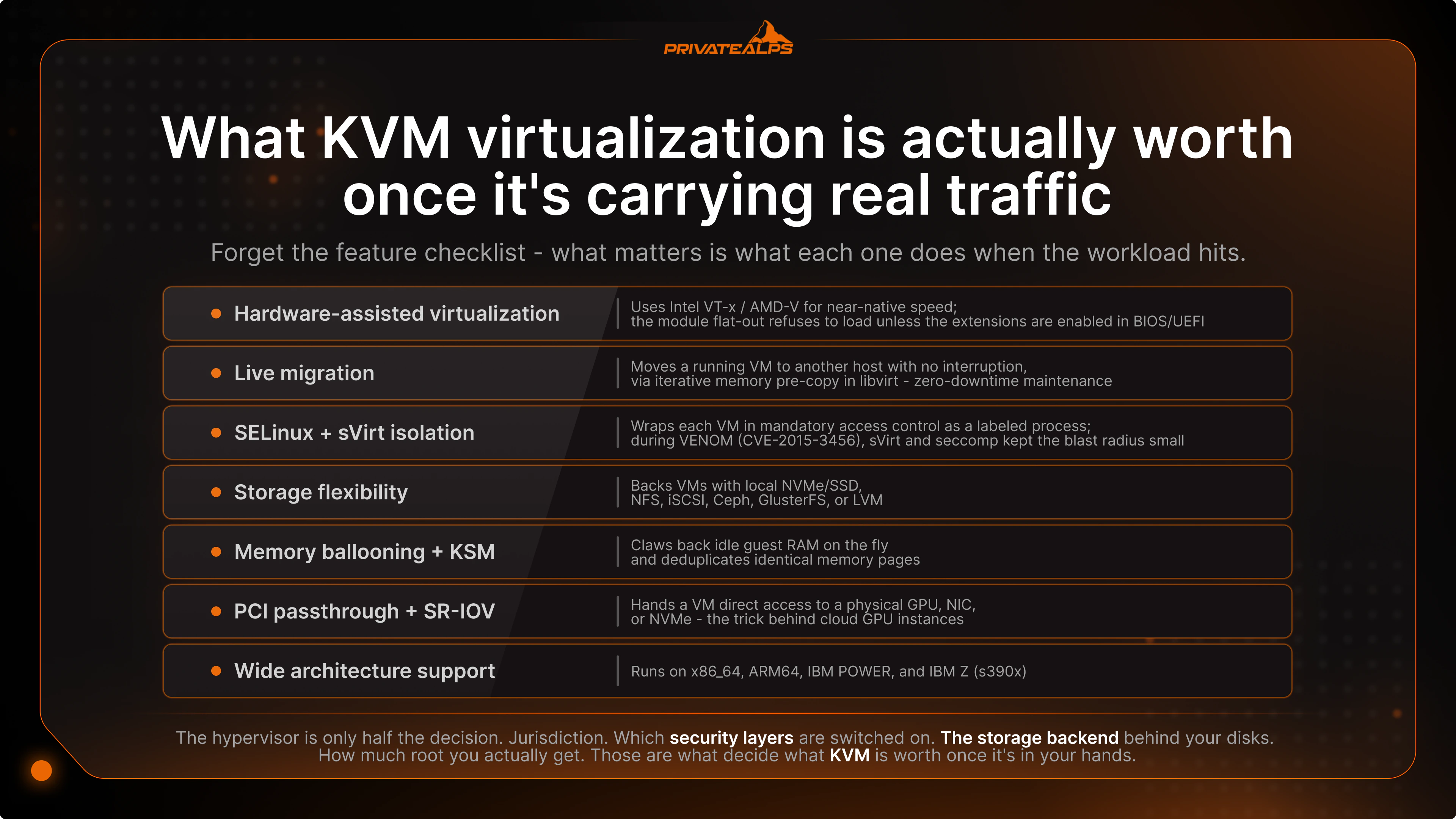
So what is KVM virtualization actually worth once it's carrying real traffic? Forget the feature checklist for a second - what matters is what each one does when the workload hits.
| Feature | What it actually does in production |
|---|---|
| Hardware-assisted virtualization | Uses Intel VT-x / AMD-V for near-native speed; the module flat-out refuses to load unless the extensions are enabled in BIOS/UEFI. |
| Live migration | Moves a running VM to another host with no interruption, via iterative memory pre-copy in libvirt - this is what makes zero-downtime maintenance possible. |
| SELinux + sVirt isolation | Wraps each VM in mandatory access control as a labeled process; during VENOM (CVE-2015-3456), sVirt and seccomp are what kept the blast radius small. |
| Storage flexibility | Backs VMs with local NVMe/SSD, NFS, iSCSI, Ceph, GlusterFS, or LVM - so your provider's storage choice decides I/O latency far more than KVM ever does. |
| Memory ballooning + KSM | Claws back idle guest RAM on the fly and deduplicates identical memory pages; the savings are biggest when a host is packed with the same OS over and over. |
| PCI passthrough + SR-IOV | Hands a VM direct access to a physical GPU, NIC, or NVMe - the trick behind cloud GPU instances and high-throughput networking. |
| Wide architecture support | Runs on x86_64, ARM64, IBM POWER, and IBM Z (s390x); that ARM64 lineage is the same one powering AWS Graviton instances. |
KVM Architecture: KVM, QEMU, and libvirt
Three layers make up the standard Linux virtualization stack, and they split the work cleanly. KVM does CPU and memory virtualization down in the kernel; QEMU emulates devices up in user space; libvirt is the management API operators actually touch. Plenty of articles list those three names and stop right there. The interesting part - the part worth reading on - is how they pass work back and forth.
Each layer owns one job:
KVM - guest fires a privileged CPU instruction, KVM traps it and sorts it in the kernel. QEMU - guest writes to disk, QEMU shows it a virtual controller and routes the write down to real storage. libvirt* - operator spins up a VM, libvirt defines it, bolts on the devices, launches the QEMU/KVM process.
And here's the detail that quietly decides whether your VM feels fast or feels like wading through mud: virtio. Modern KVM uses paravirtualized devices - virtio-net, virtio-blk, virtio-scsi, virtio-gpu - where the guest knows full well it's virtual and skips the whole charade of emulating hardware register by register. Strip virtio out, the guest drops back to fully emulated devices, and throughput just falls off a cliff. That's precisely why a Windows guest on KVM in cloud computing feels like molasses until somebody finally installs the VirtIO drivers.
KVM Use Cases
Hyperscale platforms run on it. So does your single-tenant VPS. That breadth is exactly why KVM in cloud computing turns up in so many different places - and why the list of where it fits runs as long as it does. The table below pairs each scenario with the reason KVM works there, plus a stack you'd actually run into in the wild.
| Use case | Why KVM fits | Example stack |
|---|---|---|
| Public cloud IaaS | Zero license cost at scale; open code you can harden yourself | Google Cloud, OVHcloud, OCI, AWS Nitro |
| Private / on-prem IaaS | Full control, no per-socket fees, tooling that's grown up | OpenStack + Ceph, Proxmox VE, oVirt |
| VMware ESXi replacement | Sidesteps post-Broadcom license bills; KVM platforms drop in cleanly | Proxmox VE, OpenShift Virtualization, Nutanix AHV |
| VPS hosting | Hardware-level isolation per tenant, dedicated kernel | DigitalOcean, Linode, Hetzner, PrivateAlps |
| GPU / ML training | PCI passthrough and SR-IOV expose real accelerators to the VM | Cloud GPU instances with passthrough |
| Linux dev & CI/CD | Scriptable, reproducible VMs through libvirt | Vagrant/Terraform, GitLab Runners on KVM |
| Workload consolidation | Many OS versions on one host, no extra boxes | Mixed Linux/Windows guests on one server |
| Edge / telco NFV | Low-latency packet processing for virtual network functions | KVM + DPDK + SR-IOV |
So why did the hyperscalers all wander to the same answer? Take AWS. It pulled its newer EC2 families off Xen and onto a homegrown KVM-based hypervisor - Nitro - kicking off with the C5 and M5 instances in November 2017. And the nuance hardly anyone mentions: Nitro keeps the KVM core but throws QEMU overboard. Device emulation gets offloaded onto dedicated Nitro Cards - literal custom silicon - which is how AWS manages to hand you almost the entire host. Google Compute Engine? KVM since day one. IBM Cloud, top to bottom. The reasons rhyme every time: no licensing fees at scale, an open codebase you can harden however you like, a contributor pool no single vendor could afford to staff. And it's not just a hyperscale thing - that same math is why Proxmox VE keeps showing up as the ESXi replacement of choice for smaller shops.
KVM vs Other Hypervisors
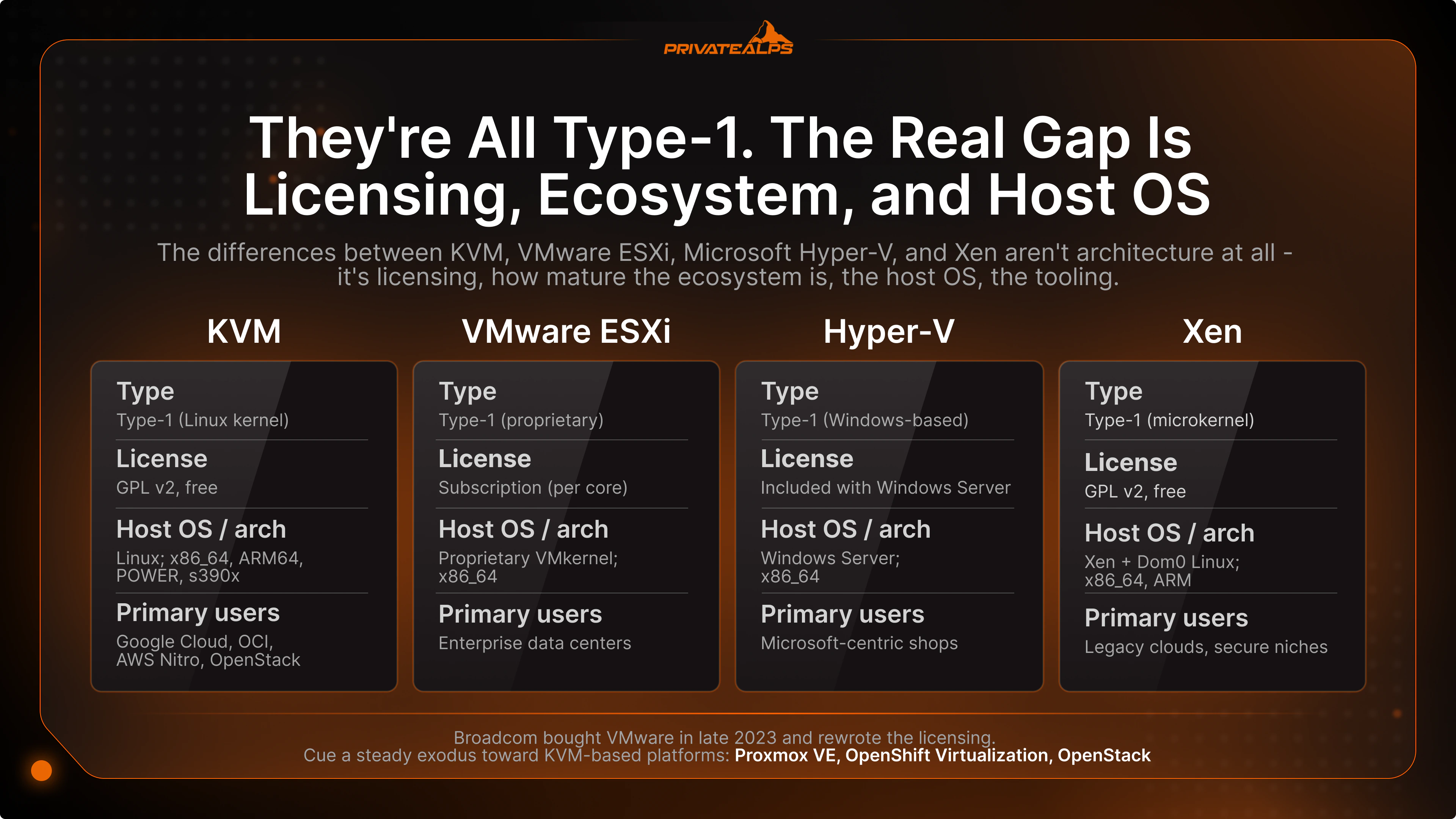
They're all Type-1, every one of them. So once you've nailed down what is KVM hypervisor classification, the real gap between KVM, VMware ESXi, Microsoft Hyper-V, and Xen isn't architecture at all - it's licensing, how mature the ecosystem is, the host OS, the tooling. The table covers the KVM vs VMware, KVM vs Hyper-V, and KVM vs Xen questions that all tend to crowd the same results page.
| Criterion | KVM | VMware ESXi | Hyper-V | Xen |
|---|---|---|---|---|
| Type | Type-1 (Linux kernel) | Type-1 (proprietary) | Type-1 (Windows-based) | Type-1 (microkernel) |
| License model | GPL v2, free | Subscription (per core) | Included with Windows Server | GPL v2, free |
| Host OS / arch | Linux; x86_64, ARM64, POWER, s390x | Proprietary VMkernel; x86_64 | Windows Server; x86_64 | Xen + Dom0 Linux; x86_64, ARM |
| Management tools | libvirt, virsh, virt-manager, Cockpit | vCenter, vSphere | Hyper-V Manager, SCVMM | xl, XCP-ng, XenCenter |
| Primary users | Google Cloud, OCI, AWS Nitro, OpenStack | Enterprise data centers | Microsoft-centric shops | Legacy clouds, secure niches |
Two things the spec sheet won't tell you. Start with KVM vs VMware. Broadcom bought VMware in late 2023 and promptly rewrote the licensing, and a lot of customers opened their renewal quotes to find the number had jumped - somewhere between double and several times the old price, depending on how the bundling and per-core minimums shook out. Cue a steady exodus toward KVM-based platforms: Proxmox VE, OpenShift Virtualization, OpenStack.
Then KVM vs Xen. Xen was the original open-source cloud hypervisor - the one AWS rode all the way through 2017. KVM caught it and passed it, and not for some marketing reason. It's structural. KVM inherits every single improvement the Linux kernel ships; Xen has to drag its own codebase along and fund its own development out of pocket. Xen still owns a corner of the heavily-secured world, where that smaller trusted computing base is a real, defensible edge. But for most people, that ship sailed.
KVM Security Model
Four layers, stacked on top of each other - that's the shape of KVM security. Hardware virtualization boundaries (VT-x/AMD-V) at the bottom, then Linux kernel isolation (process boundaries, namespaces, cgroups), then SELinux with sVirt for mandatory access control per VM, and QEMU sandboxed behind seccomp syscall filtering on top. Defense in depth is the whole point: one layer giving way shouldn't hand anyone the host.
Hardware boundary - VT-x/AMD-V split guest from host right at the CPU, so a guest can't just reach into host or peer memory. sVirt labeling - every VM and its disk images get unique SELinux MCS labels, which stops a cracked VM from rummaging through another VM's files. Seccomp filtering - QEMU runs behind a tight syscall allowlist; in the VENOM mess (CVE-2015-3456), sVirt and seccomp are exactly what boxed in what an exploited QEMU process could reach (Red Hat). Side-channel reality check - Spectre, Meltdown, L1TF all proved hardware isolation isn't airtight; KVM's answers are microcode updates, KPTI, and an L1D cache flush on VM exit.
Want the formal version? NIST SP 800-125, "Guide to Security for Full Virtualization Technologies," is still the document everybody cites (NIST).
And this is the bit buyers forget. None of those guarantees mean a thing past the threat model the operator actually bothers to set up. A provider can flip on sVirt, seccomp, cgroups, CPU pinning and get you tight isolation - or leave the whole lot switched off. So ask. Ask whoever you're about to hand money to which of these protections are really running. The answer tells you fast whether you're dealing with a serious shop or a bargain bin.
KVM vs Containers (Docker, LXC)
Different problems, not rival tools - that's the first thing to get straight about KVM versus Docker. KVM builds hardware-level virtual machines, each carrying its own kernel and OS. Docker and LXC build OS-level containers that share the host kernel and wall themselves off with namespaces and cgroups. Neither is "better." It comes down to whether you need a full OS boundary or a light process boundary.
| Dimension | KVM | Docker / LXC |
|---|---|---|
| Kernel | Dedicated kernel per VM | Shared host kernel |
| Isolation | Hardware-enforced + SELinux/sVirt | Namespace and cgroup based |
| Startup time | Seconds to minutes | Milliseconds |
| Overhead | Small VM penalty | Near-zero |
| OS flexibility | Any guest OS, any kernel | Same kernel family as host |
| Typical use | Multi-tenant hosting, OS diversity | Microservices, CI/CD |
In practice it's usually both, not one or the other. You'll see KVM hosts that turn right around and run Kubernetes clusters inside their own VMs. KubeVirt and Red Hat OpenShift Virtualization are the textbook case - VMs and containers running shoulder to shoulder, KVM holding the whole thing up from below.
How to Get Started with KVM
Three or four steps and you're running KVM on Linux: confirm the CPU has virtualization extensions, install the KVM/QEMU/libvirt packages, check the module loaded, then build your first VM with virt-install or Virtual Machine Manager. Orientation, not a full walkthrough - enough to get the lay of the land.
- 1. Verify hardware support - run
egrep -c '(vmx|svm)' /proc/cpuinfo
anything above zero means VT-x or AMD-V is there. A flat 0 means you go enable virtualization in BIOS/UEFI.
- 2. Install the stack - Ubuntu/Debian:
apt install qemu-kvm libvirt-daemon-system virtinst
RHEL-family:
dnf install qemu-kvm libvirt virt-install
- 3. Verify KVM is loaded -
kvm-ok
on Ubuntu, or
lsmod | grep kvm
anywhere; you want to see kvm_intel or kvm_amd.
- 4. Create the first VM -
virt-installfor scripted builds, or Virtual Machine Manager (GUI) and Cockpit (web) if you'd rather click.
Honestly, though? Most teams have no business running the host layer at all. Rent a KVM-based VPS and the physical box, the hypervisor config, the storage backend - all of it becomes someone else's headache. You get full root inside a clean VM and skip the rest. If you do want to run it yourself, Canonical's official Ubuntu KVM guide is the install reference to bookmark.
Summary
KVM is the open-source, Linux-baked hypervisor quietly running most of today's public cloud, private cloud, and VPS infrastructure. Type-1 performance, hardware-assisted security, zero licensing fees, and the deepest contributor community any hypervisor can claim. But the hypervisor is only half the decision. Jurisdiction. Which security layers are switched on. The storage backend behind your disks. How much root you actually get. Those are what decide what KVM is worth once it's in your hands.
PrivateAlps runs KVM-based VPS and bare-metal servers for engineers who want real hypervisor control - Swiss jurisdiction (revDSG), full root, and performance that doesn't ambush you on a Tuesday. None of which a hyperscale public cloud hands you by default. Working under GDPR or HIPAA? Swiss data residency is a concrete compliance signal, not a slogan. Have a look at the infrastructure over at PrivateAlps.
FAQ
What does KVM stand for?
KVM stands for Kernel-based Virtual Machine - an open-source virtualization technology built into the Linux kernel. Avi Kivity wrote it at Qumranet, and it landed in mainline Linux with version 2.6.20 in February 2007.
What is a KVM (in the hosting context)?
Buy a "KVM" or KVM VPS from a provider and what you're actually getting is a virtual machine on the KVM hypervisor - its own kernel, its own BIOS, walled-off CPU, RAM, and disk. That's a stronger setup than a container-based VPS (OpenVZ, LXC), where the guest shares the host kernel. One quick check before you pay: just ask whether the plan is KVM or container-based.
Is KVM a Type 1 or Type 2 hypervisor?
Type-1 - bare-metal - and Red Hat, IBM, and Oracle all classify it that way. Once the module loads, the Linux kernel itself becomes the hypervisor, with no separate host OS sitting between KVM and the hardware. The confusion only exists because KVM ships as a loadable module inside a running Linux system, which looks Type-2 at first glance.
What is the difference between KVM and QEMU?
Short version: KVM handles CPU and memory, QEMU handles everything else. KVM is the kernel module virtualizing CPU and memory through Intel VT-x or AMD-V; QEMU is the user-space process emulating the rest - chipset, NICs, disks, BIOS. In modern Linux virtualization the two tag-team, with KVM accelerating the CPU work and QEMU presenting the virtual hardware.
Is KVM better than VMware?
For cost-sensitive setups, open-source-first shops, Linux-centric environments - and anyone stung by Broadcom's post-2023 VMware licensing changes - KVM is the stronger pick. VMware still wins on mature enterprise tooling, the vCenter/vSAN/NSX kind of thing. But starting a fresh deployment in 2026? KVM-based platforms are where I'd point you.
What is KVM in cloud computing?
In a cloud context, KVM is the hypervisor layer running the virtual machines you spin up through the cloud or VPS provider's API. The big names on it? Google Cloud, IBM Cloud, OCI, and AWS Nitro for newer EC2 families. For you as the tenant, KVM is what keeps you walled off from everyone else sharing the physical host.
How does KVM work in Linux?
It comes down to a couple of kernel modules. KVM loads kvm.ko plus a CPU-specific one (kvm-intel.ko or kvm-amd.ko), and those expose the hardware virtualization features to user space. From there every VM runs as an ordinary Linux process under the standard kernel scheduler, with QEMU handling device emulation on top.
Is KVM free?
Yes. KVM ships under GPL v2 and comes with every major Linux distribution at no cost. Commercial support is optional - Red Hat, Canonical (Ubuntu Pro), and SUSE all sell paid contracts - but the hypervisor itself never needs a license.
What is the difference between KVM and a container?
The split is at the kernel. KVM builds full virtual machines, each with its own kernel, OS, and hardware-level isolation; containers (Docker, LXC) share the host kernel and isolate through namespaces and cgroups. The trade-off is clean enough: KVM gives you stronger isolation and any guest OS you fancy, while containers run lighter and faster but stay stuck on the host's kernel family.
Does KVM support Windows guests?
Yes - KVM runs Windows Server and Windows 10/11 guests, fully functional. One catch you'll want to know up front: install the VirtIO paravirtualized drivers inside the guest, or disk and network performance will let you down. The drivers come from Red Hat. They're free.
What hardware does KVM require?
KVM needs a CPU with hardware virtualization extensions - Intel VT-x or AMD-V. Realistically that's any server-class chip from the last 15-plus years, so you're almost certainly fine. The one gotcha: those extensions have to be turned on in BIOS/UEFI, and consumer hardware sometimes ships with them off.