



People don’t usually open with “what is a VPS server.” They start with the problem. Something broke. Pages slowed down without a clear reason. A traffic spike tipped things over. Or security logs started filling up with junk they couldn’t keep ignoring. That’s usually when shared hosting stops feeling cheap and starts feeling risky.
So let’s get the basics straight. What is a VPS, really?
A VPS is a virtual machine carved out of physical hardware using virtualization. You get your own operating system, your own CPU and memory limits, your own disk and network slice. Not shared accounts. Not folders. An actual server environment you control.
That matters because most real failures come from contention, misconfiguration, and slow response. Verizon’s 2025 Data Breach Investigations Report shows vulnerability exploitation now accounts for 20% of breaches, and patch delays stretch to a median of 32 days in many environments.
Availability is affected too. Cloudflare reported a 29.7 Tbps DDoS attack in 2025 and millions of attacks per quarter. If you’re asking, “What is VPS hosting?” the real answer is this: it’s the point where you accept responsibility in exchange for control.
The Quick Summary
- A VPS server gives you control, plain and simple. You’re running your own operating system inside a virtual machine, with fixed limits on CPU, memory, disk, and network.
- When people ask, “What is a virtual private server?”, they’re usually reacting to something breaking: slow pages under load, cron jobs getting killed, security settings they’re not allowed to touch on shared hosting.
- A VPS doesn’t make your site “fast” by default, but it stops other people’s traffic spikes from wrecking your performance.
- Security is where VPS responsibility becomes obvious. In Verizon’s 2025 DBIR, vulnerability exploitation showed up in 1 out of 5 real breaches, often because systems weren’t patched quickly. A VPS gives you isolation, not immunity.
- If you’re trying to pin down VPS hosting meaning, think of it as a line you cross: more freedom, more responsibility, fewer guardrails. That’s why people use it for real applications, not experiments.
What Is a VPS?
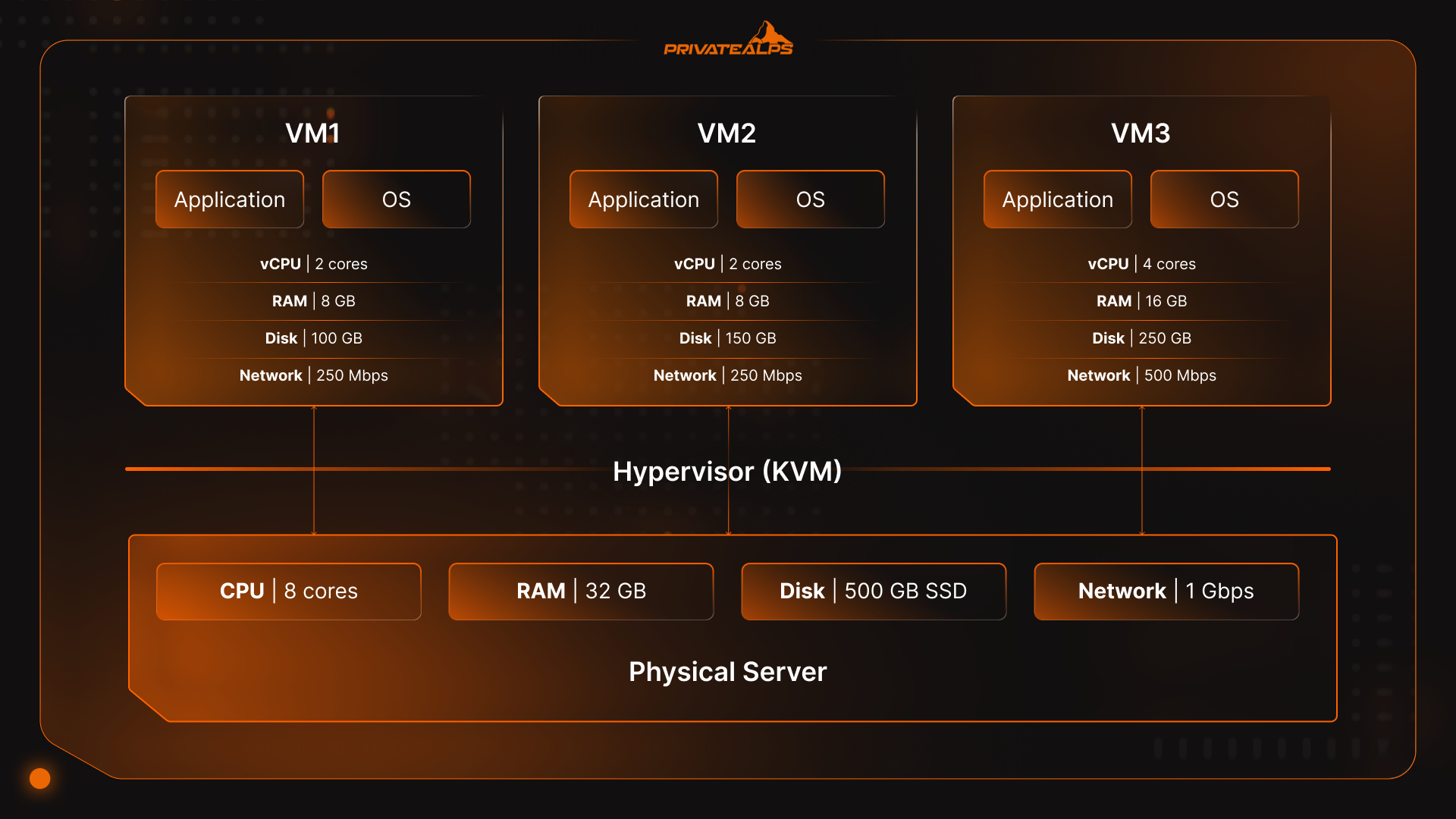
A VPS is a virtual machine. It runs its own operating system. The hardware underneath is shared, but the limits aren’t. CPU, memory, disk, network, all capped. A hypervisor keeps everything apart. You get access to the whole environment.
That isolation is the real differentiator behind VPS server meaning. You’re not sharing an OS or competing blindly for resources. If something slows down, you can usually tell why. CPU saturation. Memory pressure. Disk I/O.
This is also where VPS differs from older “partitioned server” models. Traditional shared hosting isolates users at the account level. A VPS isolates at the virtual hardware level. Separate kernel. Separate process space. Separate failure modes. That difference shows up fast once you’re running databases, background workers, or anything long-lived.
When people ask, “What is a VPS server used for?”, they often expect a performance guarantee. That’s not quite it. A VPS doesn’t fix bad architecture. What it gives you is consistency. Consistency is why virtual servers dominate modern infrastructure, Gartner expects global public cloud spending to reach $1.48 trillion by 2029, driven largely by infrastructure workloads like virtual machines.
There’s a trade-off. Root access means responsibility. Verizon’s 2025 DBIR shows vulnerability exploitation still accounts for 20% of breaches, largely due to slow patching. A VPS gives control. It doesn’t remove consequences.
How Does VPS Virtualization Work?
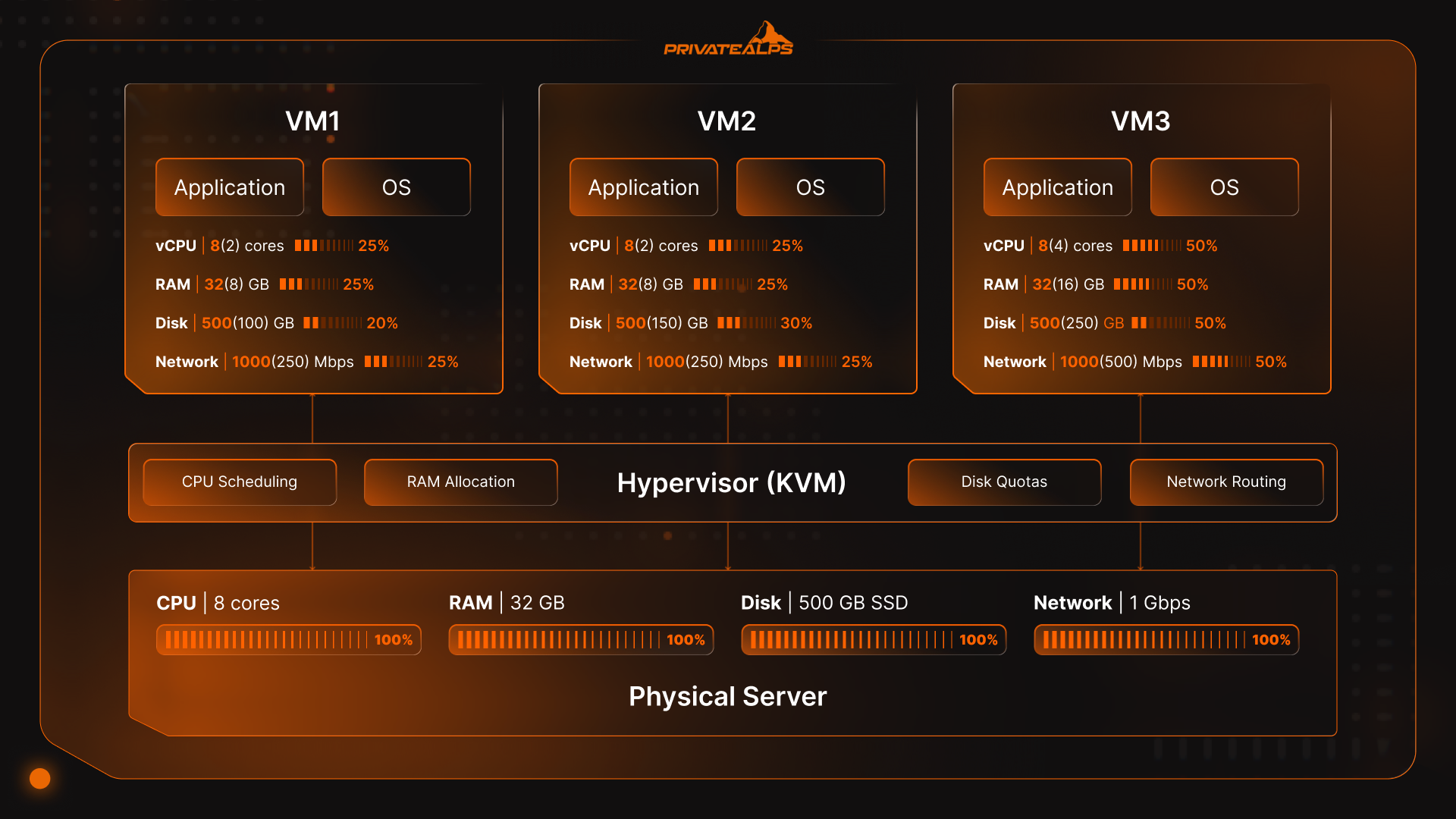
If you’re asking, “How does a VPS work?” it all comes down to one thing: a thin control layer sits between physical hardware and your server, deciding who gets what, when. That layer is the hypervisor. It turns one box into many believable machines and enforces the boundaries, so they don’t step on each other.
Here’s the flow:
- A physical server comes up and starts a hypervisor, usually KVM on a Linux host.
- That hypervisor sets up virtual hardware for each VPS.
- Each VPS boots its own OS and kernel, like it’s alone on the machine.
- In the background, the hypervisor hands out CPU time, keeps memory in check, maps disk access, and moves network traffic around.
That scheduling is why specs matter more than slogans. A “4 vCPU” VPS usually means time-sliced access, not four dedicated cores. Disk speed depends on the storage backend and IOPS limits. Network performance hinges on port speed, routing, and contention.
| Resource | How it’s carved up | What you notice |
|---|---|---|
| vCPU | Scheduled time slices (sometimes pinned) | Throttling under load if contention rises |
| RAM | Hard limits | OOM kills or swap latency when undersized |
| Disk I/O | Shared device with quotas | Databases slow first |
| Network | Port speed + transfer caps | Latency spikes beat bandwidth limits |
Isolation is strong, but it’s not magic. The hypervisor stops neighbors from reading your memory or files. It doesn’t patch your OS, close ports, or fix sloppy configs.
VPS Hosting Pros and Cons
What is VPS hosting really about? A trade. You get clarity and control in exchange for responsibility. For some workloads, that’s exactly what you want. For others, it’s unnecessary weight.
Key Advantages
| Advantage | What it actually gives you |
|---|---|
| Dedicated resource limits | Predictable performance instead of guessing who else is using the server |
| Root / admin access | Full control over the OS, services, configs, and security rules |
| Stronger isolation | Neighbor traffic spikes don’t quietly throttle your workloads |
| Scalability | You can resize CPU, RAM, and storage without migrating hardware |
| Environment ownership | Run background workers, custom stacks, containers, or VPNs |
Key Limitations
| Limitation | Why it matters |
|---|---|
| You own OS security | Miss patches, expose services, and the risk is yours |
| Admin skill required | Unmanaged VPS assumes comfort with SSH, firewalls, and logs |
| Shared hardware ceiling | A single host failure can still take your VPS offline |
| Quality varies by provider | Oversubscription and weak storage erase VPS benefits fast |
So, people asking, “What is a VPS used for?” usually aren’t looking for “better hosting.” They’re looking for clearer hosting. Clear limits. Clear ownership. Clear consequences.
VPS vs Shared Hosting
What is VPS hosting compared to shared hosting? It’s less about features and more about boundaries. Shared hosting puts lots of customers inside the same operating system. A VPS gives each customer their own OS, with limits that don’t shift around.
Shared hosting is efficient, but it’s opaque:
- CPU, memory, and disk are pooled across accounts
- One busy site can quietly starve others
- Throttling happens behind the scenes, often without clear signals
- When things slow down, you’re left guessing
This is why people upgrade even when traffic hasn’t exploded. It’s not scale. It’s unpredictability.
With a VPS, the boundaries are explicit. You know what you’re allowed to use, and nobody else can suddenly take it.
| Factor | Shared Hosting | VPS |
|---|---|---|
| Operating system | Shared across users | Dedicated OS per instance |
| Root access | Not available | Standard |
| Resource limits | Soft, opaque | Defined and enforceable |
| Custom software | Heavily restricted | Largely unrestricted |
| Failure visibility | Blurred | Clear (CPU, RAM, I/O) |
There’s also a security angle. Shared hosting reduces your surface area, but it also limits your defenses. You can’t control firewall rules, patch timing, or hardening choices. On a VPS, you can.
If you’re asking, “What is a VPS server used for?”, this comparison usually answers it. VPS is for workloads where shared environments stopped being predictable enough to trust.
VPS vs Cloud VPS
A standard VPS lives on one physical machine. Virtualized, yes. Still one box. If that box has a bad day, your server has a bad day too.
Cloud VPS changes the setup. Instead of tying your instance to a single machine, the platform spreads risk around. Storage might be copied across systems. Compute can move. If one node fails, traffic gets routed elsewhere. That’s the idea, and most of the time it holds up.
The trade is complexity. More layers. More network hops. More billing details. Monthly costs that aren’t always easy to predict.
This is why people get confused when they ask, “What is VPS hosting?” and end up staring at cloud diagrams. A VPS is concrete. You know where it lives. You know its limits. A cloud VPS is abstract by design.
Neither model is automatically safer. Cloud platforms reduce hardware risk, but they introduce operational complexity. A single-node VPS is simpler, but less forgiving when hardware fails.
VPS Compared to Dedicated and WordPress Hosting
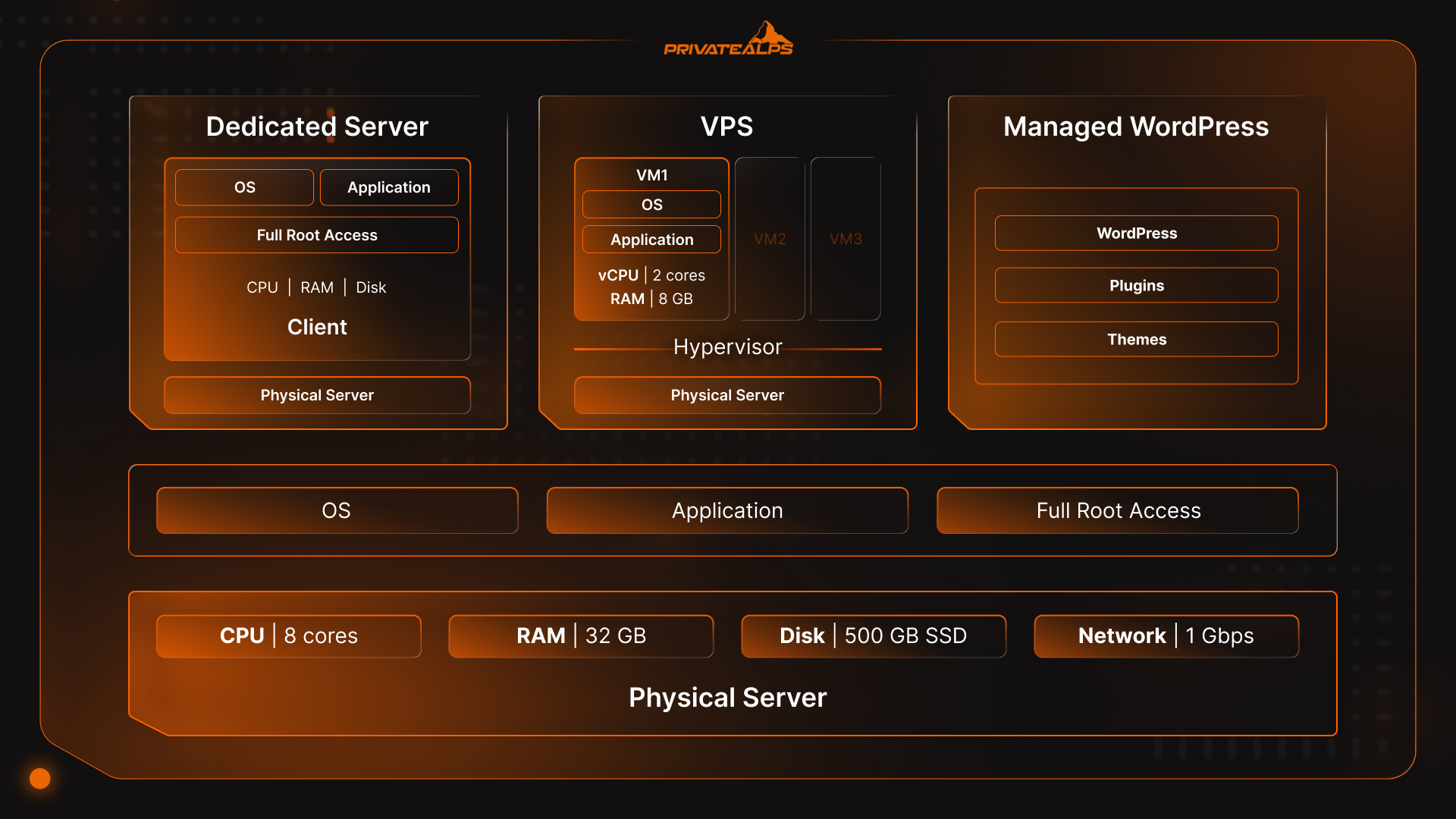
VPS feels like progress, but people still have doubts. “If we’re already doing this, should we just go dedicated?” Or the opposite: “Why not let someone else handle it and stick with managed WordPress?”
Both questions come from the same place: not wanting to make the wrong kind of work for yourself.
Dedicated servers are straightforward. One machine. One customer. Nothing shared. That feels safe. It’s also rigid. If you guess too small, you’re boxed in. If you guess too big, you’re paying for idle capacity. Even with the higher price, you’re still responsible for patching, monitoring, backups, and recovery.
Managed WordPress hosting lives on the opposite end. It’s tightly controlled and opinionated by design. WordPress only. Specific caching layers. Tight limits. It works brilliantly as long as you stay inside the lines. The moment you need a background worker, a custom service, or anything that doesn’t fit their mold, friction shows up fast.
VPS lives in between. You don’t own the hardware, but you’re not fenced in either. You can resize resources without replacing a machine. You can run WordPress next to something else without asking permission. You can experiment, then undo the experiment when it breaks.
VPS Cost Structure and Pricing Considerations
This is the part people skim, and then regret skimming later.
On paper, VPS pricing looks simple. A monthly number. CPU, RAM, storage. Pick a plan, move on.
In reality, with VPS hosting, what is being charged for tends to build up in the second-order costs.
There’s the obvious fixed cost: the base plan. That’s your guaranteed CPU share, memory ceiling, disk size, and some amount of bandwidth. Fine. Predictable. That’s the number everyone compares.
Then there’s the variable side. Extra storage when logs grow faster than expected. Bandwidth overages when traffic spikes. Paid backups or snapshots you suddenly decide you really do need after a close call.
The bigger cost, though, is time.
Unmanaged VPS assumes someone is watching the box. Applying updates. Checking logs. Testing backups. When that doesn’t happen, the bill shows up in other ways, through breaches and downtime. Downtime alone can cost you $5,600 per minute.
Managed VPS leads to a higher monthly spend, but a lower cognitive load. You’re paying someone else to worry about patch cycles, monitoring, and recovery drills. Whether that’s “worth it” depends less on traffic and more on how expensive downtime or a security incident would be for you.
Scaling has its own economics. Vertical upgrades are easy until they aren’t. At some point, stacking bigger VPS plans costs more than splitting workloads or moving to different architecture.
Managed vs Unmanaged vs Semi-Managed VPS
This is where questions about “What is VPS server access” deepen.
An unmanaged VPS is exactly what it sounds like. You get the server. You get root access. You get silence. Updates don’t run unless you run them. Firewalls don’t exist unless you build them. If a service falls over at 3 a.m., nobody’s watching except you. That’s fine if you’re comfortable living in SSH and reading logs. It’s a problem if you’re not.
Managed VPS shifts a lot of responsibility back to the provider. Patching, baseline security, monitoring, and backups are handled for you. You still control what you run, but the operating system isn’t ignored anymore.
Semi managed lives in between. The provider takes care of the infrastructure, hardware health, virtualization, sometimes backups. You handle the OS setup and the applications. It’s a split responsibility, and it only works when the lines are clear.
| Responsibility | Managed | Semi-Managed | Unmanaged |
|---|---|---|---|
| OS patching | Provider | Shared | You |
| Firewall baseline | Provider | Shared | You |
| Backups / snapshots | Included or optional | Optional | You |
| Monitoring & alerts | Provider | Provider | You |
| Application stack | Sometimes | You | You |
If you want control and have time to maintain it, unmanaged works. If you want control without constant vigilance, managed earns its cost. Semi-managed only works when everyone knows where the line is.
VPS Operating Choices and Key Terminology
Once you’ve answered, “What is a VPS server” and set one up, the abstract “hosting” talk stops and the day-to-day decisions start. Operating system, access methods, storage type.
Operating System Options
Most VPS setups run Linux. It powers close to 90 percent of public cloud infrastructure. Ubuntu and Debian show up everywhere because they’re predictable, well documented, and backed by massive package libraries. When something breaks, someone’s usually hit the same issue before and written about it. Enterprise focused distros appeal to teams that want long support windows, but that often means slower access to newer tools.
Windows Server is a different choice. It makes sense when you need .NET, Active Directory, or Windows only software. It also comes with licensing costs and a heavier footprint.
Control Panels
Control panels are time-savers. cPanel and Plesk exist because many people don’t want to manage users, DNS, SSL certificates, and web servers by hand. They cost money, but they buy back hours.
Open-source panels are a little different. Webmin, Virtualmin, CyberPanel come with less licensing, and more responsibility. They work well if you’re comfortable troubleshooting when something goes sideways. If not, they can become another layer you don’t fully trust.
Components That Actually Matter
vCPU tells you how much scheduled compute time you’re allowed, not how many physical cores you own. RAM is a hard ceiling, hit it and processes die. Storage type matters more than size once databases get involved; NVMe hides latency that SATA SSDs can’t. Network limits aren’t just about bandwidth caps. Latency and routing quality shape user experience long before you hit transfer quotas.
Root access ties all of this together. It’s power, and it’s risk. You can tune everything. You can also misconfigure everything.
VPS Security Model
So, what is a VPS server doing for security?
That depends. A VPS feels safer than shared hosting, and in some ways it is. You’re isolated. You’ve got your own OS. Other tenants can’t see your files or memory. That matters. But it also creates a false sense of comfort if you’re not careful.
The security model of a VPS is simple and unforgiving: the platform protects the box; you protect what runs inside it.
At the virtualization layer, the hypervisor does its job well. It enforces boundaries between instances. One VPS can’t poke around in another’s process space or disk. That’s the part you’re paying for. It meaningfully reduces cross-tenant risk, which is one of the reasons VPS replaced older shared environments in the first place.
What it doesn’t do is patch your server. That’s why you need to ask, “What is a VPS hosting provider doing, and what do we have to do ourselves?”
Inside the VPS, everything is your responsibility unless you’re on a managed plan. Open SSH ports. Outdated packages. Default configs. Weak access controls.
Provider-side protections still matter. DDoS mitigation, network monitoring, physical security, and hardware isolation need to be included. Cloudflare reported mitigating millions of DDoS attacks per quarter in 2025, including a 29.7 Tbps peak attack. That’s not something a single VPS can absorb on its own.
A VPS narrows the blast radius, but it also hands you the match. If you want the control, you have to own the discipline, of patching, firewalls, backups, and recovery drills.
When to Choose VPS Hosting
Most people start asking “What is VPS hosting used for?” because they’ve noticed something breaking.
A common one: a marketing email goes out, traffic bumps up, and checkout slows to a crawl. Support says everything looks “within limits.” Logs don’t tell you much. That’s shared hosting doing its thing, spreading pain.
Another pattern shows up in background work. A nightly import, a queue worker, a cron job that runs fine for weeks, then starts dying for no clear reason. On shared hosting, long-running processes are the first to get clipped. On a VPS, they either run or they don’t, and if they don’t, you can see why.
There are also security-driven moves. Teams want to tighten SSH access, control patch timing, or see full logs. Shared platforms abstract that away. If you can’t control updates or firewall rules, you’re trusting someone else’s priorities.
A few signals that usually mean it’s time:
- Performance issues you can’t trace
- Jobs or workers that need predictable runtime
- Multiple sites or services sharing one environment
- A need to know why something failed, not just that it did
What is VPS Hosting Used for? Common VPS Use Cases
Once people get past definitions, the real question becomes “What is a VPS used for when it’s sitting there day after day, handling actual work?”
The most common use case is still web applications, but not the “upload WordPress and forget it” kind. Think a site with a few moving parts. A CMS plus a search index. A marketing site plus an API. Maybe a cache layer that needs tuning. On shared hosting, those pieces trip over each other. On a VPS, they coexist because you decide how resources are split.
E-commerce shows up early too. Stores don’t usually need massive traffic to justify a VPS; they need predictability. Checkout flows hate surprises. A small CPU spike at the wrong moment can cost real money. That’s why teams move when performance becomes uneven, not when visitor numbers explode.
Development and staging environments are another driver. Teams want somewhere to test changes that behaves like production. Same OS. Same services. Same limits. A VPS gives you that symmetry without risking live users. It also makes rollbacks less dramatic when something goes sideways.
Plus, databases are a big one. MySQL or PostgreSQL running alongside other workloads on shared hosting is a gamble. Disk I/O contention hurts databases first, and it’s rarely visible until it’s painful. On a VPS, storage limits and performance characteristics are at least knowable.
Then there are the less obvious cases:
- Running background workers or job queues
- Hosting internal tools or admin panels
- Acting as a Docker host or lightweight Kubernetes node
- File processing, automation tools, monitoring stacks
How to Evaluate a VPS Provider
A lot of companies move to a VPS, things improve for a while, and then the old problems creep back in. Most of the time, it’s not the VPS model that failed. It’s the provider.
Start with “What is a VPS server provider willing to tell you?”
Good providers are transparent. They’ll say what virtualization they use. They’ll say what kind of storage sits underneath. They won’t dodge questions about oversubscription. If you can’t find out whether you’re on KVM or something more restrictive, that’s already a signal.
Uptime guarantees deserve skepticism. “99.9%” sounds comforting until you do the math. That’s close to nine hours of downtime a year. For some workloads, fine. For others, that’s a recurring incident. What matters more than the number is how they handle failure. Do they publish incident reports? Do they offer credits automatically, or only if you complain?
Support is another quiet divider. “24/7 support” can mean a lot of things. Sometimes it means fast answers to billing questions and slow answers to operational ones. Managed and unmanaged plans blur here, so read the fine print. Who patches the OS? Who watches for disk failure? Who’s responsible for backups actually restoring, not just existing?
A few questions worth asking:
- What hypervisor is used, and why?
- How is storage performance enforced under load?
- What happens when a host fails?
- How is DDoS protection handled upstream?
- Where the line is between provider responsibility and yours?
- How often do upgrades require downtime?
- How painful is it to scale back down?
VPS Setup and Ongoing Management
With VPS, the first login sets the tone. You connect over SSH, change credentials, create a non-root user, update the system, and lock things down before anything else touches the server. It’s where you prevent a lot of breaches that can be avoided.
After that, you install a web server. Maybe a database. Maybe both. You configure time zones, so logs make sense later. You set up a firewall that only allows what you actually need. If you’re running multiple services, you start thinking about separation: ports, users, processes.
Ongoing management is important:
- Packages need updates, regularly
- Logs need checking, not just storing
- Backups need restore tests, not just green checkmarks
- Disk usage creeps up until it suddenly doesn’t fit anymore
This where managed versus unmanaged stops being abstract. If you’re the one doing this work, be honest about how often you’ll actually do it. Miss a few cycles and problems compound. Hand it off to a provider, and you’re trading money for consistency.
Choose the Right VPS Solution for Your Project
By this point, most people aren’t asking “what is a VPS server” anymore. They’re trying to decide whether moving to one will actually make their life easier.
The mistake is treating VPS selection like a specs problem. More CPU, more RAM, done. What actually matters is fit.
Some projects need consistency more than power. A small app with steady traffic and a database wants disk latency it can rely on, not burst credits that disappear under load.
Others need flexibility, room to experiment, spin things up, tear them down, and run something odd next to something boring. That’s where VPS works, but only if the provider doesn’t box you in.
Management is worth consideration too. Plenty of teams think they’ll keep up with updates and backups. Then a sprint runs long. Then a release breaks something. Then patching slips. Be honest about who’s actually going to care for the server when it’s not convenient.
Once you understand what a VPS is, the appeal isn’t raw power. It’s being able to see what’s happening. You get an isolated server, fixed limits on CPU, memory, disk, and network, and fewer blind spots when something slows down or fails.
VPS hosting makes sense for systems that need their own space, but don’t justify owning hardware. If you want fewer unknowns and you’re okay owning the responsibility, it fits.
FAQs
What does VPS stand for?
Virtual Private Server. All it really means is this: you log into a server that behaves like it’s yours. You’re sharing hardware in the background, but you’re not sharing an operating system or processes with random neighbors.
Is VPS better than shared hosting?
That depends on how shared hosting feels right now. When everything’s calm, it’s fine. When things slow down without warning, or jobs stop running and no one can explain why, VPS tends to feel like a step forward.
Do I need technical skills to use a VPS?
For an unmanaged one, yes. You’ll be inside the server doing updates and fixing mistakes. Managed VPS helps, but you still need to understand what’s your responsibility and what isn’t.
Can I host multiple websites on one VPS?
Yes. That’s extremely common. A couple of sites, maybe an admin panel, maybe something running in the background. The server doesn’t care. The limits do.
How much does VPS hosting cost?
The monthly price is easy to compare. The time you spend keeping the server in shape isn’t. That second part is where most people get the math wrong.
What is the difference between VPS and cloud hosting?
A VPS usually lives on one physical machine. Cloud hosting spreads risk across many machines. That buys you resilience, but also more complexity and less simplicity when debugging.
Is VPS more expensive than dedicated hosting?
Usually not. Dedicated servers cost more because you get the whole box. VPS is cheaper and easier to change when your needs shift.