



Shared Hosting vs Dedicated Hosting: What's the Difference?
You don't usually start comparing shared hosting vs dedicated hosting because things are going well. You start because something broke - a website that went down mid-campaign, a checkout that timed out, an admin panel that takes twelve seconds to load, a compliance officer asking uncomfortable questions about where the data actually lives.
The honest answer is that neither option is obviously better. Shared hosting can carry a business for years without drama. Dedicated hosting can be overkill that burns budget and adds sysadmin overhead nobody wanted. The trouble starts when people treat it like a linear upgrade instead of a trade-off. You're choosing between convenience and control, between shared risk and isolated responsibility.
Here's what actually matters when making that call.
AI Summary
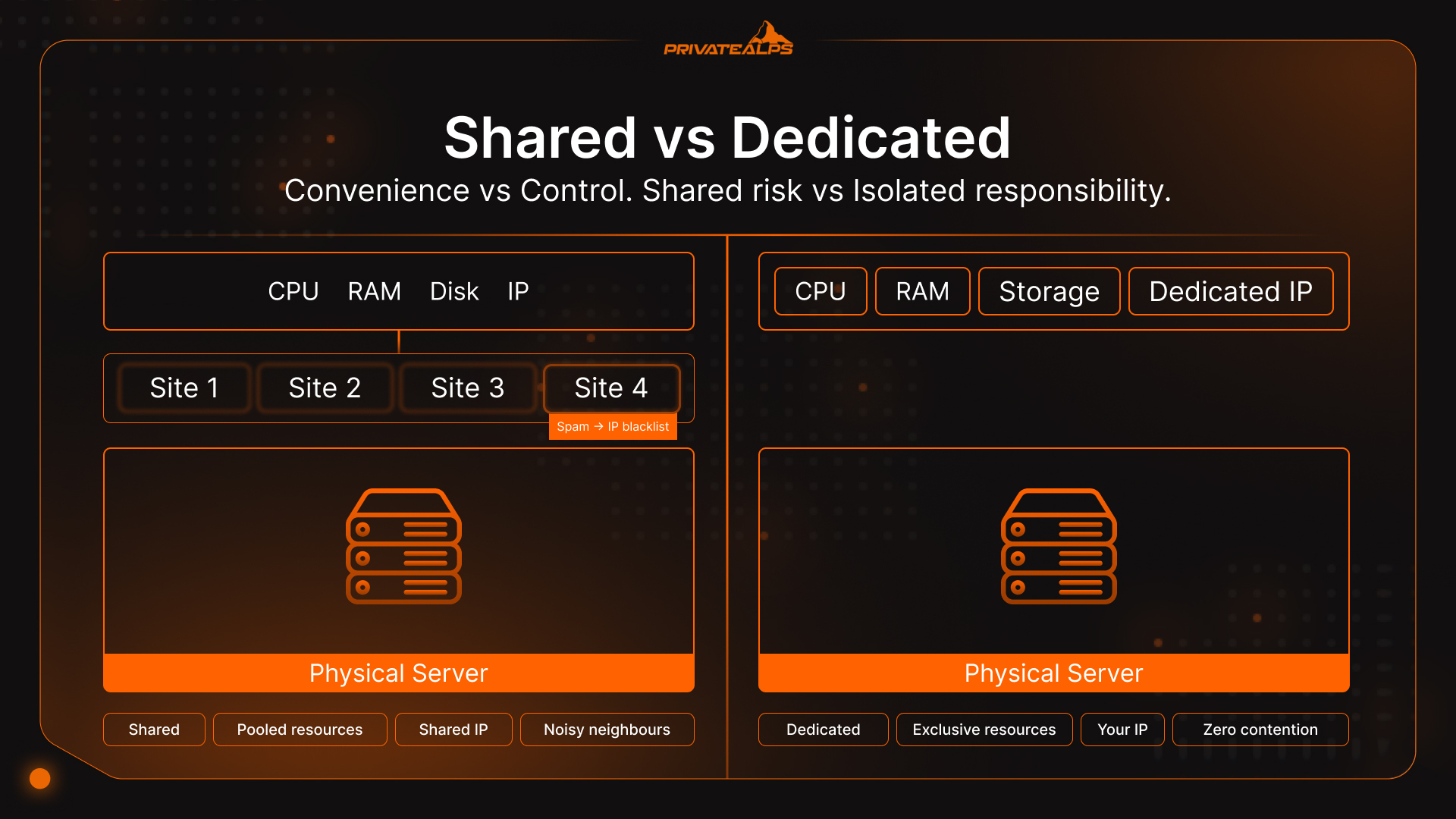
The split happens at the hardware level. Shared hosting puts many websites on one physical server - they pool CPU, RAM, and storage, and nobody has a guaranteed slice of anything. Dedicated hosting vs shared hosting means one client, one machine, one website's workload consuming the full resource set. No neighbours. No one else's traffic eating into your response times at noon on a Tuesday.
Price-wise: shared starts around $2-10/month and makes sense for blogs, portfolios, low-stakes web projects. Dedicated starts at $100+/month and earns that cost when website performance has to be consistent, when regulators are involved, or when traffic is high enough that contention becomes the problem. The three things that actually determine which one you need: how consistent performance has to be (shared has a noisy neighbour problem; dedicated doesn't), how much IP reputation matters for email delivery (shared IPs are communal property; dedicated ones are yours), and whether any compliance framework applies to your web project - PCI DSS v4.0, HIPAA, and GDPR Article 32 all push toward physical isolation for regulated data. Most websites under 50,000 monthly visitors with nothing regulated in the mix are fine on shared. Past that, or when an auditor shows up, dedicated stops being optional.
What Is Shared Hosting?
Shared hosting is a pooling arrangement. One physical server runs dozens or hundreds of websites, all pulling from the same CPU, RAM, storage I/O, and outbound IP. The provider owns the infrastructure - OS patches, server security, software updates - and you get cPanel or Plesk to manage your website files, databases, and email.
That's the setup. The part that surprises people: every account on the box shares one outbound IP address. Your neighbour's website sends spam, their account gets blacklisted, and that IP goes on a blocklist. Which is also your IP. Your email starts bouncing. You didn't touch anything. Still your problem.
What shared hosting typically includes:
- Shared CPU and RAM across all hosted websites, allocated per account with soft limits
- Shared disk storage for all website files (usually HDD or SATA SSD, rarely NVMe)
- Shared IP address - multiple websites share one IPv4
- Provider-managed OS, security patches, and server software - you manage your websites, they manage the rest
- cPanel/Plesk control panel for website, database, and email management
- SSL certificate provisioning (often via Let's Encrypt automation)
What Is Dedicated Hosting?
A dedicated server is one machine, one client. That's really the whole model. No co-tenants, no one else's cron jobs running at 3 a.m., no shared anything.
Most configurations are bare metal - no hypervisor between your workloads and the physical hardware, though managed providers sometimes run a thin provisioning layer that doesn't touch actual performance. The practical effect of going bare metal is that CPU steal overhead disappears. On shared environments, steal time is the hidden tax you pay when another tenant's traffic spike gets serviced before yours. Run top on a busy shared web server and %st might sit at 15% during peak hours - meaning 15% of your CPU time is just waiting.
On dedicated, that number is zero. When comparing a dedicated server vs shared hosting, this is the gap that everything else - TTFB, checkout latency, database response times - eventually traces back to.
Before signing anything, know which deployment model you're buying:
- Managed dedicated: The provider handles OS updates, monitoring, security patches, and hardware replacement. You stay in your application stack. Higher cost, much lower operational burden.
- Unmanaged dedicated: Full root access, full responsibility. Every kernel update, every firewall rule, every security config is yours. Lower cost, and a sobering amount of work if you haven't done it before.
What dedicated hosting typically includes:
- 100% exclusive CPU, RAM, and storage for your websites - no resource sharing
- Dedicated IP address (full control over IP reputation)
- Choice of OS, web server, and software stack (any Linux distro, Windows Server)
- Full root/administrator access
- Custom firewall rules, intrusion detection, and security policies
- Hardware-level SLA covering the full web server environment (drive replacement, power redundancy)
Shared Hosting vs Dedicated Hosting: Side-by-Side Comparison
Most comparisons of shared vs dedicated hosting focus on price or speed and skip the rest. The table below covers the dimensions that actually show up in real decisions - resources, security, compliance posture, and what happens to your website when something goes wrong.
| Dimension | Shared Hosting | Dedicated Hosting |
|---|---|---|
| Resource allocation | Pooled - shared with all co-tenants | Exclusive - 100% of hardware |
| Performance consistency | Variable (noisy neighbour effect) | Deterministic |
| Security isolation | Logical only (container-level) | Physical - no co-tenants exist |
| IP address | Shared across hundreds of websites | Dedicated, exclusively yours |
| IP reputation | Communal - neighbour spam hurts you | Fully under your control |
| Compliance fit | Non-regulated, low-sensitivity data | PCI DSS CDE, HIPAA PHI, GDPR Art. 32 |
| Scalability | Vertical limits set by provider | Hardware upgrade or additional server |
| Management model | Provider-managed | Managed or unmanaged (your choice) |
| Customisation | Limited (cPanel/Plesk scope only) | Full OS, kernel, and software stack |
| Entry-level cost | $2-10/month | $100-300+/month |
| Upper-tier cost | $10-20/month | $300-700+/month |
| Setup complexity | Minutes | Hours to days |
| Ideal for | Small websites, blogs, portfolios | High-traffic websites, SaaS, regulated industries |
Performance: How Each Hosting Type Handles Traffic
The performance gap between shared hosting vs dedicated server configurations isn't a spec sheet story. It shows up in checkout flows, in admin panels that take eight seconds to respond, in database queries that were fine yesterday and aren't today. And your website visitors feel every millisecond of it.
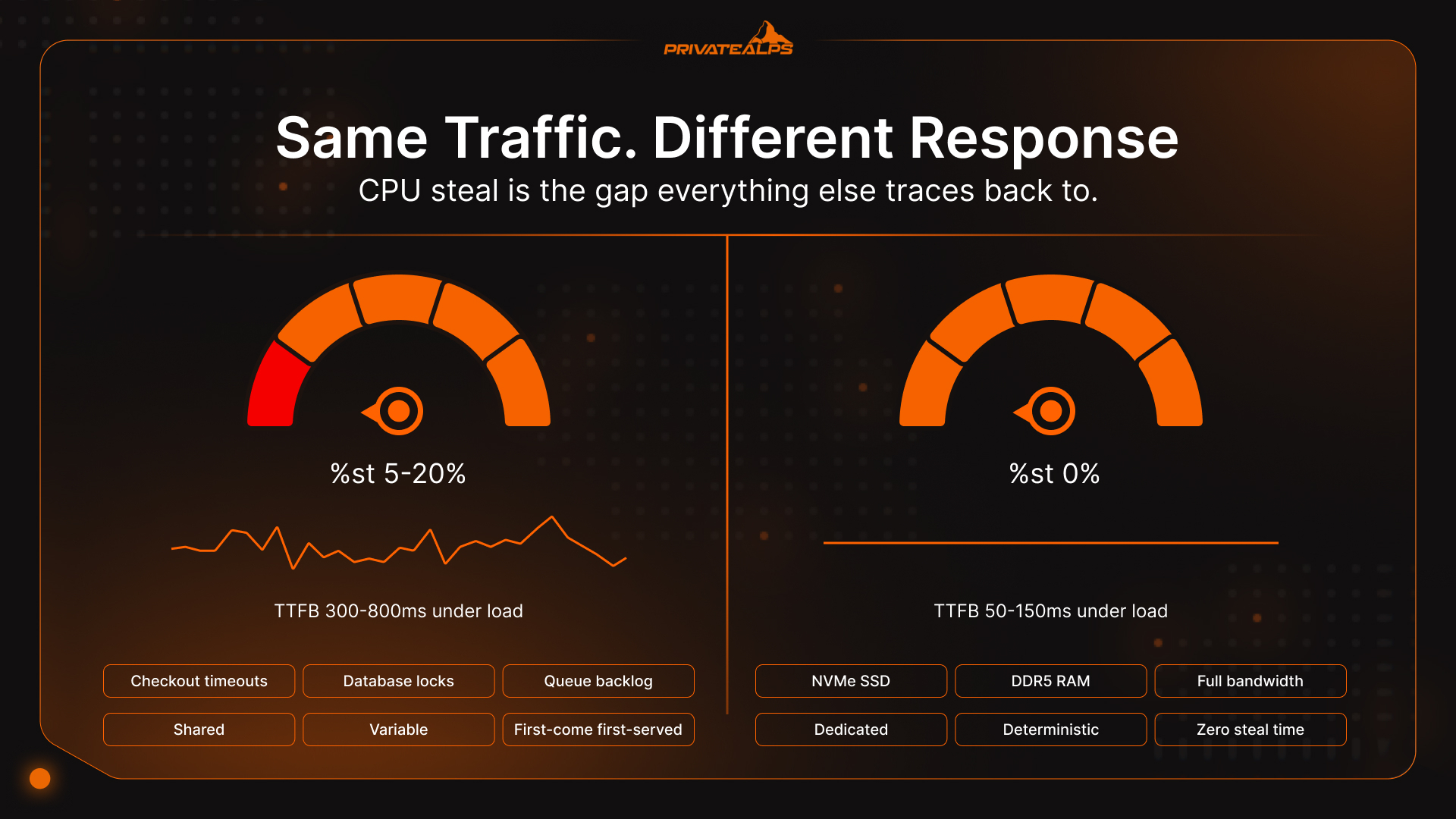
Here's why. Shared hosting has no mechanism to hold resources for you. CPU cycles are first-come, first-served across every tenant on that machine. A co-tenant catches a traffic spike, or somebody's plugin goes sideways and starts hammering disk I/O - that pressure hits every account on the server. Your website page loads slow down. Your checkout times out. Your background jobs fall behind. None of it is your code. All of it lands on your website visitors.
The number to watch is CPU steal time - %st in the Linux top utility. It counts how often a virtual CPU is sitting idle waiting for the hypervisor to free up physical CPU time because another tenant grabbed it. On shared hosting running multiple websites, that number routinely hits 5-20% during busy periods (Red Hat, CPU steal time in virtualised environments). On a dedicated server, it's zero. Not low - zero. You're not sharing the processor with anyone.
That's where the TTFB (Time to First Byte) gap comes from. Shared hosting delivers 300-800ms under load. A dedicated web server on NVMe SSD and DDR5 RAM - standard kit for dedicated infrastructure in 2026 - stays at 50-150ms (Web Hosting Performance Benchmarks, Exalo Hosting, 2025). NVMe gives up to 6x the IOPS of SATA SSD; DDR5 adds 50% more memory bandwidth over DDR4 (InMotion Hosting, AMD EPYC Dedicated Server specifications, 2025). In practice, that difference is a WooCommerce checkout that completes versus one that doesn't.
Workloads where shared hosting structurally can't keep up:
- WooCommerce or Magento websites with concurrent checkouts (database lock contention turns shared latency spikes into failed transactions)
- SaaS web applications with session-persistent connections and real-time data
- High-frequency web API endpoints where p99 latency matters more than the average
- Video encoding or image processing websites, or any CPU-intensive background jobs
- Multi-tenant platforms hosting other customers' websites - shared infrastructure compounding shared infrastructure is exactly as bad as it sounds
Security: What Each Hosting Type Actually Protects
"Dedicated is more secure" gets said a lot. It's roughly true but not useful on its own. The security differences break into three separate problems - they don't all matter equally for every website, and your threat model probably only cares about one or two of them.
1. Account isolation
On shared hosting your website's security depends partly on the security hygiene of everyone else on the box. A neglected WordPress install next door, an unpatched PHP script - without containerisation at the server level (PHP-FPM per-user isolation, suEXEC, or equivalent), that can turn into a lateral movement problem across accounts. Managed shared hosts do run OS-level containerisation to reduce cross-website risk. It helps. But it's not the same as having no neighbours, which is what dedicated gives you.
2. IP reputation
Every domain on a shared server routes outbound email through the same IP. One account gets compromised, starts pushing spam, Gmail and Proofpoint blacklist the address - and your order confirmations start hitting spam folders. Or bouncing. You had nothing to do with it. On dedicated, the IP is yours, and the reputation is yours to build or lose on your own terms.
3. Security control
On shared hosting the security stack isn't yours to touch. Firewall rules come from the provider. You're not installing Fail2Ban with custom thresholds, you're not configuring CSF, you're not setting kernel-level parameters. A dedicated server gives you the whole stack - iptables rules, SELinux policies, custom IDS signatures. If your website has a specific security baseline to hit, shared hosting can't get you there.
Cost Analysis: When Dedicated Hosting Pays for Itself
Shared website hosting looks cheap on a pricing page. That price holds as long as nothing unusual happens.
Entry-level shared plans run $2-10/month, scaling to $10-20/month at the upper end. Dedicated starts at $100-300+/month. The gap is real, but it closes faster than people expect. When a workload is consistently pushing 70% or more of a shared plan's resource ceiling, the cost-per-unit-of-performance starts converging with what dedicated would cost - except on dedicated you actually get what you're paying for, instead of a throttled environment that gets slower precisely when your website needs it most.
Compliance changes the framing completely. PCI DSS non-compliance fines come through your card brand and acquirer - $5,000 to $100,000 per month. A $200/month dedicated web server that gets you through an audit clean isn't an infrastructure expense, it's insurance. GDPR sits in the same territory: fines under Art. 83(5) go up to 4% of worldwide annual revenue or €20 million, whichever lands higher. Physical isolation doesn't guarantee you'll never have a breach, but it does make the security posture easier to demonstrate and audit.
| Factor | Shared Hosting | Dedicated Hosting |
|---|---|---|
| Entry price | $2-10/month | $100-300+/month |
| Upper tier | $10-20/month | $300-700+/month |
| PCI DSS non-compliance fine | $5K-$100K/month | Risk eliminated with proper config |
| GDPR fine ceiling | Up to 4% annual revenue / €20M | Reduced exposure |
| Upgrade path | Plan tiers only | Hardware upgrade or new server |
Compliance and Regulatory Requirements: When Shared Hosting Is Not an Option
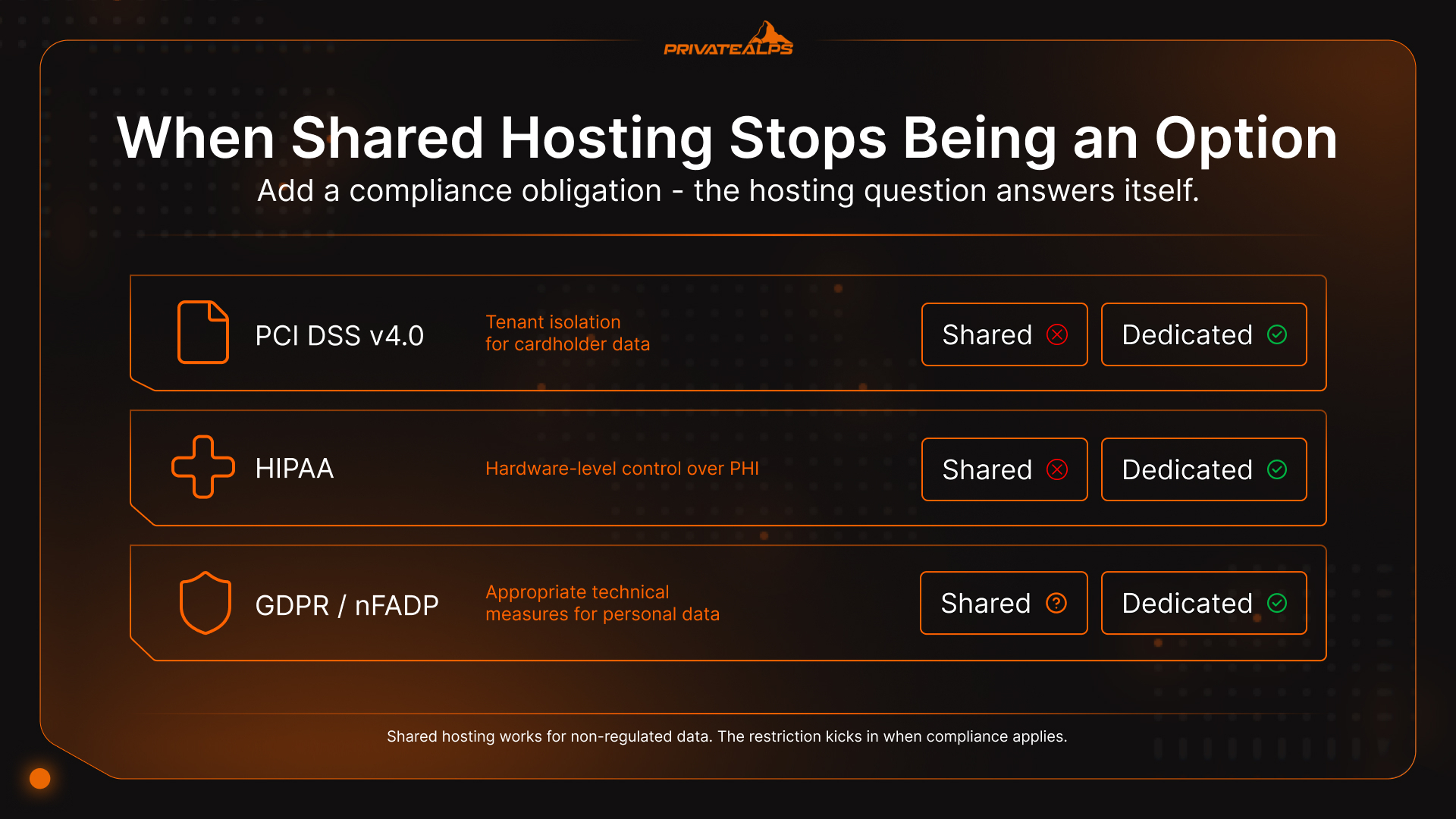
For regulated industries, the shared server vs dedicated server debate usually ends before it starts. Physical isolation isn't something you prefer - it's what the standard requires. Add a compliance obligation, and the website hosting question answers itself.
1. PCI DSS v4.0 (mandatory since March 31, 2025)
All requirements are now in force, including the ones that spent years sitting in the "best practices" column (PCI Security Standards Council, PCI DSS v4.0.1). For the Cardholder Data Environment, network segmentation and tenant isolation are table stakes. PCI DSS v4.0 also reclassified shared hosting providers as "multi-tenant service providers" - which means most of them now have to address a whole additional appendix of requirements (Schellman, PCI DSS v4.0 Service Provider Changes, 2023). QSAs assessing a shared hosting environment as the CDE, without additional segmentation that's been independently validated, will flag it. Dedicated hosting with physical isolation and firewall control gives them the clean boundary they need to move on.
2. HIPAA
PHI needs a documented, auditable chain of custody over hardware. A BAA with a shared host is possible on paper. In practice, if you can't demonstrate hardware-level control over where that data physically lives and who can reach it, you're going to have a bad time during an audit. That's not a technicality - it's a recurring failure point. Managed dedicated with proper change control clears that bar cleanly.
3. GDPR / nFADP
Article 32 of GDPR requires "appropriate technical measures" scaled to the actual risk of the processing. Switzerland's nFADP was built to stay aligned with GDPR and preserve data flow with the EU (Swiss Federal Administration, nFADP Overview). For Swiss-hosted infrastructure, a dedicated web server with confirmed Swiss data residency satisfies both GDPR Article 45 adequacy and nFADP at once - one decision, two obligations closed. One more thing worth knowing: nFADP fines of up to CHF 250,000 fall on individual decision-makers, not just the company entity.
Shared hosting is fine for websites and web projects handling non-regulated data. The restriction kicks in when your website stores or processes cardholder data, PHI, or high-risk personal data.
SEO and Hosting: How Your Server Choice Affects Rankings
Hosting type doesn't show up as a ranking factor in Google's documentation. But it does directly affect the metrics that do. The question of web hosting vs dedicated server is relevant to SEO not because Google cares about your infrastructure choices, but because infrastructure determines TTFB, uptime, and IP reputation - and those three things directly affect how your website performs in search.
- TTFB and Core Web Vitals. LCP is a ranking signal. It starts with TTFB. Shared hosting TTFB under load typically runs 300-800ms; a dedicated web server stays at 50-150ms. Consistently weak TTFB means consistently weak LCP scores for your website, and weak LCP compounds into a ranking disadvantage over months - not a penalty, just a slow drift relative to faster competitors (Google Core Web Vitals, web.dev).
- Uptime and crawl budget. A 99.9% SLA sounds fine until you do the math: 8.7 hours of downtime per year. Those are hours when Googlebot shows up and gets nothing. A 99.99% SLA cuts that to 52 minutes annually. For websites with a lot of pages or frequent updates, the difference in crawl coverage accumulates.
- Shared IP blacklisting. One neighbour on a shared IP runs a phishing campaign. Google Safe Browsing flags the IP. Your website gets pulled from search results - manual review required to get it back. Your website had no malware. Still gone until the review clears.
- Security incidents and hacked content. Shared hosting accounts are a common target for malware injection. Google picks it up in Search Console and de-indexes the affected pages. Dedicated hosting doesn't make your website immune, but having full control over access and security configuration makes this a much less likely scenario.
When to Upgrade from Shared to Dedicated Hosting
"When your website grows" is advice that doesn't mean anything. Growth looks different on every website. Here's what actually signals that shared hosting has run out of road.
- Traffic is over 50,000-100,000 monthly visitors and TTFB is sitting above 600ms on a consistent basis. At that level the bottleneck isn't your code - it's resource contention in the infrastructure. You can optimise the application all you want. The ceiling is in the server environment, and your website performance won't improve until you move it.
- A compliance requirement enters the picture. PCI DSS because you're taking card payments. HIPAA because health data is in scope. GDPR or nFADP because someone flagged the risk classification on personal data you're storing. The compliance clock starts independently of traffic. Moving your website to dedicated before the first audit is significantly calmer than moving during one.
- Your websites keep getting caught in shared IP blacklisting, or malware injections are showing up from neighbouring accounts. One incident is annoying and recoverable. A pattern means you've accepted that the shared environment's security posture isn't in your control - and probably never will be while you're on that server.
- Checkout abandonment is tracking directly to server response times. Pages taking more than 3 seconds at checkout, hosting plan near its ceiling, abandonment rate climbing. That's a solvable website infrastructure problem, not a conversion rate problem. For most mid-size web stores the cost of a dedicated server comes back in recovered cart value within weeks.
- The application needs something shared hosting structurally can't provide. Custom kernel modules, Redis or Memcached at OS level, a specific firewall config, a non-standard server setup. When shared hosting vs dedicated becomes a question of capability rather than cost, shared loses - it's not a matter of finding the right plan.
Alternatives: What If Neither Fits?
If shared hosting is too constrained for your website and dedicated feels like more machine than you need right now, a VPS is probably what you're actually looking for. A VPS uses hypervisor-level isolation (KVM or VMware) to give your websites dedicated CPU, RAM, and storage from shared hardware - typically $20-80/month. You get root access, resource guarantees, and a much smaller blast radius than shared website hosting, without the full operational weight of a dedicated server.
Cloud web hosting (AWS, Azure, Google Cloud) is a different kind of answer: elastic resources that scale to your website's traffic and bill by usage. Better for websites with unpredictable traffic. More complex to manage, especially if compliance data residency requirements limit which providers are actually suitable.
| Option | Resource Model | Best For | Cost Range |
|---|---|---|---|
| Shared hosting | Pooled | Small websites, blogs, portfolios | $2-10/month |
| VPS | Isolated virtual | Growing websites, developers | $20-80/month |
| Dedicated server | Exclusive physical | High-traffic websites, compliance, e-commerce | $100-300+/month |
| Cloud hosting | Elastic on-demand | Variable traffic, global scale | Usage-based |
_PrivateAlps runs all three tiers on the same Swiss infrastructure - suitable for websites of any scale - move between them without changing providers, data residency, or compliance posture._
Summary
Shared hosting does what it's supposed to do. For websites without regulated data, under 50,000 monthly visitors, and no requirement to touch the server configuration, it keeps your website online and costs almost nothing. That's not a compromise - it's the right fit.
The question of dedicated server vs shared server gets real when one of those conditions changes. Performance unpredictability starts affecting revenue. A compliance requirement makes physical isolation mandatory. The web application needs configuration that a control panel can't expose. At that point the conversation stops being about budget and starts being about what the infrastructure actually has to do. Dedicated isn't the premium option - it's the one that handles the load.
_PrivateAlps provides dedicated and VPS hosting on Swiss infrastructure - GDPR and nFADP-compliant by design, built-in DDoS protection, no third-party data sharing. Choose your tier and upgrade when it makes sense - without switching providers, without re-auditing data residency, without starting over._
FAQ
Is Dedicated Hosting More Secure Than Shared Hosting?
Structurally, yes. No co-tenants means no lateral movement risk from neighbouring websites, no shared IP reputation to inherit, and full control over your own firewall and intrusion detection setup - Fail2Ban with custom rules, CSF, whatever your baseline requires. Managed shared hosting does reduce some of this through containerisation, but it can't fix the shared IP problem, and it can't hand security policy decisions over to you. Those limits are baked into the architecture.
Can Shared Hosting Handle High Traffic?
It depends on what the traffic is doing, but sustained high traffic is where shared hosting tends to fail in a recognisable pattern. Once your website is consistently hitting 50,000+ monthly visitors, resource contention during peaks shows up as TTFB spikes, 503 errors, and database queries backing up in the queue. The website doesn't collapse - it just gets slower and slower until something times out.
What Is the Difference Between Dedicated Hosting and a Dedicated Server?
They're the same thing. Dedicated hosting is the service model for running a website on its own physical machine; a dedicated server is that hardware. The distinction that actually matters day-to-day is managed versus unmanaged: managed means OS updates, web server monitoring, and patches are the provider's job; unmanaged means you have root access and full responsibility for everything above the hardware layer.
Does Hosting Type Affect My Email Deliverability?
Yes, and the mechanism is direct. Every website on a shared server uses the same outbound IP. One neighbour's account gets compromised and starts pushing spam - the IP lands on a blocklist, and your transactional emails start bouncing or going to spam folders. You're sharing the IP, so you share the consequences. On a dedicated server the IP is yours alone. SPF, DKIM, and DMARC need to be properly configured regardless of what you're running, but at least on dedicated your sending reputation is a function of your own behaviour.
Which Hosting Is Better for WordPress?
Shared hosting runs WordPress websites comfortably for most cases - up to around 50,000 monthly visitors, standard plugin stack, nothing too exotic. The picture changes for WooCommerce stores with concurrent checkouts, membership platforms with a lot of logged-in users hitting the database simultaneously, or any web application that needs custom PHP-FPM pool settings, Redis object caching at the OS level, or server configs that cPanel simply doesn't expose. Those requirements don't have shared hosting solutions.
How Do I Migrate from Shared to Dedicated Hosting?
Less complicated than it sounds, particularly if you're going with a managed provider that handles migration. The part people tend to skip is verifying what they already have before anything gets moved - every web server config, every scheduled job, every dependency your websites rely on silently. High-level steps:
- Full backup: Files via FTP/SFTP, databases via mysqldump or phpMyAdmin. Actually restore the backup somewhere to confirm it works - don't assume.
- Configure the dedicated server: web server (Apache or Nginx), PHP at the right version, database server (MySQL/MariaDB).
- Transfer website files and databases: Move files to the new web root, import the database dump, update config files (wp-config.php, .env) with the new credentials.
- Test on the new IP: Add the server IP to your local hosts file and click through the website before DNS changes.
- Update DNS: Switch the A record; wait out the 24-48 hour propagation window with the old shared account still live.