



VPS vs Shared Hosting: Choosing the Right Hosting Plan
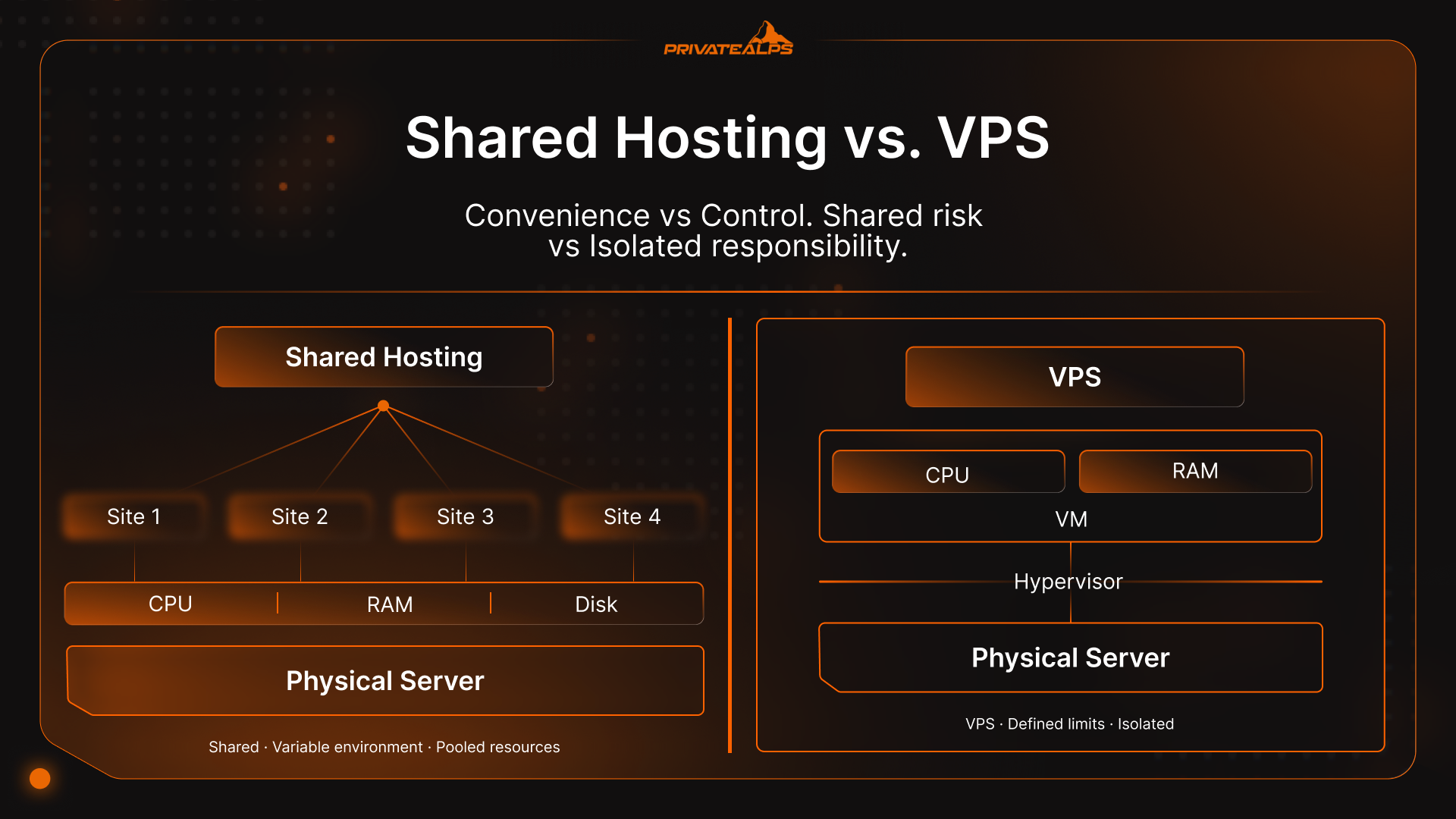
If you’ve ever had a site slow to a crawl on a random Tuesday, the VPS vs shared hosting debate has probably piqued your interest.
You don’t start comparing shared hosting vs VPS plans for fun. Generally, you do it because you’ve noticed problems with your initial setup, like pages timing out, or dashboards lagging.
Here’s the uncomfortable part: a lot of hosting advice glosses over how websites actually behave under load. The web isn’t static anymore. According to the HTTP Archive Web Almanac, fewer than 60% of desktop sites hit Google’s “good” threshold for Time to First Byte. That’s evidence that infrastructure matters.
Shared hosting can be perfectly fine. So can VPS. The trouble starts when people treat VPS hosting vs shared hosting like a linear upgrade path instead of a trade-off. You’re choosing between convenience and control, predictability and simplicity, shared risk and isolated responsibility.
Quick Summary: Shared Hosting vs. VPS at a Glance
The real difference in VPS vs shared hosting is how much randomness you’re exposed to once your site starts doing real work. Shared hosting puts many sites on the same server and assumes usage stays evenly spread. That’s not always the case. 53% of shared hosting operators reported outages over the last three years. When resources are shared, response time isn’t just about your code, it’s about everyone else’s.
VPS reduces that uncertainty by carving out defined CPU and memory for your site. You still share hardware, but not the consequences of someone else’s traffic spike or misconfigured plugin. That’s why discussions around web hosting vs VPS surface after slowdowns, failed checkouts, or security reviews. Shared hosting holds up when traffic stays modest and nothing critical is on the line. VPS tends to enter the picture once consistency, compliance, or late-night alerts start affecting revenue or peace of mind.
Key Differences: Shared Hosting vs. VPS
| Area | Shared Hosting | VPS Hosting |
|---|---|---|
| Resource isolation | None in practice. CPU, memory, and disk are pooled. | Logical isolation. Resources are reserved per instance. |
| Performance | Can be fast, but inconsistent. Depends on other tenants. | More predictable. Spikes elsewhere don’t bleed over. |
| Security exposure | Larger surface area due to many sites on one server. | Smaller blast radius through isolation. |
| Scaling | Step-based plans with hard ceilings. | Add RAM/CPU as needed, within provider limits. |
| Server access | No root access. Limited configuration. | Full root/SSH access. |
| Ongoing management | Mostly hands-off. | More responsibility, less if managed. |
| Cost pattern | Cheap to start, constraints appear later. | Higher baseline, fewer surprises as you grow. |
| Typical use | Small sites, portfolios, low-risk projects. | Ecommerce, membership sites, multi-site setups. |
What Is Shared Hosting and How Does It Work?
Shared hosting is basically a pooling setup. One physical server runs a lot of websites, all pulling from the same CPU, memory, storage, and network. There’s no real hardware separation. It only works if demand stays spread out.
That was easier back when most sites were static. It’s tougher now. Around four in ten websites run on WordPress, and even a simple page load fires off PHP and database queries. Stack that across dozens or hundreds of sites and the server’s never really idle.
Resource Allocation in Shared Environments
Shared hosting doesn’t allocate fixed resources. It enforces limits. CPU time is sliced, memory is capped per process, disk I/O is throttled when queues grow. File counts and concurrent processes are also limited, regardless of how plans are marketed.
What matters is where pressure shows first. It’s usually CPU wait time, database locks, and PHP workers backing up, rather than bandwidth. Sites often hit those ceilings at surprisingly low traffic levels, especially if they rely on plugins, background tasks, or frequent writes.
The Neighbor Effect: Performance Variability
When resources are shared, timing matters. If several sites spike at once, response times stretch. Everything is waiting its turn. That’s why server response time tends to fluctuate more than frontend metrics across the web, particularly on mobile connections where backend delays compound faster.
This is the trade-off shared hosting makes. It maximizes efficiency, not consistency. For low, steady demand, that’s fine. Once concurrency becomes normal, variability becomes the defining behavior.
Shared Hosting: Advantages and Disadvantages
Shared hosting works because it removes decisions. You don’t think about servers, capacity, or tuning. You upload a site and it runs. For a large slice of the web, that’s enough. Most sites never experience sustained traffic or heavy concurrency, which is why shared hosting continues to dominate entry-level hosting despite its limits.
Those limits appear when usage overlaps, when background tasks stack up, or when traffic stops being predictable.
When Shared Hosting Works Well
Shared hosting is a good fit when demand stays steady.
- Sites with low, steady traffic and no sharp spikes
- Mostly static or lightly dynamic content
- Projects where downtime or slowness is inconvenient, not costly
- Teams that don’t want to manage servers or updates
Industry traffic studies consistently show that the majority of websites operate well below thresholds that stress shared servers. In those cases, the trade-off is reasonable.
Shared Hosting Limitations
Problems appear once concurrency becomes routine.
- CPU and memory are managed, not reserved
- Performance varies depending on other tenants’ activity
- Background jobs and cron tasks slip under load
- Limited control over software versions and server behavior
- Scaling hits account limits early, often before traffic feels “large”
Backend delays matter because they compound. Google’s performance documentation shows server response time directly affects user-visible metrics like Largest Contentful Paint and Interaction to Next Paint. When the server hesitates, users feel it.
Shared Hosting Pros and Cons
| Advantages | Disadvantages |
|---|---|
| Lowest cost | Inconsistent performance |
| Minimal setup | No resource guarantees |
| Little maintenance | Limited customization |
| Fine for small sites | Early scaling ceilings |
What Is VPS Hosting and How Does It Work?
VPS hosting still runs on shared hardware, but your site sits inside its own virtual box. CPU, memory, and storage are set aside ahead of time. They don’t slide around based on what other sites are doing that day. What you’re gi*ven is what you get, and it stays there.
That’s the reason people move. Not because VPS is “faster” in a vacuum, but because it behaves the same way at 10 a.m. and 10 p.m. When traffic overlaps, the server doesn’t reshuffle priorities behind your back. Your site gets what it was allocated, even if something else on the machine is having a bad day.
Hypervisor-Based Isolation Explained
The separation comes from virtualization software sitting between the hardware and each virtual server. Its job is boring and strict: divide resources, enforce limits, and stop one environment from stepping on another.
That isolation matters because most modern sites are never idle. Background jobs, database writes, scheduled tasks, and API calls all overlap. On a VPS, those tasks compete only with your own workload, not with unrelated sites.
Root Access and Server Control
VPS usually comes with root or administrator access. You can decide how the server is configured, which software versions run, how caching works, and what gets locked down.
It also means responsibility moves closer to you. Updates don’t happen by accident. Backups need to be verified. If something breaks at the system level, it’s your problem unless you’re paying for management. VPS doesn’t remove work. It replaces uncertainty with choices.
VPS Hosting: Advantages and Disadvantages
VPS hosting usually enters the picture after someone gets tired of guessing why a site slowed down, and whether traffic is the problem or the server. VPS doesn’t remove limits, but it makes them visible and predictable. That alone changes how people work with it.
Why Choose VPS
The biggest benefit of VPS vs web hosting is consistency. When CPU and memory are assigned to your virtual server, they don’t vanish because another site is busy.
- Performance stays steadier when traffic overlaps
- Other customers can’t consume your allocated resources
- Server behavior is easier to explain and troubleshoot
- You can run software shared hosting won’t allow
- Hosting multiple sites is easier to plan and contain
These advantages show up most with dynamic sites. Database writes, background jobs, and scheduled tasks stop competing with strangers’ workloads and start competing only with your own.
VPS Drawbacks and Hidden Costs
VPS also removes a layer of protection. On shared hosting, the platform absorbs a lot of mistakes. On VPS, those mistakes land closer to home.
- Updates and patches don’t happen automatically unless managed
- Misconfigurations can hurt performance or security quickly
- Monitoring and alerting become necessary, not optional
- Monthly costs start higher than shared plans
- Backups need to be set up and tested, not assumed
VPS gives control, but it doesn’t come with judgment built in.
VPS Hosting Pros and Cons
| Advantages | Disadvantages |
|---|---|
| Stable resource access | More operational responsibility |
| Isolation from other tenants | Higher baseline cost |
| Greater flexibility | Configuration errors matter |
| Clear scaling path | Backups require oversight |
Managed vs. Unmanaged VPS: Which Do You Need?
This is an area of misjudgment in shared vs VPS hosting debates. People might understand virtualization, but they often underestimate the work around it. The difference between managed and unmanaged VPS isn’t philosophical. It’s about who gets paged when something goes wrong.
A managed VPS means the provider handles a defined slice of server operations. An unmanaged VPS means you do. Same underlying technology. Very different day-to-day reality.
What Managed VPS Includes
Managed plans exist because most teams don’t want to become part-time sysadmins.
- Operating system updates and security patches
- Basic monitoring and alerts
- Backups, usually on a fixed schedule with retention limits
- Help diagnosing server-level issues
- Someone else watching disk space, load, and failed services
This matters more than it sounds. Studies on infrastructure incidents consistently show that unpatched systems and misconfigurations cause about 60% of outages and breaches. Managed VPS reduces that risk by making routine maintenance someone else’s problem.
Unmanaged VPS: Full Control, Full Responsibility
Unmanaged VPS gives you a clean machine and steps out of the way.
- You handle updates, patching, and reboots
- You configure firewalls and access controls
- You set up monitoring, alerts, and backups
- You test restores, not just assume they work
This isn’t inherently bad. For teams with Linux experience, unmanaged VPS can be efficient and flexible. For everyone else, it’s easy to underestimate the ongoing time cost.
Managed vs. Unmanaged VPS Comparison
| Area | Managed VPS | Unmanaged VPS |
|---|---|---|
| Server updates | Included | Your responsibility |
| Monitoring | Built-in | Must be configured |
| Backups | Usually included | Must be set up |
| Required expertise | Low to moderate | Moderate to high |
| Cost | Higher monthly fee | Lower, plus time cost |
| Best fit | Small teams, businesses | Technical teams |
The right choice comes down to honesty. If you don’t want to think about the server until something breaks, managed VPS is usually cheaper in the long run. If you already know what you’re doing, unmanaged VPS gives you fewer guardrails-and fewer excuses.
Shared Hosting vs. VPS Hosting: Direct Comparison
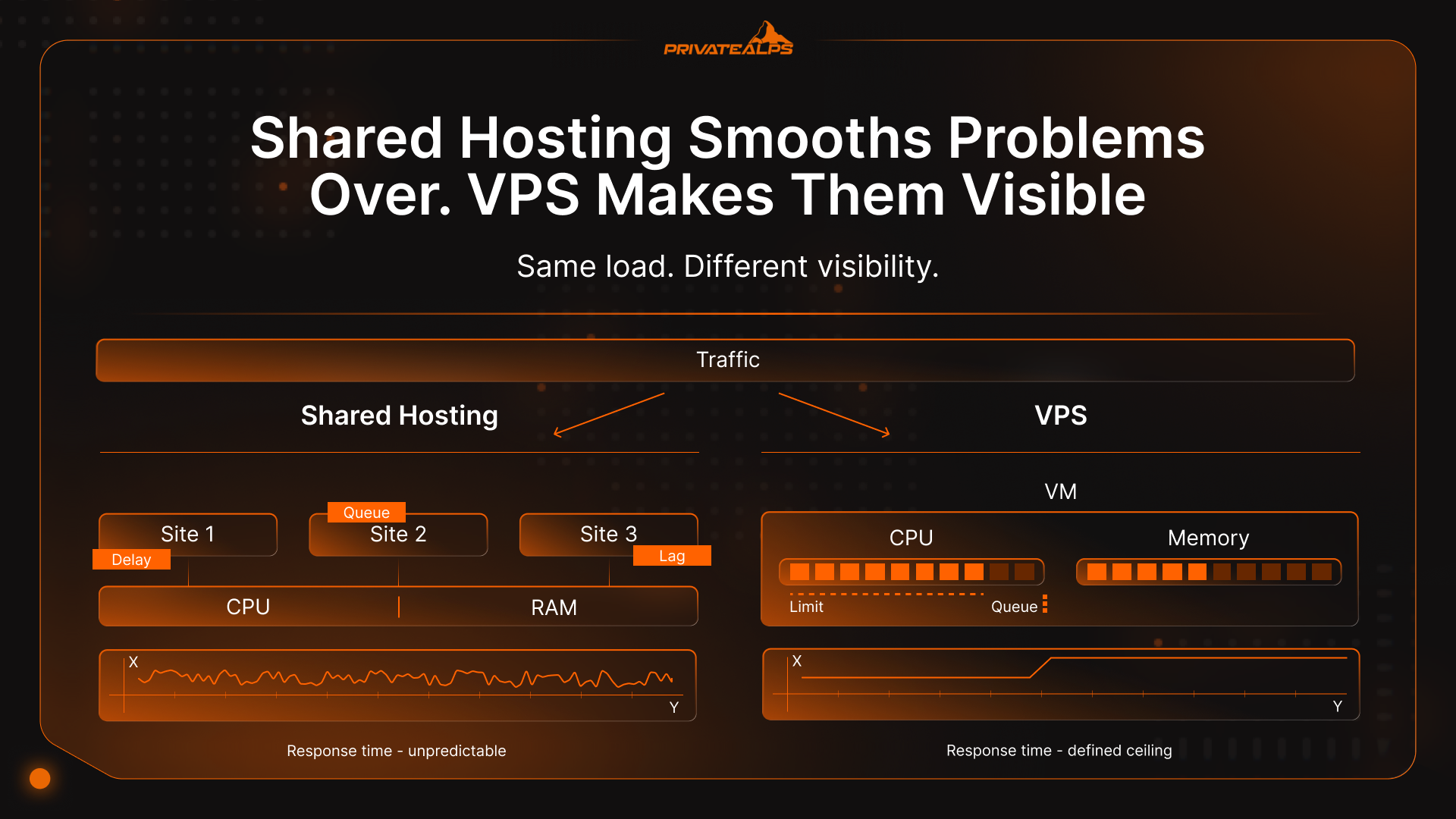
Shared hosting smooths problems over. VPS makes them visible. Which one you prefer depends on whether you’d rather have quiet slowdowns or clear limits you can act on.
Comparison: Technical Specifications
| Area | Shared Hosting | VPS Hosting |
|---|---|---|
| Resource isolation | Everything is pooled | Resources are carved out per instance |
| CPU and memory | Soft limits, adjusted on the fly | Set allocations |
| Storage access | Shared disk, throttled when busy | Reserved slice of disk I/O |
| Bandwidth | Burstable, policy-based | Defined by plan |
| Scaling | Step upgrades with hard ceilings | Add RAM or CPU as needed |
Comparison Table: Operational Factors
| Area | Shared Hosting | VPS Hosting |
|---|---|---|
| Getting started | Very little setup | Some setup required |
| Server upkeep | Handled for you | Someone has to own it |
| Skill level | Low | Moderate or higher |
| Support focus | Account and app issues | Server behavior and limits |
| Backups | Often included, limited control | Needs to be configured or checked |
This is where shared hosting vs VPS stops being about features. Shared hosting tends to fail slowly. Things lag, then recover, then lag again. VPS failures are more obvious, but also easier to trace. You can see when memory runs out or a process misbehaves.
That’s the trade-off behind every version of hosting vs VPS. One hides the edges. The other shows them to you.
Which Hosting Type Delivers Better Performance?
VPS usually wins on performance because of consistency. Shared hosting can feel quick when the server is quiet, then weirdly sluggish when it isn’t. VPS flattens that curve because your CPU and memory are fenced off, so you’re not waiting behind someone else’s spike.
It also lines up with what the broader web is fighting. The HTTP Archive’s 2025 Web Almanac shows that even among the top 1,000 sites, only 59% hit “good” Core Web Vitals on desktop and 51% on mobile. That’s the best-funded segment of the internet, and they still struggle on mobile. If you’re running on shared resources and you get a bit of contention at the wrong time, you’re basically volunteering to join that struggle.
Traffic Thresholds and Response Time Degradation
What most people trust are signals:
- TTFB variance: the same page swings from “fine” to “slow” during the day
- Queue symptoms: admin pages lag, background jobs drift, checkouts time out
- Concurrency pain: one small spike causes a disproportionate slowdown
Database and Dynamic Content Limitations
Dynamic sites trip shared hosting earlier because they’re doing work on every request. And a lot of sites are dynamic now. Interactivity is improving across the web, but that improvement mostly comes from careful engineering, plus infrastructure that doesn’t wobble under load.
How Secure Is Shared Hosting Compared to VPS?
Shared hosting security comes down to one awkward fact: you’re sharing a server with strangers. Your site can be spotless, and you still inherit risk from whatever else is running on that box. VPS reduces that exposure because your environment is separated at the virtualization layer, but it doesn’t magically make you safe, especially if nobody is patching the OS.
IBM’s 2025 Cost of a Data Breach report puts the global average breach cost at $4.4 million. That number isn’t “blame the host,” it’s just a reminder that small lapses can get expensive fast.
Cross-Tenant Vulnerabilities in Shared Hosting
Shared hosting has a wider blast radius because there are simply more moving parts on the same machine.
- A weak site next door can turn into spam, malware, or abusive traffic that affects the whole server
- Shared services and shared configuration mistakes can create weird side doors
- Reputation damage is real: one bad tenant can get the server IP range flagged, which can hit email delivery and forms
Even if a provider does a good job with isolation tools, you still don’t get to audit your neighbors, and you don’t control how quickly they clean up.
Shared Hosting vs VPS Security: Control vs. Responsibility Trade-Off
VPS is cleaner. You’re not living inside the same OS instance as everyone else. But VPS shifts work onto you. If it’s unmanaged and patching falls behind, you’ve basically bought a nicer-shaped risk.
But VPS shifts work onto you. If it’s unmanaged and patching falls behind, you’ve basically bought a nicer-shaped risk. Old packages, weak SSH habits, and sloppy permissions don’t get buffered by the platform.
Compliance Considerations: PCI-DSS, GDPR, HIPAA
PCI SSC outlines additional requirements for multi-tenant service providers in Appendix A1. That is why payment processing and audit discussions tend to be simpler when isolation boundaries are clearer. So, bluntly: shared hosting can be fine for low-risk sites. VPS can be better. But only if someone is actually maintaining it.
Scalability: Growth Paths for Each Hosting Type
Scaling sounds like a clean, upward story. In practice it’s usually reactive: you scale because something starts bending. Shared hosting bends by throttling. VPS bends by hitting clear resource limits.
Vertical Scaling on VPS
With VPS, scaling up is usually straightforward: more RAM, more CPU, sometimes faster storage.
You can also tune your stack in ways shared hosting won’t allow, with object caching, queue workers, and custom server configs, so scaling isn’t only about money.
The catch is that vertical scaling isn’t infinite. Eventually you hit provider caps, or you outgrow a single machine because you need redundancy, not just horsepower.
When to Migrate: Shared → VPS → Cloud
Shared → VPS is usually triggered by consistency problems: spikes, slow admin, timeouts, limits you keep bumping into. VPS → cloud tends to happen for different reasons: high availability, multi-region needs, or workloads that don’t fit neatly on one server.
A useful mental model:
- Move off shared when performance is unpredictable and you can’t tune the environment.
- Move off a single VPS when one failure becomes unacceptable and you need resilience by design.
Cost Analysis: True Total Cost of Ownership
Sticker price is the least interesting number in hosting vs VPS conversations. What actually matters is how much time, risk, and rework you absorb once the site is live. Shared hosting looks cheap because most of the cost is hidden. VPS looks expensive because most of the cost is visible.
Shared Hosting: Low Entry, Hidden Constraints
Shared plans win on monthly price, but that price assumes nothing unusual happens.
- Resource limits show up before traffic looks “big”
- Upgrades are coarse-grained and often reactive
- Performance issues cost time, not line items
- Add-ons (backups, security, email) quietly stack up
For sites tied to revenue, those slowdowns aren’t abstract. Google’s own performance guidance shows that backend delays directly affect user-visible experience, which means slower pages don’t just annoy people, they reduce conversions and engagement.
VPS Hosting: Higher Baseline, Predictable Scaling
VPS costs more per month, but the math is clearer.
- You pay for defined CPU and memory
- Scaling is incremental instead of plan-based
- Problems surface as measurable limits, not vague slowdowns
- Managed VPS trades money for fewer operational hours
There’s also a risk angle. VPS doesn’t prevent breaches, but clearer isolation and ownership make security easier to reason about when something goes wrong.
Cost Comparison by Use Case
| Use case | Shared Hosting (annual) | VPS (unmanaged) | VPS (managed) |
|---|---|---|---|
| Static site | Lowest | Overkill | Overkill |
| Small business site | Low | Moderate | Moderate–High |
| Ecommerce | Risky | Reasonable | Safer |
| SaaS / membership | Poor fit | Good | Strong fit |
Cheap hosting is only cheap if it stays quiet. Once you factor in lost time, missed sales, or late-night firefighting, the “expensive” option in VPS vs shared hosting often ends up costing less.
Use Case Decision Matrix: Which Hosting Fits Your Project?
Most web hosting vs VPS decision mistakes aren’t technical. They’re contextual. The hosting plan makes sense on paper, then real users show up and everything feels off.
What usually matters isn’t size. It’s shape. How traffic arrives. Whether users are logged in. How often the database gets hit.
| Project | What traffic looks like | Complexity | What usually fits | Why |
|---|---|---|---|---|
| Portfolio site | Occasional visits | Very low | Shared hosting | Static pages, nothing time-sensitive |
| Blog | Light, uneven | Low | Shared hosting | Spikes are tolerable |
| Small business site | Predictable | Medium | Shared or small VPS | Depends on plugins and forms |
| Online store | Spiky, transactional | High | Managed VPS | Checkout needs consistency |
| Membership site | Concurrent users | High | VPS | Logged-in users stress shared limits |
| SaaS MVP | Unpredictable | High | VPS | Control matters early |
| Multiple sites | Mixed | Medium+ | VPS | Easier to contain and plan |
Technical Skill Requirements
Shared hosting is built on the assumption that you will never touch the server. Unmanaged VPS assumes the opposite, that you can step in when updates break or services stop responding. Managed VPS sits between those two. You still run the application, but someone else keeps an eye on the system. When the hosting choice doesn’t match your skills, the mismatch shows up quickly, usually at the worst moment.
Migration Considerations: Moving from Shared to VPS
When people decide to switch after comparing VPS vs shared hosting, they often realize a shared plan did more than they thought. When you move, all of that responsibility lands at once. Mail delivery. Scheduled jobs. Server defaults you never chose but relied on anyway.
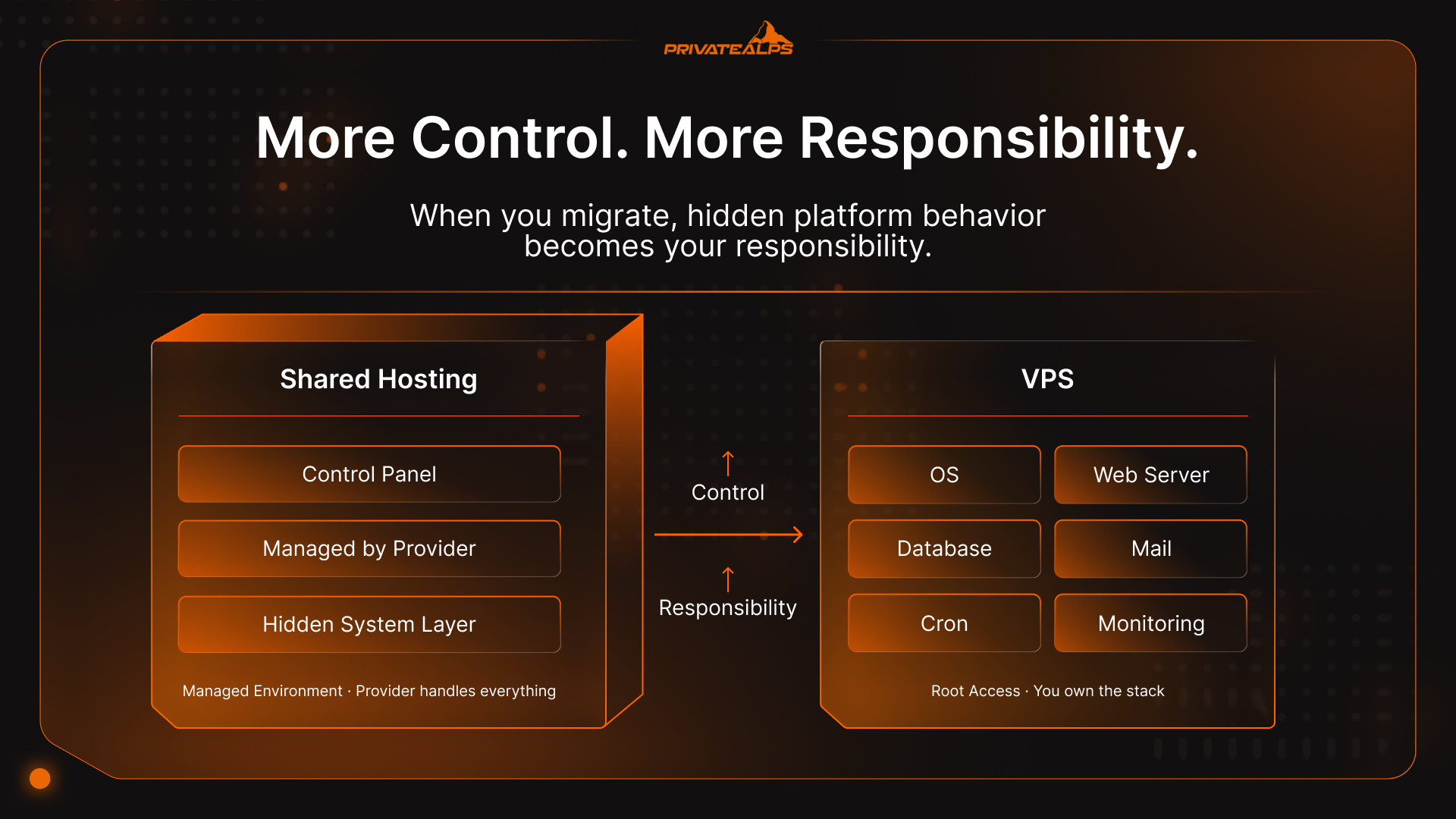
If you only slow down for one part of the move, make it this.
- Take a full backup and restore it somewhere else to confirm it actually works
- Reduce DNS TTL well before the switch so changes don’t drag on
- Write down every cron job, queue worker, and scheduled task
- Check how email is sent and where it’s relayed
- Match PHP versions and extensions exactly
- Bring the VPS online and click through the site before touching DNS
Run both setups side by side. Let the VPS sit there while the shared site stays live. Once you’re confident the new environment behaves the same, flip DNS and watch closely.
Final Verdict: Shared Hosting vs VPS Decision Checklist
This decision usually comes down to a handful of signals.
Shared hosting is still the right call if:
- Your traffic is low and mostly predictable
- Pages are public and not time-sensitive
- A slow load is annoying but not expensive
- You don’t want to think about servers at all
In that setup, shared hosting does what it’s meant to do. It stays out of the way.
VPS starts to make sense when a few things change:
- Performance varies depending on the time of day
- Traffic spikes are normal, not rare
- Logged-in users or checkouts are part of the flow
- You’re hitting limits before traffic feels “big”
- Security or compliance questions are becoming specific
At that point, the cost difference matters less than the predictability. VPS doesn’t remove problems, but it makes them measurable. You know how much memory you have. You know when CPU is exhausted. You know where to look when something slows down.
There’s also an honesty check here. VPS only pays off if someone owns it. That can be you, your team, or a managed provider. If nobody’s watching updates, backups, and resource usage, VPS can be worse than shared hosting, not better.
So the real verdict isn’t “shared hosting vs VPS.” It’s whether your site is still forgiving. When it stops being forgiving, shared hosting stops being cheap.
Choose the Right Solution for Your Project
This usually isn’t a big strategic moment. It’s practical.
If the site is small and traffic doesn’t swing much, shared hosting usually holds up. Nothing fancy, but it works. VPS starts coming up when that steadiness disappears. Pages slow down at the same times every day. Admin clicks feel delayed. Even small bumps in traffic cause trouble. Then it stops being a speed problem. It’s more about uncertainty.
PrivateAlps has both shared hosting and VPS plans, including managed ones. The difference comes down to how much control you want and how much responsibility you’re willing to take on.
FAQs
Can I start with shared hosting and upgrade later?
Yes. That’s how most sites start. The upgrade usually happens after something feels off for a while, not after one bad day. The only real mistake is waiting until traffic is already high or money is on the line. Moving early is calmer than moving under pressure.
Is VPS hosting worth it for a small blog?
Most of the time, no. A simple blog doesn’t push a server very hard. VPS adds complexity without fixing a real issue. It starts to make sense only when traffic spikes are common or when the site relies on heavier features that shared hosting struggles to handle.
What’s the difference between VPS and cloud hosting?
A VPS is one virtual server. Cloud setups spread things across multiple machines. VPS gives you clearer limits and control. Cloud is about redundancy and failure tolerance. A lot of projects skip cloud until they actually need that resilience.
Does VPS hosting improve SEO performance?
No, not directly. Google doesn’t rank hosting plans. What changes is consistency. If VPS prevents slowdowns during peak usage, that can improve real user experience.
Can I host multiple websites on a VPS?
Yes. That’s very common. It works as long as you think ahead a bit. One busy site can still drag everything else down if they’re all pulling from the same resources. That’s why layout and limits matter more than how many sites you run.
How do I know when it’s time to upgrade from shared hosting?
Usually the same problems keep showing up. Slow pages at certain hours. Admin panels lag. Jobs don’t always run on time. You hit limits that don’t line up with traffic numbers. When those things keep happening, shared hosting has done all it’s going to do.