



Web Server vs. Application Server: What's the Difference?
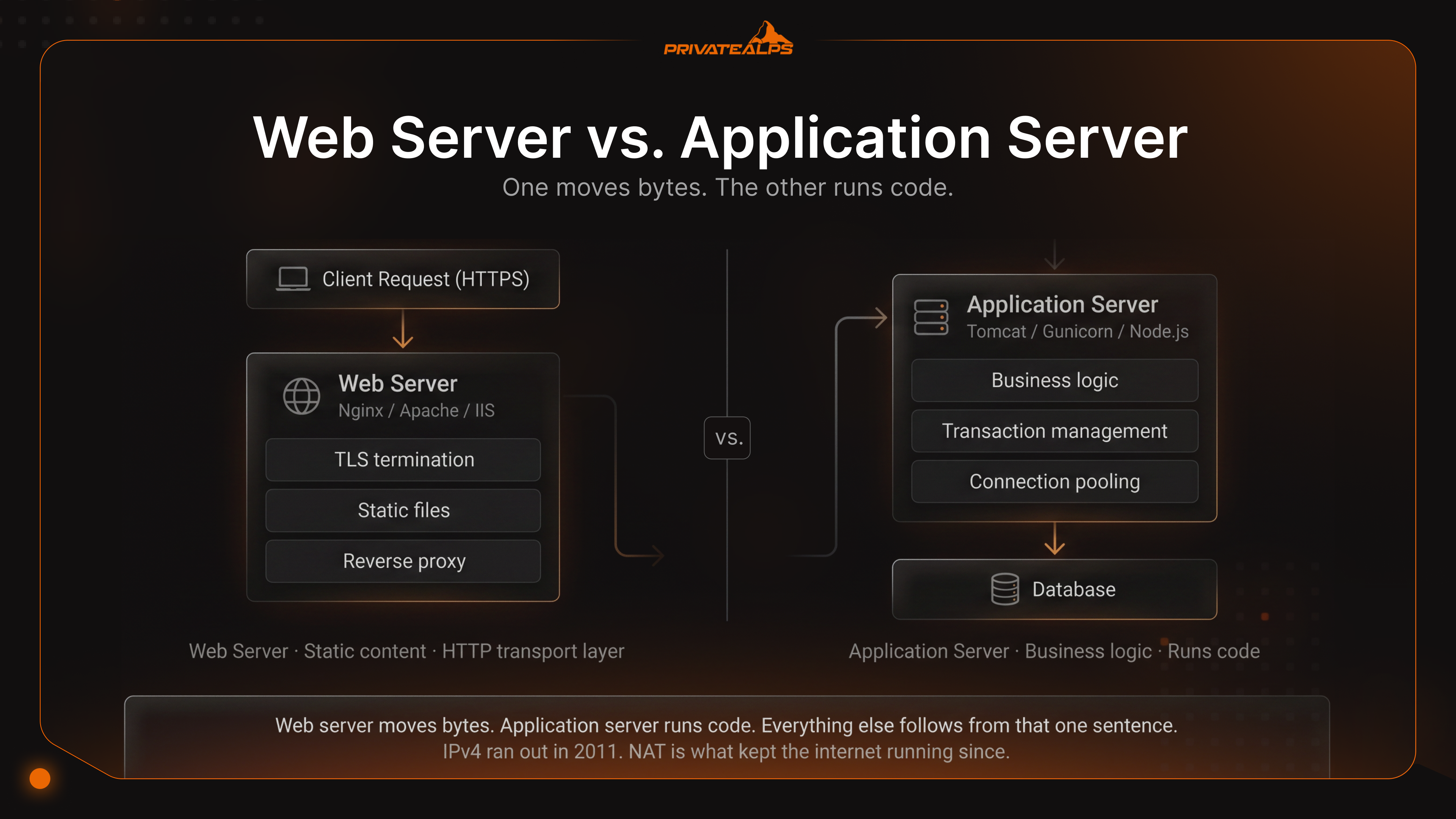
Nobody opens a tab and types "web server vs application server" for fun. You do it because something broke. A checkout that hung. An admin panel that froze when traffic doubled. A pager going off at 2 a.m. because something, somewhere, ran out of threads.
Here's the uncomfortable part. Most "what's the difference" articles read like glossary entries. They list features. They don't tell you when one breaks and the other doesn't. The application server vs web server distinction stops being academic the moment your stack starts doing real work - concurrency, money, sessions, regulated data. That's when the web server vs application server differences start showing up in your monitoring graphs, not before.
This guide is closer to a decision framework than a glossary. By the end you'll know when a single Nginx process is enough, when an application server becomes non-negotiable, and why modern frameworks like Spring Boot and Node.js have blurred the line without erasing it.
AI Summary
A web server delivers static content and proxies HTTP requests; an application server runs business logic, manages transactions, and pools database connections. That's what is web server and application server in one breath. One moves bytes. The other runs code. Web servers live at the HTTP transport layer. Application servers wrap a full language runtime around stateful services. Same machine sometimes, different responsibilities always.
Quick reference, the things worth remembering:
- Static files first - HTML, CSS, images, plain HTTP/HTTPS traffic. That's the web server's home turf.
- Dynamic code lives elsewhere. JVM, Node.js, .NET - pick your runtime; that's where the application server lives.
- Async event-driven I/O on the web server side. Thread-per-request on a lot of application servers, though reactive runtimes are eating into that.
- Transactions, session management, connection pooling - all application server territory, none of it free in a raw web server.
- Real production usually pairs them. Nginx out front, Tomcat (or Gunicorn, or Puma) behind it.
- Spring Boot, Django, Next.js - modern frameworks bundle both layers into one process and call it a day.
- Names you'll see: Nginx, Apache HTTP Server, IIS on the web side; Tomcat, WildFly, WebSphere on the app side.
What Is a Web Server?
A web server is software that takes HTTP/HTTPS requests, pulls static resources off disk, and ships them back. That's the whole job, more or less. Live at the transport edge. Parsing headers, terminating TLS, serving files, forwarding the dynamic stuff upstream. The big names: Nginx, Apache HTTP Server, Microsoft IIS, LiteSpeed, Caddy. Each one has its quirks, but the job description doesn't change much. The difference between web and application server starts here, and it's pretty simple. Web server moves bytes. Application server runs code. Everything else follows from that one sentence.
A typical request walks through these steps:
- Listen. TCP port 80 for HTTP, 443 for HTTPS. Accept the incoming connection.
- Terminate TLS if HTTPS - decrypt the request using the server's certificate.
- Parse the HTTP request line, headers, and body, per RFC 9110.
- Match the URI against virtual host rules, location blocks, and rewrite directives.
- Resolve the response - serve a static file from disk, return a cached object, or hand off to an upstream application server.
- Stream it back, with the appropriate headers (Content-Type, Cache-Control, gzip/brotli compression).
Now, why are modern web servers so weirdly good at concurrency? Async event-driven I/O. Instead of one thread per connection - which gets you killed at scale - Nginx runs a small pool of workers and multiplexes thousands of sockets through epoll on Linux or kqueue on BSD. Boring under the hood. Brutally effective in practice. Per Netcraft's February 2026 Web Server Survey, Nginx held about 22.7% market share across all sites and over 42% across web-facing computers. The configuration syntax isn't winning any beauty contests, but those numbers don't lie.
What Is an Application Server?
An application server is the runtime where your code actually runs - executing business logic, managing transactions, holding session state, handing out the middleware services web servers won't touch. Think container, not server. The thing that wraps your servlets, REST controllers, message-driven beans and gives them somewhere to live. Apache Tomcat. JBoss WildFly. IBM WebSphere. Oracle WebLogic. Payara Server. On the non-Java side, Gunicorn for Python, Puma for Ruby, Node.js with Express. Different ecosystems, same general idea - somewhere to put the code that does work.
A request through an application server typically looks like this:
- Receive the request from a fronting web server, or directly from the client in embedded deployments.
- Authenticate and authorize through the container's security realm or middleware.
- Acquire a database connection from the pool. The application doesn't open a new TCP connection per request - that would be a disaster.
- Begin a transaction if the operation needs atomicity. XA for distributed, local for single-resource.
- Execute business logic - validate input, apply domain rules, call other services.
- Persist or read data through JDBC, JPA, or an ORM.
- Commit or roll back, then return the connection to the pool and serialize the response.
Connection pooling is one of those services that sounds boring until you measure what happens without it. Opening a fresh database connection costs roughly 10–200 milliseconds - TCP handshake, TLS handshake, authentication. Doing that on every request? You've basically launched a denial-of-service attack against yourself. Pools like HikariCP (Spring Boot's default) and Tomcat JDBC keep connections warm and hand them out in microseconds. The Apache Tomcat documentation covers the knobs that actually matter - pool size, validation interval, abandoned connection cleanup.
There's more, though. Session management - sticky sessions, distributed replication through in-memory data grids. Middleware services web servers don't touch - JNDI for resource lookup, JMS for asynchronous messaging, EJB containers for transactional components. This is the stuff that turns "we run a website" into "we process payments and pass an audit." Whether you actually need any of it? Depends on what your site is for. A blog won't. A bank will.
Web Server vs. Application Server: Key Differences
Static vs dynamic - that's the surface answer to the web server vs application server differences. Real one is deeper. Threading models. Protocol stacks. How each one consumes memory under load. The table below covers what to look at when you're capacity-planning or hardening a production stack - the parameters that actually move the needle.
| Parameter | Web Server | Application Server |
|---|---|---|
| Primary function | Serves static content, proxies HTTP requests | Executes business logic, runs application code |
| Content type | HTML, CSS, JS, images, video | Dynamically generated responses, JSON, XML, RPC payloads |
| Protocols | HTTP/1.1, HTTP/2, HTTP/3, WebSocket (proxy) | HTTP plus RMI, IIOP, JMS, gRPC, AMQP, WebSocket (native) |
| Threading model | Async event-driven (Nginx) or hybrid (Apache MPM) | Thread-per-request (Tomcat) or async/reactive (Netty, Vert.x) |
| Transaction support | None | Local and distributed (XA) transactions |
| Connection pooling | None for application data | Built-in JDBC and JCA pools |
| Business logic execution | None - delegates to upstream | Native - runs servlets, beans, controllers |
| Caching | Edge caching, reverse-proxy cache | Object cache, second-level ORM cache |
| Security features | TLS termination, rate limiting, WAF integration | Authentication realms, role-based access, JAAS |
| Fault tolerance | Health checks, upstream failover | Cluster failover, session replication, circuit breakers |
| Examples | Nginx, Apache, IIS, Caddy, LiteSpeed | Tomcat, WildFly, WebSphere, WebLogic, Gunicorn, Puma |
Threading model is where this becomes a money question. Nginx workers can babysit thousands of idle keep-alive connections at a few kilobytes each - nothing's happening between requests, so why hold real resources? A Tomcat thread is heavier. Full thread stack, usually 512 KB to 1 MB, allocated for the entire duration of a request. Stack that against a few hundred concurrent users and the math gets ugly fast. That's the entire reason putting Nginx in front of Tomcat became standard practice. Web server eats slow clients and keep-alives. Application server stays free to do real work. Simple division of labor.
Things have gotten muddier lately, though. Spring Boot ships with an embedded Tomcat or Undertow. Node.js with Express is both web server and application runtime, depending on which slide you're reading. Service meshes - Envoy, Istio - pull TLS, routing, and retries out of both layers and into a sidecar. None of that erases the categories. It just means they describe responsibilities now, not separate processes. The web vs application server question still earns its keep, even when both layers live in the same binary.
How Web Servers and Application Servers Work Together
Most production stacks look the same way: web server out front as a reverse proxy, one or more application servers behind it. Web server handles TLS, static files, traffic shaping. Application server handles dynamic logic. You get security isolation. You get performance gains. You get operational flexibility. And that's what people usually mean when they say "web and application server" as one phrase.
A request through a typical reverse proxy stack flows like this:
- Client sends an HTTPS request to the public IP of the web server.
- Web server terminates TLS and inspects the request. Rate limiting, malicious-pattern blocking, static asset serving from disk or cache - whatever fits.
- Routing. If the URI matches a dynamic location (say,
/api/), the request gets forwarded to the application server's internal address. - Protocol bridge. Nginx talks to the upstream over HTTP, FastCGI, uWSGI, or SCGI, depending on the stack.
- Application server processes the request, queries the database via the connection pool, returns a response.
- Web server receives the response, applies compression and caching headers, streams it back.
- Connection management - the web server keeps the client connection open for HTTP/2 multiplexing while the application server's worker is freed immediately.
The protocol bridge changes by stack. Quick reference:
| Stack | Web Server | Application Server | Protocol Bridge |
|---|---|---|---|
| Java EE | Nginx / Apache | Tomcat / WildFly | AJP, HTTP |
| Python | Nginx | Gunicorn / uWSGI | uWSGI, HTTP |
| Ruby | Nginx | Puma / Passenger | HTTP, Unix socket |
| Node.js | Nginx | Node.js + Express | HTTP |
| PHP | Nginx / Apache | PHP-FPM | FastCGI |
| .NET | IIS / Nginx | Kestrel | HTTP |
Nginx's reverse proxy documentation covers proxy_pass, upstream blocks, and load balancing for production deployments. Worth bookmarking.
Security Considerations: Web Server vs. Application Server
Web servers and application servers don't get hit by the same things. Web server lives at the network edge - DDoS, slow-loris, whatever else hits the public IP. Application server lives behind it, running business logic and deserializing inputs. That makes it the prime target for code execution exploits. One security policy for both? You've already underestimated half the attack surface. That's the application server and web server difference operators trip on most often.
| Threat | Web Server | Application Server | Mitigation |
|---|---|---|---|
| DDoS / Slowloris | High exposure | Low (behind proxy) | Rate limiting, connection limits, CDN |
| SQL injection | Indirect (passes payload) | Direct (executes query) | Parameterized queries, ORM |
| Path traversal | Common attack vector | Possible via file APIs | Strict URI normalization, chroot |
| Java deserialization RCE | None | Critical (CVE-2015-4852 WebLogic T3) | Disable unsafe deserialization, allow-listing |
| OGNL / expression injection | None | Critical (CVE-2017-5638 Apache Struts) | Patch framework, WAF rules, input validation |
| TLS misconfiguration | Direct exposure | Internal only if proxied | TLS 1.3, HSTS, strong ciphers |
| Exposed admin interface | Manager dashboards | JMX, admin consoles | Network segmentation, mTLS |
| Log4Shell (CVE-2021-44228) | Not affected | Java apps using Log4j 2.x | Upgrade Log4j, remove JndiLookup |
Two of those rows - the Java ones - explain why the application server side gets its own security review. CVE-2015-4852 is a real deserialization flaw. WLS Security component in Oracle WebLogic accepted crafted serialized Java objects over the T3 protocol on TCP port 7001. Result: remote code execution through Apache Commons Collections, no authentication required. Bad day. CVE-2017-5638 is a different beast - OGNL expression injection in the Apache Struts 2 multipart parser. That's the one behind the 2017 Equifax breach. Roughly 147 million people's data exposed because of a missed patch. Different bug classes. Same operational lesson: web server in front can't see them, because the malicious payload looks like ordinary header content.
Then there's Log4Shell. The one that made every Java team have a bad December. Per CISA's official guidance, CVE-2021-44228 scored a CVSS of 10.0. The maximum. An unauthenticated attacker could trigger remote code execution by sticking a single string into any logged HTTP header. The library was a transitive dependency in countless products, invisible to teams scanning their own code. Most of them found out by reading the news.
Baseline hardening is the same boring list it always is. It's also the list that works:
- Directory listing off, plus the HTTP methods you don't actually use (
TRACEfirst, thenOPTIONSwhere it isn't needed). - Server process should never run as root. Minimal filesystem permissions, full stop.
- Security headers - HSTS, CSP, X-Frame-Options, X-Content-Type-Options. Not optional anymore.
- Patch within the vendor's CVE response window. NIST NVD feeds will tell you when something matters.
- Admin consoles? Tomcat Manager, WebSphere ISC, JMX - internal networks only. Never the public internet.
- Input validation against the OWASP Top 10 2021 categories. Annoying, mandatory.
- TLS 1.3 with modern cipher suites. Legacy SSL/TLS gone. No exceptions.
- Outbound connections from application servers - watch them. Unexpected egress is usually how you find out you're already compromised.
When to Use a Web Server vs an Application Server
Use a web server alone when the workload is static, or the dynamic part is minor. Add an application server when you need transactions, persistent state, or actual business logic execution. The application vs web server choice depends on the data model, the traffic shape, and the security boundary. Not on what language your team prefers. That last part trips people up surprisingly often.
| Scenario | Recommended Setup | Reason |
|---|---|---|
| Static portfolio / docs site | Nginx or Caddy alone | No dynamic logic; CDN handles scale |
| WordPress / CMS | Nginx + PHP-FPM | PHP-FPM is the application layer; Nginx terminates TLS |
| REST API (low traffic) | Embedded server (Spring Boot, FastAPI) | One process simplifies ops; reverse proxy optional |
| E-commerce platform | Nginx + Tomcat / Node.js | Transactions, payment integration, session management |
| Real-time dashboard | Nginx + Node.js (WebSocket) | Long-lived connections; event loop fits the workload |
| File download portal | Nginx alone with auth module | Static delivery; offload large files via X-Accel-Redirect |
| ML inference API | Nginx + Gunicorn / Triton | GPU workers behind connection-aware proxy |
| Internal admin panel | Embedded server, no proxy | Low traffic, network-restricted; simplicity wins |
Embedded servers have changed the math for greenfield projects. Spring Boot. Django with ASGI servers like Uvicorn. Next.js. They bundle the application server right into the deployment artifact, and for a small service that's plenty - framework listens on 443, terminates TLS, serves static assets, done. For high-traffic services the reverse proxy comes back, because static caching, request coalescing, and DDoS protection still belong at the edge no matter how clever your framework is.
Popular Web Servers and Application Servers
Product landscape splits cleanly along the same lines as the technical categories. Web servers compete on throughput, configuration ergonomics, module ecosystems. Application servers compete on runtime features, transaction support, and which corporate ecosystem they fit into. Different decisions, different vendors, mostly different conferences.
| Web Server | License | Key Strength | Notable Users |
|---|---|---|---|
| Nginx | BSD-2-Clause | Async event loop, reverse proxy | Netflix, Cloudflare, WordPress.com |
| Apache HTTP Server | Apache 2.0 | Module ecosystem, .htaccess | Wikipedia, NASA, government sites |
| Microsoft IIS | Proprietary | Windows / .NET integration | Microsoft, Stack Overflow (historical) |
| Caddy | Apache 2.0 | Automatic HTTPS via Let's Encrypt | Modern startups, indie deployments |
| LiteSpeed | GPL / commercial | Drop-in Apache compatibility, performance | High-traffic shared hosting |
The Netcraft Web Server Survey tracks monthly market share and remains the canonical source for deployment trends across the public web.
| Application Server | Ecosystem | License | Transaction Support | Notes |
|---|---|---|---|---|
| Apache Tomcat | Java Servlet / JSP | Apache 2.0 | Local (JTA via library) | Lightweight, default for Spring Boot |
| JBoss WildFly | Jakarta EE | LGPL | Full XA, JTA | Red Hat-backed, full enterprise stack |
| IBM WebSphere Liberty | Jakarta EE / MicroProfile | Commercial / Open Liberty (EPL) | Full XA, JTA | IDC research on Liberty deployments highlights infrastructure efficiency gains in production migrations |
| Oracle WebLogic | Jakarta EE | Commercial | Full XA, JTA | Common in Oracle-centric stacks |
| Gunicorn | Python WSGI | MIT | Application-managed | Pre-fork worker model |
| Puma | Ruby Rack | BSD | Application-managed | Multi-threaded, used by Rails |
| Node.js + Express | JavaScript | MIT | Application-managed | Event loop, dominant for real-time APIs |
So here's the short version. Web server delivers static content and proxies traffic. Application server runs business logic, manages transactions, pools database connections. They complement each other - web server at the edge for TLS, caching, security; application server behind it doing the dynamic work. Modern frameworks may stuff both into one process, but the operational distinction still drives capacity planning, security boundaries, and how you respond when something breaks at 2 a.m.
Whatever you run - Nginx in front of Tomcat, a single Spring Boot binary, something more exotic - the demand on the underlying hardware doesn't change. Predictable I/O. Deterministic CPU. No noisy neighbors stealing cycles when traffic spikes. PrivateAlps offers bare metal infrastructure in Switzerland with dedicated resources, no virtualization tax, and protection under the revised Swiss Federal Act on Data Protection (revDSG). Take a look at privatealps.net.
FAQ
What is the difference between a web server and an application server?
A web server delivers static files and proxies HTTP requests. An application server runs business logic, manages transactions, executes a full language runtime. The application server and web server difference comes down to scope. One moves bytes. The other runs code, with stateful services like connection pools and transaction managers attached. That's the short answer to what is application server and web server in any production context. Anything past that is implementation detail.
Can a web server act as an application server?
Sort of. Web servers can execute code through CGI, FastCGI, PHP-FPM, or embedded modules - covers a lot of dynamic workloads, WordPress being the obvious one. But you don't get connection pooling. No distributed XA transactions. No JNDI resource lookup, no EJB container. Fine for simple dynamic sites. Not fine for transactional enterprise systems where atomicity and rollback actually matter.
What is the difference between a client-server and a web application architecture?
Client-server is the broad pattern. A client requests resources from a server over any protocol. FTP, SMTP, RDP, HTTP, take your pick. A web application is a specific instance of that pattern, using HTTP and a browser as the client. So the difference between client server and web application is scope: every web application is client-server, but not every client-server system is a web application.
Which is faster - a web server or an application server?
Web server. For static content, anyway. Barely does any work - read a file off disk, write bytes to a socket, move on. Application server is slower because it's actually running code, hitting databases, serializing responses. Not a flaw. That's the job. Caching at the web server layer (reverse-proxy cache, edge CDN) closes the gap by serving cached application responses without invoking the application server at all.
Do I need both a web server and an application server?
Static-only site? No, a web server alone is fine. Anything with backend logic? Usually yes. Splitting them gives you security isolation (the application server isn't internet-exposed), better scalability (caching and connection management at the edge), cleaner observability boundaries. The exception is small embedded deployments where one Spring Boot or Node.js process handles everything - there the web server and application server difference collapses into a single binary, and that's fine for the workloads it fits.
What protocols does an application server use that a web server does not?
Application servers natively support RMI, IIOP, JMS, AMQP, gRPC, and stateful WebSocket sessions on top of HTTP. Web servers stick to HTTP/1.1, HTTP/2, HTTP/3, and proxy WebSocket without participating in the application protocol. That protocol-level difference between application server and web server is what makes enterprise integration patterns possible - message queues, remote procedure calls, all of it.
Are web servers and application servers the same thing today?
No. Modern frameworks like Spring Boot, Django, and Node.js embed both layers into one process, but the operational distinction still matters. IBM and Oracle have been using "web application server" for years to describe runtimes that combine both roles. Even when packaged together, capacity planning, security hardening, and failure isolation treat the web-facing component and the logic-executing component as separate concerns. That's the practical answer to what is the difference between web server and application server in a converged stack - and why understanding the application server vs web server differences still pays off, whether you're building for cloud, bare metal, or somewhere in between.