



What Is Distributed Storage?
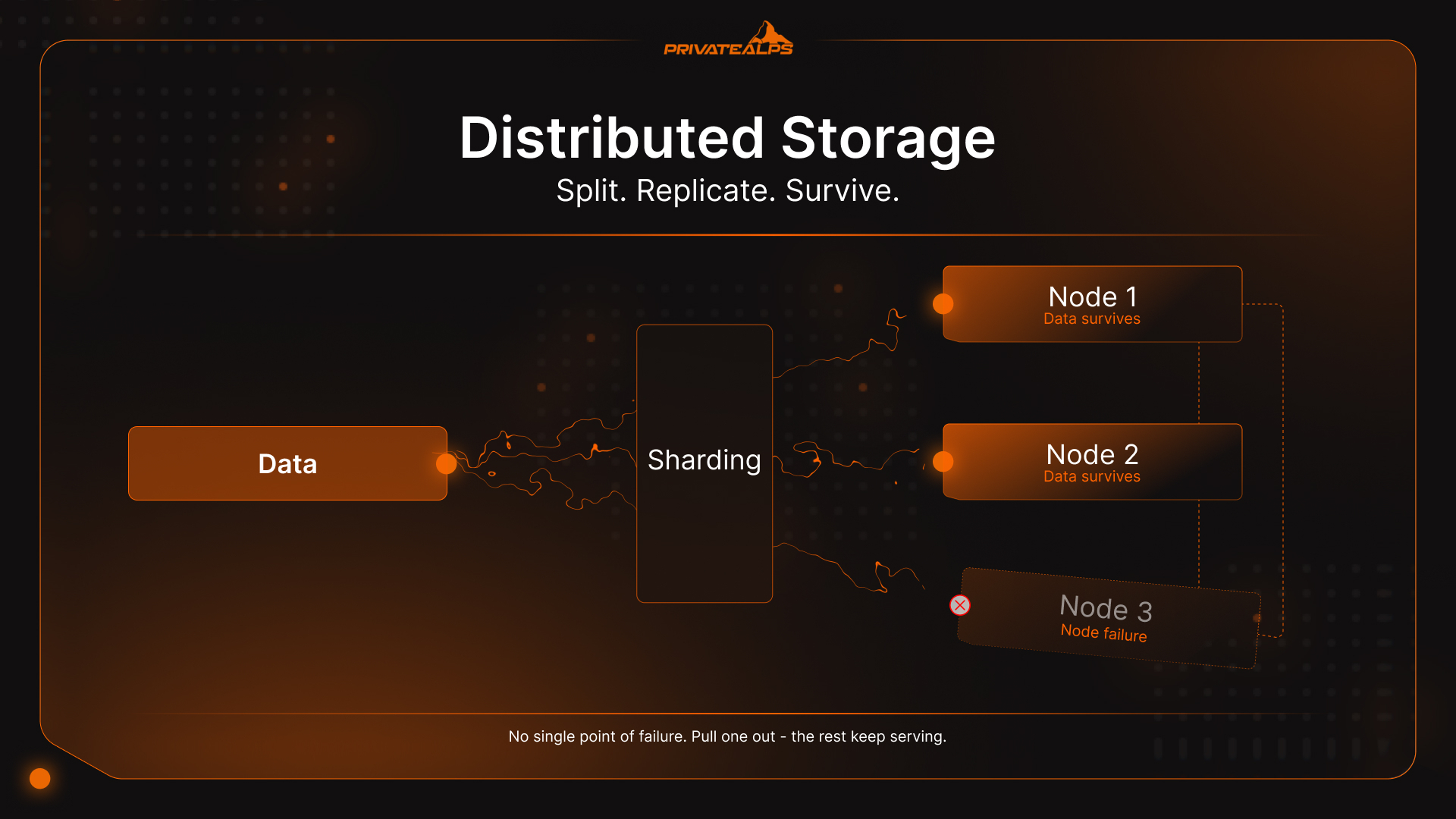
Distributed storage is how modern infrastructure handles data that's simply too large, too critical, or too access-heavy for one machine to hold reliably. Instead of writing everything to a single server, the system splits, replicates, or encodes that data across multiple independent nodes - servers, drives, data centers. They act together, but no single node holds everything. Pull one out, and the rest keep serving. This guide covers how distributed storage systems actually behave under load, what architectural trade-offs they force, and which storage type fits which workload.
AI Summary
Distributed storage is a software-defined architecture that partitions data across multiple physical nodes using three core techniques: sharding (dividing data into discrete chunks routed to different nodes), replication (keeping multiple identical copies across nodes for fast access), and erasure coding (encoding data into fragments with mathematical parity so any subset can reconstruct the whole).
Three main types of distributed storage systems exist: object storage (flat namespace, S3-compatible API), block storage (fixed-size volumes for low-latency random I/O), and file storage (hierarchical namespace via NFS or SMB). Every distributed data storage setup runs into the CAP theorem - it can only guarantee two of consistency, availability, and partition tolerance simultaneously.
The core operational benefit is that node failures don't cause outages; the system reroutes requests to surviving replicas automatically. The scale of what's at stake: humanity generates over 400 million terabytes of new data every single day - a volume no centralized architecture can absorb without eventually collapsing under its own weight.
Distributed Storage vs. Centralized Storage
Centralized storage puts everything in one location - one server, one SAN, one data center. That's the whole model. When that location has a problem, everything stops. Distributed storage addresses this directly: data lives across multiple independent nodes, so no single failure point can take the entire system offline or block all access.
One hardware failure and access stops. Full stop. Scaling means upgrading or replacing the primary system, which usually involves downtime and a capital expenditure conversation nobody wants to have. Distributed storage sidesteps both by design: add a node to grow, and when a node dies, the cluster reroutes around it. No drama, no outage. The data was already on multiple nodes before anything broke.
| Dimension | Centralized Storage | Distributed Storage |
|---|---|---|
| Fault tolerance | Single point of failure | Data survives individual node loss |
| Scalability | Vertical (upgrade hardware) | Horizontal (add nodes) |
| Latency | Low for local access | Variable; depends on network topology |
| Cost at small scale | Lower upfront cost | Higher minimum viable cluster |
| Cost at large scale | Expensive to scale | Commodity hardware reduces cost |
| Geographic distribution | Single location | Multi-region by configuration |
| Operational complexity | Simple to manage | Requires orchestration tooling |
How Distributed Storage Systems Work
A distributed storage system takes incoming data, breaks it into chunks, routes those chunks to the right nodes across the cluster, and tracks every piece through a metadata layer - so any fragment can be located, retrieved, and reassembled on demand, regardless of which node is holding it. That's the basic loop. Four mechanics power it:
- Sharding (Data Partitioning) When data lands, the system cuts it into smaller pieces - shards or blocks - and spreads them across nodes. That's what unlocks parallel I/O: multiple nodes handle reads and writes at the same time, so throughput scales with cluster size instead of topping out at one machine's ceiling. The routing logic is usually consistent hashing, which keeps distribution even as the cluster grows without reshuffling everything each time a node gets added.
- Replication The blunt but effective approach: store N identical copies of each shard on separate nodes, typically three. One node drops offline - the other two keep serving immediately. No reconstruction, no waiting. Replication is the right call for hot data - active databases, real-time feeds, anything where an extra millisecond on reads actually costs you something.
- Erasure Coding Erasure coding is where the storage efficiency math gets interesting. Instead of three full copies, the system encodes an object into $k$ data fragments plus $m$ parity fragments, distributes all $k+m$ across nodes, and can reconstruct the full object from any $k$ of them. So $m$ nodes can fail simultaneously and nothing is lost. A Reed-Solomon RS(6,3) configuration stores 9 blocks instead of the 18 required by 3x replication, cutting raw storage overhead from 200% down to roughly 50%. The catch is that encode/decode burns CPU cycles, and erasure coding performs better on cold data - content that's rarely modified or accessed at high frequency. For workloads with frequent small writes, 3x replication still wins on latency.
| Protection Method | Storage Overhead | Best For | Trade-Off |
|---|---|---|---|
| 3x Replication | 3x raw capacity | Hot data, low-latency workloads | High storage cost at scale |
| Erasure Coding RS(6,3) | 1.5x raw capacity | Cold data, archival, large objects | CPU overhead, higher rebuild latency |
- Metadata Routing Every distributed storage system keeps a metadata layer - basically a map of which shard lives on which node. When a client requests data, the metadata service identifies the right nodes, and the system retrieves and reassembles fragments without the client ever seeing the complexity. In large-scale clusters like Ceph or HDFS, the metadata layer is itself distributed across nodes. It has to be. A single metadata server becomes the bottleneck you were trying to escape.
Types of Distributed Storage Systems
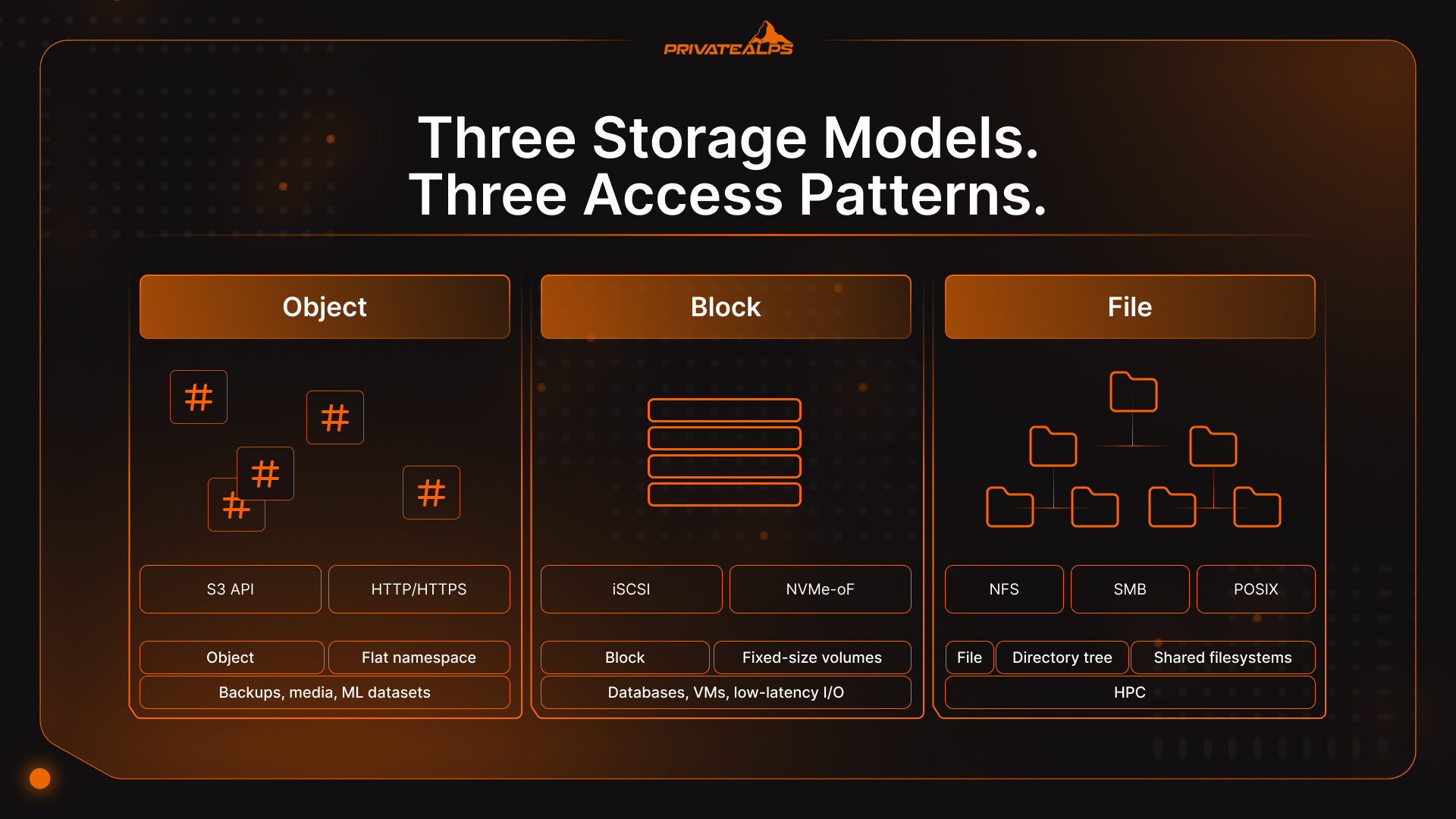
Distributed storage isn't one thing. It's a category with three distinct data models underneath it, and picking the wrong one for a workload is a surprisingly common and expensive mistake. Object, block, and file storage each solve a different problem. Distributed databases - Cassandra, CockroachDB, Google Spanner - represent a fourth type, layering query semantics on top of distributed data management, but that's a separate discussion.
| Type | How Data Is Stored | Access Method | Best For | Examples |
|---|---|---|---|---|
| Object | Flat namespace, metadata-rich objects | S3-compatible API (HTTP/HTTPS) | Unstructured data at scale: backups, media, ML datasets | AWS S3, MinIO, Ceph RADOS |
| Block | Fixed-size raw volumes | iSCSI, NVMe-oF, FC | Databases, VMs, low-latency random I/O | Ceph RBD, AWS EBS, Lightbits |
| File | Hierarchical directory tree | NFS, SMB, POSIX | Shared filesystems, HPC, home directories | GlusterFS, HDFS, Azure Files |
Distributed Object Storage
Distributed object storage organizes data as individual, immutable objects sitting in a flat namespace - no directories, no file paths, no hierarchy to maintain. Each object gets a unique identifier (a hash or UUID) plus rich metadata, and you reach it through an S3-compatible API over HTTP. Because objects are replaced rather than partially updated, the locking problem that constrains performance and limits scalability in block and file systems simply disappears. That's how AWS S3, Azure Blob, and Ceph scale to exabytes: no namespace coordination overhead, no lock contention, and any node in the cluster can serve any object request independently.
Distributed Block Storage
Block storage hands raw volumes to servers - fixed-size blocks with unique addresses, no filesystem abstraction on top. Applications write to blocks directly, which is what delivers consistent, low-latency random I/O for databases, VM disks, and containerized workloads. One architectural limitation that catches people: a block volume is normally mountable by only one server at a time. Multi-server shared access requires additional orchestration on top, such as a cluster filesystem layered over the block devices.
Distributed File Storage
File storage presents a shared filesystem through standard protocols - NFS, SMB, POSIX-compatible access. Multiple clients can mount the same volume at the same time, which makes it the natural fit for collaborative workloads, HPC environments, and legacy applications that expect a directory tree and aren't being rewritten anytime soon. The real-world trade-off: maintaining a consistent directory namespace across distributed nodes creates coordination overhead that compounds at scale. Most hyperscalers eventually migrate from distributed file storage to distributed object storage for primary data once volumes get big enough.
The CAP Theorem: The Unavoidable Trade-Off in Distributed Storage
The CAP theorem says a distributed data system can guarantee only two of three things at once: Consistency (every read returns the latest write), Availability (every request gets a response), and Partition Tolerance (the system keeps running through network splits). Networks split - partition tolerance isn't optional. The real decision is always between consistency and availability when a failure hits.
[Eric Brewer introduced CAP in 2000; Gilbert and Lynch formalized the proof in 2002][https://www.scylladb.com/glossary/cap-theorem/]. It's still the decision that shapes everything else in distributed storage architecture, because it determines how the system behaves at exactly the moment you most need it - when something is already broken.
| System | CAP Type | Behavior During Partition | Best For |
|---|---|---|---|
| MongoDB | CP (with majority read/write concern) | Rejects requests until consistency is restored | Financial records, inventory, booking |
| HBase | CP | Returns errors rather than stale data | Structured analytics, consistent batch jobs |
| Apache Cassandra | AP | Stays available; may serve stale reads | Social feeds, messaging, IoT telemetry |
| DynamoDB (default) | AP | Always responds; reconciles inconsistency asynchronously | High-throughput consumer apps |
| CockroachDB | CP | Consistency first, distributed SQL | Global transactional workloads |
The practical call: can your workload tolerate a stale read? A bank balance, a seat reservation, an inventory count - probably not. Go CP. A social feed, a sensor event stream, analytics telemetry - a few seconds of staleness is fine. Go AP, keep the availability guarantee.
Distributed Storage Security: Encryption and Data Sovereignty
Security in distributed storage sits across three distinct layers: data at rest, data in transit, and key ownership. Get any one wrong and the others don't save you. The infrastructure can be perfectly available while sensitive data is quietly accessible to the wrong people.
Encryption has to cover all three. Data at rest typically uses AES-256, through either provider-managed keys or customer-managed keys (CMK). Provider-managed is operationally simpler - but the storage vendor holds the key material, which is a critical security consideration for regulated industries that go through audits. Client-side encryption removes that exposure entirely; data is encrypted before it leaves the client, so the provider never touches plaintext regardless of what legal requests show up. For data in transit, TLS 1.3 is the security floor; anything still permitting TLS 1.2 needs a documented exception under most current compliance frameworks.
Data sovereignty tends to catch teams off guard. Data is subject to the laws of wherever it physically lives - not the company's country, not the user's location. Switzerland holds adequacy status under GDPR Article 45, so EU-to-Switzerland data transfers proceed without additional contractual safeguards. The revised Federal Act on Data Protection (nFADP) aligns Swiss domestic rules with GDPR, which means Swiss infrastructure delivers consistent regulatory coverage across both frameworks simultaneously.
One thing easy to defer but shouldn't be: the cryptographic algorithms protecting most storage infrastructure today weren't designed to survive a capable quantum computer. NIST finalized three post-quantum cryptography standards in August 2024, including FIPS 203 (ML-KEM). If your distributed data storage holds records with a long retention horizon - medical archives, financial records, legal documents - the "harvest now, decrypt later" threat model is already active. Evaluation timelines should start well before those archives reach maturity.
Key Advantages of Distributed Storage
- Fault tolerance without service interruption: Node failure triggers heartbeat detection and automatic rerouting to surviving replicas - no manual intervention, no maintenance window required.
- Horizontal scalability: New storage capacity comes from adding nodes to the cluster; data rebalances in the background without touching live traffic or requiring downtime.
- Geographic distribution: Replication across regions reduces latency for geographically dispersed users and turns data residency compliance into a configuration decision rather than an infrastructure project.
- Parallel I/O throughput: Multiple nodes handle reads and writes simultaneously - the only scalable architecture for AI/ML training pipelines, video transcoding, or media streaming at real production volumes.
- No vendor lock-in with open protocols: S3-compatible APIs, NFS, and open-source platforms like Ceph let teams migrate between providers or run infrastructure on-premises without rewriting application code.
- Cost efficiency at scale: Commodity hardware replaces expensive proprietary storage arrays; erasure coding further cuts raw capacity requirements by up to 50% compared to full replication across nodes.
Limitations and Challenges of Distributed Storage
- Consistency complexity: Maintaining consistent state across nodes requires careful tuning of consistency models, replication factors, and quorum settings - a misconfiguration doesn't announce itself loudly, it quietly drifts data into divergence.
- Operational overhead: Running a distributed storage cluster means owning failure domain planning, node replacement procedures, monitoring pipelines, and performance tuning. A single server just doesn't ask all that of you.
- Network dependency: The entire architecture assumes reliable, high-bandwidth connectivity between nodes. Network degradation translates directly and proportionally into storage latency and throughput loss.
- Latency for small random I/O: Distributed storage is optimized for large sequential reads and parallel throughput. Workloads with heavy small-random I/O patterns - OLTP databases especially - often perform better on locally attached NVMe block storage.
- Minimum viable scale: The cost and complexity advantages of distributed storage don't show up on a two-node cluster. Below a certain threshold, a managed cloud storage service or a well-tuned single server is simply cheaper and easier to operate.
Real-World Use Cases for Distributed Storage
- Media and Streaming Netflix and YouTube don't serve video from a central location - they distribute encoded content across object storage clusters placed geographically close to viewers. A single data center can't handle simultaneous global streams at scale; the bandwidth costs alone would be prohibitive. Distributed data storage is what makes the economics of streaming actually work.
- Healthcare One MRI study generates 500 MB to 1 GB of imaging data. Multiply that across a large hospital network - different modalities, long retention requirements, multiple sites - and you're looking at petabytes accumulating fast. Scalable distributed storage with geographic redundancy is how health systems maintain HIPAA-compliant access to patient records even when a regional data center fails.
- AI and Machine Learning Training a large language model means feeding GPU clusters terabytes to petabytes of data, accessed in non-sequential patterns that would saturate a traditional storage system almost immediately. Ceph, HDFS, and S3-compatible object stores have become the standard infrastructure layer for ML pipelines because their parallel read throughput actually matches what GPU clusters consume.
- Backup and Disaster Recovery Genuine disaster recovery means data exists in at least two geographically separate locations with independent failure domains - not two racks in the same building. Replication policies and placement rules built directly into the distributed storage layer define RPO and RTO at the infrastructure level, without requiring a separate backup software stack. Fewer moving parts also means a smaller attack surface.
Distributed Storage vs. Decentralized Storage: What's the Difference?
Distributed storage means data is spread across many nodes, but one organization still owns and controls the whole thing - policies, access rights, deletion capability, audit logs. Decentralized storage removes that central authority entirely. Data lives across independent peers, and no single operator can unilaterally censor, access, or delete it.
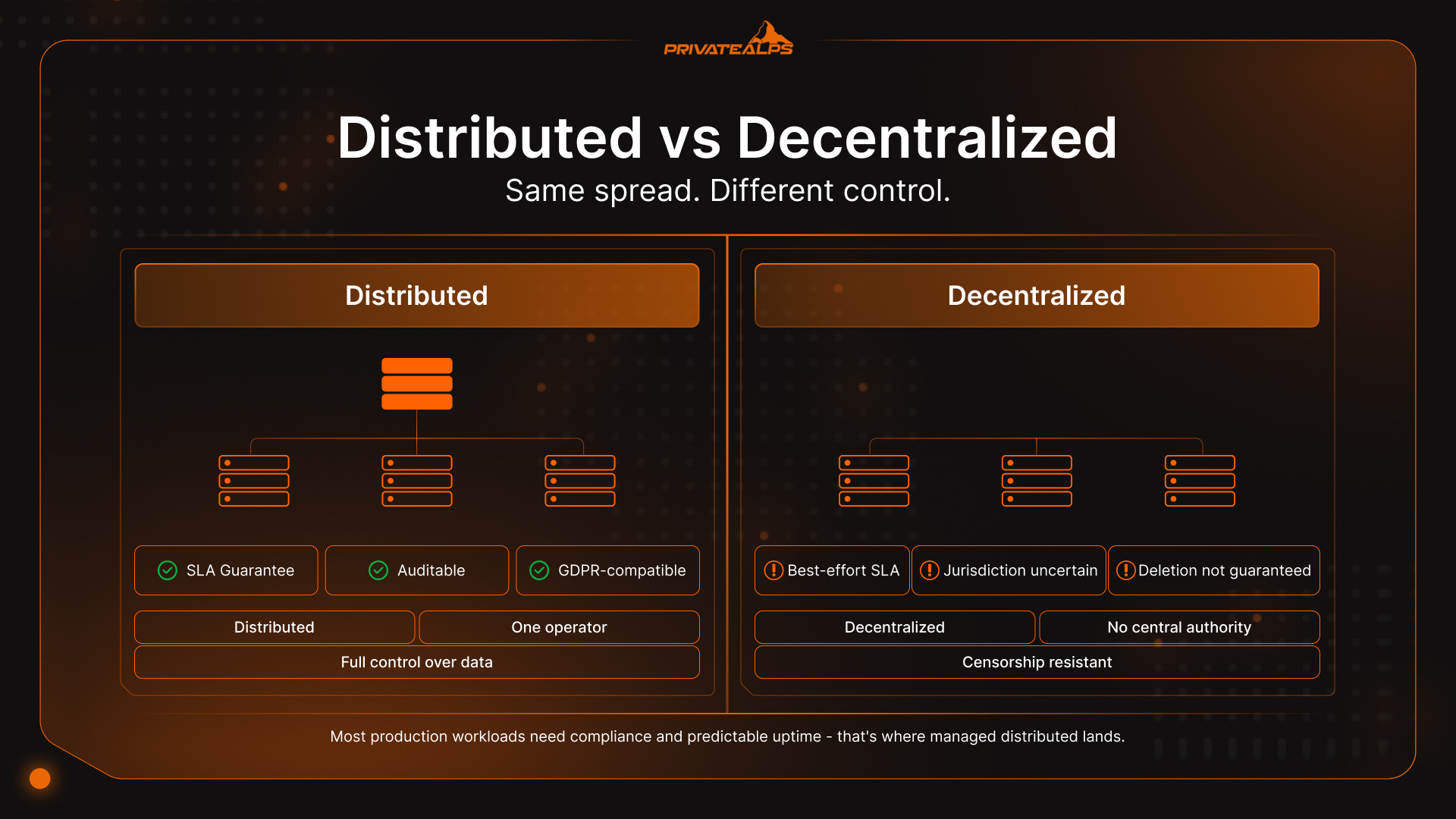
That distinction has real operational consequences. A centrally managed distributed system can be audited, patched, SLA-backed, and brought into regulatory compliance. A decentralized system trades all of that for censorship resistance and trustless operation - valuable in specific contexts, but not what most businesses running production storage infrastructure actually need.
| Dimension | Distributed Storage | Decentralized Storage |
|---|---|---|
| Control | Centrally administered | No central authority |
| SLA / uptime guarantees | Contractual guarantees possible | Best-effort, protocol-dependent |
| Compliance | Auditable, GDPR-compatible | Jurisdiction uncertain |
| Data deletion | Guaranteed | Not always possible |
| Access control | Role-based, managed | Cryptographic, trustless |
| Examples | AWS S3, Azure Blob, Ceph | Storj, Filecoin, IPFS |
One more layer worth separating out: multi-region cloud storage - AWS S3 with cross-region replication, Azure geo-redundant storage - is still centrally administered infrastructure. The provider manages nodes and replication; you're effectively renting geography. True distributed cloud platforms like Storj or Cubbit route data across independent operators, removing provider lock-in but reopening questions around SLAs and audit trails. For most workloads that need compliance documentation and predictable uptime, the managed distributed approach is where things land.
Summary
Distributed storage isn't a product - it's an architectural category, and the right flavor depends entirely on what you're running. Object, block, and file storage each have a data model built for different access patterns and workload shapes. The CAP theorem forces a genuine trade-off between consistency and availability the moment network failures occur; getting that call wrong can be expensive. And when it comes to replication versus erasure coding, data temperature decides: hot data needs replication for latency, cold data benefits from erasure coding's storage efficiency gains. For most teams, a managed distributed solution - private provider or public cloud, as long as data residency and security controls are verifiable - hits a better balance of scalability, performance, and day-to-day operational simplicity than a self-hosted cluster.
Store Your Data in Switzerland - with PrivateAlps
If your workload needs S3-compatible distributed object storage with verifiable data residency, PrivateAlps runs Swiss-based infrastructure fully compliant with both GDPR Article 45 and nFADP. Your data stays in Switzerland - no third-party sharing, no ambiguous routing through foreign jurisdictions, no surprises. Whether you're migrating away from a hyperscaler or building a privacy-first distributed storage architecture from scratch, PrivateAlps delivers the performance and compliance certainty your workload actually requires.
FAQ
What Is the Difference Between Distributed Storage and Cloud Storage?
Cloud storage is a delivery model - someone else manages the infrastructure, you access it over the internet on a pay-per-use basis. Distributed storage is an architecture - data spread across multiple nodes for redundancy and scalability. They're independent concepts. You can run distributed storage entirely on-premises with Ceph or MinIO, and a cloud provider can technically serve centralized storage behind an API. Most cloud storage services use distributed architectures internally, but that's an implementation detail, not the definition of cloud storage.
What Is the Best Distributed Storage System?
No universal answer - it depends on the workload and the data model. For unstructured data and backups, S3-compatible object stores like MinIO or Ceph RADOS are the standard choice. For database volumes and VM disks needing consistent low-latency block I/O, Ceph RBD or Lightbits is a better fit. For shared filesystems in HPC or legacy environments, GlusterFS or HDFS is where teams typically land. Start with the access pattern; the storage system follows from that.
Is Distributed Storage the Same as RAID?
No. RAID operates within a single server or storage array - it protects against disk failure inside one machine. Distributed storage operates across separate physical nodes connected over a network, potentially spanning multiple buildings or entire data centers. RAID doesn't help when the server itself fails. Distributed storage systems are specifically designed to tolerate node failures, rack failures, and full data center outages. The scope difference is fundamental.
How Does Distributed Storage Handle Node Failures?
Nodes send regular heartbeat signals to the cluster's metadata layer. When a node stops responding, the system detects the failure - usually within seconds - and reroutes requests to nodes holding the replicas or erasure-coded fragments. In replication-based setups, a background recovery process then spins up new copies to restore the configured replication factor across the cluster. The whole thing is automatic; in a well-configured distributed storage cluster, applications never see the failure at all.
Is Distributed Storage Suitable for Small Businesses?\\
Managed distributed storage services - S3-compatible object storage from a cloud provider or a specialist like PrivateAlps - work at any scale with no minimum cluster requirement. Self-hosted distributed storage clusters are a different story: running Ceph productively typically requires at least three to five nodes before the operational overhead starts to justify itself. For small teams, managed services provide the full architectural benefits of distributed storage without the infrastructure management burden.