



What Is NGINX and How Does It Work?
So you take over a Linux box from someone who left the company, and there's NGINX on it. Possibly nobody's touched the config in two years. Possibly it's the only thing keeping a creaky old Rails app alive at a thousand requests per second. Either way - here you are. What is NGINX used for in real-world setups, on bare metal or in the cloud? Most of the things that need to live between a browser and a backend. TLS. Load balancing. Caching. Rate-limiting that one endpoint someone's currently trying to brute-force. All of it usually, on one box, in one binary.
This isn't a stylistic preference, by the way. The web server you put in front of your stack is what decides how many open connections you can hold before your latency graph turns into a stairstep. It's also what decides what each idle keepalive costs you in RAM. And it's what decides - somewhat directly - whether your phone goes off at 3 a.m. with a security alert. The numbers back this up: per W3Techs, Nginx is used by 32.7% of all the websites whose web server is known. That puts it first, ahead of Cloudflare Server (27.8%) and Apache (23.7%) at the time of writing. And on the high-traffic end of the web - WordPress.org, TikTok, Cloudflare's own edge - you'll find most of them are running on the same binary or something derived from it.
Here's what's coming up. Bits inside the binary. The eight roles people put it in. Install steps for Ubuntu and RHEL. A reverse-proxy config that actually works. Seven hardening directives that aren't on by default. Some of this you probably know already. The rest tends to be what bites your team later.
AI Summary
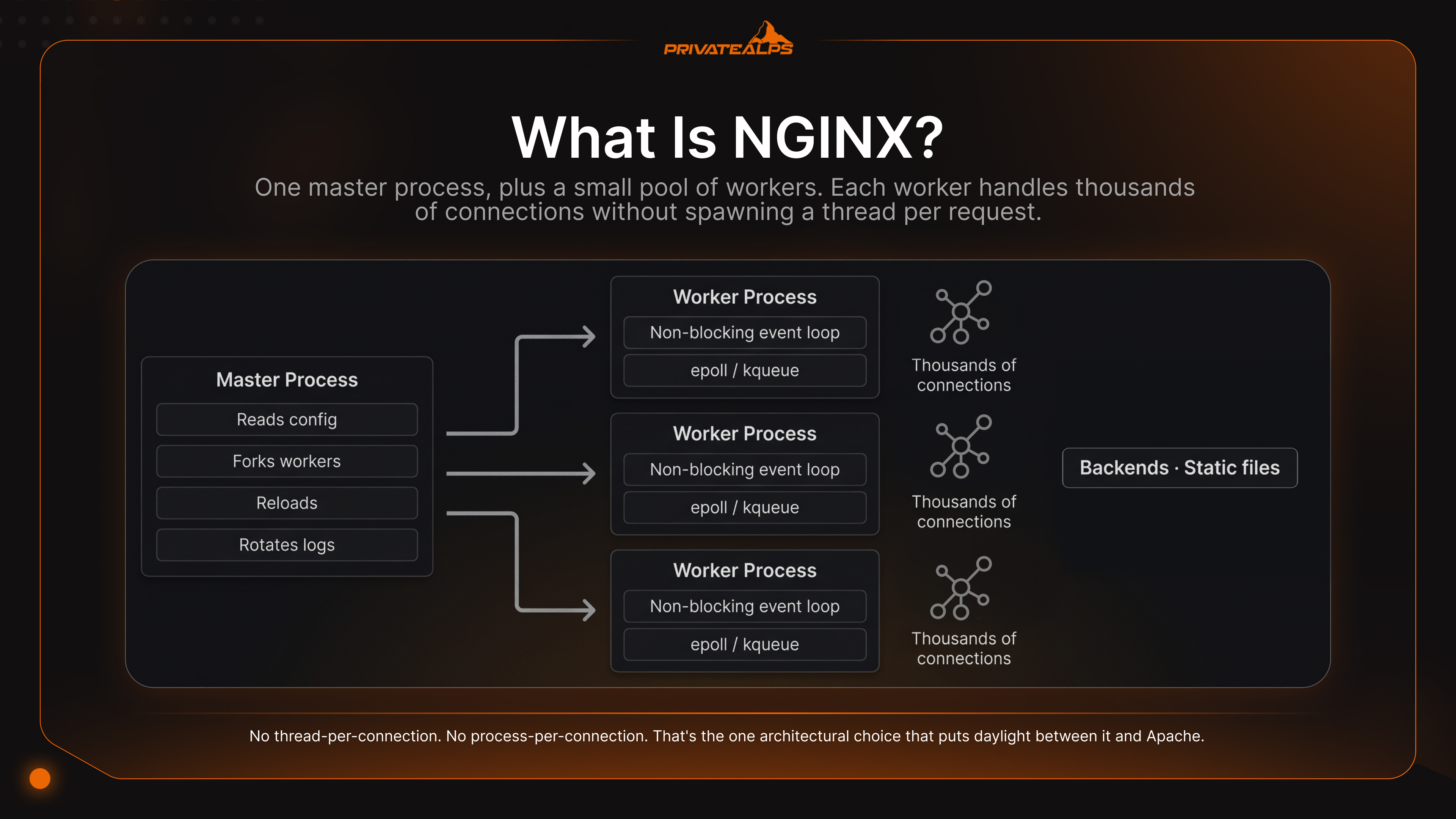
NGINX is a high-performance, open-source web server and reverse proxy. Igor Sysoev started writing it back in 2002. The public release went out on October 4, 2004 - Sysoev picked the date deliberately, it's the anniversary of Sputnik. Architecture is event-driven and asynchronous. One master process, plus a small pool of workers. Each worker handles thousands of connections without spawning a thread per request. That's the design that solved C10K. It's also why this server shows up underneath Kubernetes Ingress, Cloudflare's edge, and a whole list of cloud and on-prem infrastructure you've probably touched today without thinking about it.
- Built by Igor Sysoev (2002); first public release October 4, 2004
- Master process + worker processes; one worker per CPU core is the typical default
- Default config at /etc/nginx/nginx.conf; check syntax with nginx -t
- Zero-downtime reload via nginx -s reload
- Roles: HTTP server, reverse proxy, load balancer, HTTP cache, mail proxy, API gateway
- Native WebSocket support; HTTP/3 over QUIC since version 1.25.0
- Two flavours: free open-source build (BSD-2-Clause) and the commercial Plus subscription (F5)
- The Plus tier brings active health checks, JWT/OIDC/SAML auth, a live activity dashboard, and a REST API for dynamic reconfiguration in cloud-native deployments
:::
What Is NGINX?
Shortest way to put it? NGINX is a web server and reverse proxy that holds thousands of concurrent connections inside a single worker process via a non-blocking event loop. No thread-per-connection. No process-per-connection. That's the one architectural choice that puts daylight between it and Apache. Apache, in classic prefork mode, hands every connection its own process. Fine when traffic is low. Less fine once concurrency climbs and the kernel starts burning more cycles juggling processes than serving actual bytes.
So why does any of this exist? The C10K problem - Dan Kegel's 1999 question about how a single server could handle ten thousand simultaneous clients. That was the wall. Sysoev's design was the way through it. So when people ask what is an NGINX server today, they're typically pointing at a Linux box - bare-metal, VPS, or cloud instance - running this binary as the front door for one or several of your apps. Inside each worker, the server organizes traffic in user space. The kernel does the heavy lifting via epoll on Linux, kqueue on BSD and macOS, IOCP on Windows. That split is what lets the whole thing scale linearly with cores while keeping each idle connection cheap. We're talking kilobytes per connection. Not megabytes.
Two flavours. Same source tree. The open-source build is free, BSD-2-Clause licensed, and it covers basically everything most teams actually need: web server, reverse proxy, load balancer, cache. The commercial Plus build is what F5 maintains. You buy it for specific reasons. Active health checks against upstreams. Native JWT/OIDC/SAML for security-sensitive APIs. The live activity dashboard. The REST API that lets you reconfigure upstream pools without editing files - useful in cloud environments where the backend pool changes constantly. None of those apply to your situation? The open-source build is fine. Don't overthink it. The full diff between editions sits in the official NGINX documentation.
| Dimension | NGINX | Apache HTTP Server |
|---|---|---|
| Connection model | Event-driven, non-blocking | Thread- or process-per-connection (MPM) |
| Concurrency performance | Excellent at 10k+ concurrent connections | Degrades sharply past a few thousand |
| Memory usage under load | Stays roughly constant as connections grow | Grows linearly with active connections (prefork) |
| Static content speed | Native sendfile() zero-copy delivery | Slower; relies on standard file I/O |
| Dynamic content | Proxies to FastCGI, uWSGI, gRPC, HTTP upstreams | Native mod_php, mod_python in-process |
| Configuration style | Centralized files, no per-directory overrides | Centralized + .htaccess per directory |
| Typical use case | Reverse proxy, edge load balancer, static + API | Shared hosting, legacy LAMP stacks |
What Is NGINX Used For?
The list goes: web server, reverse proxy, load balancer, HTTP cache, SSL/TLS terminator, WebSocket proxy, mail proxy, API gateway. Eight roles. The thing people new to it don't expect is that most of those roles run at the same time, in the same process, off the same config tree.
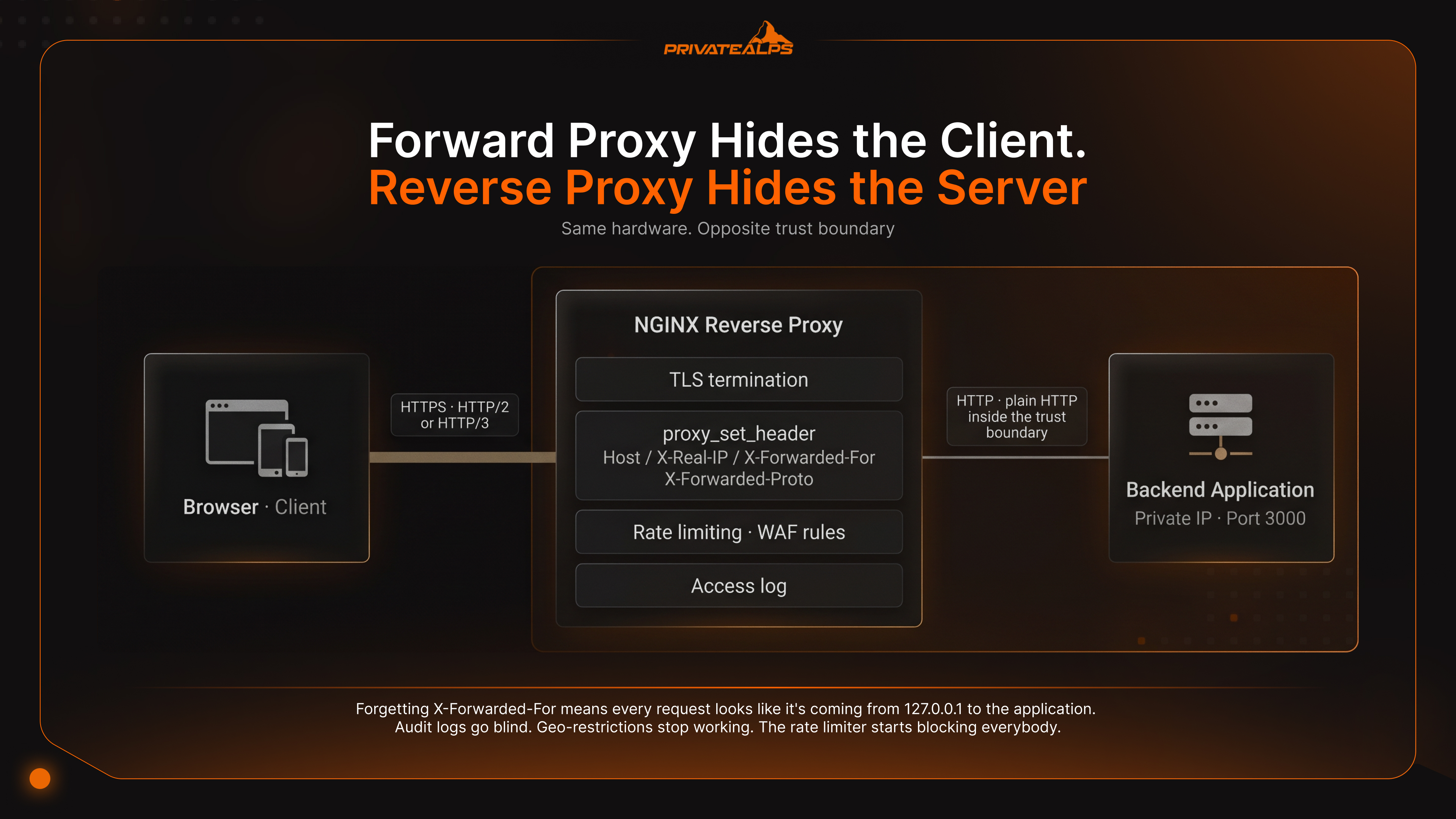
They expect a tool that does one thing. What they get instead is a Swiss Army knife where most of the tools work simultaneously without arguing with each other. Your typical edge instance? It terminates TLS, distributes traffic to an upstream pool, serves the static frontend out of /var/www/, and rate-limits the API. One binary. One config tree. One nginx -s reload to ship a change.
| Role | How It Works | Typical Production Scenario |
|---|---|---|
| HTTP/HTTPS web server | Serves files from disk via sendfile() zero-copy. HTTP/3 over QUIC since NGINX 1.25.0 (released May 23, 2023) | Static sites, SPA frontends, JAMstack, asset delivery |
| Reverse proxy | Forwards client requests upstream via proxy_pass; rewrites headers, terminates TLS | Node.js, Python, Go, or PHP-FPM apps behind a public edge |
| Load balancer | Distributes traffic across an upstream block using round-robin, least_conn, or ip_hash | Horizontally scaled API tier, microservices, multi-AZ failover |
| HTTP cache | Stores upstream responses on disk via proxy_cache_path | Caching dynamic CMS output (WordPress, Drupal) at the edge |
| SSL/TLS terminator | Decrypts TLS at the edge; backend speaks plain HTTP inside the trust boundary | Let's Encrypt + certbot automation; offloading crypto from app servers |
| WebSocket proxy | Upgrades HTTP/1.1 connections via proxy_http_version 1.1 and the Upgrade header | Real-time apps: chat, collaborative editors, trading dashboards |
| Mail proxy | Proxies IMAP, POP3, and SMTP with auth handover to a backend HTTP service | Hosted mail platforms, multi-tenant mail gateways |
| API gateway | Combines proxy_pass, URI routing, and limit_req to enforce per-route policy | Public REST/gRPC APIs, rate-limited partner endpoints |
A quick aside on Kubernetes, since it always comes up. The NGINX Ingress Controller is, for better or worse, the de-facto default for HTTP traffic going into a cluster. Watches the K8s API for Ingress and Service objects. Regenerates the config every time something changes. Runs as a pod, not a daemon - which means it restarts on crash and gets scheduled across nodes. If you're routing HTTP traffic in Kubernetes, you're almost certainly running this or something that builds on it.
How Does NGINX Work?
One master, several workers. The master reads the config and supervises. The workers do all the actual work - each one sitting in a non-blocking event loop holding thousands of open connections at a time. The master never touches a packet. Its whole job is forking workers, reloading configs, rotating log files. Boring stuff, mostly. The interesting stuff happens inside the workers.
Worker count comes from worker_processes auto;, which gives you one worker per CPU core. Each worker registers its sockets with epoll (Linux) or kqueue (BSD/macOS) and then sits in a tight loop, waking up only when the kernel says something is ready. New TCP connection. A few hundred bytes of headers showed up. Upstream just sent the first chunk back. No thread per request. No context switch per connection. Just one busy loop per core, doing as much work as the silicon can push through.
Here's the flow, six stages:
- TCP accept. Kernel pings the worker through
epoll/kqueueto say there's a connection waiting. Worker callsaccept(), adds the socket to its event set. - HTTP header parsing. Reads the request line and headers into a small buffer (
client_header_buffer_size, default 1K). Headers don't fit? Long cookies, big JWT in the auth header? It falls back tolarge_client_header_buffers. Get the buffer sizing wrong here and you'll see400 Bad Request, with "client sent too long header line" splashed acrosserror.log. Classic gotcha behind reverse proxies that pile on extra headers. - Server and location matching. Host against
server_namefirst. Then the URI against the location blocks in that server. Order matters more than people realize. Exact match beats prefix. Prefix beats regex. Within regex, first-match-wins. There's a whole class of "why isn't my config doing what I expect" tickets that boil down to this exact rule. - Static file or upstream proxy. Static content goes out through
sendfile()- kernel zero-copy, the bytes never even cross into user space. Dynamic content gets handed off to an upstream viaproxy_pass. - Upstream response buffering. The worker reads the upstream response into memory (
proxy_buffer_size,proxy_buffers), or temp files if the response is too large to hold. Reason for this is mundane but important: a slow client on bad WiFi shouldn't be allowed to hold an upstream worker hostage while it dribbles bytes back to the user. - Client delivery and logging. Bytes go out. A line gets appended to
access.logper the activelog_format. Done.
Now - the thing about zero-downtime reload that almost nobody internalizes on first read. nginx -s reload doesn't restart the process. What it actually does is tell the master to fork new workers using the new config, while old workers stop accepting new connections but keep serving the in-flight ones. Old workers run out of work, they exit. The master holds the listening sockets the entire time. From outside? Nothing dropped. From inside? You swapped the entire config and nobody noticed. This is also why systemctl reload nginx ends up doing the same thing - same SIGHUP underneath, just a different wrapper.
What Is NGINX Reverse Proxy?
A reverse proxy is an NGINX instance that sits in front of one or more backend application servers. It accepts client traffic and forwards it upstream. Opposite direction from a forward proxy, which forwards outbound client traffic to the public internet on behalf of internal users. Forward proxy hides the client. Reverse proxy hides the server. Same hardware. Opposite trust boundary.
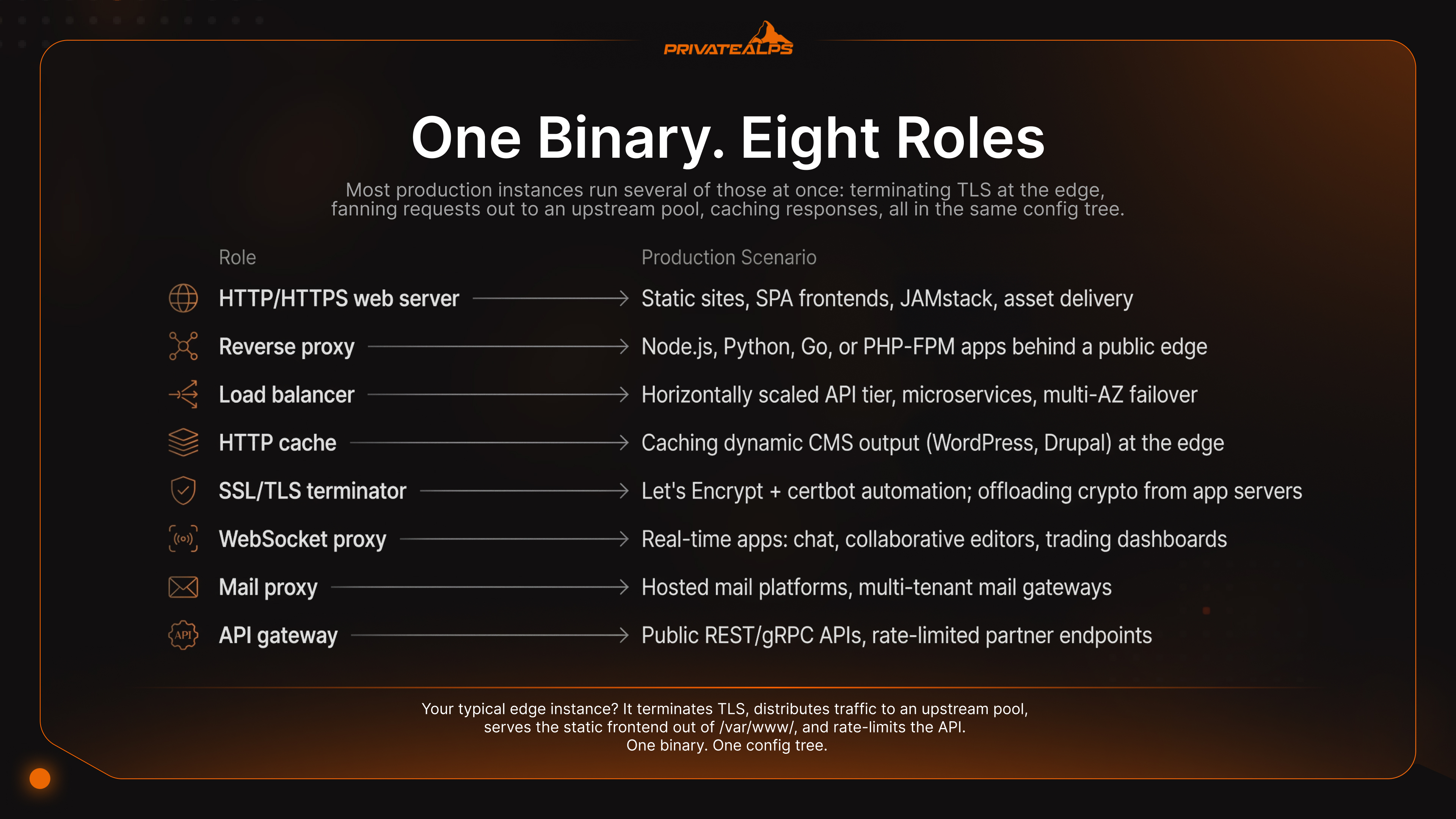
Which side of the boundary you're on is what tells you which one you've got. A forward proxy - Squid, your corporate web filter, the thing that blocks Reddit during work hours - is configured by the client and exists to protect the user. A reverse proxy is configured by the operator and exists to protect the application. Backends keep private IPs. The public surface speaks HTTP/2 or HTTP/3 even when upstream still only knows HTTP/1.1 (which, in 2026, is more legacy stacks than anyone wants to admit). Rate limits, WAF rules, TLS certificates - all of that lives in one place instead of getting copy-pasted across every service.
A working production reverse-proxy block is shorter than people expect. The four proxy_set_header lines below are not optional, no matter what some tutorial on the internet might tell you:
server {
    listen 443 ssl http2;
    server_name app.example.com;

    ssl_certificate     /etc/letsencrypt/live/app.example.com/fullchain.pem;
    ssl_certificate_key /etc/letsencrypt/live/app.example.com/privkey.pem;
    ssl_protocols       TLSv1.2 TLSv1.3;

    location / {
        proxy_pass         http://127.0.0.1:3000;
        proxy_set_header   Host             $host;
        proxy_set_header   X-Real-IP        $remote_addr;
        proxy_set_header   X-Forwarded-For  $proxy_add_x_forwarded_for;
        proxy_set_header   X-Forwarded-Proto $scheme;
    }
}
Single mistake that costs the most time, in my experience? Forgetting X-Forwarded-For. Without it, every request looks like it's coming from 127.0.0.1 to the application - because that is, literally, the source IP of the proxy connection. Audit logs go blind. Geo-restrictions stop working. The rate limiter you keyed on client IP suddenly thinks one user is making all the traffic and starts blocking everybody else. And X-Forwarded-Proto has its own special way of ruining your day: leave it off, and frameworks like Django or Rails will cheerfully generate http:// redirect URLs even though the user came in over HTTPS. Hello, redirect loop. Hello, Slack DM at 11pm.
Reasons to actually do this in the first place:
- Backend isolation - internal IPs and ports never make it into client traffic
- TLS termination in one place - one cert renewal pipeline, not one per service
- Protocol upgrade - clients get HTTP/2 or HTTP/3 even when upstream only speaks HTTP/1.1
- Centralized rate limiting and WAF -
limit_req_zoneand F5 WAF for NGINX in front of every backend - One access log to grep through, one set of latency histograms to look at
How to Install and Start NGINX
How to install NGINX, on Ubuntu/Debian: apt install nginx. On RHEL/Fedora: dnf install nginx. How to start NGINX once that's done: systemctl enable --now nginx, then nginx -t to validate the config before any reload. How to use NGINX in production really comes down to four files:
/etc/nginx/nginx.conffor global directives./etc/nginx/conf.d/*.conffor per-site config./var/log/nginx/access.loganderror.logfor when things go sideways.
Both Ubuntu and RHEL ship the package in their official repos - but the bundled versions tend to lag behind upstream mainline. So if you need HTTP/3 or anything else freshly cooked, pull from the official NGINX repository instead of whatever your distro happens to ship.
| Command | What It Does | Distro |
|---|---|---|
apt update && apt install nginx | Installs the packaged stable build | Ubuntu, Debian |
dnf install nginx | Installs the packaged build | RHEL 9, Fedora, Rocky, Alma |
systemctl enable --now nginx | Starts NGINX now and on every boot | All systemd distros |
nginx -t | Validates the config file syntax without reloading | All |
nginx -s reload | Sends SIGHUP to the master - zero-downtime reload | All |
systemctl reload nginx | Same outcome via systemd's ExecReload | All systemd distros |
nginx -V | Prints the build info, OpenSSL version, and compiled modules | All |
That last command is the one everybody forgets exists until something breaks. nginx -V dumps every --with-* flag the binary was compiled with. It's the only honest way to find out whether HTTP/3 (--with-http_v3_module), the stream module, or geoip support are actually available - before you waste an hour wondering why your quic directive keeps getting rejected with "unknown directive."
Right, so once you've installed it, work through the list:
- Confirm the service is up:
systemctl status nginx - Validate the default config:
nginx -t - Drop your site config into
/etc/nginx/conf.d/yoursite.conf(orsites-available/on Debian-style layouts) - Reload:
nginx -s reloadorsystemctl reload nginx - Tail the logs while you click around:
tail -f /var/log/nginx/error.log /var/log/nginx/access.log
Three errors come up over and over again in support tickets. None of them is exotic. The error messages, on the other hand, can be misleading on first read:
| Error | Most Likely Cause | First Fix |
|---|---|---|
| 502 Bad Gateway | Upstream app is down, or proxy_pass URL points to the wrong port | curl [http://127.0.0.1](http://127.0.0.1):<upstream-port> to confirm the backend is alive |
| 504 Gateway Timeout | Upstream is slow; the default proxy_read_timeout of 60s is being hit | Increase proxy_read_timeout; profile the slow endpoint upstream |
| Excessive CPU at low traffic | TLS-handshake CPU cost on a small VPS, or a busy regex in location | Enable ssl_session_cache; replace regex location with a prefix match |
NGINX Security Best Practices
A fresh install isn't hardened. The defaults exist for compatibility, not for facing the open internet - and certainly not for cloud environments where your server is exposed to scanners within minutes of going up. Server version disclosure: on. Some builds still happily accept TLSv1.0 and TLSv1.1. Rate limiting? Not unless you configure it yourself. Every directive in this section is opt-in, and skipping them turns your NGINX deployment from a security layer into a fast attack surface. Which, frankly, is worse than a slow one - an attacker gets through the same number of probes a lot quicker on fast infrastructure.
| Threat | Attack Vector | NGINX-Level Mitigation |
|---|---|---|
| Server version disclosure | Server: nginx/1.25.3 header leaks the exact version, making targeted CVE lookup trivial | server_tokens off; in http block |
| Clickjacking | Site rendered inside a hostile <iframe> to harvest credentials | add_header X-Frame-Options "SAMEORIGIN" always; |
| HTTP flood / brute force | Login or API endpoint hit thousands of times per second from one IP | limit_req_zone $binary_remote_addr zone=api:10m rate=10r/s; + limit_conn_zone |
| MIME-type sniffing | Browser executes uploaded .txt as JavaScript based on content guessing | add_header X-Content-Type-Options "nosniff" always; |
| Weak TLS protocols | TLSv1.0 / TLSv1.1 downgrade attacks (BEAST, POODLE) | ssl_protocols TLSv1.2 TLSv1.3; |
| Dotfile exposure | .git/, .env, .htaccess served as plain files, leaking secrets | location ~ /\. { deny all; } |
| Oversized headers | Memory exhaustion via abusive header sizes | client_header_buffer_size 1k; large_client_header_buffers 2 1k; |
Take nothing else out of this section if you don't want to. But take these five lines and paste them into every production nginx.conf you maintain:
server_tokens off;- strips the version string from response headers and error pagesssl_protocols TLSv1.2 TLSv1.3;- kills every protocol version with known weaknesseslimit_req_zone $binary_remote_addr zone=api:10m rate=10r/s;- per-IP request budgetlocation ~ /\. { deny all; }- blocks every dotfile path (.git,.env,.aws, you name it)user nginx;- runs workers as a non-root, non-login system account
For TLS specifically: don't write the cipher list yourself. Just don't. Use the Mozilla SSL Configuration Generator - it outputs an NGINX-ready protocol and cipher set for each policy tier (modern, intermediate, old) and gets updated whenever a new attack lands in the wild. There's roughly zero reason to write that block by hand in 2026.
Summary
Shortest version of all of this: NGINX solves C10K with a master/worker architecture that scales linearly with cores and keeps each idle connection cheap. Whatever role it plays - web server, reverse proxy, load balancer, API gateway, cloud Ingress controller - comes down to your deployment topology, not a different binary. Security hardening is opt-in. Mess up the defaults, you've got a fast attack surface. Get them right, you've got the same edge layer Cloudflare and Netflix run.
The server behaves very differently on bare metal than it does on shared hosting or in cloud environments. On a managed platform you typically can't touch worker_processes. The kernel knobs (net.core.somaxconn, worker_rlimit_nofile) are off-limits. Recompiling for a custom module isn't a conversation. Module flag names also drift between mainline releases, so verify against the official documentation before you start. PrivateAlps runs bare-metal in Switzerland - full root access for your team, custom NGINX builds (HTTP/3, stream, whatever you actually need), strong physical security, and Swiss revDSG jurisdiction for teams where data residency has to be more than a checkbox on a compliance form somewhere.
FAQ
What is NGINX?
NGINX is an open-source, event-driven HTTP server and reverse proxy. Igor Sysoev started writing it in 2002. NGINX what is it in one line: a non-blocking event-loop binary that holds thousands of concurrent connections in a single worker process, where Apache's classic prefork would have spawned a thread or process per connection instead. Asked NGINX what is the right product category - honest answer is several things at once. HTTP server. Reverse proxy. Load balancer. HTTP cache. API gateway. Depends which directives you've got turned on. What is NGINX server software's licensing model, by the way? BSD-2-Clause for the open-source build. Commercial F5 subscription for NGINX Plus.
What is NGINX used for?
Web server, reverse proxy, load balancer, SSL/TLS terminator, Kubernetes Ingress controller - those are the big five. Most production instances run several of those at once: terminating TLS at the edge, fanning requests out to an upstream pool, caching responses, all in the same config tree.
What is the difference between NGINX and Apache?
NGINX wins on high concurrency and static-file delivery. That's the event loop, not marketing. Apache wins where you specifically need .htaccess per-directory rules or in-process mod_php. The pattern you'll see most often in real deployments? Hybrid. NGINX as the public-facing reverse proxy. Apache + PHP-FPM behind it. NGINX does what it's good at - connections, TLS, caching. Apache does what it's good at - running PHP. Neither one has to do something it's bad at.
What is NGINX reverse proxy?
It's an NGINX instance that takes client traffic and forwards it to backend application servers, hiding the upstream from the client. Two big production wins. Backend isolation - internal IPs and ports stay private. Centralized SSL/TLS termination - cert renewal happens in one place, not one per service.
How do I install and start NGINX?
Ubuntu: sudo apt install nginx, then sudo systemctl enable --now nginx, validate with nginx -t. Same flow on Debian. RHEL/Fedora: just swap apt for dnf. The official install guide on nginx.org covers the upstream repo if you need a newer version than the distro ships with.
What is NGINX web server?
What is an NGINX server when it's running in the web-server role specifically? It's an NGINX instance handling client requests directly - reading files from disk, pushing them back out via sendfile() zero-copy. Distinct from the reverse-proxy role, where the NGINX server forwards each request to an upstream application process instead of touching the filesystem at all. Both can run inside the same instance. Different location blocks in the same server block can serve static assets straight from disk and proxy /api/ to a Node.js process upstream.
What is NGINX and how does it work?
When people ask about NGINX and how it works, the short version is this: it's an event-driven web server and reverse proxy. One master process reads the config. A small pool of worker processes handles every connection through a non-blocking event loop, using epoll on Linux or kqueue on BSD. A single request goes through TCP accept, header parsing, server and location matching, static delivery or upstream proxying, response buffering, and client write - all without ever spawning a thread per request.