


What Is an SSL Certificate and How Does It Work?
Most people don't go looking for an explanation of what is ssl certificate until something breaks. Or more precisely: what is a ssl certificate and what does certificate mean for their site's security? The browser throws a "Not Secure" warning. A payment provider flags the connection. An audit checklist asks whether HTTPS is configured. That's the moment the question stops being abstract.
An SSL certificate is a digital file installed on a web server. It activates encrypted communication between the server and any browser connecting to it, and it proves the server's identity in the process. Both functions matter. Encryption without identity verification is a secure channel to an unknown destination. Identity verification without encryption is a name tag on a postcard.
AI Summary
An SSL certificate is a cryptographic credential issued by a Certificate Authority (CA) that enables HTTPS on a web server. During a TLS handshake, browsers verify certificate authenticity against a pre-installed root store, both sides derive symmetric session keys, and all data flows through AES-256 encryption from that point forward. Certificates come in three validation tiers - DV confirms domain control, OV verifies legal organisation identity, EV runs a full background check against 14+ criteria.
On April 11, 2025, CA/Browser Forum passed the TLS certificate validity reduction schedule SC-081v3, proposed by Clint Wilson (Apple) and endorsed by Nick France (Sectigo), Ryan Dickson (Google Chrome), and Ben Wilson (Mozilla), with 25 CA votes in favour out of 30 cast. Maximum certificate validity drops from 398 days to 47 days by March 2029. Manual renewal stops being viable at March 2027's 100-day milestone - ACME automation becomes the operational baseline.
What Is SSL and What Does It Mean for Website Security?
SSL - Secure Sockets Layer - was developed by Netscape in the mid-1990s to solve a specific problem: data sent across public networks was readable to anyone intercepting it. In cybersecurity terms, this is the definition of an exposed channel. The protocol encrypted it. SSL itself has since been replaced entirely by TLS, but the name stuck across the industry and never left.
What does SSL mean for a website in practice? It means the difference between a conversation in a sealed envelope and one written on an open postcard. Without it, form submissions, passwords, and payment details cross every network hop between browser and server as plain text. An SSL connection changes that - captured traffic becomes unreadable noise.
A security certificate is the mechanism behind this. What is a security certificate technically? A digitally signed file binding a cryptographic public key to a verified identity. What is a website security certificate in operational terms? A credential allowing browsers to confirm two things simultaneously: this connection is encrypted, and this server is the one you actually intended to reach. At DV tier, that identity is just a domain name; at OV and EV tiers, it includes verified legal organisation details.
That's what a website security certificate provides. What is ssl certificate for website security specifically? It's the credential that makes both confirmations possible at once - the padlock icon is just the visible result of that process.
What is ssl connection versus plain HTTP? An SSL connection is the encrypted channel that results from the TLS handshake. Unencrypted HTTP sends everything in plain text across the network. An SSL connection wraps all transmitted data in a cipher that only the two endpoints involved can decode.
What is ssl encryption, to be precise? It's the AES-256 symmetric cipher that runs after the handshake completes - not the certificate itself, and not the handshake process. The certificate sets up trust. The handshake establishes the keys. SSL encryption is what actually protects the data stream.
How SSL Certificates Work
Here's where most explanations go wrong: they describe a certificate as something doing the encrypting. It isn't. A certificate is an identity document - it contains a public key and a CA signature proving that key is legitimate. Encryption happens afterward.
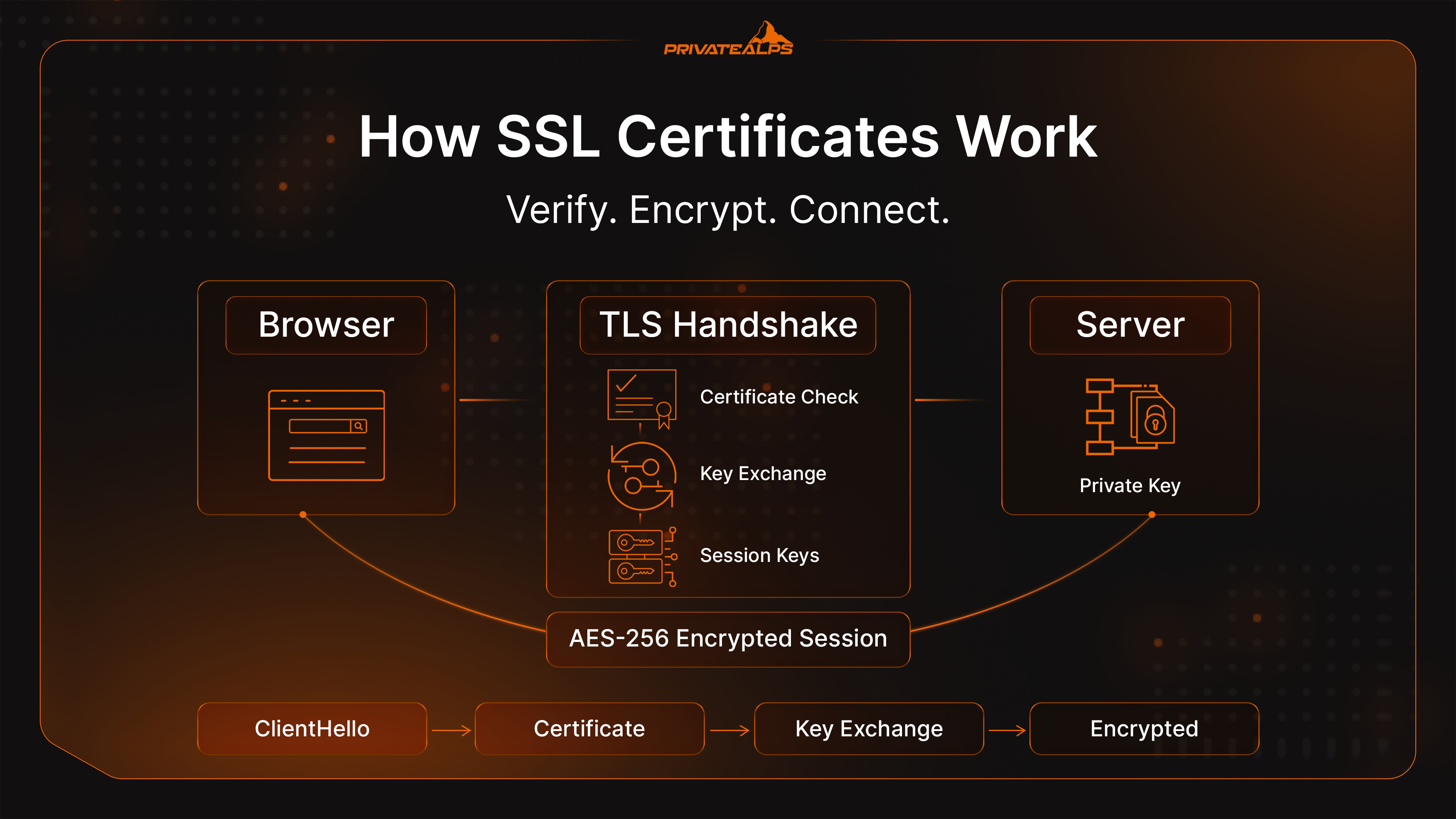
Understanding how ssl certificate works means separating three stages that often get conflated: the key pair that underpins the whole system, the TLS handshake where identity is verified and keys are exchanged, and the symmetric session where the actual data travels.
How ssl works at the system level - and more specifically, how does ssl work as a complete process - is a handoff between two types of cryptography. Asymmetric cryptography handles the trust establishment. Symmetric encryption handles everything after.
Public and Private Keys
Every certificate is tied to a key pair - two mathematically linked values that work only together. The public key is embedded in the certificate and shared with anyone who connects. The private key stays on the server and never moves. Data encrypted with the public key can only be decrypted with the matching private key.
When a server operator requests a certificate, the server generates a Certificate Signing Request. The CSR bundles the public key with the domain name and, for OV and EV certificates, verified organisation details. That CSR goes to a Certificate Authority, which validates the claims, signs the CSR with its own private key, and returns the completed certificate. Browsers verify that signature against the CA's public key, which they already have pre-installed in their root store.
That process - CSR generation, CA signing, browser verification - is what makes the chain of trust work.
The TLS Handshake Step by Step
What is ssl handshake in concrete terms? It's the negotiation that runs before any page content loads. On TLS 1.3 it completes in a single round trip. Here's the sequence:
- ClientHello - The browser sends supported TLS versions, acceptable cipher suites, and a random value to the server.
- ServerHello + Certificate - The server responds with the chosen cipher, its own random value, and the SSL certificate containing the public key and CA signature.
- Certificate Verification - The browser validates the CA signature against its root store, confirms the domain name matches, and checks the certificate hasn't expired or been revoked.
- Key Exchange - Browser and server derive a shared pre-master secret using RSA or ephemeral Diffie-Hellman, without transmitting it directly across the wire.
- Session Keys Derived - Both sides independently compute identical symmetric session keys from the pre-master secret combined with the two random values. No additional transmission required.
- Encrypted Session Begins - Both send a "Finished" message encrypted with the new session key. If both sides can decrypt it successfully, the handshake is complete. All traffic from this point uses the symmetric cipher.
Session Encryption and Data Integrity
Post-handshake, the TLS connection switches to AES-256 symmetric encryption. The security benefit is significant: asymmetric cryptography is computationally expensive - well-suited for the key exchange phase, impractical for encrypting a continuous data stream at speed. AES-256 handles bulk data efficiently. With a 256-bit key, brute-force is computationally infeasible with any current or near-future technology. You can test this yourself by running a TLS security check - the cipher suite will confirm AES-256 in any ssl test tool result.
Data integrity is enforced through Message Authentication Codes - MACs. Every transmitted record carries a keyed hash. The receiving end recalculates that hash and compares. A single altered bit anywhere in the record causes a mismatch and triggers immediate discard.
SSL encryption prevents reading the data. MACs prevent tampering going undetected. Both run simultaneously on every record.
SSL vs. TLS: What's the Difference?
SSL as an active protocol no longer exists. SSL 3.0 - the last SSL version - was formally deprecated by IETF in June 2015 via the TLS security protocol standard RFC 7568. POODLE was the specific reason - a vulnerability exploiting a flaw in how SSL 3.0 handled CBC padding, allowing attackers to decrypt ciphertext. That flaw wasn't patchable. Disabling SSL 3.0 entirely was the only fix. TLS 1.0 and 1.1 followed into deprecation. TLS 1.2 (2008) remains the required minimum under every major compliance framework. TLS 1.3 (2018) is the current recommended standard - it removed all legacy cipher suites, improved security significantly, and cut handshake latency from two round trips to one.
"SSL certificate" is purely legacy terminology. Credentials installed on servers today are X.509 certificates activating TLS. File format hasn't changed. Security protocol has changed significantly. Certificate validity periods, TLS version requirements, and security configuration all apply to TLS - not SSL.
| Version | Year | Status |
|---|---|---|
| SSL 2.0 | 1995 | Prohibited |
| SSL 3.0 | 1996 | Prohibited - deprecated 2015 |
| TLS 1.0 | 1999 | Deprecated - banned by PCI DSS |
| TLS 1.1 | 2006 | Deprecated |
| TLS 1.2 | 2008 | Active - required minimum |
| TLS 1.3 | 2018 | Active - recommended |
What Information Does an SSL Certificate Contain?
Certificates use the X.509 format. Click the padlock in Chrome or Firefox, open "Certificate details," and the full contents are visible:
- Common Name (CN) and Subject Alternative Names (SANs) - the specific domain or domains the certificate is valid for
- Organisation name and country - populated for OV and EV; left empty for DV
- Issuing Certificate Authority - the CA that signed and validated the request
- Public key - used during the TLS handshake key exchange
- Digital signature - the CA's cryptographic seal, verifiable against the CA's pre-installed public key
- Validity period - Not Before and Not After timestamps
- Serial number - unique identifier assigned by the CA at issuance
- CRL and OCSP endpoints - addresses browsers query to check real-time revocation status
What Is an SSL Certificate Chain?
What is an ssl certificate chain? It's the sequence of certificates that connects your server's leaf certificate to a root CA that browsers already trust. And what is a certificate in this chain, exactly? Each one is a digitally signed file that vouches for the next - root vouches for intermediate, intermediate vouches for your server certificate. Without the full chain intact, that trust cannot be established.
No browser stores certificates for every CA in existence. Instead, browsers and operating systems ship with a trusted root store - roughly 150 to 170 pre-vetted root certificates from organisations that have passed independent audits. The complication: most server certificates aren't signed directly by a root CA. They're signed by an intermediate CA whose own certificate traces back to the root.
Root CA  (self-signed - pre-installed in browser/OS root store)
    └── Intermediate CA  (signed by Root CA)
            └── Server Certificate  (signed by Intermediate CA)
A browser receiving your server certificate walks the chain upward - validates the intermediate's signature on the server cert, then the root's signature on the intermediate, then checks whether that root is in its trust store. Every link has to hold.
A valid server certificate served without the accompanying intermediate causes the exact same browser warning as an invalid certificate. Missing intermediate CA bundles are one of the most common post-install failures in production environments.
Types of SSL Certificates by Validation Level
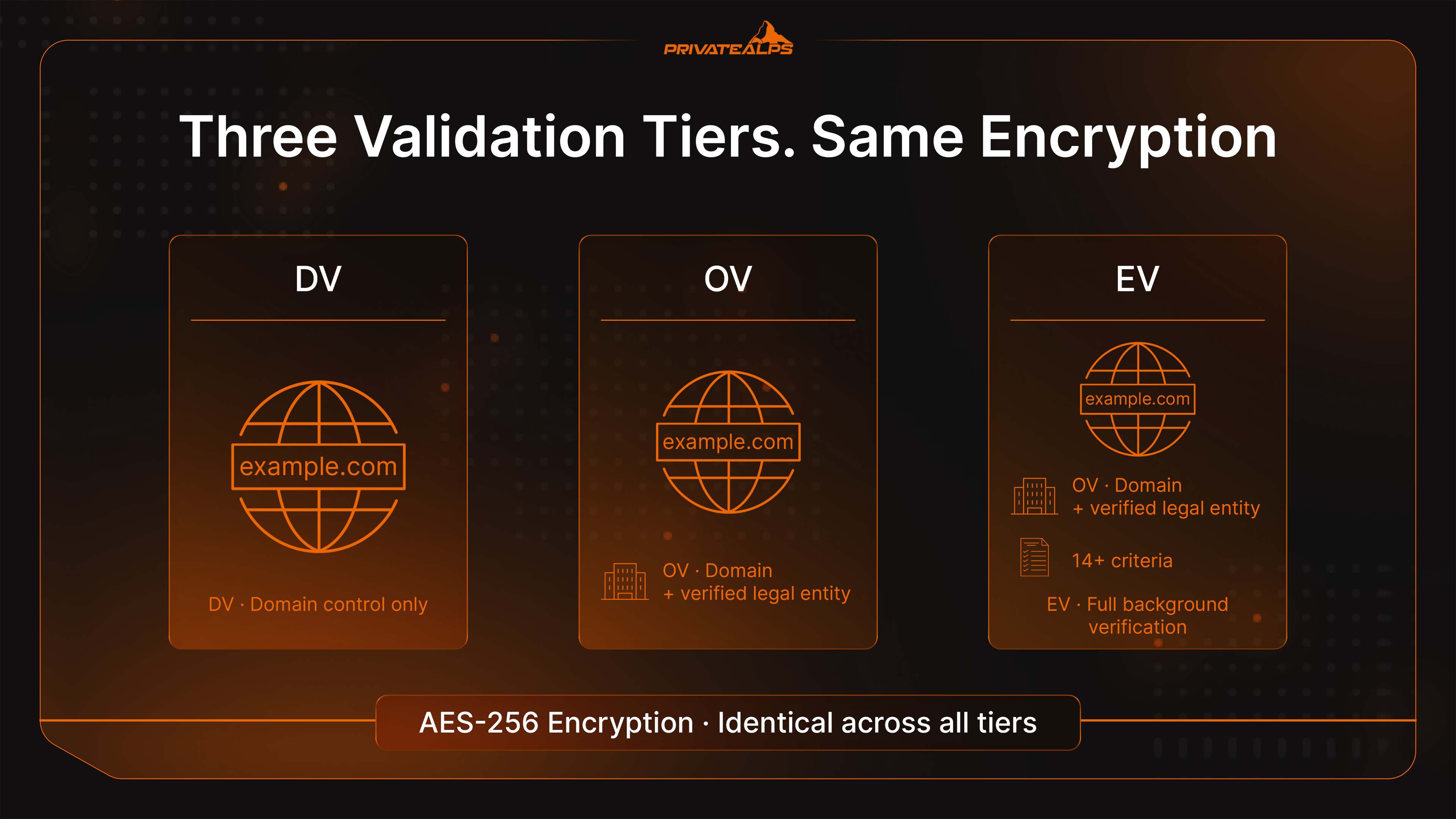
The validation tier indicates what the CA verified about the applicant before issuing. Encryption strength is identical across all three tiers - this is an important resource of clarification for site owners who assume EV provides better protection than DV at the cipher level. It doesn't. What differs is the depth of identity verification and what claims the certificate can make. Even minimal DV validation provides full AES-256 encryption.
| Type | What Was Verified | Trust Level | Best For | Approximate Cost |
|---|---|---|---|---|
| DV (Domain Validated) | Domain ownership only | Basic | Blogs, personal sites, portfolios | Free-$30/year |
| OV (Organization Validated) | Domain + legal entity | Medium | Business websites, SaaS, portals | $50-$200/year |
| EV (Extended Validation) | Full background check, 14+ criteria | High | Banks, payment processors, regulated industries | $150-$500+/year |
Domain Validated (DV)
DV confirms that the applicant controls the domain - nothing else. Verification is automated: a DNS TXT record, an HTTP challenge file, or an email to the domain registrant. No check on the organisation. No phone calls. Issuance completes in minutes.
For a personal blog, portfolio, or documentation site, DV is the appropriate choice. It enables HTTPS, removes the browser "Not Secure" flag, and satisfies Google's HTTPS ranking signal. The certificate won't display an organisation name in its details, because none was verified. That's a known limitation, not a security gap, for sites that don't require organisational accountability.
Organization Validated (OV)
OV adds a human verification layer. The CA confirms the applicant is a legitimately registered legal entity - typically by cross-referencing government business registries and making a direct verification call. The verified company name then appears in the certificate's Subject field, visible to anyone who inspects the details.
For any business operating user accounts, running integrations, or handling non-trivial user data, OV is the appropriate floor. It creates a verifiable accountability record that DV structurally cannot produce.
Extended Validation (EV)
EV is the most thorough tier: legal registration, physical address, operational status, telephone verification, and up to 14 defined criteria. Chrome 77 (September 2019) and Firefox 70 (October 2019) both removed the green address bar indicator that previously distinguished EV sites visually. The browser signal is gone. The underlying verification is not.
Financial institutions, regulated payment processors, and compliance-heavy organisations still issue EV certificates. Not for browser aesthetics - for the identity verification and assurance record on file at the CA, which is what auditors and compliance frameworks use to distinguish trustworthy operators from the rest. For enterprises that treat certification as a core part of their risk management, EV remains the appropriate tier.
Types of SSL Certificates by Domain Coverage
Validation level and domain coverage are independent decisions. Any DV, OV, or EV certificate can be issued in any of these coverage formats:
| Type | What It Covers | Example | Use Case |
|---|---|---|---|
| Single-Domain | One specific FQDN | example.com | Single-site deployment |
| Wildcard | One domain + all direct subdomains | *.example.com | SaaS platforms with multiple subdomains |
| Multi-Domain (SAN/MDC) | Multiple distinct domains (up to 100+) | example.com, example.net, shop.io | Agencies, multi-brand operators |
| UCC (Unified Communications) | Multiple hostnames including internal | mail.example.com, autodiscover.example.com | Microsoft Exchange, Skype environments |
UCCs (Unified Communications Certificates) provide the same encryption protection as other certificate types - the distinction is purely in what hostnames they cover. On wildcards worth being explicit about: *.example.com covers app.example.com, api.example.com, blog.example.com - but not example.com itself, and not second-level wildcards like *.api.example.com. When the requirement is to add ssl certificate coverage across multiple entirely separate domains and allow visitors to see a secured connection on each one, a multi-domain SAN certificate is the right structure - one expiry, one renewal event, one management point.
Why Your Website Needs an SSL Certificate
What is ssl certificate for website operations worth in concrete terms? Running without one creates problems in several places simultaneously:
- Data exposure in transit - Unencrypted HTTP sends login credentials, credit card and payment data, personally identifiable information (name, address, phone, email), medical records, session tokens, and confidential legal documents as readable plain text across every network hop. Organisations that handle personal data have a policy obligation to ensure this channel is encrypted.
- No server authentication - Without a certificate binding the domain to a verified key, there is nothing technically preventing a man-in-the-middle from substituting a different server.
- Search ranking disadvantage - Google confirmed HTTPS as a ranking factor in August 2014. For businesses and companies operating websites, HTTP is not a neutral choice - organisations running HTTP sites carry a structural disadvantage in search against comparable encrypted competitors.
- Browser security warnings - Chrome 68 (July 2018) began marking all HTTP pages "Not Secure." According to 2026 SSL security statistics, 82% of users abandon a site displaying a security warning.
- PCI DSS 4.0.1 non-compliance - The PCI DSS TLS requirements prohibit SSL and early TLS versions and mandate TLS 1.2 minimum for cardholder data. PCI DSS compliance requires organisations to check ssl certificate validity regularly, track certificate expiry, and maintain a full TLS certificate inventory. A failed ssl security check, an expired certificate, or a weak TLS configuration all create PCI DSS violations. Certificate inventory management is a specific PCI DSS 4.0 documentation requirement.
- GDPR Article 32 exposure - GDPR requires "appropriate technical measures" to protect personal data in transit. Operating HTTP while processing personal data is a documentable compliance gap.
Specific data categories SSL protects in transit:
- Usernames, passwords, and session tokens
- Payment card numbers and transaction data
- Personally identifiable information: name, address, date of birth, phone, email
- Medical and health records
- Legal documents and signed contracts
- Session cookies and on-site user interaction data
How to Get an SSL Certificate
Knowing how to get ssl certificate for a project means understanding that the process is consistent regardless of which CA or validation tier you choose. Whether you need to know how to get a secure website quickly with a free DV certificate, how to get ssl certificate for website with full OV validation, how to get https certificate for an e-commerce checkout, or simply how to get certificate of any kind for a new domain - the steps are the same in both cases.
- Decide on type and coverage - Match validation level (DV, OV, EV) to the data the site handles. Separately choose domain coverage: single, wildcard, or multi-domain. These are independent decisions.
- Generate a CSR on the server - Server creates a Certificate Signing Request containing public key plus domain and organisation details. Private key is generated at the same time and stays on the server - it is never submitted to any CA.
- Select a CA and submit - How to buy ssl for free: Let's Encrypt for automated DV. How to obtain ssl certificate from a commercial provider, or how to purchase ssl certificate for OV/EV: DigiCert, Sectigo, or GlobalSign. Submit the CSR and start validation.
- Complete validation - DV completes in minutes via DNS record, HTTP file, or email. OV takes one to three business days. EV typically requires three to five days and involves direct CA contact with the organisation.
- Receive the certificate files - The CA delivers the signed certificate (
.crtor.pem) and the intermediate CA bundle. Both files are required for a complete, trusted chain. - Install, configure, and verify - Upload files to the server, configure the web server, redirect HTTP traffic to HTTPS, and run a post-installation check.
Certificate Authorities and the Chain of Trust
A Certificate Authority earns its place in browser root stores through independent audits - either WebTrust or ETSI EN 319 411 standards - and formal acceptance into the root programs maintained by Mozilla, Apple, Microsoft, and Google. That acceptance is what allows a CA to issue certificates browsers trust automatically. Currently active publicly trusted CAs include DigiCert, Sectigo, GlobalSign, Entrust, and Let's Encrypt.
Root store membership is not permanent. When a CA violates issuance standards, browsers remove trust in its root - a decision that cascades to every certificate that CA has ever signed. Google's phased distrust of Symantec's PKI, completed with Chrome 70 in October 2018 after Symantec had already sold its CA operations to DigiCert, is the clearest example. Sites that hadn't migrated to reissued certificates lost browser trust on a fixed, publicly announced date. No negotiation, no extension.
Free vs. Paid SSL Certificates
| Factor | Free (Let's Encrypt) | Paid (Commercial CA) |
|---|---|---|
| Validation levels | DV only | DV, OV, EV |
| Validity period | 90 days, automatable via ACME | Up to 398 days today; 200 days from March 2026 |
| Financial warranty | None | $10,000-$1.75M depending on tier |
| Support | Community forums | Dedicated technical support |
| Wildcard / Multi-domain | Supported | Supported |
| Best for | Blogs, personal sites, dev projects | Business sites, e-commerce, regulated environments |
When deciding whether to buy ssl from a commercial CA or rely on Let's Encrypt, the dividing line is clear. Commercial CAs are essential when OV or EV validation is required, when a financial warranty matters, or when dedicated support is part of the operational requirement - premium solutions from providers like DigiCert or Sectigo include warranty coverage that free options don't. Everything else, Let's Encrypt handles well.
Let's Encrypt is operated by the Internet Security Research Group (ISRG). By December 2025, it was issuing roughly ten million certificates per day and protecting over 700 million websites, as documented in its Let's Encrypt 10-year anniversary report. Its 90-day validity model, which seemed aggressive when it launched in 2015, is now the direction the entire industry is moving under SC-081v3.
Self-Signed vs. CA-Issued Certificates
A self-signed certificate is one the server has signed with its own private key. No CA was involved. No external verification of the domain or organisation was performed. No chain connects it to anything browsers recognise as trusted.
The consequence is predictable. Every major browser displays a full-page "Your connection is not private" block, or refuses to load the page at all without a manual override that most users won't look for.
Self-signed certificates are appropriate in exactly two situations: local development environments where the developer has manually imported the certificate as trusted on their own machine, and internal machine-to-machine communication within a private network where both endpoints are under the same administrative control. Any site accessible to users on the public internet requires a CA-issued certificate.
How to Install an SSL Certificate on Your Website
How to install ssl certificate on a website, how to add ssl certificate to website servers across different environments, and how to install ssl certificate on website stacks running Nginx or Apache - the process follows the same sequence:
- Upload the certificate files - Transfer the signed certificate (
.crt), the intermediate CA bundle (.ca-bundleor.pem), and confirm the private key generated during CSR creation is already on the server. - Configure the web server - Nginx: set
ssl_certificateto the full chain file andssl_certificate_keyto the private key, then reload. Apache: useSSLCertificateFile,SSLCertificateKeyFile, andSSLCACertificateFile, then restart. - Force HTTPS via 301 redirect - Redirect all HTTP traffic to HTTPS at the server level. This eliminates mixed-content issues and consolidates all SEO signals under the HTTPS URL.
- Verify the full configuration - Use the SSL certificate checker tool from Qualys SSL Labs - it grades the setup A through F, covering chain completeness, TLS protocol versions, cipher suite strength, and known vulnerability exposure. Run it before the site goes live.
- Use hosting automation where available - cPanel's AutoSSL and Plesk's Let's Encrypt module handle CSR generation, domain validation, issuance, and installation in a single automated workflow. Most shared hosting plans include this at no extra charge.
To know how to add ssl certificate to an existing server: the process is identical - upload the new certificate files and update the web server configuration to reference them.
How to Check an SSL Certificate
Knowing how to check ssl certificate status matters both during deployment and when evaluating an unfamiliar site. There are several methods - from a quick browser check to a full online security test:
- Browser padlock - Click the padlock → "Connection is secure" → "Certificate is valid." Displays issuer, validity dates, covered domains, and the organisation name for OV and EV certificates. The fastest online check available.
- OpenSSL command line -
openssl s_client -connect example.com:443 -showcertsis how to check ssl certificate on server without a browser. It retrieves and prints the full chain exactly as served - bypasses browser rendering and shows precisely what clients receive. - SSL certificate security test - Use the SSL certificate checker tool from Qualys SSL Labs - an industry-standard online ssl test that grades the setup A through F, covering chain completeness, TLS protocol versions, cipher suite strength, and known vulnerability exposure. Run this test before the site goes live and after any configuration change.
- Certificate transparency logs - check ssl certificate history by domain using the public certificate transparency database - the standard tool for how to check the certificate of a website across its full public issuance history, including certificates issued without the site owner's knowledge.
- Online SSL checker tools - Services like SSL Shopper provide a quick online security check: they verify that the installed certificate matches the server's private key and that the full intermediate chain is being served correctly.
SSL Certificate Lifecycle and Expiration
Every certificate has a hard expiry - the Not After date embedded in the file. When that date passes, browsers reject the certificate immediately and display a full-page block before any page content loads. There is no grace period. Certificate validity is not a suggestion - it's a hard security boundary enforced by every major browser. Run an online ssl test before each renewal to verify TLS configuration remains valid.
The window between "certificate approaching expiry" and "site completely inaccessible to all visitors" can be hours. Managing the full TLS certificate lifecycle - issuance, deployment, security monitoring, validity tracking, renewal - used to be a once-a-year task. That assumption no longer holds. With certificate validity periods shrinking, organisations need to check ssl certificate expiry dates proactively, not reactively.
The Shift to 47-Day Certificates
CA/Browser Forum Ballot SC-081v3 was proposed by Stephen Davidson of DigiCert, endorsed by Clint Wilson (Apple) and Ashish Dhiman (GlobalSign), and passed on April 11, 2025, with 25 CA votes in favour out of 30 cast. Browser vendors including Google, Apple, Mozilla, and Microsoft all voted in favour. The ballot mandates a phased reduction of maximum TLS certificate validity from 398 days to 47 days:
| Date | Max Validity | DCV Reuse | Renewal Cadence |
|---|---|---|---|
| Until March 15, 2026 | 398 days | 398 days | ~Annual |
| March 15, 2026 | 200 days | 200 days | ~Every 6 months |
| March 15, 2027 | 100 days | 100 days | ~Every 3 months |
| March 15, 2029 | 47 days | 10 days | ~Every 6-7 weeks |
An organisation managing 1,000 certificates today handles roughly 1,000 renewal events per year. At 47-day validity, that same inventory generates over 8,000. Certificate lifecycle reduction analysis from DigiCert identified March 2027 - not 2029 - as the point at which manual renewal processes stop being operationally viable. ACME protocol automation is the only practical response at that scale.
What Happens When a Certificate Expires
An expired certificate triggers a full-page interstitial on every major browser. "Your connection is not private" in Chrome. "Warning: Potential Security Risk Ahead" in Firefox. Safari and Edge follow equivalent patterns. These are not dismissable warnings - they are hard blocks that prevent page load.
Traffic drops immediately and completely.
What organisations frequently discover too late: the impact isn't limited to human visitors. Expired certificates also break API integrations, payment gateway connections, and partner service calls that validate the certificate chain programmatically before establishing any connection. Standard mitigation practice is to check ssl certificate validity with an online ssl test tool, set automated alert thresholds at 30, 14, and 7 days before expiry, and combine validity monitoring with automated renewal. As TLS certificate validity windows shorten, this is no longer optional - it becomes a baseline security operational requirement. Run a full online security test after every renewal to confirm TLS configuration and certificate validity are correct before the next cycle begins.
SSL Security: What It Protects and What It Doesn't
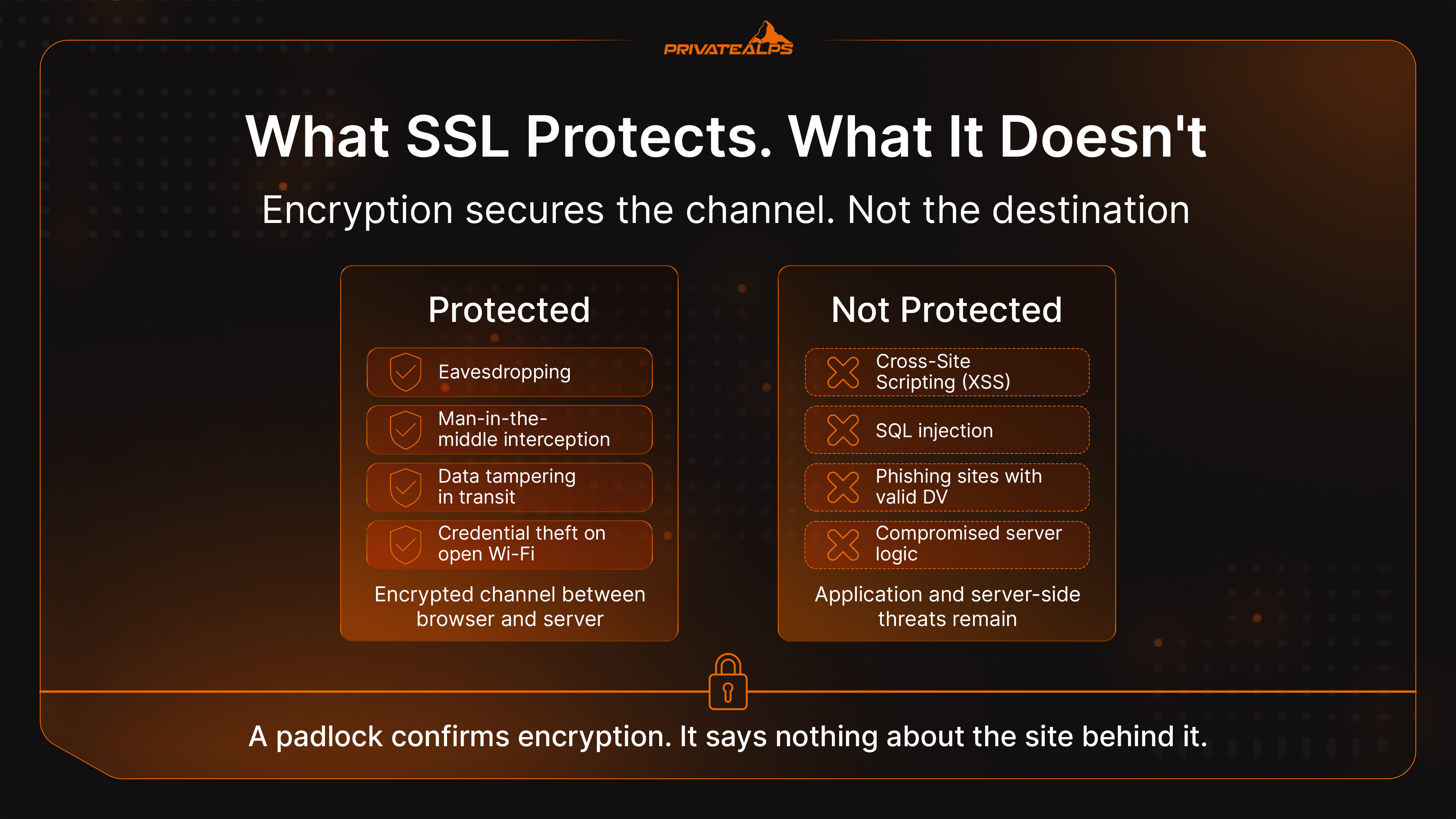
The padlock icon is one of the most systematically misunderstood signals in a browser interface. It confirms that the connection between browser and server is encrypted. That is the complete scope of what it signals.
| SSL Protects Against | SSL Does NOT Protect Against |
|---|---|
| Eavesdropping and packet sniffing | Cross-Site Scripting (XSS) |
| Man-in-the-middle interception | SQL injection |
| Data tampering in transit | Server-side malware and data breaches |
| Credential theft on open Wi-Fi networks | Phishing sites carrying valid DV certificates |
| Session hijacking via unencrypted cookies | Compromised application or server logic |
The phishing dimension needs to be stated directly. Any site operator - including someone running a phishing campaign - can obtain a free DV certificate in minutes. According to website security warning statistics for 2026, over 90% of phishing sites carried a valid padlock in 2023. By 2024-2025, the figure had become so routine that the security industry largely stopped reporting on it as a distinct trend.
A padlock confirms encryption. It says nothing about the site behind it.
Practical guidance for evaluating a site beyond the padlock:
- Open the certificate details. An organisation name appears only in OV and EV certificates. A bank or financial service with no organisation name in its certificate is a meaningful anomaly.
- Verify the actual domain in the address bar character by character before entering credentials or payment data. Phishing domains are designed to look similar at a glance.
- For financial transactions specifically: the absence of OV or EV organisation data in certificate details is a risk indicator worth acting on.
SSL Certificates in the Hosting Context
The hosting tier in use has direct practical consequences for how certificate management works.
Most shared hosting platforms have integrated Let's Encrypt through cPanel's AutoSSL or Plesk's built-in module. Certificates are provisioned, installed, and renewed without any manual intervention required from the site owner. You can verify the setup online with any ssl security check tool after provisioning. CDN providers like Cloudflare and Fastly handle certificate lifecycle at the edge, making it entirely transparent from the origin server's perspective.
Moving up the infrastructure stack changes the responsibilities:
| Factor | Shared Hosting | VPS | Dedicated Server |
|---|---|---|---|
| Certificate provisioning | Automatic (AutoSSL / Let's Encrypt) | Manual or scripted (Certbot / ACME) | Full control - manual or automated |
| Certificate types available | Typically DV only | DV, OV, EV | DV, OV, EV |
| Private key control | Managed by the host | Fully in operator's control | Fully in operator's control |
| Custom CA support | Limited | Supported | Supported |
| OV/EV installation | Rarely available | Supported | Supported |
Environments where private key ownership is a compliance or jurisdictional requirement - Swiss data infrastructure, regulated financial services, healthcare data processing - need VPS or dedicated infrastructure. Shared hosting AutoSSL is convenient, but it means the host holds the private key. That's an acceptable trade for most sites and products; for regulated organizations and enterprises whose security center around data sovereignty, it typically isn't - the risks of shared key management outweigh the convenience.
How to Choose the Right SSL Certificate
What type of ssl certificate do i need? That question has a framework answer, not a universal one. It depends on three variables: what data the site handles, how many domains need covering, and what regulatory obligations apply.
What Type of Data Does Your Site Handle?
Data sensitivity maps directly to the minimum appropriate validation tier.
A personal blog or static portfolio: a free DV certificate is fully appropriate. A business site running user accounts, contact forms, or any form of data capture: OV at minimum - not because DV provides weaker encryption, but because OV creates a verified legal identity that compliance frameworks and accountability processes require. Any site processing payment card data, health records, or operating under a financial services licence: EV, where the identity verification record at the CA is what compliance auditors will examine, regardless of what appears in the browser address bar.
How Many Domains Do You Need to Secure?
One domain, no subdomains: single-domain certificate. A platform running multiple subdomains off a single root domain: wildcard certificate. Multiple completely distinct domains across a portfolio: multi-domain SAN, one renewal covering everything. Microsoft Exchange or Unified Communications environments with mixed internal and public hostnames: UCC.
Choosing the wrong format here doesn't compromise encryption. It creates certificate management overhead that compounds significantly as validity periods shorten under SC-081v3.
What Are Your Compliance Requirements?
Three regulatory frameworks specify TLS requirements explicitly. Understanding these compliance obligations is essential for choosing the right ssl security setup and maintaining valid certificate configuration:
- PCI DSS 4.0.1 - The PCI DSS encryption requirements require TLS 1.2 minimum for all cardholder data transmission, prohibit SSL and TLS 1.0/1.1, and since PCI DSS version 4.0 require documented certificate inventory across all public-facing domains. Certificate validity periods and renewal cycles fall within PCI DSS compliance scope. Organisations must check ssl certificate configuration online against PCI DSS standards and run regular TLS security tests. Any TLS configuration that fails an online security test is a PCI DSS finding that requires remediation.
- GDPR, Article 32 - Requires appropriate technical and organisational measures to protect personal data in transit. HTTPS over TLS is the accepted security standard; operating HTTP while processing personal data is a documentable compliance failure.
- HIPAA Security Rule - Classifies in-transit encryption of electronic protected health information as "addressable." Every covered entity that transmits ePHI over a network uses TLS. "Addressable" does not mean discretionary when a standard implementation exists and is universally deployed.
Summary
SSL certificates do three things with one credential: encrypt data in transit, verify server identity, and satisfy the technical security requirements of PCI DSS, GDPR, and HIPAA. For most sites, a free DV certificate from Let's Encrypt automated via ACME is the right answer - it costs nothing and requires no ongoing manual work. Business sites handling user data need OV. Regulated entities and payment processors need EV. When evaluating providers, ACME automation support is now the critical requirement - the March 2027 milestone makes that concrete. Use an online ssl test to check tls configuration and certificate validity after every deployment. A failed security check, a weak TLS version, or an expired certificate all have the same result: users see a warning and leave. PCI DSS compliance requires documented tls certificate validity management. A stack that cannot automate certificate renewal at the 100-day validity level will create operational and security problems before 2029 arrives.
PrivateAlps provides Swiss-based hosting infrastructure with free SSL included on every plan - automated provisioning, full private key control, and HTTPS configured from day one. If you want certificate management handled without compromising infrastructure transparency or data sovereignty, explore PrivateAlps hosting plans.
FAQ
What Does an SSL Certificate Do?
An SSL certificate encrypts data channels between user browsers and web servers - intercepted traffic becomes unreadable. Simultaneously, it authenticates server identity, confirming to browsers that a domain connected is genuinely the one that certificate was issued for. Remove encryption and channels are exposed. Remove authentication and encryption proves nothing about destination.
How Do I Know If a Website Has an SSL Certificate?
HTTPS at URL start and a padlock icon in browser address bar are visible indicators. Clicking that padlock reveals certificate details: issuer, validity dates, covered domains, and - for OV or EV certificates - verified organisation name. An HTTP URL with no padlock, or a broken padlock indicator, means connection is either unencrypted or serving mixed content.
How Much Does an SSL Certificate Cost?
Free for DV through Let's Encrypt, renewed every 90 days via ACME automation. Commercial OV certificates from DigiCert, Sectigo, or GlobalSign run approximately $50-$200 per year. EV ranges from $150 to $500+ depending on the CA and coverage type. The price difference reflects the validation work involved - not the encryption strength, which is identical across all tiers.
Do I Need an SSL Certificate If I Don't Sell Anything?
Yes. Chrome marks all HTTP pages "Not Secure" regardless of whether the site processes payments or collects any data. Google's HTTPS ranking signal applies whether or not commerce is involved. A read-only site still transmits session cookies and IP address data across the connection - encrypting that is standard practice, and every major browser makes its absence visible to every visitor.
What Is the Difference Between SSL and HTTPS?
SSL/TLS is a cryptographic protocol. HTTPS is what results from running HTTP over that protocol. A padlock and HTTPS in URLs confirm TLS is active and a valid certificate passed browser verification during handshake. SSL is an underlying mechanism. HTTPS is what users and search engines see.
Can an SSL Certificate Expire?
Yes. Every certificate carries a hard Not After date. Current maximum validity for newly issued public certificates is 398 days. Under the 47-day certificate validity schedule, this reduces to 200 days from March 15, 2026; 100 days from March 15, 2027; and 47 days from March 15, 2029. An expired certificate produces immediate full-page blocks in Chrome, Firefox, Safari, and Edge - not warnings users can dismiss, but hard blocks that prevent page load entirely. Automated ACME renewal is the standard mitigation and becomes the only operationally viable one as renewal frequency increases.