



Web Hosting vs. Domain: What Is the Difference?
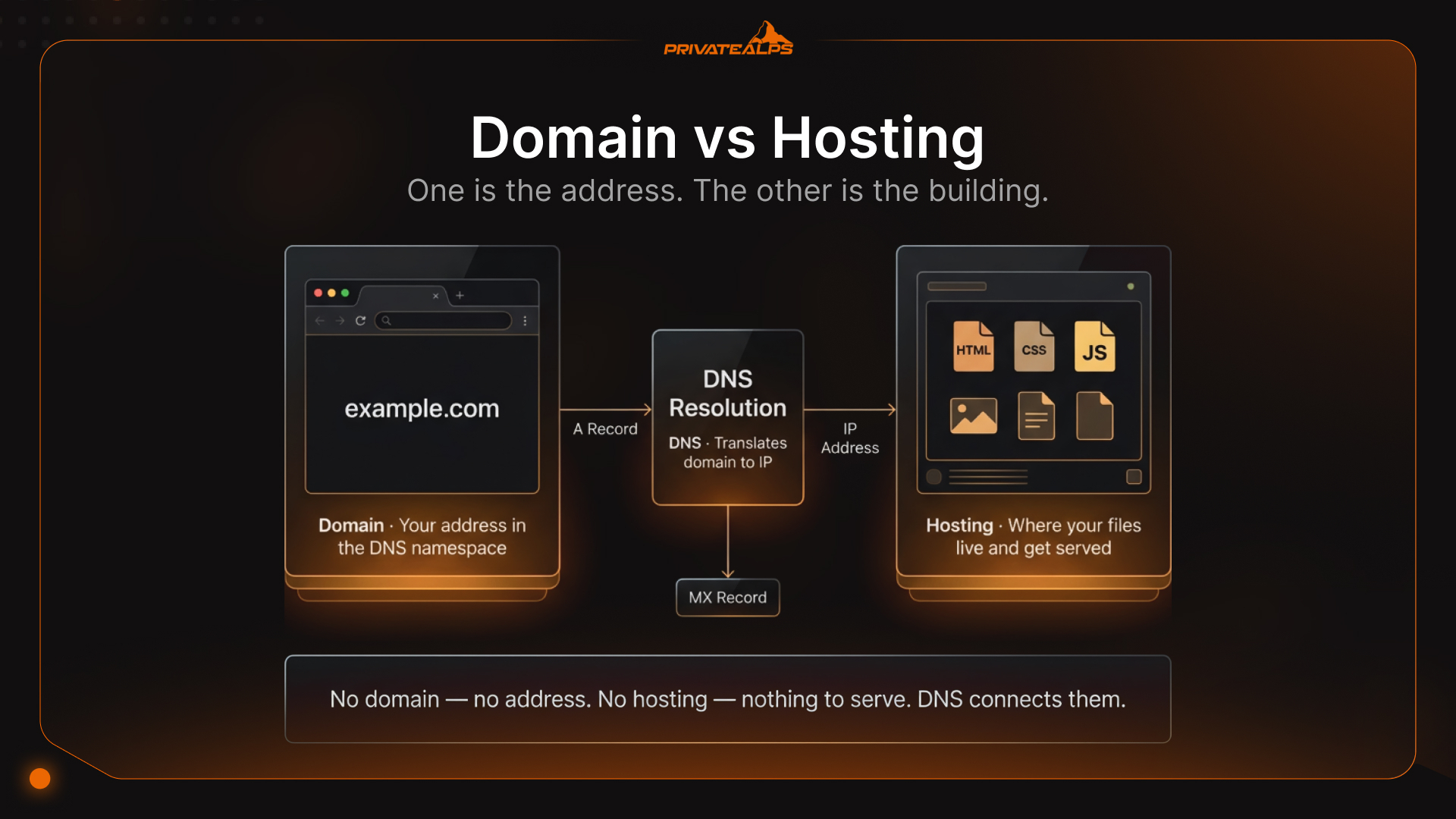
Most people buying their first domain have no idea they're actually buying two different things. A domain name is your website's address. Web hosting is the server that holds the actual content. Sold separately, billed separately, and broken in completely different ways. The web hosting vs domain confusion is harmless until something goes wrong - that's when understanding the difference between domain and hosting stops being optional.
AI Summary
Quick version: a domain name is a readable label (like example.com) that maps to a server through the Domain Name System (DNS). Web hosting is where your website's files and code actually live. DNS is the connector - when someone types your domain, it resolves to the hosting server's IP and the page loads. Pull either one out and the site stops working. No domain, no address. No hosting, nothing to serve.
According to the latest Domain Name Industry Brief Quarterly Report from DNIB.com, sponsored by Verisign, the fourth quarter of 2025 closed with 386.9 million domain name registrations across all top-level domains.
Quick differences:
- Hosting vs domain: hosting is the server that stores and serves files - the domain is just the address pointing at it
- You don't own a domain: you lease it from a registrar, usually year by year
- DNS sits between the two - it's what translates the domain name into the server's IP
- Lose the domain and visitors hit an error page. Lose the hosting and the domain resolves to nothing.
What Is a Domain Name?
A domain name is a leased address - not owned, leased. Two parts: a Second-Level Domain (SLD) and a Top-Level Domain (TLD). Take privatealps.net: privatealps is the SLD, .net is the TLD. You rent that combination from an accredited registrar for anywhere from 1 to 10 years. ICANN - the Internet Corporation for Assigned Names and Numbers - runs the coordination layer above all of it.
When you register, your registrar logs your contact data in the WHOIS database and updates the TLD's authoritative registry. That last part matters more than most people realize.
Here's the distinction almost nobody explains: a domain registrar (Namecheap, GoDaddy, Gandi) is the business where you lease the name and manage DNS settings. A domain registry is the authoritative database for that TLD - Verisign runs the registry for .com and .net. Not the same thing. If your registrar loses ICANN accreditation or just closes down, ICANN steps in and mandates a transfer to a different registrar. Your domain doesn't disappear with it - the authoritative record lives at the registry, which keeps running regardless. That's why people who've been burned by a failing registrar don't lose their .com. It also clarifies the domain name vs web hosting divide: domains are governed by this two-tier registrar/registry system, completely separate from whatever server your files are on.
What Is Web Hosting?
Web hosting is rented server space - storage, processing power, a network connection - so your website has somewhere to actually exist. A browser hits your domain, the hosting server fires back the HTML, CSS, JavaScript, and images that build the page. No server, no page. That's the whole job. Hosting comes in several forms - shared, VPS, dedicated, cloud - and the trade-offs between them matter once you're past basic setup. The hosting types article covers each in detail; what matters here is understanding what hosting does, not which plan to pick.
One thing keeps tripping people up, and it's worth being blunt about: domain hosting vs web hosting are not the same thing. Domain hosting is DNS management - nameserver records, A records, MX records, the configuration layer that says "this domain points to that destination."
Web hosting is the server where your files actually live. Same word, different world. They often come from different providers, which is fine as long as you know about it.
The mess happens when someone registers a domain at Registrar A, buys hosting at Provider B, and never touches the nameservers. DNS still points at the old provider. Visitors hit the wrong server - or a wall. The new host is sitting there fully configured and completely unreachable.
That single missed step accounts for an outsized share of "why isn't my site live" support tickets.
Domain vs. Hosting: Key Differences at a Glance
The domain vs hosting comparison reduces to one question: what does each layer actually do? Both are subscriptions. Both renew. Both can fail. The difference is in what fails and how you fix it.
| Dimension | Domain Name | Web Hosting |
|---|---|---|
| Function | Human-readable address resolving to an IP | Server storing and delivering website files |
| What you pay for | Exclusive use of a name in the global DNS namespace | Server resources: storage, RAM, bandwidth, uptime |
| Who manages it | ICANN-accredited domain registrar | Web hosting provider |
| Renewal cycle | Typically 1–10 years; annual is most common | Monthly or annual; plan-based |
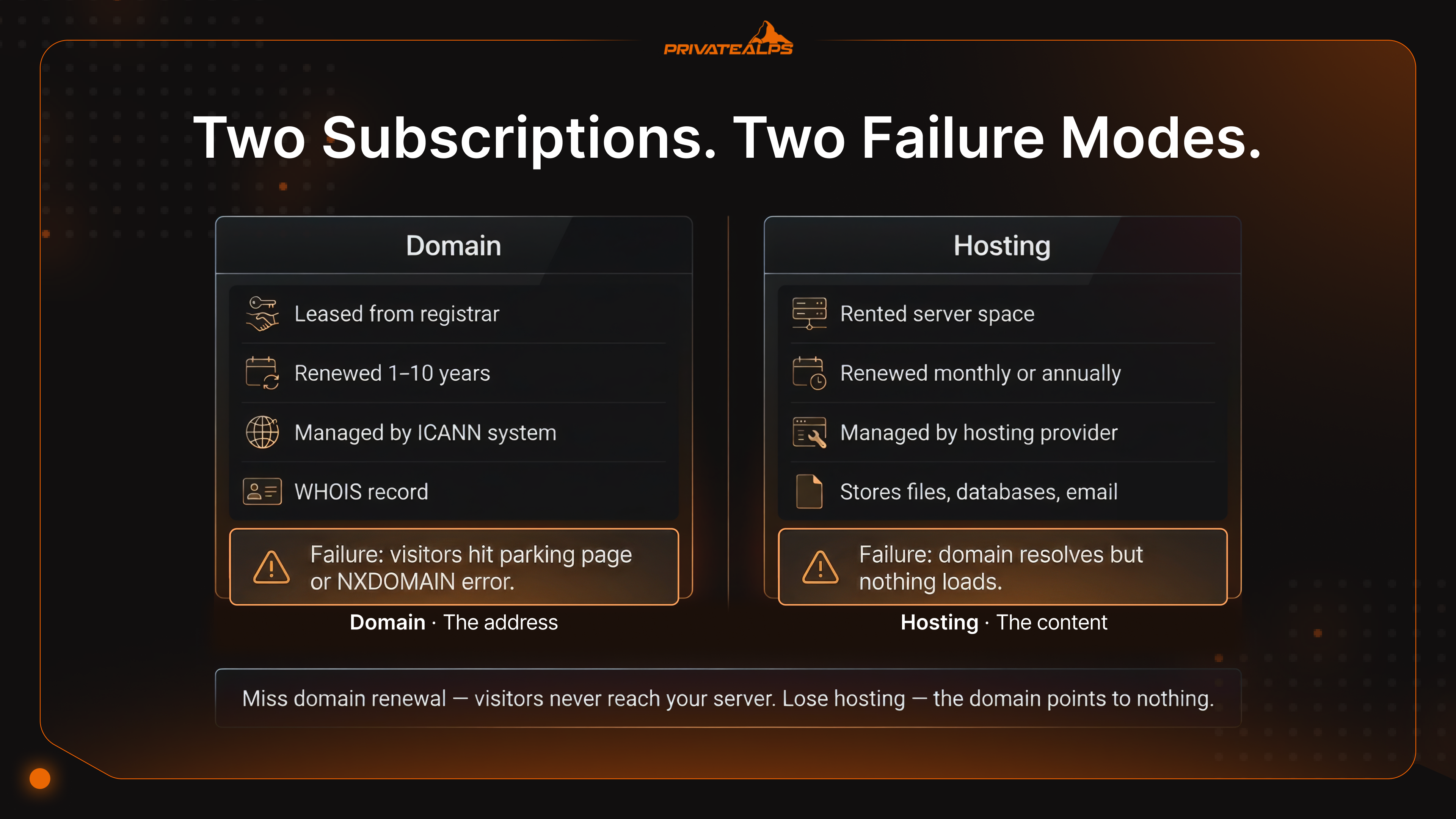
| Failure state | Registrar placeholder page or DNS error (NXDOMAIN) | Site accessible only via raw IP address - not viable for public use |
The failure state row is worth memorizing. Miss your domain renewal and visitors hit a parking page - they never reach your server at all. Lose your hosting and the domain resolves fine, but there's nothing on the other end. Just a raw IP, no content. The two failures look different, feel different, and get fixed differently. Knowing which one you're dealing with saves a lot of panicked rebooting.
How a Domain and Hosting Work Together - The DNS Connection
DNS is the thing that turns example.com into 203.0.113.42 - a number a server can route to. Without it, domain names are just text. The whole lookup happens invisibly, usually in milliseconds. You only notice DNS when it breaks or when you've just changed something and are staring at your screen wondering why the new site isn't showing up yet.
Here's the full chain from someone typing your URL to their browser loading the page:
- The browser checks its local DNS cache. If no record exists, it queries a recursive DNS resolver (typically your ISP's or a public resolver like Cloudflare's 1.1.1.1).
- The resolver queries the root nameservers to find the authoritative nameservers for your TLD (e.g., .com).
- The root directs the resolver to your TLD's registry (e.g., Verisign for .com), which returns your domain's authoritative nameservers.
- The resolver queries your authoritative nameservers - configured at your registrar - and retrieves the DNS records.
- The A record returns your hosting server's IP address.
- The browser sends an HTTP/HTTPS request directly to that IP, and the server returns your website's files.
Six steps, and it all happens before the page starts loading. What you actually control is step 4 - the nameservers at your registrar. That's the bridge between "someone typed your domain" and "they reached your hosting server." Change hosting providers without touching nameservers, and DNS just keeps routing people to the old server. Nobody hits the new one.
When you do make the change, it doesn't go live everywhere simultaneously. DNS resolvers cache records by TTL (Time to Live), so the switch rolls out over 24-48 hours. During that gap, your website answers differently depending on which resolver a visitor's device happened to query. Half the world sees the new site, half sees the old one. Maddening to debug unless you know it's coming.
The three DNS records that actually matter day-to-day:
- A record - points your domain to an IPv4 address. This is the one that connects example.com to your server. Get this wrong and the site doesn't load.
- CNAME record - an alias. www.example.com pointing to example.com is a CNAME. Also used to hook in third-party services like Cloudflare.
- MX record - tells the internet where to deliver email for your domain. Has nothing to do with your website loading. Email can break completely while the site works fine, and vice versa.
One more thing: SSL. People forget it until a user sends them a screenshot of the browser warning. HTTPS is the third required piece - after domain and hosting - and it lives entirely on the hosting server. The registrar has nothing to do with it. Neither does DNS propagation timing. It's just a setting you enable on the host. Skip it and every visitor sees "Not Secure" in their address bar before they've read a word.
Quick Setup Checklist
- Search domain availability - most registrars have a lookup tool; check a few variations while you're there.
- Register at an ICANN-accredited registrar - verify accreditation status at ICANN.org. Not all domain sellers are accredited directly.
- Buy a hosting plan - match the tier to what you're actually building, not to what the upsell page suggests.
- Swap the nameservers - log into your registrar, find the nameserver settings, replace the defaults with the ones your host gave you. This is the step people skip.
- Verify site loads and allow for propagation - DNS takes up to 48 hours to spread globally. Use whatsmydns.net to watch it in real time instead of just hitting refresh and guessing.
How to Choose a Domain Name
A good domain name gets out of the way - people remember it, type it correctly, and don't ask "wait, is there a hyphen?" A bad one creates friction that compounds every time you hand out a business card or run an ad. And changing it once the site is live is painful enough that you really want to get it right the first time (details in the FAQ below).
Five things that actually matter when picking a name:
- Five things that actually matter when picking a name:
Length and memorability - under 15 characters is the practical ceiling. Longer than that and typos start accumulating.
- No hyphens or numbers - "is that a hyphen or underscore?" is a question you'll hear forever if you go that route. Both are also markers for lower-trust domains in user perception.
- Trademark check before you pay - search the USPTO database (US) or your national trademark registry first. Registering a trademarked name triggers UDRP complaints, and you can lose the domain even years later.
- TLD choice isn't cosmetic - .com is still the default assumption most people type. ccTLDs like .ca, .uk, .de work well for local audiences but sometimes carry eligibility requirements. Specialty TLDs (.io, .ai, .swiss) have positioning trade-offs worth thinking through.
- Check the domain's history - aged and expired domains carry baggage. Run it through the Wayback Machine, look at WHOIS history, and pull the backlink profile in Ahrefs or Semrush before you buy. Spam signals from a previous owner follow the domain to you.
Already taken? Different TLD, a short prefix or suffix that still makes sense, or a direct offer to the current owner through Afternic or Sedo. Most domains have a price.
Should You Buy Domain and Hosting from the Same Provider or Separately?
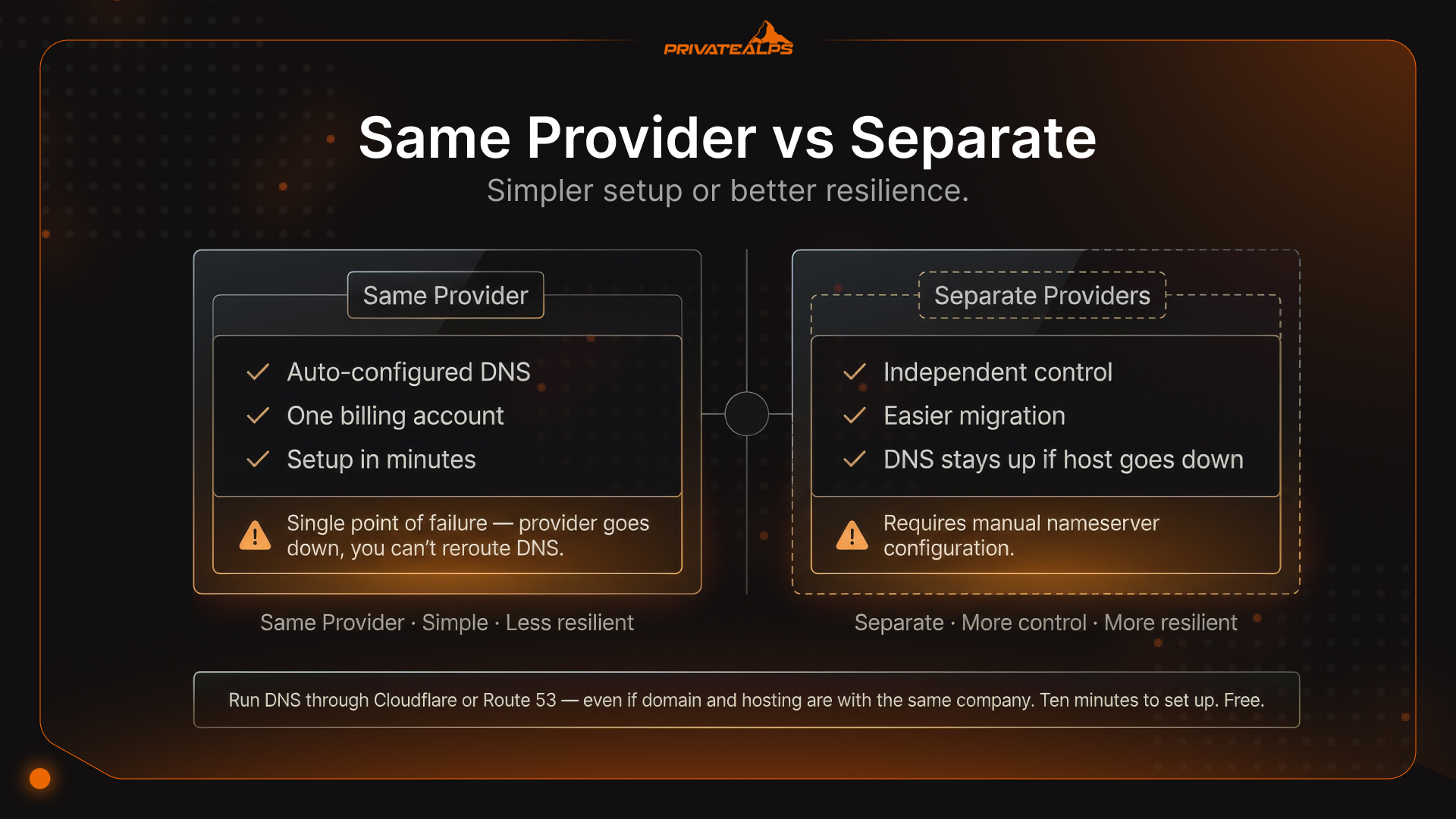
When weighing web hosting vs domain hosting as a combined purchase, the question isn't really which is better. It's how much redundancy you care about. Same provider is genuinely simpler - DNS usually auto-configures, one billing account, setup in minutes. Most beginners start there. The problem is that "simpler" and "resilient" pull in opposite directions here.
| Approach | Pros | Cons | Best For |
|---|---|---|---|
| Same provider | Simpler setup, auto-configured DNS, one billing account | Single point of failure; domain tied to hosting's fate | Beginners, low-stakes personal sites |
| Separate providers | Independent control, easier migration, redundancy | Requires manual nameserver configuration | Businesses, production environments |
| Domain + third-party DNS | Maximum resilience; Cloudflare DNS or Amazon Route 53 sit between registrar and host | Adds one more account to manage | High-availability setups |
The single-point-of-failure problem catches people off guard because it only becomes obvious at the worst moment. Provider goes down - scheduled maintenance, unexpected outage, doesn't matter - and you want to reroute DNS. Except your registrar panel lives at the same provider. Same login, same account, equally unreachable. Your website is dark and you can't fix it from outside. That's not a theoretical scenario. It happens.
The fix takes ten minutes and costs nothing: run your authoritative DNS through Cloudflare DNS or Amazon Route 53, even if domain and hosting are with the same company. DNS stays up independently. If the host goes down, you can point the domain somewhere else within minutes instead of waiting for your provider's status page to show green again.
How Much Do Domain Names and Web Hosting Cost?
Domain and hosting cost very differently, and the difference matters more than the raw numbers. When comparing web hosting vs domain registration costs, domains are predictable - they go up slightly at renewal but nothing dramatic. Hosting is where the budget surprises hide. The number on the landing page is almost never what you pay after year one.
| Service | Typical First-Year Cost | Typical Renewal Cost | Notes |
|---|---|---|---|
| Domain (.com) | $8–15 | $15–20/yr | Promotional pricing common; renewal is the true cost |
| WHOIS Privacy Protection | $0–15/yr | $10–15/yr | Often omitted from advertised pricing; some registrars include it free |
| Shared Hosting | $2–5/mo (promotional) | $8–15/mo | Renewal rates often 3–4× the introductory price |
| VPS Hosting | $10–25/mo | $20–60/mo | More stable pricing; resources are dedicated |
ccTLD domains like .ca, .uk, .de, .swiss - some of these have eligibility strings attached. You may need to prove residency or business registration in the relevant country before you can register one. They also tend to cost more than .com at both registration and renewal.
The "free domain with hosting" offer deserves a hard look. The domain is genuinely free in year one. What's less visible: it's registered under the hosting provider's account, transfer lock can make migration messy, and the price that matters is the hosting renewal rate, not the promotional one. A $3/month plan that renews at $12/month, with an $18/year domain tacked on, is a $162/year commitment after year one. The $36 promotional price is a 12-month loan, not a deal.
Do You Need Both a Domain and Web Hosting?
Standard website? Yes, both. That's not even really a question - domain is the address, hosting is what's at the address. But the setup varies depending on how you're building:
- Email-only - if all you need is a professional email address (not a public site), a domain plus something like Google Workspace or Zoho Mail is enough. No hosting required.
- Website builders - Squarespace, Wix, Webflow include hosting in the subscription. You connect a custom domain to it, done. The hosting question is already answered for you.
- Serverless platforms - Cloudflare Pages, Vercel, Netlify free tiers all give you a place to deploy without a traditional hosting plan. You still need a registered domain to replace their default subdomain.
- Third-party subdomains (yoursite.wordpress.com, yoursite.github.io) - fine for testing, genuinely not viable for a business. The website isn't independently indexed, there's no brand authority, and if you ever want to move, you're starting your SEO from scratch.
For anything with a business attached to it, the website hosting vs domain question isn't really "do I need both" - it's "which hosting model fits what I'm building."
Summary
Three pieces: domain, hosting, DNS. The domain is the address people type. Hosting is the server holding everything. DNS is what stitches them together. Most "why is my site broken" problems are a failure in one of these layers while the person is looking at a different one. If what is web hosting vs domain is still fuzzy at the infrastructure level, go back to the DNS section - that's where it stops being abstract.
Real advice: manage these three things through separate accounts from day one. Not because it's more work, but because when one provider goes down, you want the other two still accessible. That separation is cheap to set up and expensive to retrofit under pressure.
Stop Duct-Taping Security Onto Your Infrastructure
If you've read this far, you know what to look for. PrivateAlps handles the hosting layer the way it should work by default: Swiss jurisdiction, DDoS protection built in, VPS and dedicated options, privacy without needing third-party add-ons to reach a production-grade baseline. No assembling security from separate tools.
FAQ
What Is the Difference Between a Domain Name and Web Hosting?
Short version: domain is the address, hosting is where the content lives. Someone types example.com, DNS translates that into an IP address, and the hosting server sends back the page. That's the whole loop. The core difference between hosting and domain is what breaks when you lose one - miss your domain renewal and visitors hit a parking page; lose hosting and the domain resolves fine but there's nothing there. If you're asking what is the difference between domain and hosting in practical terms, that failure distinction is the clearest way to see it.
Can I Have a Domain Without Web Hosting?
Yes, and it's more useful than it sounds. Without hosting attached, visitors land on a registrar parking page or hit a DNS error - depends on the registrar. But that's sometimes the whole point. Reserving a brand name before the site is ready is completely normal. So is running professional email through Google Workspace or Zoho while the actual site is still being built. Domain without hosting isn't broken. It's just not a website yet.
Can I Have Web Hosting Without a Domain?
Technically yes. Practically, it's a dead end for anything public-facing. Your content sits at a raw IP like http://203.0.113.42 - search engines ignore it, nobody can remember it, and some browsers flag it as unsafe for not having SSL attached to a real domain. You'd basically be building a website that nobody can find. A domain is the minimum requirement for a site that actually functions as a site.
What Is Domain Hosting vs. Web Hosting?
Domain hosting is the DNS layer - nameserver records, A records, CNAME records, MX records. It controls where your domain points. Web hosting is the server where your files actually live and get served from. The difference between web hosting and domain management is that one answers "what IP does this domain point to?" and the other answers "what files does that IP serve?" They can be at the same provider. They're often not. What connects them is the nameserver setting at your registrar - that's the config that tells DNS which hosting provider is authoritative for your domain.
Is a Domain Name the Same as a Website?
No, and the confusion makes sense - the words get used interchangeably, even by people who should know better. A domain is an address. Hosting is the server infrastructure. A website is the actual content - the files, code, and database sitting on that server. You can have a domain without a website. You can have hosting without a domain pointing at it. The website only exists when all three pieces are connected. A domain name alone is just a label floating in DNS with nothing behind it.
How Do I Register a Domain Name?
Find an ICANN-accredited registrar - Namecheap, GoDaddy, Porkbun, plenty of options - search the name you want, enter your contact details (they go into WHOIS unless you pay for privacy protection), pick your registration term, and pay. That's it. Worth knowing before you start: registering a domain isn't buying it. You're leasing the right to use it for however long you paid for. When that term ends and you don't renew, it's gone.
How Long Does DNS Propagation Take?
Plan for 24-48 hours, but you'll usually see it working in some regions within the first 1-4. The delay exists because DNS resolvers worldwide cache your records until the TTL (Time to Live) expires. While that's happening, different visitors get different answers depending on which resolver they hit - some see the old server, some the new. It's not broken. It's just slow. One thing that helps: if you know a DNS change is coming, lower your TTL to 300 seconds (5 minutes) at least 24 hours before you make the switch. Old records flush out fast instead of camping for a full day.
Do I Need an SSL Certificate Separately?
Most hosting providers in 2026 include free SSL through Let's Encrypt - it's usually a checkbox in your control panel, not a separate purchase. What catches people is forgetting to enable it. The certificate lives on the hosting side; your registrar has nothing to do with it. And if domain and hosting are at different providers, it still goes on the hosting side - that part doesn't change. Miss it and visitors see the "Not Secure" warning before they've looked at anything on your site.
Do I Need Hosting If I Use a Website Builder?
No. Squarespace, Wix, Webflow - hosting is baked into the subscription. You're paying for the platform, the hosting comes with it. What you still need is a custom domain. The free subdomain they give you (yourname.wixsite.com) isn't a real substitute - it's their domain, not yours. Your brand doesn't travel with it. If you ever move to a different platform, you're rebuilding SEO from scratch. The domain is the one thing that stays yours no matter what you build on top of it.
Can I Transfer My Domain to a Different Registrar?
Yes, and it's not complicated - just slow. Unlock the domain at your current registrar, request the EPP (authorization) code, then initiate the transfer at the new registrar using that code. The catch most people hit: ICANN enforces a 60-day lock on transfers after initial registration or after any previous transfer. Doesn't matter how good your reason is - if it's been less than 60 days, the transfer won't go through. Factor that into any migration timeline.
Can I Change My Domain Name After Launch?
You can, but it's one of those things that looks manageable until you're actually doing it. Every backlink, every indexed URL, every bit of search authority your site has accumulated - all of it is attached to the old domain. Change the domain without setting up 301 redirects from every single old URL, and it all disappears. Even with redirects in place and a fresh sitemap submitted in Google Search Console, expect rankings to drop temporarily while Google re-indexes everything. It recovers, but it takes time. Don't do this impulsively. If there's any chance the domain might change, sort it out before you launch.
What Happens If I Don't Renew My Domain?
Miss the renewal and most registrars give you a grace period - anywhere from a few days to 45 days, depending on the registrar - where you can still renew at the normal price. Let that slide and the domain enters a redemption period, usually around 30 days, where recovery is technically possible but the fee jumps to $80-200 on top of the standard cost. After redemption closes, the domain drops back into the public pool. Anyone can register it. At that point you're either buying it back from whoever grabbed it - often at a steep premium if the name has any value - or you're starting over with a new domain. Autorenewal exists for a reason.