



Dedicated vs Non-Dedicated Server: What's the Difference?
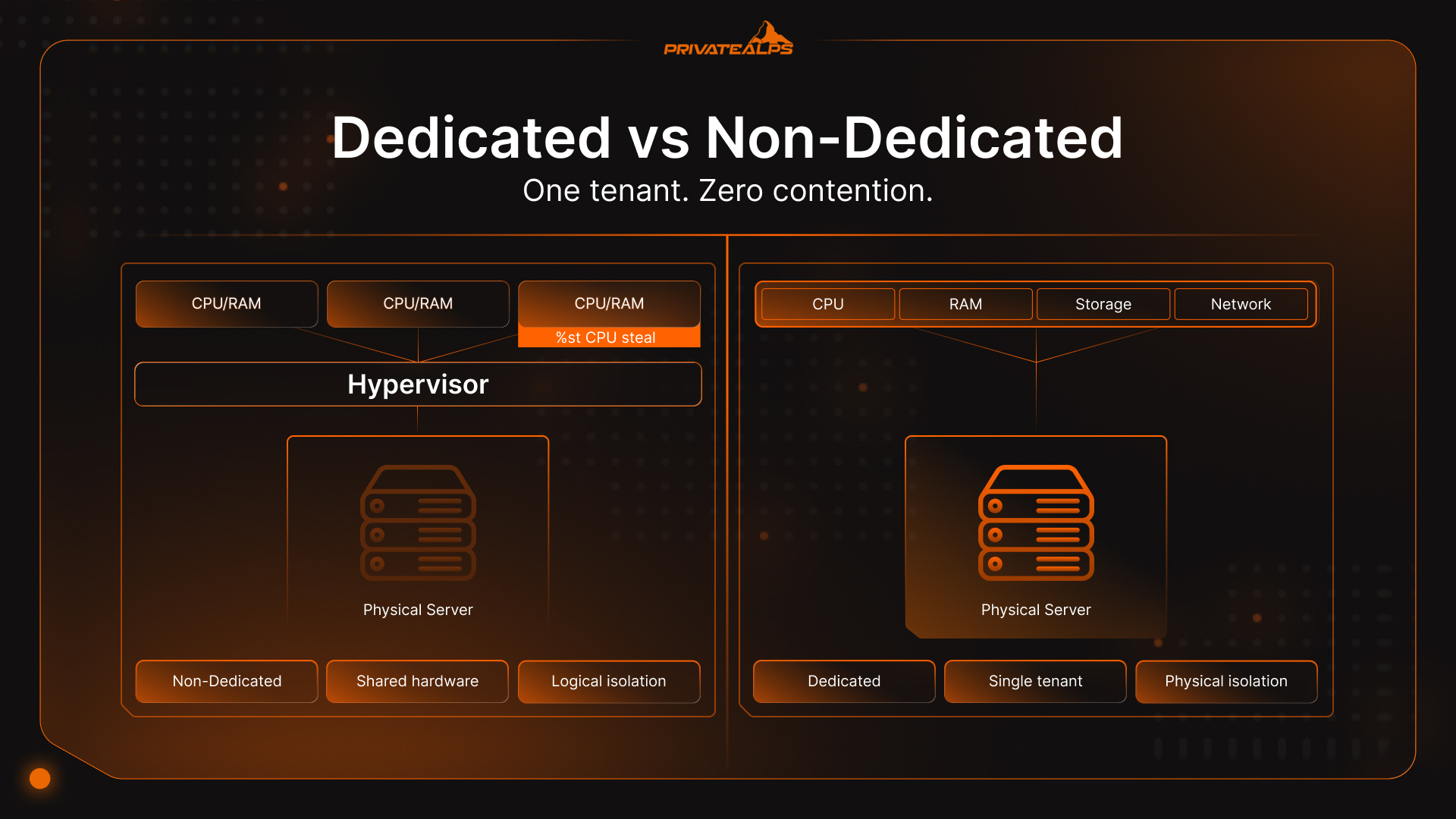
One machine, one tenant, nobody else's workload touching yours. That's what dedicated means in practice. Non-dedicated hosting is the other side of that coin - the same physical hardware, split up and sold to several different clients at once, either through shared OS instances or a hypervisor carving virtual slices. The question of dedicated vs non dedicated server isn't really about specs on a product page. It shows up later, when traffic spikes and you find out whose resources you were actually sharing.
AI Summary
A dedicated server is a physical machine reserved entirely for one client - no shared hardware, no hypervisor overhead, no co-tenants. A non dedicated server is any environment where that hardware is split: shared hosting pools resources across dozens or hundreds of sites with no isolation at all; VPS uses a hypervisor (KVM or VMware) to carve out reserved CPU and RAM per tenant; VDS guarantees those resources without oversubscription; cloud VPS adds on-demand horizontal scaling without migration.
The core trade-off is predictability versus cost - dedicated delivers consistent, hardware-level performance, while non dedicated options reduce upfront spend at the price of resource contention risk. For regulated workloads, the distinction also determines audit scope: physical isolation on dedicated hardware satisfies PCI DSS, HIPAA, and GDPR/nFADP requirements that shared and virtualized environments can only approximate. Dedicated server hosting was valued at $16.9 billion in 2023, growing at 19.1% CAGR through 2032 (Introspective Market Research, 2024), driven by compliance mandates and AI compute demand. :::
What Is a Dedicated Server?
A dedicated server is bare metal - one physical machine with no hypervisor layer, allocated to a single client. No CPU sharing, no RAM pooling, no other tenants. Every core is yours. Every IOPS is yours.
People throw "bare metal" around loosely. What it actually means: the OS sits directly on the hardware. Nothing in between. No virtualization abstraction eating cycles, no memory balloon drivers fighting for headroom, no I/O going through a translation layer. When you benchmark throughput on a dedicated box, you're measuring what the hardware can actually do - not what the hypervisor decided to pass through to you that day.
Where dedicated servers are usually the obvious answer:
- E-commerce platforms that can't afford a checkout timeout during a flash sale
- Financial trading infrastructure where microseconds matter in order-book latency
- HIPAA environments storing or processing ePHI
- PCI DSS-compliant payment systems
- ML model training with direct GPU pass-through
- Game servers holding 64- or 128-tick rates (Counter-Strike 2, Valorant)
What Is a Non-Dedicated Server?
Non dedicated hosting covers a wide range - shared hosting, VPS, VDS, cloud instances all qualify. Every non dedicated environment shares one trait: the physical hardware underneath belongs to multiple clients simultaneously. How much that matters depends almost entirely on where in that spectrum you land.
Multi-tenant hosting is the messiest end of it. Multiple websites on one OS instance, no real resource fences between them. One client's PHP process gets greedy, and the server doesn't necessarily stop it - the limits are soft, and they flex until something slows down. A virtual server tightens that up. A hypervisor (usually KVM or VMware) enforces reserved CPU and RAM per virtual machine. You still share the physical box, but a traffic surge on someone else's site doesn't automatically eat your resources. VDS - Virtual Dedicated Server - takes another step: resources are guaranteed and not oversubscribed, though the machine is still virtualized underneath. Cloud instances are the most flexible of the bunch, letting you resize horizontally without touching DNS or moving data.
The noisy neighbor problem isn't theoretical. Take a pooled server running 200 accounts. One client runs a sloppy database query at peak hours. Server-wide CPU hits 95%. The latency hit on co-tenants? Easily 400–800ms - enough to fail Google's Core Web Vitals LCP threshold of 2.5 seconds before a user even sees a page. A virtual server cuts the exposure but doesn't eliminate it. CPU steal time - that's the %st column in Linux's top - runs 2–5% on a well-managed host and climbs to 15–20% on a moderately oversold one during busy periods. One fifth of your allocated compute, gone, no notification.
Dedicated vs Non-Dedicated Server: Side-by-Side Comparison
| Dimension | Dedicated | VPS | Shared Hosting |
|---|---|---|---|
| Performance | Maximum, consistent | Good, with steal-time risk | Variable, unpredictable |
| Resource Isolation | 100% physical | Hypervisor-enforced logical | None |
| Security | Full physical isolation | Logical isolation only | Shared OS kernel, high risk |
| Compliance Fit | PCI DSS, HIPAA, GDPR/nFADP native | Possible with documented controls | Rarely sufficient |
| Scalability | Vertical (hardware upgrade) | Vertical + horizontal | Limited to plan tier |
| Cost | $80–$500+/month | $10–$200/month | $2–$30/month |
| Management | Full root, full responsibility | Root access available | Control panel only |
| Customization | Kernel + BIOS level | OS-level only | None |
Multi-tenant hosting handles low-traffic sites that don't have anything critical riding on uptime. A virtual server covers most growing applications without overpaying. Dedicated isn't the "premium upgrade" - it's the option you reach for when performance consistency and regulatory requirements stop being things you can trade away.
Performance: Where the Gap Is Real
The performance difference between dedicated and non dedicated hosting isn't really about raw specs. It's about whether what's on paper is what you actually get. Dedicated servers are steadier - not always faster in isolation, but they don't wobble when the machine next door gets busy. A VPS on the same physical host inherits two architectural penalties by design: hypervisor CPU overhead and I/O virtualization latency.
Two architectural facts explain most of it. A virtual server carries hypervisor CPU overhead by design. I/O goes through a virtualization layer. Neither of those exist on bare metal. So when a non dedicated instance benchmark looks slower than expected, it's not usually a hardware problem. It's the tax you pay for running virtual.
CPU steal time is where this gets measurable. Check the %st column in Linux's top on any virtual server. That number is the percentage of time your virtual CPU spent waiting on the physical CPU because another tenant held it. On a well-run provider, it stays around 2–5%. On a provider that's oversold their hardware - and plenty do - that number spikes to 20–30% during peak usage. A third of your compute, quietly unavailable, no error messages, no alerts. Dedicated machines read zero. There's nothing to compete with.
Hardware specs compound this. Current dedicated servers come with DDR5 RAM (per-channel bandwidth of 89.6 GB/s versus DDR4's 51.2 GB/s in comparable dual-channel setups, with multi-channel server platforms pushing considerably further), NVMe storage at 7,000+ MB/s sequential read, and CPUs like the AMD EPYC 9654 - 96 cores, 384MB L3 cache. A virtual server sitting on that same physical host can't get all of it. The hypervisor takes a cut of I/O and memory bandwidth before your environment sees a byte.
Workloads that feel this most:
- Financial transaction processing - latency on order books and clearing pipelines
- High-concurrency databases: PostgreSQL, MySQL running 10,000+ queries/second
- Live video encoding and transcoding
- ML inference where GPU pass-through at full bandwidth isn't optional
- Game servers that fall apart below 128-tick rates
Security and Compliance: When Physical Isolation Is Required
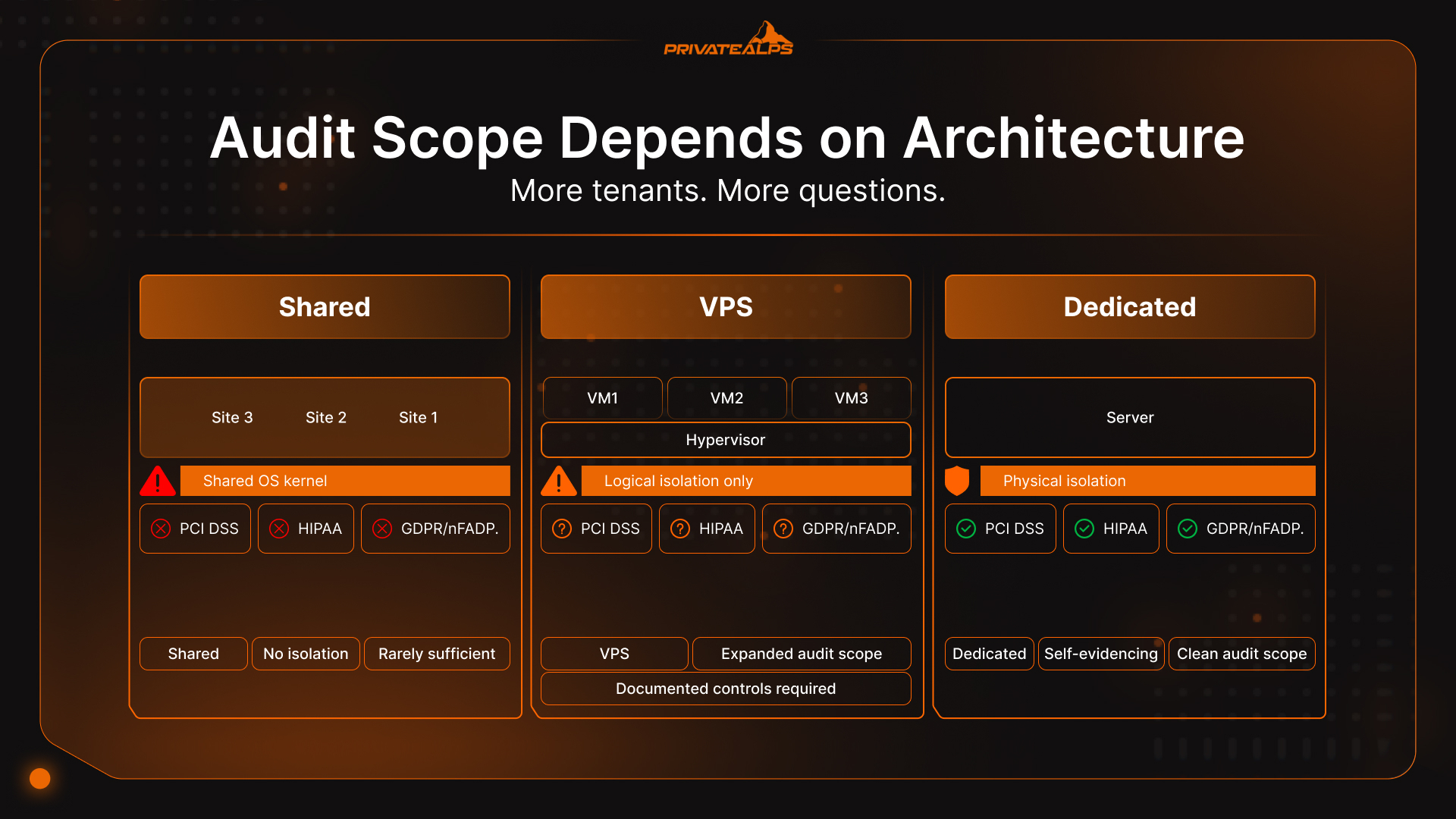
For PCI DSS, HIPAA, and GDPR/nFADP environments, physical isolation on a dedicated server means no co-tenant can reach your CPU, storage, or network - satisfying audit requirements that shared and virtualized setups can only approximate through documentation. The architecture is self-evidencing; the compliance argument is shorter as a result.
Physical isolation is a specific thing. It means no other tenant's processes share your CPU, no other client's traffic shares your NIC, no other workload touches your storage controller. Not through a misconfigured hypervisor, not through a shared kernel - nothing. For environments governed by PCI DSS, HIPAA, or GDPR and its Swiss equivalent nFADP, that architecture determines audit scope more than almost any other infrastructure decision.
Here's the compliance framing that gets missed in most comparisons: what is the difference between dedicated and non dedicated server environments when an auditor is involved? Every co-tenant on a shared physical host is a surface area the auditor now has to evaluate. More tenants, more questions, more documentation to justify why logical isolation satisfies a standard that often prefers physical. Dedicated hardware sidesteps that entire conversation. The separation is self-evidencing. You don't need a supplemental appendix explaining it.
Three regulations where this plays out differently depending on your setup:
- PCI DSS v4.0 - active as the sole standard since March 2024, with 51 future-dated requirements fully mandatory from March 31, 2025. Requirement 2.2.1 demands isolation between system components with different security functions. On shared hosting, that's architecturally impossible. On VPS, it requires documented justification that expands audit scope and cost. On dedicated, the physical boundary satisfies the requirement directly. (PCI Security Standards Council)
- HIPAA - the U.S. HHS requires technical safeguards protecting ePHI from unauthorized access. Multi-tenant environments need a signed Business Associate Agreement from the provider, plus documented evidence of logical isolation. Some VPS providers supply that. Many don't, or won't put it in writing. Dedicated removes the shared-tenant question from HIPAA scope entirely. (HHS HIPAA Security Rule)
- GDPR / Swiss nFADP - Switzerland's Federal Act on Data Protection took effect September 2023, imposing accountability requirements that closely mirror GDPR. For companies processing Swiss resident data, physical server location and resource isolation are audit-relevant facts. A dedicated server on Swiss infrastructure produces a clean, documentable data-processing chain without co-tenant variables to explain away.
The numbers make the cost argument concrete. Visa and Mastercard can levy PCI non-compliance fines of $5,000 to $100,000 per month on acquiring banks - and those get passed through to the merchant. A dedicated server at $150/month that removes PCI audit exposure isn't a hosting upgrade. It's cheaper than the first penalty.
IP reputation is a shared hosting problem most people don't think about until it's already happened: Every site on a shared server shares one IP address. A neighbor gets flagged for spam or phishing - Spamhaus picks it up, Google Safe Browsing flags it, major mail providers block it. Your domain's email deliverability takes the hit. Your SEO standing erodes. You didn't do anything. VPS and dedicated each get their own IP. It's a non-issue.
Cost Analysis: When Dedicated Becomes Cheaper Than VPS
The common read on dedicated hosting is that it's the premium option - more money for more server. That's only true at low utilization. Push a non dedicated virtual server consistently above 70% of allocated CPU and RAM, and the economics start flipping.
At that utilization level, scaling a virtual server vertically or adding instances costs more month-over-month than equivalent dedicated infrastructure. Non dedicated providers oversell physical hosts by design - they rely on statistical averaging across tenants to stay within hardware limits. Most of the time it works. When it doesn't, you notice.
Dedicated removes oversubscription from the equation and with it the unpredictability that makes performance hard to reason about. Add compliance to the picture and the math moves faster still: audit prep hours and regulatory risk exposure have real costs, and dedicated often wins on total cost well before traffic volume justifies it on raw specs alone.
| Configuration | Monthly Cost | CPU | RAM | Storage | Best Fit |
|---|---|---|---|---|---|
| Shared Hosting (cPanel) | $5–$15 | Shared, burstable | 512MB–2GB shared | 10–100GB HDD | Static sites, blogs |
| VPS (2 vCPU / 4GB RAM) | $20–$40 | 2 vCPU | 4GB | 80GB NVMe | Dev envs, SMB apps |
| VPS (8 vCPU / 16GB RAM) | $80–$150 | 8 vCPU | 16GB | 200GB NVMe | Mid-traffic apps |
| Entry Dedicated (Xeon E) | $80–$150 | 4–8 phys cores | 32GB DDR4 | 2×480GB NVMe | Zero steal time |
| Performance Dedicated | $200–$350 | 16+ phys cores | 64GB DDR5 | 4×960GB NVMe | High-traffic, compliance |
That $80–$150 overlap is the practical punchline. An entry dedicated server and a high-spec VPS cost the same - but only one delivers physical core performance with zero CPU steal and no co-tenant risk.
How to Choose: Decision Framework
| Your Situation | Recommended | Why |
|---|---|---|
| Static site or blog, <10K visitors | Shared Hosting | Cost-efficient; dedicated adds no value |
| Growing app or SaaS, 10K–50K visitors | VPS | Isolated resources, horizontally scalable |
| E-commerce/API under sustained load | Dedicated | Consistent performance; zero steal time |
| PCI DSS, HIPAA, or GDPR required | Dedicated | Physical isolation simplifies audit scope |
| ML training or GPU inference | Dedicated (GPU) | Bare-metal GPU pass-through is mandatory |
| Startup MVP, traffic pattern unknown | Cloud VPS | Pay-per-use; scale horizontally as needed |
| High-frequency trading | Dedicated | Zero hypervisor latency |
Managed vs Unmanaged: The Second Decision
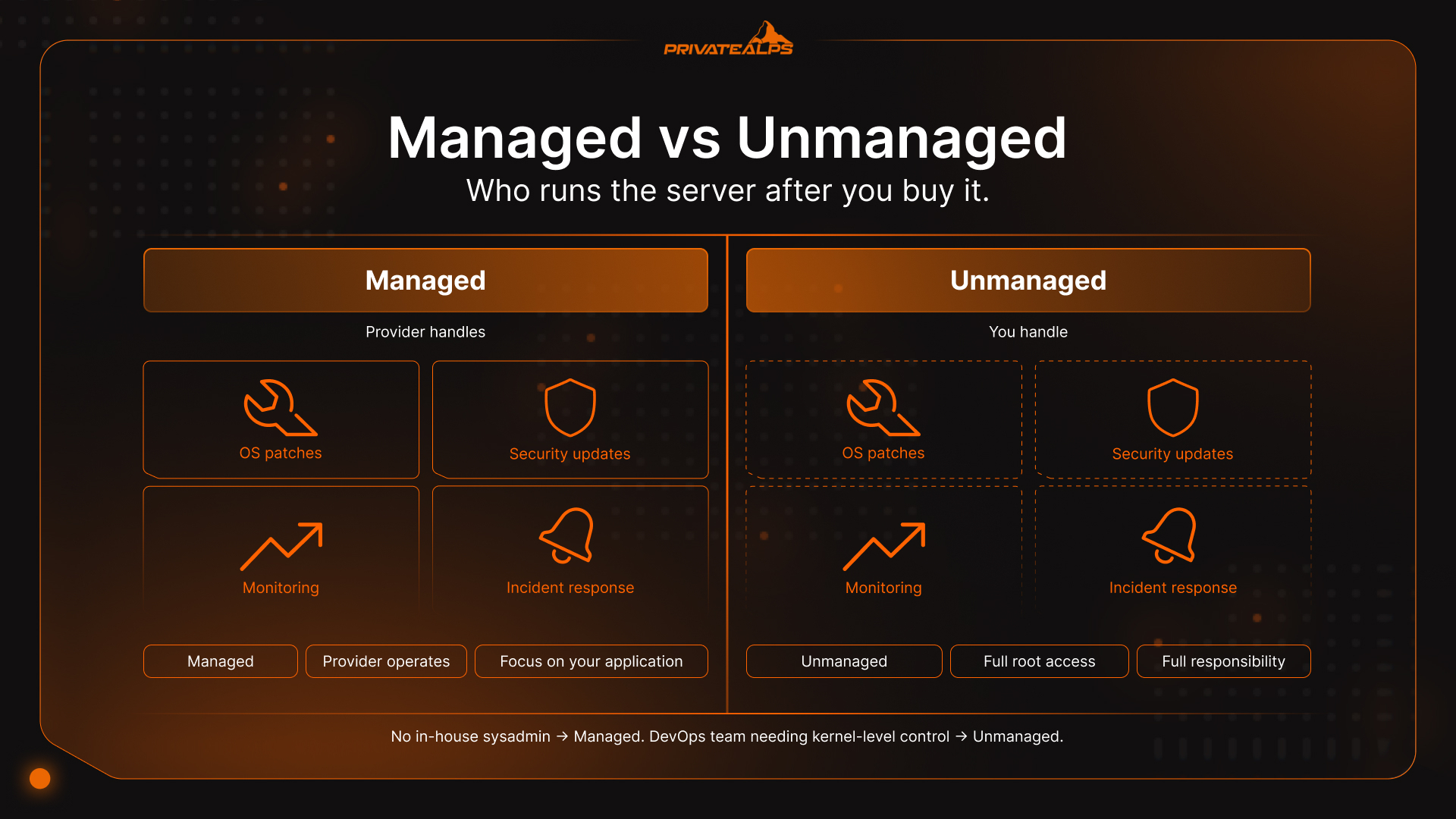
Managed means the provider patches the OS, handles security updates, watches monitoring, and responds when services fall over. Unmanaged means you get root access and a clean machine - everything else is your problem.
| Option | Who Handles Operations | Best For |
|---|---|---|
| Managed Dedicated | Provider (OS, security, monitoring) | Teams without in-house sysadmin |
| Unmanaged Dedicated | Client (full root, responsibility) | DevOps needing kernel-level control |
| Managed VPS | Provider (core OS maintenance) | Developers focused on application layer |
| Unmanaged VPS | Client manages OS and above | Engineers wanting control at lower cost |
Summary
The difference between dedicated and non dedicated server options is really about one thing: who else is on your hardware and how much of it they can reach. Multi-tenant hosting - everyone's pooled together. A virtual server - isolated by a hypervisor, but still the same physical box. Dedicated - nobody else, full stop. That distinction doesn't matter much when traffic is light and nothing regulated is involved. It starts mattering a lot when performance needs to be consistent, when an auditor starts asking questions, or when you run the numbers past 70% utilization and realize the "cheaper" non dedicated option isn't cheaper anymore.
Start With the Right Infrastructure - Scale Without Migration PrivateAlps runs dedicated and VPS hosting on Swiss infrastructure - GDPR and nFADP compliance built in, not added after the fact. Start on VPS, move to dedicated when the workload justifies it. Explore PrivateAlps hosting plans and pick the setup your application actually needs.
FAQ
What Is the Main Difference Between a Dedicated and Non-Dedicated Server?
Dedicated means one physical machine per client - full CPU, RAM, and storage with no sharing and no hypervisor overhead. Non dedicated server environments like virtual servers and multi-tenant hosting divide those same resources across multiple tenants. In practice, the difference shows up as performance predictability.
Is a VPS the Same as a Non-Dedicated Server?
Yes - VPS is one type of non dedicated server. It runs on shared physical hardware, separated from other tenants by a hypervisor. You don't have exclusive access to the underlying machine.
Can a VPS Meet HIPAA or PCI DSS Compliance Requirements?
It can, but with significant caveats. A non dedicated virtual server satisfies both with documented logical isolation controls. However, it expands audit scope and complexity considerably. PCI DSS v4.0 became active in March 2024 with stricter isolation documentation for non dedicated environments. Dedicated removes the ambiguity; physical separation is self-evidencing.
When Does a Dedicated Server Become Cost-Effective?
When a non dedicated virtual server utilization stays consistently above 70%, scaling it costs more than equivalent dedicated infrastructure. For PCI DSS and HIPAA workloads, the math often tips to dedicated even at lower utilization once audit preparation time is factored in.
What Is the Noisy Neighbor Problem?
One tenant on a shared host consumes a disproportionate share of resources, causing performance to drop for everyone else on that machine. On a dedicated server, there are no other tenants, so the problem doesn't exist.
Is Dedicated Hosting Worth It for Small Businesses?
Usually not - a VPS gives most SMBs adequate isolation at lower cost. That changes when payment card data is involved (PCI DSS), when health records are being stored (HIPAA), when Swiss/EU data law applies, or when a slow page load translates to lost sales.