



Running AI Agents on a VPS: How to Choose a Server and What to Run
An AI agent is autonomous software built to run continuously - planning, calling tools, and acting toward a goal on its own. That continuous nature is exactly why running an AI agent on a VPS makes more sense than running it on a laptop, which sleeps, drains its battery, and exposes your personal files to whatever the agent does next.
This guide answers two linked questions: what to run (the agent type and framework) and how to choose a server for it (the specs and the host). Both answers hinge on one decision - does your model run through an external API, or locally on the machine itself? Get that right, and the rest of the sizing falls into place.
There is a quieter thread running under every choice here. An autonomous agent holds your API keys, your files, and access to your accounts, so where it lives and what it can reach matter as much as how fast it runs.
In Brief
A VPS is the standard home for an AI agent because it provides 24/7 uptime, a stable IP, dedicated resources, and isolation from your personal machine. The biggest factor in sizing the server is whether the language model runs via an external API or locally on the hardware. API-based agents stay small; local models need far more. A server fixes infrastructure, not judgment - it will not save a badly scoped agent.
- A VPS keeps an agent running 24/7, independent of your laptop.
- A stable IP lets the agent receive webhooks and API callbacks.
- Isolation contains the damage if the agent is ever compromised.
- API-based agents are light: ~1-2 vCPU and 2-4 GB RAM is often enough.
- Multiple agents plus Docker and a vector DB push you to 4 vCPU / 8 GB+.
- Local model inference needs a GPU (VRAM), not just more CPU.
- A server does not fix a poorly scoped agent or weak secret handling.
- Backups and scoped API keys are your responsibility, not the host's.
What Is an AI Agent, and Why Run It on a Server?
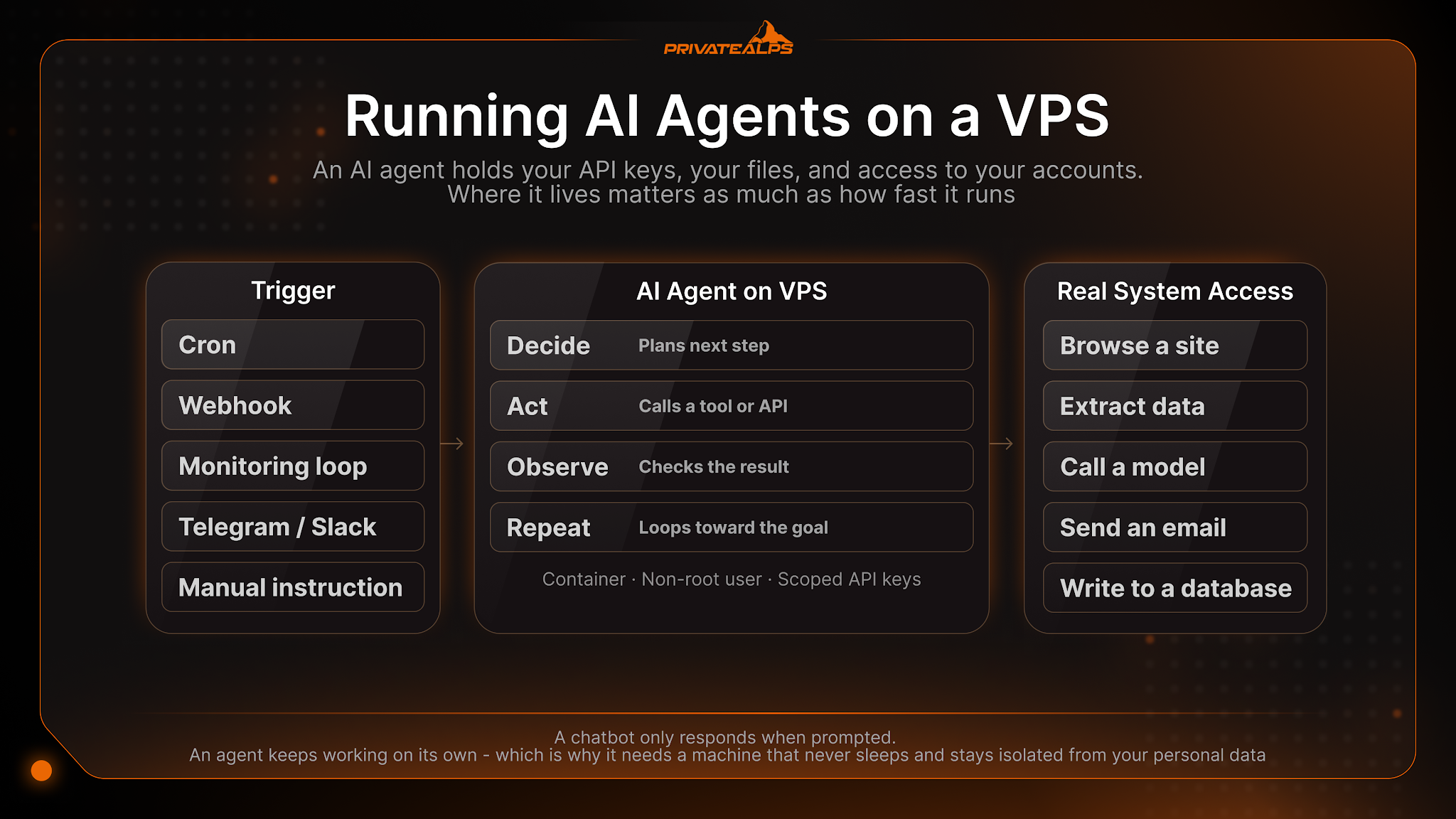
An AI agent is autonomous software that plans steps, calls tools, checks the results, and acts in a loop toward a goal - without a human approving each step. A chatbot only responds when prompted. An agent keeps working on its own, which is why it needs a machine that never sleeps and stays isolated from your personal data.
In practice, the agent receives a goal, breaks it into steps, and runs a reasoning loop: decide, act, observe, repeat. "Acting" means real system access - it can browse a site, extract data, call a model, send an email, or write to a database. Each action touches something you own, so the agent needs a stable, always-on host rather than a personal laptop.
Common triggers that wake an agent:
- Scheduled tasks (a cron-style nightly run)
- Incoming webhooks from another service
- Monitoring loops watching a price, feed, or endpoint
- New messages on Telegram, Slack, or email
- Manual instructions from its operator
Why a VPS Is the Default Home for AI Agents
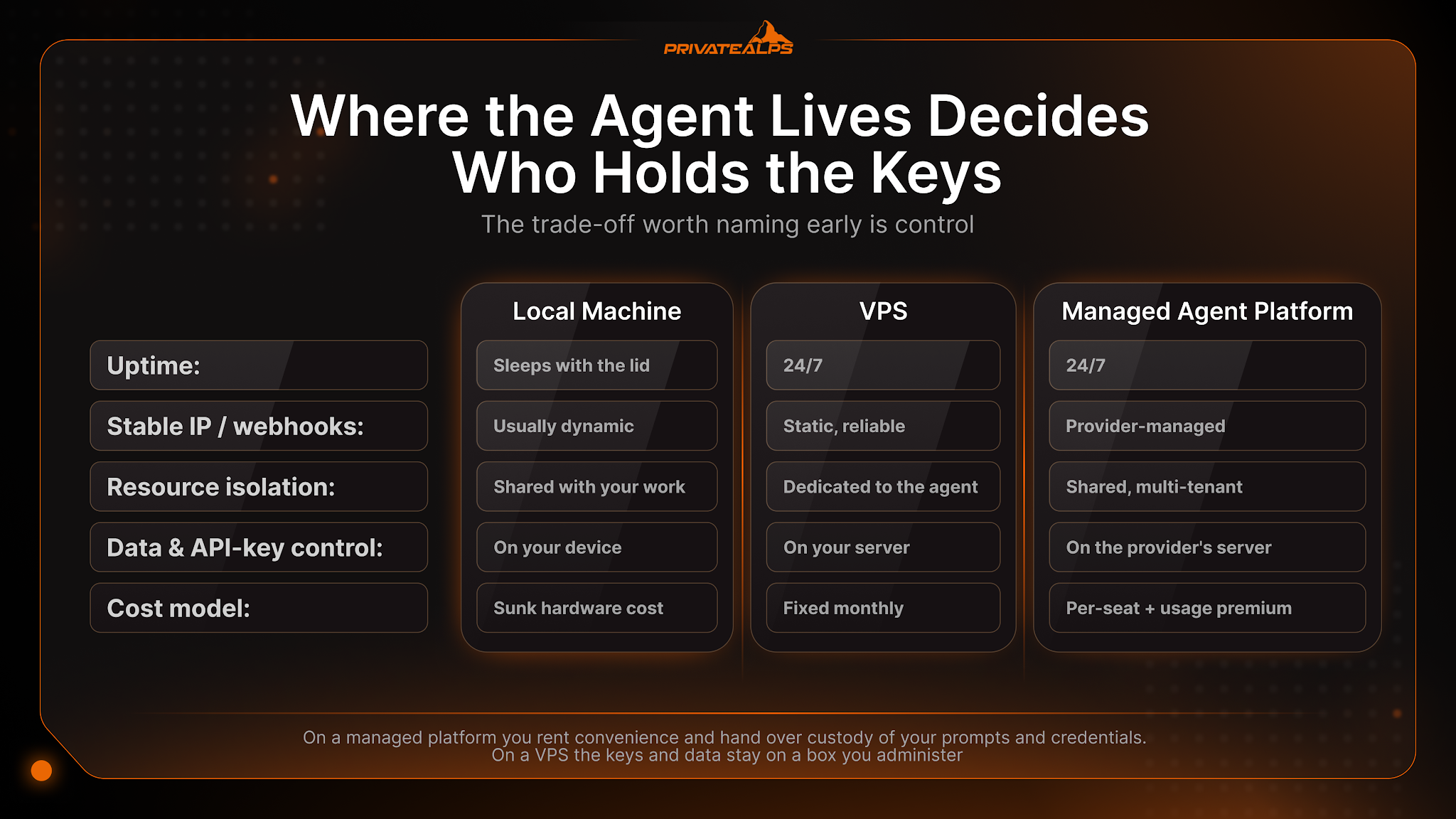
A VPS is the practical middle ground between a laptop and a fully managed agent platform. A laptop sleeps, drains, and sits on your personal network. A managed platform is convenient, but your keys, data, and conversation history live on someone else's server. A VPS gives you 24/7 uptime and dedicated resources while keeping control of the box.
| Factor | Local machine | VPS | Managed agent platform |
|---|---|---|---|
| Uptime | Sleeps with the lid | 24/7 | 24/7 |
| Stable IP / webhooks | Usually dynamic | Static, reliable | Provider-managed |
| Resource isolation | Shared with your work | Dedicated to the agent | Shared, multi-tenant |
| Data & API-key control | On your device | On your server | On the provider's server |
| Setup effort | Low | Moderate | Lowest |
| Cost model | Sunk hardware cost | Fixed monthly | Per-seat + usage premium |
| Scalability | Limited by the laptop | Scale CPU/RAM/storage | Scales, on their terms |
The trade-off worth naming early is control. On a managed platform you rent convenience and hand over custody of your prompts and credentials. On a VPS you do the setup yourself, but the keys and data stay on a box you administer - and if the agent is ever prompt-injected, the blast radius is contained to that instance rather than spread across a shared service.
What Can You Run? AI Agents, Frameworks, and Workloads
Almost any Linux-based AI agent runs on a VPS. The useful way to group them is by where the model runs - through an external API or locally on the machine - and by workload. They all install on a standard Linux VPS.
Two generations are worth distinguishing. AutoGPT was the early viral autonomous agent and is best treated as the first generation, not a current default; CrewAI and LangChain are mature frameworks. The 2026 wave - OpenClaw, Hermes Agent, and Claude Code - runs as persistent, self-hosted services. Note that Claude Code authenticates with your own Anthropic account and calls the model through Anthropic's API; it is not a shared consumer login.
| Tool | What it is (generation) | Model location | Typical use |
|---|---|---|---|
| OpenClaw | Self-hosted personal agent daemon (2026 wave) | API or local | Always-on assistant, messaging, monitoring |
| Hermes Agent | Self-hosted autonomous agent, Nous Research (2026 wave) | API or local | Persistent tasks, self-built skills |
| Claude Code | Terminal coding agent, own Anthropic API account (2026 wave) | API (remote) | Reading/writing code, repo automation |
| CrewAI | Multi-agent orchestration framework (established) | API or local | Role-based agent teams |
| LangChain | Agent / LLM application framework (established) | API or local | Custom pipelines, tool chaining |
| AutoGPT | Early viral autonomous agent (first generation) | API or local | Experiments, legacy projects |
| Cline / Aider / Continue | Coding agents and assistants | API or local | In-editor and CLI code tasks |
| n8n | Workflow automation with AI nodes | API or local | Webhook-driven automations |
| Ollama | Local model runtime | Local | Running open models on the box |
Typical workloads these tools handle:
- Competitor and price monitoring
- Scraping and structured data extraction
- Messaging assistants on Telegram, Slack, or Discord
- Coding agents that read and write your repository
- Scheduled automations and webhook listeners
- Local document processing and RAG queries
Every tool here is granted real system access - shell, files, API keys - which is why where it runs is not a side detail.
API-Based vs Local-Model Agents: The Decision That Sets Your Specs
The agent code itself is light. What makes a server big or small is where the language model runs. With an API-based agent, inference happens on the provider's infrastructure, so the server mostly orchestrates calls. With a local-model agent, the model runs on your hardware, and the constraint shifts from token cost to GPU memory.
| Dimension | API-based agent | Local-model agent |
|---|---|---|
| Where inference runs | Provider's servers | Your VPS / GPU |
| CPU need | Low-moderate | High (or offloaded to GPU) |
| RAM need | 2-4 GB for one agent | 16-32 GB system RAM (VRAM is the real limit) |
| GPU need | None | Required - VRAM sets the ceiling (see GPU section) |
| Storage | Small (logs, dependencies) | Large (model weights) |
| Cost model | Low server + per-token | High hardware + ~zero per-token |
| Where prompt data goes | To the model provider | Stays on your server |
"API-based" does not mean "zero load." Even with remote inference, CPU and RAM come under pressure during document parsing, text chunking, local embedding computation, and vector-database queries - the parts of a RAG pipeline that run on your box. The control angle is concrete here too: an API-based agent sends your prompt data to a third-party provider, while a local model keeps every token on the server. Running a model locally through a runtime like Ollama is what keeps that data in-house.
How to Choose Server Specs: CPU, RAM, Storage, and Bandwidth
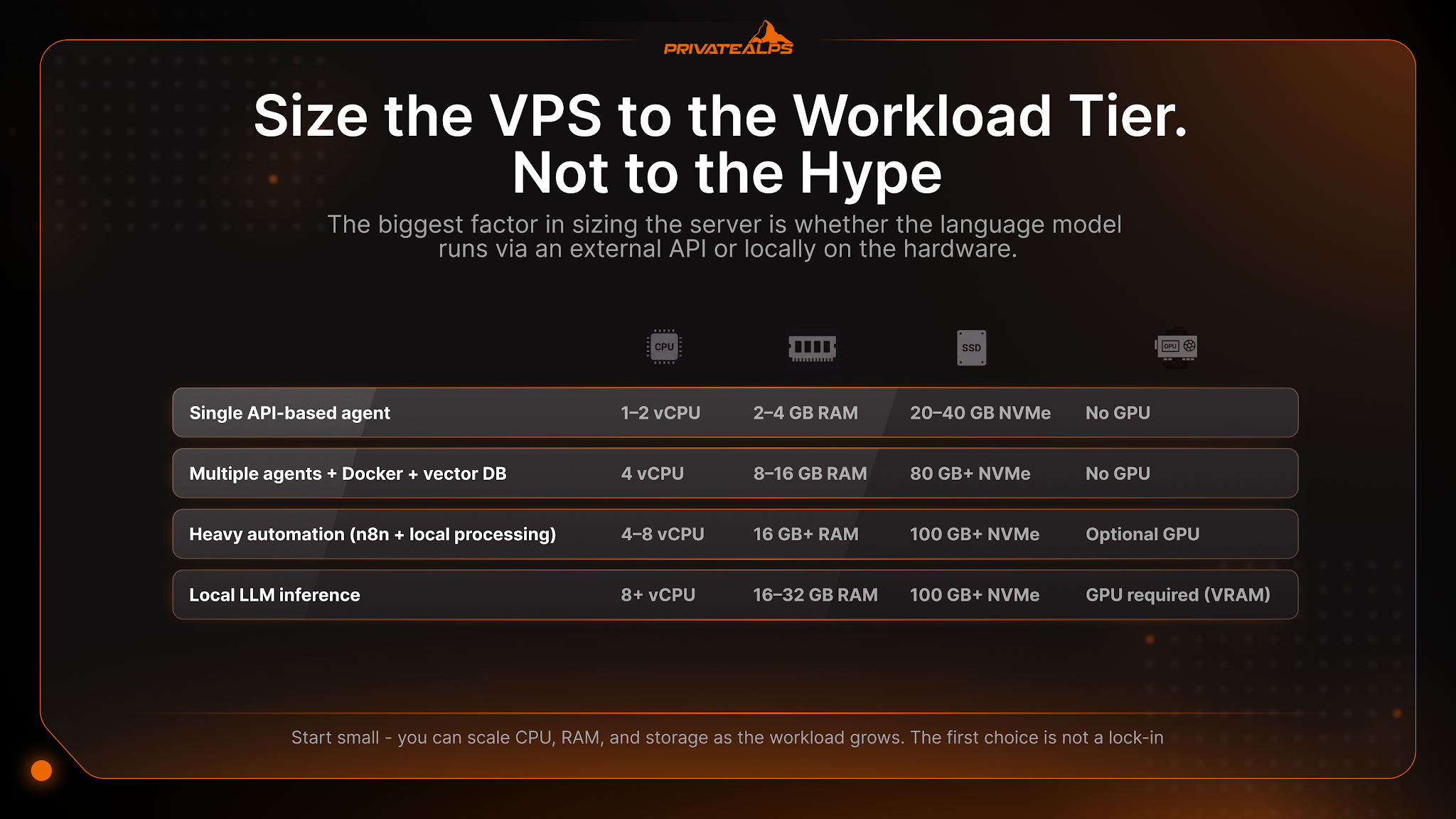
Size the VPS to the workload tier, not to the hype. A single API-based agent runs on a small instance. Add Docker, a database, and several agents, and RAM plus NVMe storage become the limiting factors. Local model inference is a different category that needs a GPU. Start small - you can scale CPU, RAM, and storage as the workload grows.
| Workload tier | vCPU | RAM | Storage | GPU? | Example agents |
|---|---|---|---|---|---|
| Single API-based agent | 1-2 | 2-4 GB | 20-40 GB NVMe | No | One OpenClaw / Hermes agent |
| Multiple agents + Docker + vector DB | 4 | 8-16 GB | 80 GB+ NVMe | No | Several agents, RAG pipeline |
| Heavy automation (n8n + local processing) | 4-8 | 16 GB+ | 100 GB+ NVMe | Optional | Workflow + scraping fleet |
| Local LLM inference | 8+ | 16-32 GB | 100 GB+ NVMe | Yes (VRAM) | Ollama / vLLM serving a model |
Each driver maps to a real need. RAM holds agent state and any local database or vector store; NVMe storage speeds up vector queries, logs, and dependency caches; bandwidth matters for scraping and streaming; and dedicated - not shared - CPU cores remove the noisy-neighbour effect that adds latency to a tight monitoring loop. Because these requirements move fast, size against the current framework docs, then start on a modest NVMe Linux VPS and scale up. The first choice is not a lock-in.
Do You Need a GPU to Run an AI Agent?
No - not for API-based agents, because the model runs on the provider's infrastructure. A GPU is only required if you self-host the model locally with a runtime like Ollama, vLLM, or llama.cpp. There, VRAM is the limiting factor, and it scales with model size and context length.
A rough rule for local inference: estimate VRAM as (parameters × bits per weight) ÷ 8. A 7B model at 4-bit quantization needs roughly 4-6 GB of VRAM, while a 70B model needs around 38-48 GB. Quantised small models can run CPU-only, but slowly - often single-digit tokens per second - so a GPU dedicated server with NVIDIA CUDA support is the practical choice for responsive local inference.
How to Choose a VPS Provider for an AI Agent
Once the specs are set, choosing a host comes down to a short list of criteria that matter specifically for an always-on agent holding credentials and tool access. Dedicated resources, root access, fast deployment, snapshots, encryption, and jurisdiction all carry different weight for an agent than they do for a static website.
| Criterion | Why it matters for an AI agent | What to check |
|---|---|---|
| Dedicated vs shared CPU/RAM | Predictable latency for monitoring and loop workloads | Whether cores and RAM are guaranteed, not "fair share" |
| Root access | Install any framework, container runtime, or local model | Full root, not a restricted panel |
| Deployment speed | Spin up and iterate quickly | How fast a VPS instance is provisioned |
| Snapshots / backups | Roll back before a risky agent change | Snapshot frequency and restore process |
| Full-disk encryption | Protect keys and data at rest | Whether encryption is available (e.g. KVM) |
| Console / IPMI access | Recover a locked or misconfigured instance | Out-of-band console availability |
| Bandwidth & network | Scraping and streaming agents move data | Traffic limits and port policy |
| Jurisdiction & privacy posture | The agent processes your data and keys | Where the server sits, sign-up and logging policy |
The last row deserves emphasis. Because the agent processes the operator's data and credentials, the legal home of the server and what the host logs become part of your security posture, not an afterthought. A provider's jurisdiction, sign-up requirements, and logging policy are all worth reading before you hand an autonomous process your keys.
How to Deploy an Agent on a VPS: Docker, Users, and Isolation
Deploy the agent inside a container with a dedicated non-root user - not on the bare host as root. Containerisation makes the setup reproducible and adds an isolation layer; a non-privileged user limits what a compromised agent can touch. A process manager keeps it alive across reboots, and snapshots let you undo a bad change.
- Containerise the agent with Docker for reproducibility and isolation.
- Create a dedicated non-root user and run the agent as that user.
- Use a process manager (systemd or pm2) so it restarts on reboot.
- Keep memory, logs, and config on persistent storage.
- Store API keys outside the code, in a restricted environment file.
- Snapshot the instance before any major change.
Isolation is the whole point of this layout. If the agent is prompt-injected or runs a malicious skill, containment keeps the damage inside the container instead of spreading to the host or the wider network. That is the difference between a contained incident and a compromised server.
Security and Privacy: Containing an Autonomous Agent
An agent with shell, file, API, and messaging access is an expanded attack surface, so least privilege and isolation are mandatory, not optional. The OWASP Top 10 for LLM Applications ranks prompt injection and excessive agency among the top risks for exactly this reason - an agent can be tricked into misusing the access you gave it.
- Store API keys in a restricted environment file, never in code.
- Run the agent as a non-root user inside a container.
- Firewall outbound traffic to a whitelist so a compromised agent cannot reach arbitrary hosts.
- Scope each API key to the minimum it needs.
- Log everything for incident review.
- Use open-source observability (e.g. Langfuse) to keep trace data on your server.
On a managed platform, your prompts, keys, and conversation history live on a third party's infrastructure. Self-hosting keeps them under the operator's control - and once they are on your server, the box's jurisdiction, disk encryption, and whether sign-up required your identity all become part of the privacy picture. None of this is fear-mongering; it is simply the surface area you take on when software acts on your behalf.
Cost: Self-Hosting on a VPS vs Managed Agent Platforms
A VPS is a fixed, predictable monthly cost you fully control. Managed agent platforms add a convenience premium and put your data off-box. Separately, model usage - API tokens - is its own line item, independent of the server. API-based agents pair a low server cost with variable token costs; local-model agents trade tokens for higher hardware cost.
The real trade-off is volume. An API-based setup keeps server spend low but adds a per-token bill that grows with use. A local-model setup carries a higher fixed hardware cost (a GPU) but near-zero marginal cost per token, which only pays off at sustained volume. Managed platforms hide costs of their own - per-seat fees, token markup, and lock-in that gets expensive to leave.
| Setup | Server cost | Model cost | Best for |
|---|---|---|---|
| API-based on a VPS | Low, fixed | Variable per token | Most agents, bursty workloads |
| Local model on a GPU server | Higher, fixed | ~Zero per token | High, sustained volume |
| Managed agent platform | Bundled | Marked-up + per-seat | Fastest start, least control |
Summary - Matching the Server to the Agent
A single API-based agent needs only a small VPS; multiple or Docker-heavy agents want more RAM and NVMe; local inference needs a GPU server; and privacy- or isolation-critical deployments belong on single-tenant dedicated hardware. There is no single best server - only the one that matches your agent's model location, workload, and privacy needs. Decide where the model runs first, then size the box, then choose a host you trust with the keys.
PrivateAlps maps to each agent type along the spectrum above. For API-based agents, an NVMe Linux VPS offers full root access, dedicated CPU and RAM, and fast provisioning; for local model inference, GPU dedicated servers run NVIDIA A100/H100 hardware (subject to availability) with CUDA support. For scale, isolation, or running your own hypervisor, single-tenant dedicated bare-metal servers provide dedicated (non-shared) CPU and RAM, full-disk encryption via KVM, IPMI/console access, and anonymous (no-KYC) payment options under Swiss offshore jurisdiction. Built-to-spec dedicated and GPU servers can take time to provision, while VPS instances deploy quickly - see the full range at privatealps.net.
FAQs
What is an AI agent?
An AI agent is autonomous software that plans and executes multi-step tasks using tools, without a human approving each step. That sets it apart from a chatbot, which only responds when you prompt it. The agent decides, acts, checks the result, and continues toward its goal on its own.
Can I run an AI agent on a VPS?
Yes - a VPS is the standard place to run one. It gives the agent 24/7 uptime, a stable IP for webhooks, and isolation from your personal machine. For anything beyond casual testing, a server is the right home.
How much RAM does an AI agent need?
A single API-based agent runs on about 2-4 GB of RAM. Once you add Docker, a database, or several agents, plan for 8-16 GB. A local language model needs far more - 16 GB at minimum, and 32 GB or more for larger models.
Do I need a GPU to run an AI agent?
No, not for API-based agents - the model runs on the provider's infrastructure, so the GPU sits on their side. You only need a GPU when you self-host the language model locally. In that case, VRAM is the limiting factor.
Which AI agents can run on a VPS?
Most Linux-based agents run on a VPS. The current set includes OpenClaw, Hermes Agent, and Claude Code, alongside established frameworks like CrewAI, LangChain, and n8n. All of them install on a standard Linux instance.
What server specs do I need for an AI agent?
For one API-based agent, an entry tier of 1-2 vCPU and 2-4 GB RAM is enough. For multiple or containerised agents with a vector database, step up to around 4 vCPU, 8-16 GB RAM, and NVMe storage. Local inference needs a GPU on top of that.
Is it safe to run an autonomous agent on a server?
Yes, with proper isolation. Run it in a container as a non-root user, firewall outbound traffic to a whitelist, scope every API key to the minimum it needs, and log everything. Those controls keep a compromised or prompt-injected agent contained.
Should I run an agent on a VPS or locally?
Use a VPS for anything beyond casual testing. A local machine sleeps, drains its resources, and exposes your personal data and network to whatever the agent does. A server stays on, stays isolated, and keeps the agent away from your day-to-day device.
Can I self-host the language model too, or only the agent?
Both can be self-hosted. You can run the agent and the model together using a runtime like Ollama or vLLM. The catch is that the local model needs a GPU with enough VRAM - or substantial dedicated CPU - to stay responsive.
How much does it cost to run an AI agent on a VPS?
The server is a fixed monthly cost you control. API-based agents add a variable token bill on top, which grows with usage. Local-model setups trade those token costs for higher upfront hardware cost, mainly a GPU.