



How to Prevent DDoS Attacks: 10 Best Practices
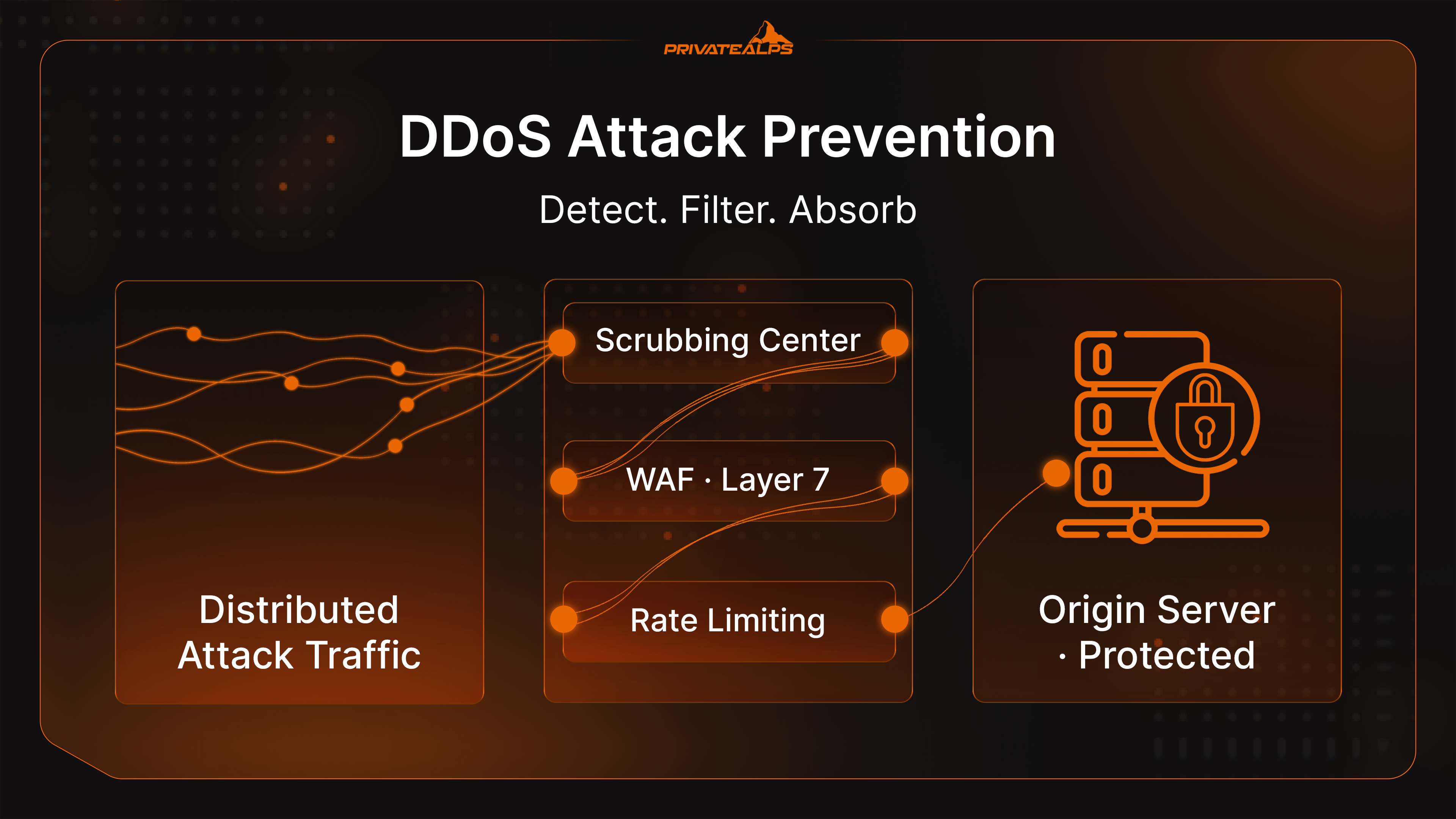
DDoS attack prevention isn't a one-time setup - it's a layered posture you either build before an incident or scramble to build during one. This guide covers 10 best practices for DDoS attack protection: network-level traffic controls, denial of service attack protection tools, and the organizational decisions that determine response time.
Whether you need to know how to stop a DDoS attack that's already running, or focus on preventing DDoS attacks before they start, every practice here is operational and specific.
AI Summary
What is DDoS protection, in plain terms? It's the combination of technical controls - scrubbing centers, firewall rules, detection systems - and processes that filter out malicious distributed traffic before it takes down your infrastructure.
The scale problem is real: according to the Cloudflare Q4 2025 DDoS Threat Report, attacks surged 121% in 2025 to 47.1 million incidents, with the single largest attack reaching 31.4 Tbps. According to NETSCOUT H2 2025 DDoS Threat Intelligence Report covering over 8 million incidents, 42% of attacks used 2-5 distinct vectors simultaneously. A single firewall rule or scrubbing service won't cut it.
The 10 Best Practices at a Glance
- Use a cloud-based DDoS protection service - and lock down your origin IP.
- Implement rate limiting at the web server, WAF, and API gateway layers.
- Deploy a Web Application Firewall (WAF) for Layer 7 attack coverage.
- Enable anycast network diffusion to spread volumetric attack traffic.
- Configure blackhole routing as an ISP-level emergency fallback.
- Apply ingress and egress filtering (BCP38) to block spoofed-source amplification.
- Scale infrastructure with cloud redundancy, load balancing, and economic DDoS guards.
- Develop and test a DDoS incident response plan with clear escalation paths.
- Conduct regular risk assessments and DDoS simulation testing.
- Train employees and set up ISP coordination in advance.
What Is DDoS Protection and Why Does It Matter?
DDoS protection is a set of technical and organizational controls that absorb, filter, and neutralize distributed attack traffic without disrupting legitimate users. It works across multiple network layers - from packet inspection at Layer 3 to HTTP behavioral analysis at Layer 7 - and covers both pre-attack prevention and in-attack response.
The cost of getting this wrong goes past downtime. Revenue loss, SLA penalties, customer churn. For payment processors and SaaS platforms, 15 minutes of unavailability is a measurable hit. According to the Cloudflare Q4 2025 DDoS Threat Report, the largest attack of 2025 hit 31.4 Tbps - a number that immediately overwhelms any on-premises firewall or mitigation hardware. Those appliances aren't built for that scale.
There's a second risk that gets glossed over in most guides. DDoS as a smokescreen. Attackers flood your network on purpose - not to knock you offline, but to keep your team busy while something worse happens in parallel. Credential theft. Lateral movement. Data exfiltration. This pattern is confirmed as an actively exploited tactic by Wiz's January 2026 security analysis. Effective denial of service attack protection has to account for both threats at once.
Types of DDoS Attacks You Need to Defend Against
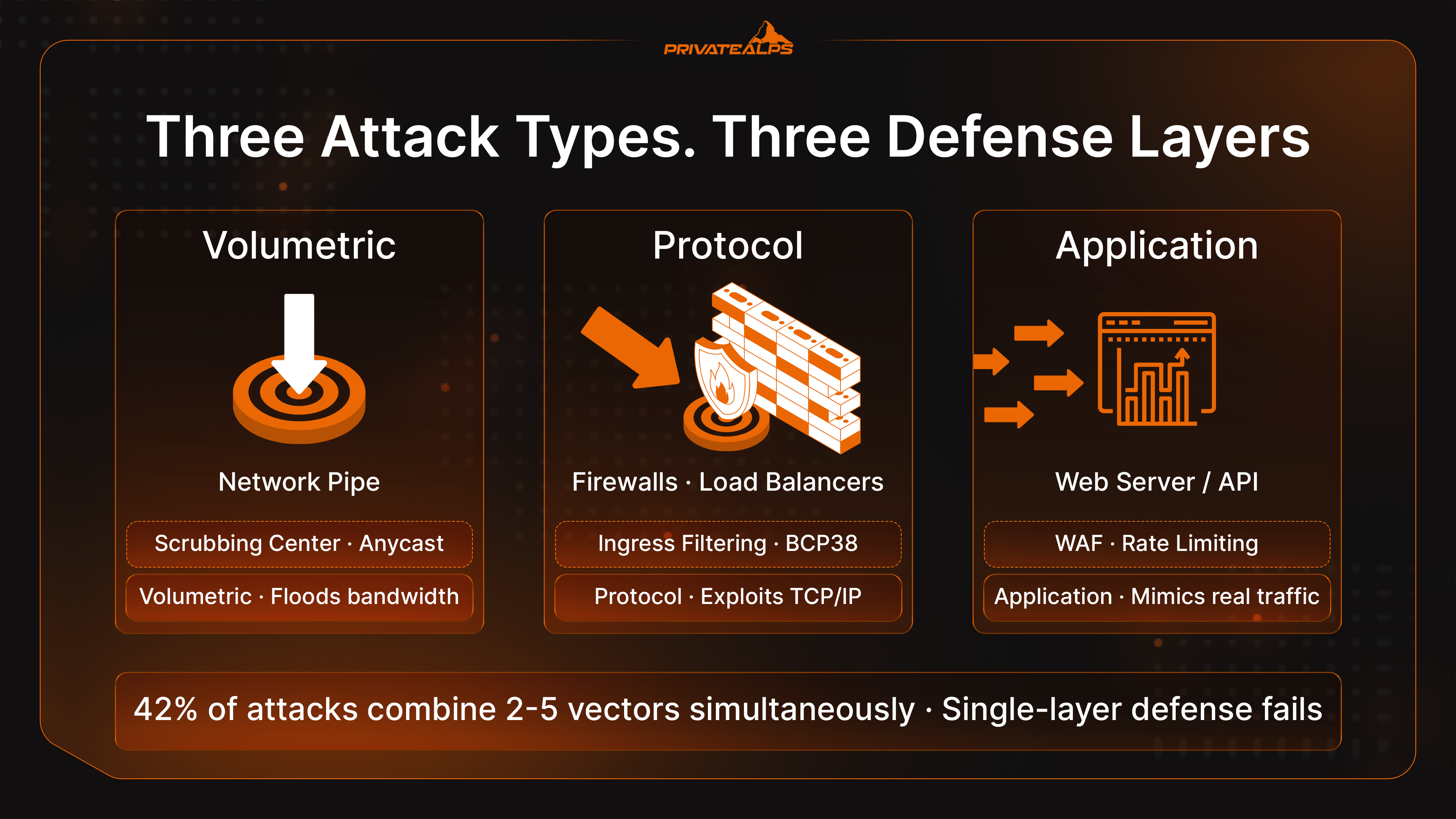
Volumetric, protocol, and application-layer attacks target entirely different parts of your stack. The tool that stops one type won't necessarily touch the others - and that gap is exactly what attackers count on.
| Attack Type | Method | Target | Example | Defense Layer |
|---|---|---|---|---|
| Volumetric | Flood bandwidth with massive traffic | Network pipe / uplink | DNS amplification, UDP flood | Scrubbing center, anycast diffusion |
| Protocol | Exploit TCP/IP stack vulnerabilities | Firewalls, load balancers | SYN flood, Smurf attack | Ingress filtering (BCP38), stateful firewalls |
| Application Layer | Mimic legitimate HTTP requests at scale | Web servers, APIs | HTTP flood, Slowloris | WAF, rate limiting, behavioral analysis |
In Q4 2025, network-layer attacks made up 78% of all DDoS incidents, per the Cloudflare Q4 2025 DDoS Threat Report. That's a lopsided share - but it doesn't make application-layer attacks less dangerous. HTTP floods and Slowloris bypass network-layer defenses completely, because they generate valid TCP connections and keep them open with minimal traffic. Nothing looks obviously wrong until the server runs out of threads.
The NETSCOUT H2 2025 DDoS Threat Intelligence Report found that 42% of attacks combined two to five vectors at once, with some shifting technique mid-attack. In November 2025, the botnet was linked to the record 31.4 Tbps attack. Separately, in December 2025, the "Night Before Christmas" campaign peaked at 205 million requests per second.. DDoS-for-hire services built on infrastructure like that have put hyper-volumetric attacks within reach of anyone willing to pay. A single-tool defense doesn't hold against that.
How to Detect a DDoS Attack
Understanding how to detect DDoS attack traffic early is the difference between a short, controlled response and a full-blown incident. Security teams that monitor traffic baselines catch the earliest warning signs - pattern shifts, not service failure - before detection becomes damage control.
The signals below show how to detect a DDoS attack in progress - these should all be part of your baseline monitoring:
- Sudden bandwidth spike from a narrow IP range or single geolocation - a key detection signal, especially when traffic comes from regions with no logical business relationship to your users.
- Surge in 503 errors or connection timeouts across application logs - often the first system-level detection indicator
- Unexplained latency increase on internal services, even ones not directly exposed
- Employee connectivity complaints - internal network degradation often shows up before the public-facing site goes down
- Disproportionate load on one endpoint (login page, API auth route) while everything else looks normal
- ISP upstream alerts - many providers send automated notifications when traffic anomalies hit the edge
One thing that trips teams up: not every traffic spike is an attack. Organic traffic spikes follow geographic and temporal patterns that line up with your user base. They arrive gradually. They correlate with something - a launch, a newsletter, a mention on social. DDoS traffic doesn't. It appears suddenly, concentrates on a narrow URL set, comes from headless clients with no session depth, and has no business explanation. Detection depends on knowing what your normal traffic looks like.
For tooling: NetFlow/IPFIX gives per-flow visibility at the network layer and is the standard for traffic anomaly detection at scale. SIEM platforms - Splunk, IBM QRadar - pull security signals from across infrastructure and surface coordinated attack patterns. AWS Shield Advanced and Azure DDoS Protection both have built-in anomaly detection and automated alerting. A firewall alone won't give you this visibility - purpose-built detection tools do. Pulling them into a continuous monitoring strategy cuts mean time to respond (MTTR).
10 Best Practices to Prevent DDoS Attacks
1. Use a DDoS Protection Service - and Protect Your Origin IP
Cloud-based DDoS protection solutions route all incoming traffic through scrubbing centers distributed across the globe. Malicious packets get filtered out before anything reaches your origin server. The major providers - Cloudflare Magic Transit, Akamai Prolexic, AWS Shield Advanced, Radware Cloud DDoS Protection - all run anycast networks built specifically to absorb multi-Tbps attack traffic. They need to be: the Cloudflare Q4 2025 DDoS Threat Report recorded a 31.4 Tbps attack in 2025. No on-premises appliance survives that. Always-on protection models keep inspection running continuously; on-demand models cost less but leave a gap right at attack onset.
There's a step most teams skip: locking down the origin IP. Knowing how to protect against DDoS means more than pointing traffic at a scrubbing service. If your real server IP leaks, attackers go around the CDN entirely and hit the origin directly. According to Red Button's June 2025 analysis published on Security Boulevard, direct-to-origin (D2O) attacks are a documented technique for neutralizing cloud-based DDoS defenses. Where do attackers find the IP? A few common places:
- DNS history archives (SecurityTrails, ViewDNS) - old A records from before the CDN was set up
- Certificate transparency logs (crt.sh) - TLS certs issued before CDN deployment often contain the origin IP
- Subdomain enumeration - mail., vpn., ftp. subdomains frequently resolve directly to origin
- Email headers - outbound mail servers leak the origin IP in Received: headers
- Legacy DNS records - MX, SPF, and TXT records sometimes point at infrastructure outside the CDN
Once they have it, the scrubbing layer stops mattering. The fix: rotate the origin IP after CDN routing is configured, restrict the server firewall to the CDN provider's published IP ranges, and audit your own exposure quarterly using SecurityTrails and crt.sh.
2. Implement Rate Limiting
Rate limiting caps how many requests a single IP or session can make in a given window. It's one of the more direct answers to how to prevent a DDoS attack at the application layer before server resources run out. Set it up at multiple points: your web server (Nginx limit_req_zone, Apache mod_ratelimit), WAF, CDN edge, and API gateway. A reasonable threshold for a login endpoint is 10 requests per minute per IP. That stops credential-stuffing DDoS hybrids without affecting real users. Rate limiting alone won't neutralize a distributed flood from thousands of IPs - but it eliminates single-source amplification and makes low-sophistication attacks noticeably more expensive to run.
3. Deploy a Web Application Firewall (WAF)
A WAF - Cloudflare WAF, AWS WAF, Imperva App Protect - sits in front of HTTP/HTTPS traffic and filters at Layer 7 using rule sets and behavioral analysis. It catches Slowloris connections, HTTP floods that mimic legitimate browsing, and malformed requests designed to exhaust threads. If you need to know how to prevent denial of service attack traffic at the application layer, WAF is the mandatory piece: a standard network firewall works at Layer 3-4, can't read HTTP payloads, and is completely blind to these patterns. The firewall sees a valid TCP connection and waves it through - detection and blocking of application-layer attacks requires WAF. Pair it with rate limiting: WAF filters by rule, rate limiting cuts by volume.
4. Enable Anycast Network Diffusion
Anycast announces the same IP from multiple geographically distributed nodes simultaneously. When an attacker floods that IP, traffic routing splits the load across all the nodes instead of hammering one point. Each node absorbs a fraction of the attack traffic. That's how Cloudflare, Akamai, and Fastly handle volumetric attacks - they spread traffic thin enough to survive rather than trying to block it all. It's an effective DDoS attack solution for bandwidth-based floods specifically. The catch: anycast requires BGP peering and real distributed infrastructure. If you're already routing through a CDN, the question is whether you're fully proxied or only partially covered.
5. Configure Blackhole Routing as an Emergency Measure
Blackhole routing sends all traffic aimed at a targeted IP straight to a null interface. Gone. The attack stops - and so does all legitimate traffic to that IP. That's the trade: availability for network survival. It's an ISP-level emergency measure, not a protection strategy you run proactively. Use blackhole routing when an attack threatens to saturate the upstream link and damage to other network tenants must stop immediately. Implement it via Remote Triggered Black Hole (RTBH) filtering - BGP communities that signal blackhole routes to upstream providers programmatically. Set up RTBH access with your ISP before any incident. Negotiating it during a live flood is not where you want to spend that hour.
6. Use Ingress and Egress Filtering (BCP38)
BCP38 (RFC 2827) is among the more important denial of service attack prevention tools at the network boundary, and one of the most underrated. It drops packets with spoofed source IPs - cutting off amplification attacks at the root. DNS amplification, NTP reflection, SSDP amplification: all of these work by forging the victim's IP as the source, so that amplified DNS responses and other traffic flood the target. Ingress filtering blocks inbound packets with source IPs that couldn't legitimately come from the incoming path. Egress filtering stops your own network from sending spoofed traffic out - keeping your infrastructure from being weaponized in someone else's attack. CISA and the IETF both treat BCP38 as foundational network security hygiene.
7. Scale Infrastructure with Cloud Redundancy and Load Balancing - Including Economic DDoS Guards
Auto-scaling groups (AWS, Azure Scale Sets, GCP Managed Instance Groups) and load balancers spread incoming attack traffic across multiple server instances. One node takes what it can; traffic routes around anything that degrades. CDN offloading handles static assets at the edge so the origin server doesn't see that traffic load. Health checks reroute automatically when a node struggles. Horizontal scaling in cloud infrastructure buys time - the attacker has to match your expansion, which gets expensive faster than it does for you.
There's a specific risk here that most DDoS guides don't mention. Auto-scaling creates a billing attack surface in cloud environments. Attackers send moderate, sustained traffic - not enough to cause an outage, just enough to keep triggering scale-out events. Your availability looks fine. Your cloud bill doesn't.
According to Wiz's January 2026 security analysis, this is economic DDoS: exploit the auto-scaling mechanism to inflate costs instead of causing downtime. Standard DDoS detection software won't catch this traffic pattern because it doesn't look like an attack. Defense: hard caps on instance count in your scaling configuration, budget alerts in AWS Cost Explorer or Azure Cost Management, and rate limiting at the CDN or WAF edge before traffic ever reaches cloud scaling triggers.
8. Develop and Test a DDoS Incident Response Plan
Good technical controls fail under pressure when nobody knows what to do next. An effective plan defines detection thresholds that trigger escalation, specific roles - who calls the ISP, who activates scrubbing, who drafts the customer message - communication templates ready within minutes, and post-incident review procedures. Early detection only matters if it feeds into a documented security response workflow. The Canadian Centre for Cyber Security ITSM.80.110 guidance provides a solid framework. The part that gets skipped most: actually testing it. Run tabletop exercises at least annually - both a pure volumetric attack and a DDoS-plus-breach scenario. Teams that have rehearsed the path respond faster, not because they're smarter, but because they've already made the decisions once.
9. Conduct Regular Risk Assessments and Penetration Testing
Before attackers map your exposure, you should. Public-facing APIs, login endpoints, payment gateways, and DNS infrastructure get targeted most - DNS in particular because taking it down cuts access to everything else. Understanding how to prevent DDoS at the asset level means knowing which surfaces in your network are most exposed. Load test with Locust or k6; managed red team services can run multi-vector scenarios. Update assessments after infrastructure changes - a new CDN, new API routes, or a cloud migration all shift the attack surface in ways that aren't obvious. NIST CSF (DE.AE, RS.AN) and ISO 27001 Annex A.12 both provide systematic frameworks.
10. Train Employees and Establish ISP-Level Coordination
Technical controls only activate as fast as the humans behind them. Employees - not just the security team - need to recognize early DDoS warning signs: internal apps slowing down, unusual help desk volume, service alerts that feel off. IT teams need pre-established contacts at their ISP for fast RTBH or scrubbing activation. Knowing how to stop DDoS attacks quickly isn't a technical problem - it's a relationship problem. The contact and the process have to exist before the incident. Train security teams to treat every DDoS event as a potential smokescreen: while the flood runs, check simultaneously for lateral movement, unusual authentication, and data access anomalies. Botnet-driven floods in particular are often used as cover. The traffic might be the distraction.
DDoS Prevention vs. DDoS Mitigation: What's the Difference?
Prevention means controls in place before an attack: rate limiting, WAF rules, anycast routing, a tested incident response plan. Mitigation means what you do once an attack is running: blackhole routing, scrubbing activation, ISP coordination. Relying only on mitigation means accepting that downtime is inevitable - you're just trying to shorten it.
| Approach | Goal | Timing | Example Tools |
|---|---|---|---|
| Prevention | Reduce attack impact before it starts | Before any attack | WAF, rate limiting, anycast CDN, BCP38 filtering |
| Mitigation | Reduce MTTR after attack begins | During / after attack | RTBH, scrubbing center activation, ISP coordination |
| Hybrid (Best Practice) | Minimize both impact and recovery time | Continuous | Cloudflare Magic Transit, AWS Shield Advanced + response plan |
The goal of DDoS mitigation solutions is to cut mean time to recovery. The goal of prevention is to reduce what needs recovering in the first place. Neither works well without the other. Knowing how to prevent a DDoS and knowing how to respond when prevention isn't enough are two parts of the same posture - teams that skip one eventually find out which half they were missing.
Choosing a Solution: Key Criteria
The right DDoS protection solution isn't the biggest brand - it's the one that fits your attack surface, your team's capabilities, and your tolerance for downtime. Evaluate on specifics, not marketing.
| Criterion | Why It Matters | Red Flag |
|---|---|---|
| Scrubbing capacity (Tbps) | Has to exceed realistic attack sizes; 2025 record was 31.4 Tbps | Provider won't publish capacity figures |
| Time to mitigate (TTM) | Seconds matter; always-on is near-zero vs. minutes for on-demand | No TTM SLA published |
| Network coverage (anycast PoPs) | More PoPs = better geographic distribution of attack load | Single-region scrubbing only |
| Layer 3-7 protection scope | Needs to cover network-layer floods and application-layer attacks | Only advertises "network-level" protection |
| SLA uptime guarantee | Defines accountability during actual attack events | SLA excludes DDoS events entirely |
| Pricing model | Bandwidth-based pricing can spike during large attacks | No cost cap on volumetric billing |
| Integration complexity | More integration steps = more time before protection is live | Requires BGP peering expertise, no managed onboarding |
For organizations running VPS or dedicated server infrastructure, providers that include DDoS protection at the infrastructure layer - like PrivateAlps, which builds it into Swiss-based hosting plans - remove integration complexity entirely. The mitigation runs at the network edge. Traffic doesn't reach your server at all, instead of being redirected to a third-party scrubbing service after the fact.
What to Do After a DDoS Attack
Most guides stop at prevention. The post-attack phase is where things go wrong quietly - and where the real damage from a DDoS-as-smokescreen scenario gets missed.
- Confirm the attack is over: Traffic normalization isn't confirmation. Check with your ISP or scrubbing provider that protection and mitigation have been fully.
- Look for secondary breaches: . Pull authentication logs, database access logs, and privileged account activity from the attack window. A clean traffic graph doesn't mean the network is clean. Attackers use the flood to buy time - and that time often shows up in the access logs if you look.
- Communicate with stakeholders and regulators: Send customers a factual, timeline-based summary. If there's any sign of data access or exfiltration during the attack window, GDPR Article 33 starts a 72-hour clock for supervisory authority notification. Don't wait for full forensic confirmation before starting that process.
- Run a post-incident review: Document attack vectors, the full timeline from detection to recovery, which controls held and which didn't. Update the incident response plan with concrete findings. If there are gaps that require budget, make the case while the incident is still fresh.
Every attack leaves data. The teams that improve after incidents are the ones that actually use it.
Summary
No single tool stops all DDoS attack types. The 10 practices here map to three pillars: technical controls (WAF, rate limiting, anycast routing, ingress filtering, cloud scrubbing), infrastructure resilience (auto-scaling with economic DDoS guards, CDN offloading, load balancing, origin IP protection), and organizational readiness (tested incident response, regular risk assessments, ISP coordination, employee training). Skip one and the other two fail sooner. Build all three and attacks become measurably less effective before they start.
PrivateAlps: DDoS Protection at the Infrastructure Layer
PrivateAlps runs Swiss-based VPS and dedicated server hosting with DDoS protection built into the network layer - no third-party scrubbing integration, no traffic redirection, no extra setup. Protection runs at the edge before attack traffic reaches your server. If you want the infrastructure controls from this guide handled by default, explore PrivateAlps hosting plans.
FAQ
What Is the Most Effective Way to Prevent DDoS Attacks?
Layered defense. Cloud-based scrubbing, rate limiting, a Web Application Firewall, and a tested incident response plan working together - no single measure covers all attack vectors. The 10 best practices above are the current standard for comprehensive DDoS attack prevention. There's no one tool that handles everything.
Can a Firewall Stop a DDoS Attack?
A standard network firewall (Layer 3-4) blocks certain protocol attacks but gets overwhelmed by volumetric floods and can't read HTTP payloads - blind to application-layer DDoS entirely. A firewall has no visibility into what traffic contains, only where it's going. A WAF adds Layer 7 protection and catches patterns a network firewall misses entirely. But even WAF plus firewall together won't absorb a 10 Tbps flood - that's what scrubbing capacity handles.
How Long Do DDoS Attacks Last?
It varies. Short bursts under 30 minutes are common - often used to probe defenses or apply extortion pressure. Sustained attacks on business-critical infrastructure can run 24 to 72 hours. According to Cloudflare and Radware threat reports, most individual incidents are under 10 minutes, but they tend to recur. The 2025 record attack - 31.4 Tbps - lasted 35 seconds. Duration and size don't correlate the way you'd expect.
What Is the Difference Between DoS and DDoS?
A DoS (Denial of Service) attack comes from one source IP - block it, stop the attack. A DDoS attack comes from a botnet of thousands to millions of devices, each on a different IP. No single address to block. Stopping it requires traffic analysis, behavioral filtering, and scrubbing capacity.
Do Small Businesses Need DDoS Protection?
Yes. Small businesses get targeted precisely because their defenses are weaker - cost-effective for extortion, competitive disruption, and use as botnet stepping stones. An attack on shared hosting doesn't just hit one site; it can take down every tenant on the server. Cloudflare's free plan and OVH anti-DDoS both provide meaningful baseline protection at no cost. That's the minimum, not the ceiling.
How Much Does DDoS Protection Cost?
Anywhere from free (Cloudflare Free plan, Nginx rate limiting) to $200-$3,000+ per month for enterprise scrubbing with guaranteed SLAs. Many VPS and dedicated server providers include baseline DDoS protection in their hosting plans, which removes the third-party integration cost entirely. Enterprise pricing scales with required mitigation capacity and contractual response time guarantees.