



VPN vs. Proxy: What's the Difference?
You don't usually compare these two for fun. Most people land here because something prompted the question - a streaming service blocked them, a friend mentioned a "proxy" without explaining what it was, or work made everyone install a VPN client and nobody got around to saying why. The "what is a VPN vs proxy" search gets typed into Google hundreds of thousands of times a month. The "what is a proxy vs VPN" version is almost as popular. Same question, different word order.
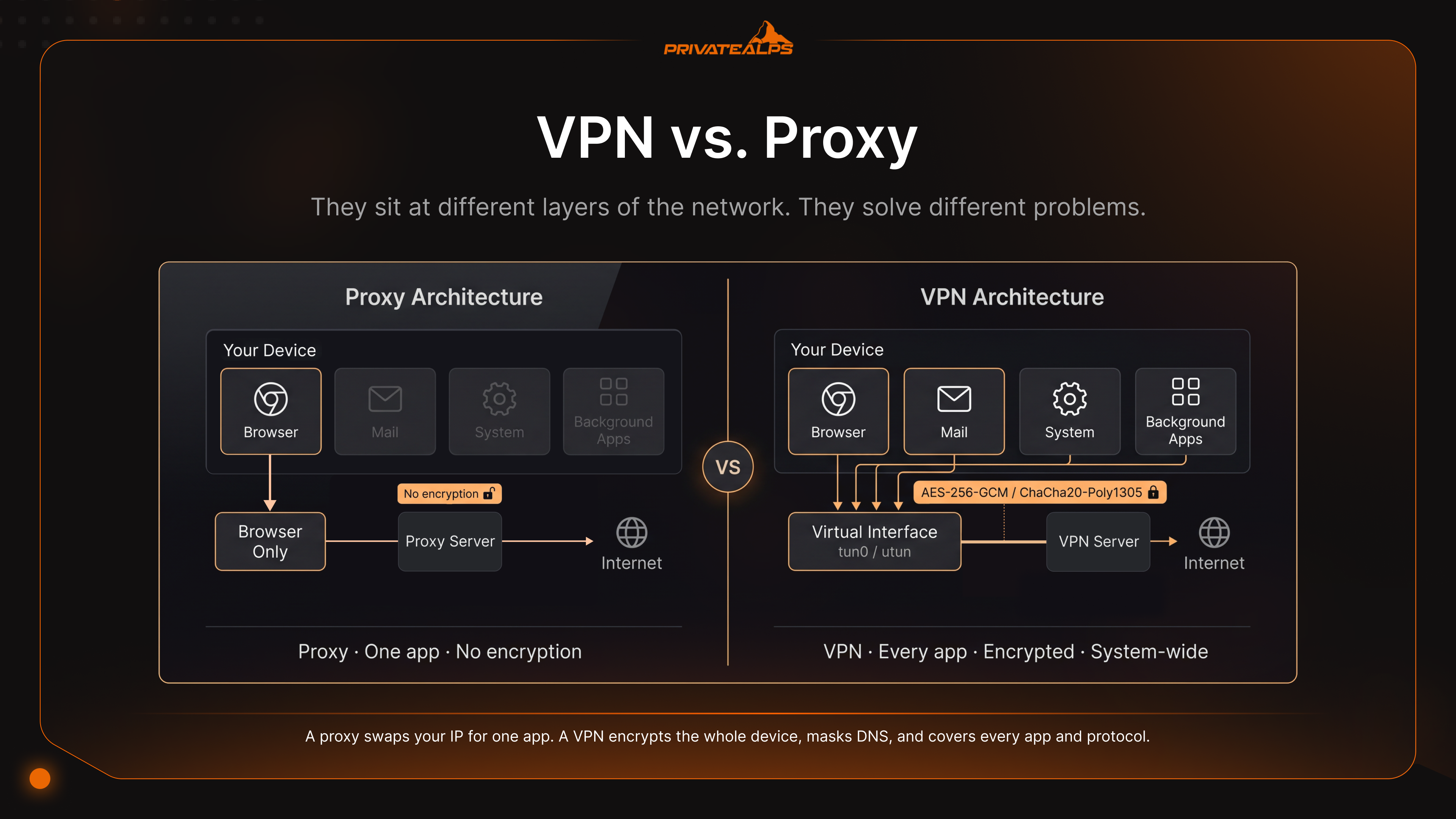
And there's a slightly awkward thing about how this topic gets written about. A lot of articles treat the two as interchangeable tools at different price points. They aren't. They sit at different layers of the network. They solve different problems. Treat them as the same thing and you can end up paying monthly for "privacy" that doesn't actually exist.
The market is enormous, which is part of why the marketing got messy. The global VPN business hit USD 88.96 billion in 2025 and is on track for USD 534.22 billion by 2034. Remote work pushed it up. Surveillance pressure did the rest. Proxies, on the other hand, quietly run SEO tools, scrapers, and corporate firewalls - different audience, fewer billboards.
So this guide breaks things down the way a network engineer would, over coffee, not the way an affiliate page would. OSI layers. What gets encrypted, what doesn't. How detection actually works. What each tool can't fix no matter what you pay.
AI Summary
The short version: a proxy works at the application layer (OSI Layer 7) and reroutes traffic for one app at a time, usually a browser. It doesn't encrypt anything by itself. A VPN sits deeper, at Layers 2-3, encrypts every packet at the OS level using ChaCha20-Poly1305 (WireGuard) or AES-256-GCM (OpenVPN), and routes the entire device through a virtual interface. Proxies are quicker because they skip the math. VPNs are safer because they don't.
- OSI layer: Proxy = Layer 7 (one app). VPN = Layers 2-3 (whole device).
- Encryption: Proxy = nothing built in. VPN = ChaCha20-Poly1305 or AES-256-GCM.
- Speed: Proxies barely cost anything. WireGuard takes about 4-15% on a fast link. OpenVPN/TCP can eat 40-50%.
- Kill switch: VPN-only. Cuts everything the second the tunnel drops.
- DNS protection: VPN tunnels the queries. HTTPS proxies leak the hostname through SNI before the page ever loads.
- Free proxy/VPN risk: ICSI/CSIRO found 67% of free Android VPN apps embedded third-party tracking libraries and 84% leaked traffic.
- What neither fixes: Browser fingerprinting, cookies, or any account you're logged into.
What Is a Proxy Server?
A proxy server is a middleman. It takes traffic from one application - usually a browser - and forwards it to the destination, swapping your IP for its own along the way. That's the whole job. It runs at the application layer (OSI Layer 7). It doesn't encrypt anything unless the site you're visiting already speaks TLS. It only handles the app you point at it. Everything else on your machine keeps talking to the internet exactly the way it did before.
| Proxy Type | How It Works | Typical Use Case |
|---|---|---|
| HTTP proxy | Forwards plaintext HTTP requests at Layer 7 | Internal corporate web filtering, caching |
| HTTPS proxy | Tunnels TLS via CONNECT; reads SNI but not payload | Browsing to TLS-protected sites |
| SOCKS5 proxy | Layer-5 relay; protocol-agnostic, supports UDP | Torrenting, gaming, generic TCP/UDP tunneling |
| Transparent proxy | Intercepts traffic without client config | ISP-level caching, school/library filtering |
| Residential proxy | Routes traffic through real consumer IPs (often IoT devices) | Sneaker bots, ad verification, SEO scraping |
One thing trips people up here. They assume an HTTPS proxy hides what sites they visit. It doesn't. The hostname goes out in plaintext via the TLS Server Name Indication (SNI) field during the handshake, before any encryption happens. Your ISP sees it. Anyone between you and the proxy sees it. They can't read the page, but they can read the address bar - which is usually the part people thought they were hiding.
DNS is the other quiet leak. Proxies mostly don't deal with DNS, so your operating system keeps asking your ISP's resolver, "hey, where's this domain?" That question alone tells the story. And the free-proxy ecosystem is, to put it mildly, not friendly. A CSIRO study of Android apps in this space found 16% deployed non-transparent proxies that injected JavaScript into user traffic for advertising and tracking, and 67% embedded third-party tracking libraries. Free is rarely free with this stuff. You're the inventory.
What Is a VPN?
A VPN - Virtual Private Network - wraps your entire device in an encrypted tunnel and ships every packet through it. Every app. Every service running in the background. The browser, the mail client, those silent system updates that happen when you're not looking. You don't configure anything per-app. The operating system just hands traffic to a virtual interface and the VPN client takes it from there.
The plumbing is stricter than people expect. When you hit connect, the client and server run a cryptographic handshake - WireGuard uses Noise with Curve25519 key exchange, OpenVPN does a TLS handshake (TLS 1.2 or 1.3 depending on which build you're running) to agree on session keys. Then the client creates a virtual network interface - tun0 on Linux, utun on macOS - and the routing table starts shoving everything into it. Each packet gets encapsulated, encrypted, fired off to the server. Server decrypts, forwards, sends the reply back. Anyone watching the wire just sees encrypted blobs flying back and forth. The WireGuard whitepaper walks through the gritty details if you want the canonical version.
Two features separate a real VPN from a marketing one. The kill switch is a firewall rule that blocks every byte the moment the tunnel drops - server crash, lost Wi-Fi, suspended laptop, whatever. No leaking your real IP while the client tries to reconnect. DNS leak protection is the other one. It pushes DNS queries through the encrypted tunnel to the VPN's own resolver, so your ISP can't piece together your browsing from the lookups. Without those two, what you've got is a proxy with extra steps and a higher monthly bill.
VPN vs. Proxy: Core Technical Differences
The proxy server vs. VPN distinction lives in three places: how much of your traffic gets encrypted, how much gets covered, and how easy you are to spot. A proxy swaps your IP for one app. A VPN encrypts the whole device, masks DNS, blocks WebRTC leaks, and - with the right obfuscation layer - looks indistinguishable from someone reading the news on HTTPS.
| Dimension | Proxy | VPN |
|---|---|---|
| Traffic encryption | None (SOCKS5/HTTP); TLS only if site uses HTTPS | Full payload encryption (ChaCha20-Poly1305 or AES-256-GCM) |
| Traffic coverage | Per-application only | Entire OS, all apps and protocols |
| IP masking | Yes, for configured app | Yes, system-wide |
| DNS protection | No - OS uses ISP resolver | Yes - DNS tunneled through VPN |
| Kill switch | No | Yes (firewall-level fail-closed) |
| WebRTC leak protection | No | Yes (when properly configured) |
| Speed overhead | Negligible (1-3%) | 4-50% depending on protocol |
| MITM protection on public Wi-Fi | No | Yes |
| Detection resistance | Low - IP reputation databases flag fast | High with obfuscation (Shadowsocks, Obfs4, VLESS) |
| Audit availability | Almost never | Reputable providers: Big 4 audits |
| Jurisdiction transparency | Usually opaque | Disclosed legal entity and country |
| Typical cost | Free to $1-5/IP/month | $3-12/month consumer; self-hosted from $5 |
Detection resistance is where they really part ways. An open, unauthenticated SOCKS5 proxy is essentially a liability - anyone who stumbles on the IP and port can route their own traffic through it, and transparent setups happily hand back the originating IP in HTTP headers. VPN obfuscation protocols play a completely different game. Shadowsocks, Obfs4, V2Ray/VLESS wrap the tunnel so deep packet inspection sees something that looks like ordinary HTTPS. That's why these protocols dominate in countries that actively block VPN traffic, and why proxies - with their predictable headers and well-mapped IP ranges - get caught first.
Proxy vs. VPN Speed Comparison
Proxies are faster than VPNs, and the reason is unglamorous: they skip the encryption. No cipher, no encapsulation, no header overhead. A VPN does all of that for every single packet, which piles up quickly once you're pushing real throughput.
| Solution | Encryption Overhead | Latency Impact | Best Scenario |
|---|---|---|---|
| HTTP/SOCKS5 proxy | None | +5-15 ms (one extra hop) | High-volume scraping, geo-QA testing |
| WireGuard VPN | Low (kernel-space ChaCha20) | +10-20 ms; 4-15% throughput loss | General-purpose privacy on fast connections |
| OpenVPN/UDP | Moderate (userspace AES) | +20-40 ms; 20-35% throughput loss | Compatibility-first deployments |
| OpenVPN/TCP | High (TCP-over-TCP meltdown) | +50-100 ms; 40-50% throughput loss | Last-resort firewall bypass only |
| Tor | Very high (3-hop onion routing) | +200-1000 ms; 80-95% throughput loss | Anonymity over speed |
The numbers aren't theoretical. A peer-reviewed benchmark clocked WireGuard at 210.64 Mbps TCP throughput against OpenVPN's 110.34 Mbps in the same VMware environment - basically double. On a 1 Gbps line, independent tests show WireGuard running roughly 4× the speed of OpenVPN across multiple geographies. The OpenVPN/TCP figure has a specific name behind it: TCP-over-TCP meltdown. Tunnel TCP inside another TCP connection and both layers run their own retransmission timers. A single dropped packet makes both layers retransmit. Latency climbs, throughput tanks, the whole thing eats itself.
Slow connections hide all of this. If your bottleneck is a 30 Mbps DSL line, the VPN cipher overhead might as well not exist. On a 1 Gbps fiber link, you'll feel it. So if the job is rotating residential IPs to crawl pricing pages - and encryption isn't part of the threat model - a proxy is the obvious call.
VPN vs. Proxy: Privacy Comparison
A VPN vs proxy privacy comparison comes down to one thing: a proxy hides your IP from the site you're hitting, while a VPN also hides your traffic from your ISP and the local network. Everything past that depends on logging policies, jurisdiction, and what your adversary already knew about you before you started.
| Threat | Proxy | VPN | Neither Solves |
|---|---|---|---|
| ISP sees visited domains | Exposed via DNS + SNI | Encrypted | - |
| ISP sees traffic content | Plaintext on HTTP; safe only on HTTPS | Always encrypted | - |
| MITM on public Wi-Fi | Vulnerable | Protected | - |
| DNS query exposure | Uses ISP resolver | Tunneled | - |
| Browser fingerprinting | - | - | Canvas, fonts, WebGL identify you |
| Cookie tracking | - | - | Persistent across sessions |
| Logged-in account identity | - | - | Google sees you regardless of IP |
Audits are where privacy claims either prove themselves or quietly fall apart. Serious VPN providers pay independent firms - Deloitte, KPMG, Cure53, PwC, Securitum - to dig through their server configurations, employee access policies, and incident logs. Deloitte has done NordVPN six times by late 2025. KPMG audited ExpressVPN most recently in February 2025, with Cure53 separately picking through the Lightway protocol. Cure53 also handles Mullvad and Proton VPN. The commercial proxy market has nothing like this. No transparency reports worth reading. No real audits. The same CSIRO research on free Android VPN apps found 84% leaked traffic and 18% used no encryption at all, despite what their app store listings claimed.
Jurisdiction matters more than people think it does. Every VPN provider lives under someone's law. A US-based provider can get hit with a National Security Letter and a gag order. A Swiss provider operates under the Federal Act on the Surveillance of Post and Telecommunications (BÜPF), which only allows targeted disclosure under a court order - narrower than EU or US bulk retention, but not nothing. And neither tool fixes persistent identity. Log into Gmail through any VPN and Google still recognizes you. Your browser fingerprint - canvas, fonts, WebGL - barely shifts when your IP changes.
When to Use a Proxy vs. a VPN
Use a proxy when you need IP rotation at volume and encryption doesn't matter for the job. Use a VPN when you need to protect data in transit or keep activity away from your ISP. That's the split. Everything else is detail.
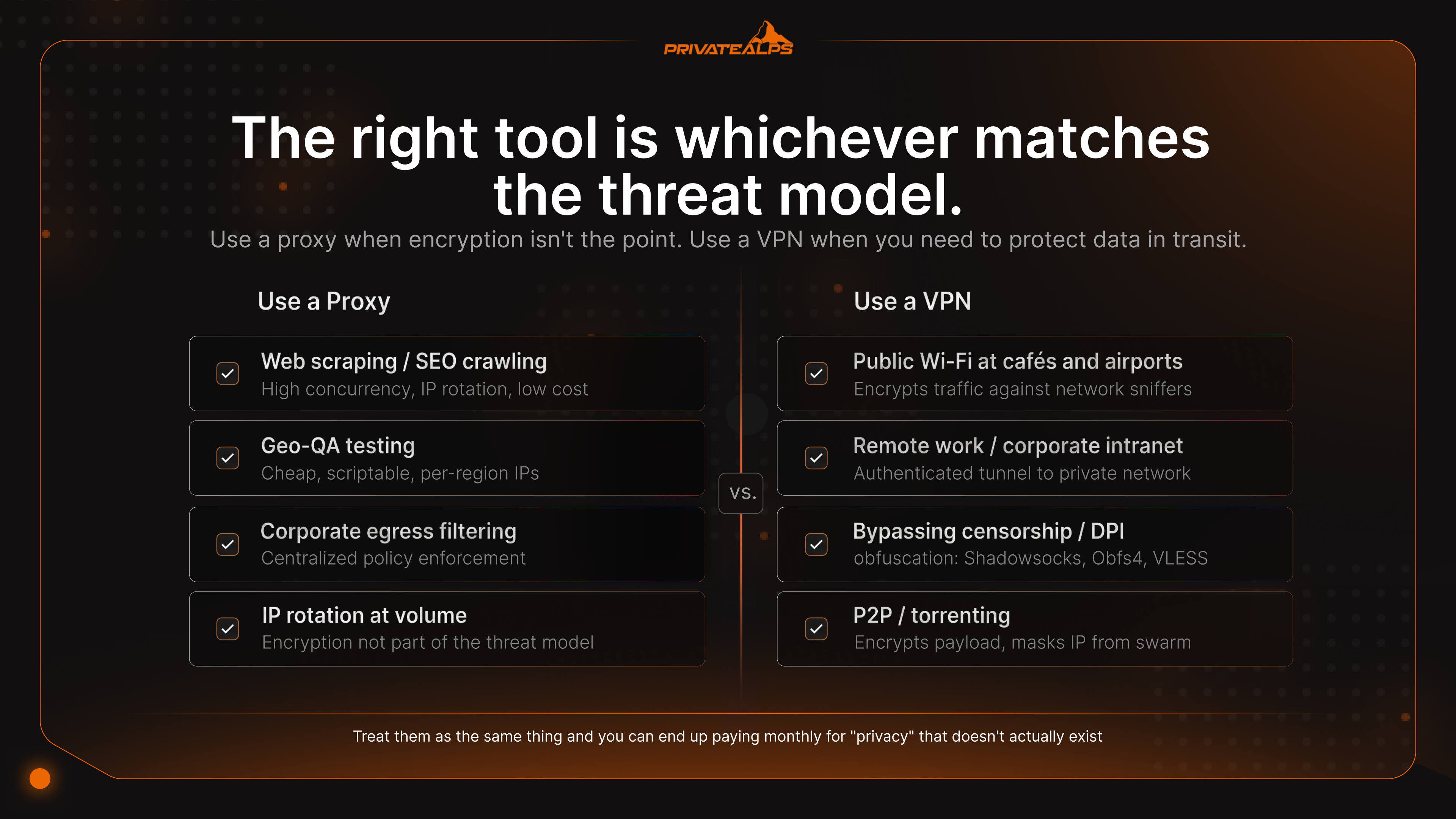
| Scenario | Recommended Tool | Why | What It Does Not Solve |
|---|---|---|---|
| Public Wi-Fi at a café or airport | VPN | Encrypts traffic against network sniffers | Phishing, malicious downloads |
| Remote work / corporate intranet | VPN | Provides authenticated tunnel to private network | Endpoint compromise |
| Web scraping / SEO crawling | Rotating proxy pool | High concurrency, IP rotation, low cost | Site fingerprinting, JS challenges |
| Streaming geo-restrictions | VPN (residential or streaming-optimized) | Bypasses IP reputation checks better than proxies | Account-level geo-locks |
| Bypassing state censorship / DPI | VPN with obfuscation (Shadowsocks, Obfs4, VLESS) | Disguises tunnel as HTTPS | Targeted endpoint surveillance |
| P2P / torrenting | VPN with kill switch | Encrypts payload, masks IP from swarm | Malicious peers, copyright trolls |
| Developer/sysadmin on untrusted net | VPN | Protects SSH/RDP sessions and API tokens | Compromised credentials |
| Geo-QA testing (ads, pricing) | Proxy | Cheap, scriptable, per-region IPs | Logged-in user behavior |
| Self-hosted private infrastructure | Self-hosted WireGuard VPN | Removes the provider trust variable | Server compromise |
| Enterprise web filtering / egress | Forward proxy (Squid, Zscaler) | Centralized policy enforcement, content inspection | Encrypted exfiltration via DoH |
Streaming detection is its own little arms race. Netflix, BBC iPlayer, and the rest lean on IP reputation databases - MaxMind GeoIP2 and IPQualityScore being the heavyweights - that tag every IP as residential, business, hosting, or VPN. Commercial proxies almost always live in hosting ranges. The databases catch them instantly. VPN providers running residential or streaming-optimized server pools lease IPs from consumer ISPs and rotate through them, which is why VPN traffic tends to get through where a proxy gets a polite "this title isn't available in your region" page.
VPN Detection vs. Proxy Detection: How Services Tell Them Apart
Detection systems compare your connection against five fingerprints: ASN reputation, TLS hashes, DNS consistency, header leakage, and packet timing. Proxies fail more of these checks because their signatures are simpler and easier to enumerate. VPNs hang around longer because there's less to grab onto.
| Detection Method | Proxy Vulnerable? | VPN Vulnerable? | Bypass Solution |
|---|---|---|---|
| ASN / IP reputation (MaxMind, IPQS) | Yes - hosting ASNs flagged | Partial - known VPN ranges flagged | Residential IPs or fresh subnets |
| TLS fingerprinting (JA3/JA3S hash) | Yes - HTTP proxies expose client TLS | Partial - some VPN clients have distinctive JA3 | uTLS, browser-matched fingerprints |
| DNS mismatch (IP region ≠ DNS region) | Yes - OS DNS leaks | No - tunneled DNS prevents mismatch | DNS-over-VPN |
| HTTP header leakage (X-Forwarded-For) | Yes - transparent proxies leak origin IP | No - headers reconstructed at exit | Use only anonymous-elite proxies |
| Deep Packet Inspection (DPI) | Yes - plain proxy traffic identifiable | Partial - standard VPN protocols detectable | Obfuscation: Shadowsocks, Obfs4, VLESS |
Why do proxies get caught faster? They leak more metadata. Their IP ranges are catalogued. Their TLS handshakes are distinctive. HTTP headers quietly include the originating IP when transparent mode is on. VPNs are quieter - DPI looking at VPN traffic just sees encrypted blobs, not protocol fields you can fingerprint. Obfuscation closes whatever's left. Shadowsocks, heavily used in mainland China, and V2Ray/VLESS make the tunnel look statistically indistinguishable from HTTPS. Censorship infrastructure that blocks standard VPN protocols can't separate these from regular web traffic.
Can You Use a VPN and a Proxy Together?
Yes - and it's a legitimate setup for specific jobs, but it brings DNS complexity along and most people shouldn't bother. A misconfigured chain leaks more than a single, properly set-up tunnel.
Browser SOCKS5 + OS-level VPN. Run a VPN at the system level, then point Firefox or Chrome at a SOCKS5 proxy. Browser traffic exits through the proxy IP. Everything else - mail, system services, background apps - exits via the VPN. One detail almost nobody mentions: turn on network.proxy.socks_remote_dns in Firefox, or DNS queries skip the proxy and leak through the VPN, leaving a regional mismatch that fingerprinting tools pick up immediately.
VPN-to-proxy chain. Connect to the VPN first, then send browser traffic through a proxy on the exit side. The destination sees the proxy IP. The VPN provider sees you connected to a proxy but can't read anything that went through it. Common in scraping work that needs both encryption and residential-IP rotation.
Proxy-to-VPN in corporate egress. Enterprises do this constantly. Outbound traffic goes through a forward proxy (Squid, Zscaler) for content inspection and policy enforcement, and the proxy itself talks to a VPN for branch-to-headquarters tunneling. Standard architecture in anything regulated.
Tor over VPN is the privacy-maximalist version: VPN first, Tor on top. Throughput drops 80% or more. The anonymity properties improve meaningfully.
Summary
The core distinction in any VPN vs proxy comparison: a proxy changes your IP for one application; a VPN encrypts and tunnels everything your device sends. Pick the proxy when the threat model is geo-restriction or IP-based rate limiting on a single app and encryption isn't the point. Pick the VPN when you need privacy from your ISP, safety on a hostile network, or coverage across every app on the system. The proxy vs VPN difference still leaves anonymity unsolved - fingerprinting, cookies, and account logins follow you across IPs. The one structural change that genuinely improves things is self-hosting your VPN on infrastructure you control - providers like PrivateAlps take the third-party trust variable out of the chain entirely.
Run Your Own VPN on Swiss Infrastructure
Self-hosting your VPN changes the math. You become your own provider. The only logs that exist are the ones you write. No third party gets subpoenaed for traffic they never saw. PrivateAlps offers an OpenVPN service hosted in Swiss data centers - AES-256 encryption, strict zero-logs policy, P2P allowed, no bandwidth throttling on the 10G uplink - operating under revDSG, the revised Federal Act on Data Protection, and the BÜPF targeted-disclosure framework, where law enforcement access requires a court order tied to a named subject. Narrower than EU or US bulk retention. Not absolute immunity, but structurally a different trust model than buying from a consumer VPN provider.
FAQ
What is the difference between a VPN and a proxy?
The difference between a VPN and a proxy boils down to three things: what gets encrypted, what gets covered, and what happens to DNS. A VPN encrypts every byte your device sends and routes it at the OS level. A proxy reroutes one application's traffic and encrypts nothing by itself. The difference between proxy and VPN matters most the moment you're trying to hide activity from your ISP, not just swap an IP.
Is a proxy safer than a VPN?
No. A VPN gives you three things a proxy doesn't - encryption, a kill switch, and tunneled DNS. Free proxies are particularly rough; the ICSI/CSIRO research found 16% of free VPN/proxy apps actively injected JavaScript into user traffic.
Can a proxy hide your IP address?
It hides your IP for the one app you set it up on. Nothing else. And HTTPS proxies still leak the destination hostname through the unencrypted TLS SNI field during the handshake. So if you're asking what is the difference between a proxy and a VPN specifically on this point - the VPN tunnels DNS too, which is why your ISP can still see which sites you visit through a proxy but not through a VPN.
Does a VPN work like a proxy?
Both swap your visible IP for the server's IP, so on the surface they look like cousins. The VPN goes further - it encrypts traffic at the network layer, covers every app on the device, and routes DNS through the tunnel. A proxy is per-app, unencrypted by default, and stops at swapping the IP.
What is a SOCKS5 proxy and how does it differ from a VPN?
SOCKS5 is a Layer-5 proxy protocol that handles arbitrary TCP and UDP traffic. That's why it's popular for torrenting, gaming, and anything that isn't plain HTTP. What it doesn't do is encrypt anything. A VPN gives you the rerouting and the crypto. SOCKS5 just gives you the rerouting.
Do streaming services block proxies and VPNs?
Both, but not equally. Detection runs through IP reputation databases like MaxMind GeoIP2 and IPQualityScore. Proxies almost always come from flagged hosting ASNs, so they get caught fast. VPN providers using residential-IP server pools usually slip through longer because their IPs look like ordinary consumer connections.
Which is faster - a proxy or a VPN?
A proxy, by a wide margin. It doesn't encrypt anything. WireGuard typically costs 4-15% of throughput, OpenVPN/UDP runs 20-35%, and OpenVPN/TCP can eat 40-50% once TCP-over-TCP meltdown shows up.
Can I use a VPN and a proxy at the same time?
Yes. The most common professional setup is a SOCKS5 proxy in the browser running on top of a system-wide VPN, so the browser identity is isolated from the rest of your traffic. One thing to watch - make sure DNS resolution happens at the proxy (in Firefox, that's network.proxy.socks_remote_dns). Otherwise you create a DNS mismatch that fingerprinting tools will catch.
What is a no-logs VPN and does a proxy offer the same?
A no-logs VPN doesn't retain connection metadata, IP timestamps, or browsing records - and the claim only carries weight when an independent auditor like Deloitte, KPMG, or Cure53 has actually gone in and verified it. Commercial proxy providers don't have anything like this standard. No-logs claims from proxies are basically unverifiable.
Is a VPN better than a proxy?
It depends on what you're doing. A VPN wins for privacy, safety on public Wi-Fi, and getting around DPI-based censorship. A proxy wins for high-volume web scraping, geo-QA testing, and corporate egress filtering. The difference between VPN and proxy server is functional, not hierarchical - the right tool is whichever matches the threat model, not the one with more bullet points on the marketing page.