



VPS vs. VPN: What's the Difference?
Here’s a story that plays out more often than people admit. A 40-person engineering team buys a commercial VPN subscription, planning to ship a staging API. A day later somebody asks where it’s actually running. There isn’t a server. The vps vs vpn confusion just cost a week of onboarding. Goes the other way too: a founder rents a VPS to anonymise her browsing, then notices the static IP traces straight back to her rental account.
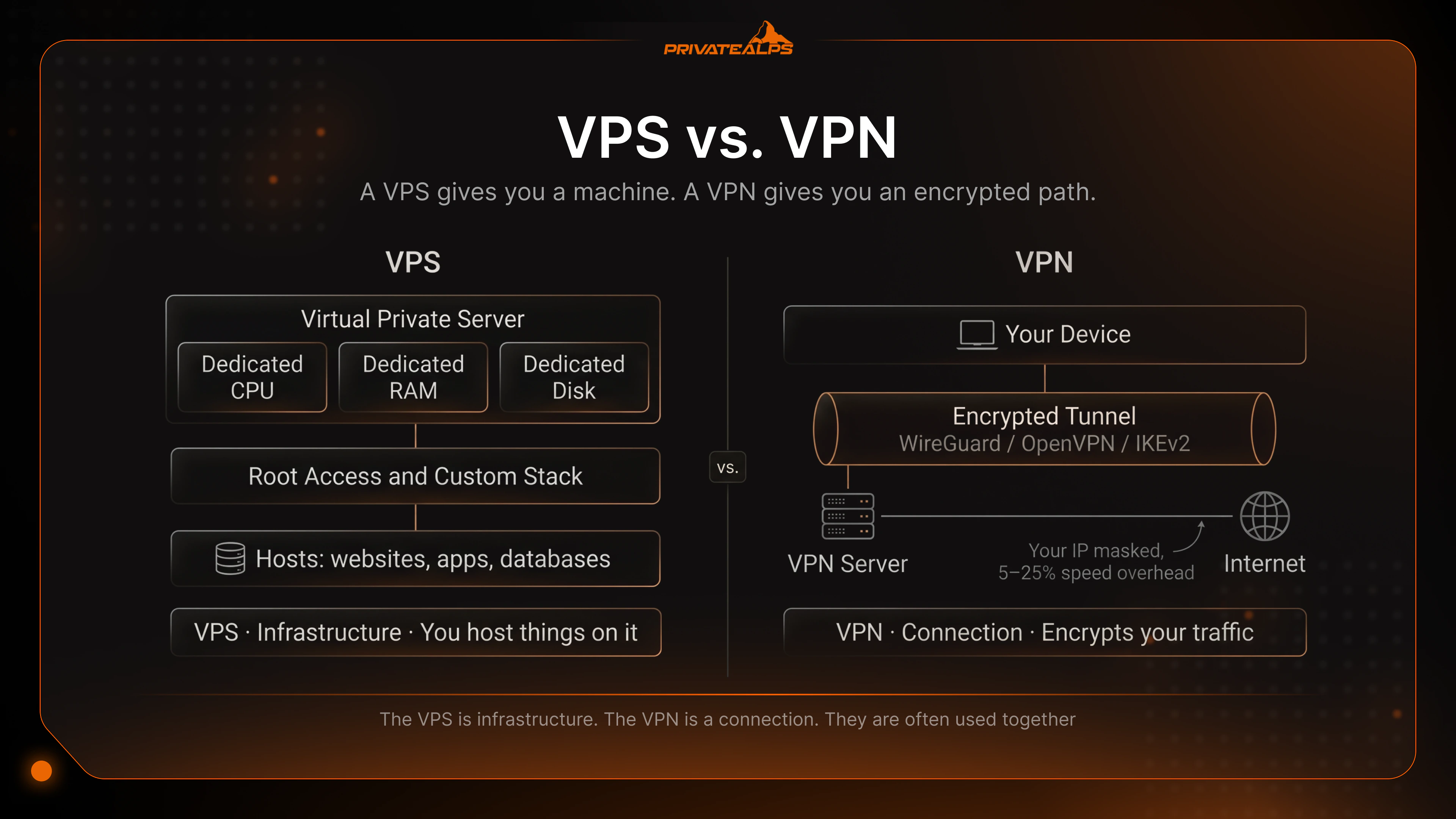
The difference between vpn and vps isn’t about features. It’s about which layer of the stack you’re renting. A VPS gives you a machine. A VPN gives you an encrypted path. Mix them up and you spend money on something that doesn’t solve your problem.
This guide is for engineers and infrastructure buyers. It covers the mechanics of both, the protocols that move them (WireGuard, OpenVPN, IKEv2, KVM, OpenVZ), and the pattern where they’re actually deployed together.
AI Summary
A VPS is an isolated virtual environment with dedicated CPU, RAM and disk allocated from a physical host. A VPN is a private networking technology that uses tunneling protocols to create an encrypted connection between your device and a remote server. Framed as vpn vs vps, the VPS is server infrastructure for private hosting, the VPN is a security tool for traffic encryption. They sit at different layers and aren’t really substitutes.
- VPS technology: hypervisor (KVM, Xen) or container engine (OpenVZ, LXC).
- VPN technology: tunneling protocols (WireGuard, OpenVPN, IKEv2/IPsec) for traffic security.
- VPS access: root shell access, package management, custom kernel modules on KVM.
- VPN access: client app routes outbound packets through the tunnel.
- VPS IP: static IPv4, publicly registered.
- VPN IP: the server's IP masks the user's, usually shared across subscribers.
- Combination pattern: use a self-hosted WireGuard on a VPS for full kernel and key control.
VPS vs. VPN: Key Differences at a Glance
The difference between vps and vpn comes down to purpose. A VPS is a rented virtual private server you use to host things - applications, databases, whatever you put on it. A VPN is a security service that encrypts your traffic and pushes it through a remote server, masking your IP. The VPS is infrastructure. The VPN is a connection. They are often used together.
| Attribute | VPS | VPN |
|---|---|---|
| What it is | Virtual server with dedicated private resources | Encrypted security tunnel to a remote server |
| Core technology | Hypervisor (KVM, Xen) or container (OpenVZ, LXC) | Tunneling protocol (WireGuard, OpenVPN, IKEv2) |
| Primary purpose | Host websites, apps, databases | Encrypt traffic, mask IP, bypass geo-blocks |
| Access level | Root / admin shell | Client routes traffic; no server access |
| IP address | Static, dedicated, publicly registered | Shared, dynamic IP of the VPN server |
| Speed impact | None on local stack | 5-25% reduction (security overhead) |
| Data jurisdiction | Datacenter country (you choose) | Provider's stated server locations |
| Typical cost | $5-$80/month per server | $3-$15/month per seat |
| Combinable | Yes - host a VPN on a VPS | Yes - connect from a VPS via a VPN |
| Best-fit audience | Developers, sysadmins, hosting buyers | Remote workers, privacy-conscious users |
What Is a VPS (Virtual Private Server)?
A VPS is an isolated virtual private server carved out of physical hardware, with dedicated CPU, RAM and disk for one tenant. It runs on one of two things: a full hypervisor (KVM, Xen - each VM gets emulated hardware and any kernel), or a container engine (OpenVZ, LXC - all tenants share the host kernel, isolation via Linux namespaces).
This distinction is the most consequential thing you decide when picking a VPS. On OpenVZ or LXC you can’t load a custom kernel module - which means WireGuard needs explicit provider support, or it just won’t work. On KVM, you get full root access and can use whatever you want. The day you reach for self-hosted VPN and your container can’t handle it, you’ll wish you’d defaulted to KVM. A typical production stack: Ubuntu 22.04 LTS, Nginx, PostgreSQL, with Node.js, Python or Go behind it.
| Hosting tier | Dedicated resources | Isolation | Control | Cost |
|---|---|---|---|---|
| Shared hosting | No (oversold) | None | Control panel only | $2-$10 |
| VPS | Yes (allocated) | Full (separate OS) | Root access | $5-$80 |
| Cloud instance | Yes (elastic) | Full (virtualized) | Root access + cloud API | $10-$500+ |
| Dedicated server | Entire machine | Hardware-level | BIOS / IPMI | $80-$500+ |
How Does a VPS Work?
A VPS slices one physical host into isolated virtual guests. KVM does it by creating a virtual machine with emulated hardware - virtual NIC, virtual disk - so the guest OS thinks it owns the box and gets full access to its resources. OpenVZ goes lighter: namespaces and cgroups separate the processes, no hardware emulation, everyone sharing the host kernel.
A single metric tells you whether your VPS is well-provisioned or oversold. CPU steal time - the percentage of time your virtual CPU waits while the hypervisor serves someone else. Anything sustained above 5% and you’re on a crowded host. Read it from %st in top or st in vmstat 1. The difference between resources you have and resources you’re promised.
- Client sends an HTTP request to the host's public IP.
- The packet arrives at the host's physical NIC.
- The hypervisor routes the packet to the VM's virtual interface.
- The guest OS hands the packet to the listening process (e.g., Nginx).
- The application returns a response that traverses the same path in reverse.
What Is VPS Used For?
A VPS fits when you need root access and dedicated resources but not a whole physical machine. The list isn’t glamorous but it’s where most of the real workload lives. Common use cases:
High-traffic web hosting - shared hosting collapses above ~500 concurrent connections. Development and staging environments - isolated, reproducible, version-locked. Game servers - Minecraft, CS2, Valheim with custom configs and persistent processes. Self-hosted VPN - run WireGuard or OpenVPN on a Linux VPS with full control over keys, logs and access policies. Databases - PostgreSQL or MySQL on a virtual machine without managed-cloud connection limits. CI/CD runners - self-hosted GitHub Actions or GitLab Runner in a private cloud setup with custom toolchains.
What Is a VPN (Virtual Private Network)?
A VPN (Virtual Private Network) is a security technology that uses tunneling protocols to send your traffic through an encrypted connection to a remote server, which forwards it on. The server’s IP shows up online instead of yours. The tunnel stops anyone in the middle - ISPs, café Wi-Fi, sniffers - from reading what’s inside. The protocol decides how fast, how secure.
Three protocols matter today. WireGuard has a codebase of ~4,000 lines vs OpenVPN's ~70,000+ and ships in the Linux kernel since version 5.6. Smaller attack surface, higher throughput, easier to audit for security issues. OpenVPN is the mature workhorse - flexible enough to run over TCP port 443 and look like HTTPS, exactly what you want behind a hostile firewall, though the user-space cryptography burns CPU. IKEv2/IPsec is the mobile pick. Its MOBIKE extension (RFC 4555) keeps the session alive when you walk from Wi-Fi to LTE, no renegotiation. Split tunneling often decides the whole deployment - it sends only certain apps or subnets through the VPN, leaving the rest local.
| Protocol | Speed | Security | Best scenario |
|---|---|---|---|
| WireGuard | Highest throughput, lowest latency | Fixed cipher (ChaCha20-Poly1305) | Default for new virtual deployments, mobile |
| OpenVPN (UDP) | Moderate, CPU-bound | Configurable ciphers, audited | Legacy clients, cipher flexibility |
| OpenVPN (TCP/443) | Slower (TCP-over-TCP) | Same as UDP variant | Censorship circumvention |
| IKEv2/IPsec | High, fast reconnect | AES-GCM, SHA2, P-256 | Mobile devices switching networks |
How Does a VPN Work?
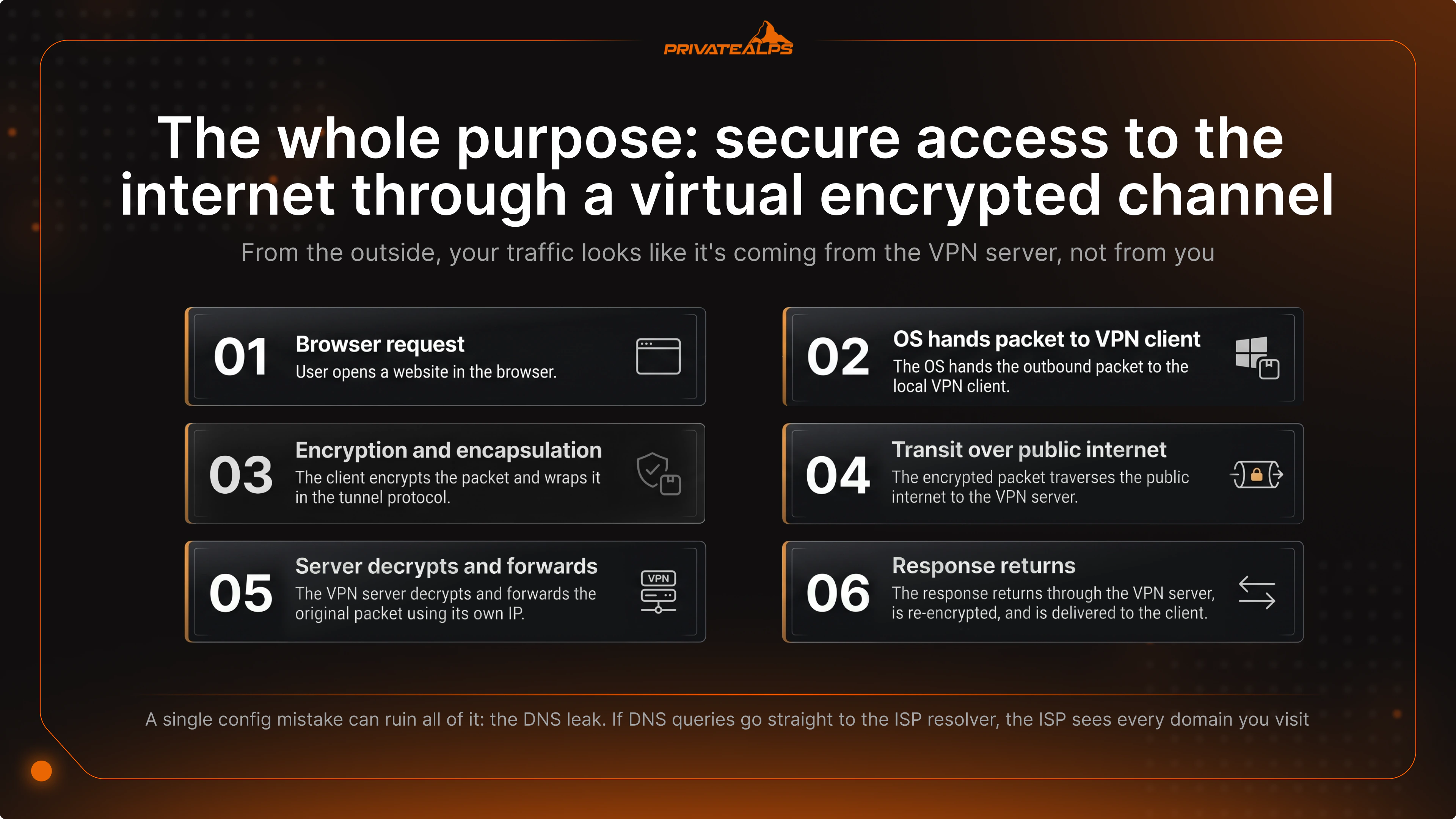
A VPN wraps each outgoing IP packet inside an encrypted protocol packet, ships it to the VPN server, which unwraps it and sends the original to its destination using its own IP. The response reverses the path. From the outside, your traffic looks like it’s coming from the VPN server, not from you. The whole purpose: secure access to the internet through a virtual encrypted channel.
A single config mistake can ruin all of it: the DNS leak. If your client isn’t set up to push DNS queries through the tunnel, they go straight to the ISP resolver - and the ISP sees every domain you visit. Verify with dnsleaktest.com. The extended test should show only the VPN provider’s DNS servers. If you see your ISP, something’s misconfigured.
- User opens a website in the browser.
- The OS hands the outbound packet to the local VPN client.
- The client encrypts the packet and wraps it in the tunnel protocol.
- The encrypted packet traverses the public internet to the VPN server.
- The VPN server decrypts and forwards the original packet using its own IP.
- The response returns through the VPN server, is re-encrypted, and is delivered to the client.
What Is VPN Used For?
VPNs serve two crowds with overlapping tech and very different goals. Most articles blur them together. They shouldn’t.
Personal:
Public Wi-Fi protection - on café or airport Wi-Fi, anyone else on the network can run a packet sniffer. A VPN turns what they’d capture into ciphertext. This is the most common use case for personal VPN, and honestly the one scenario where even a free service earns its keep. Geo-block bypass - use it to access Netflix US, BBC iPlayer, regional sports broadcasts. ISP surveillance avoidance - moves visibility from ISP to VPN provider. Censorship circumvention in jurisdictions that filter at the national firewall.
Business:
Remote access VPN - employees use a private tunnel to reach internal apps as if on the LAN. Site-to-site VPN - two offices linked over an encrypted security tunnel. GDPR / HIPAA data-in-transit compliance - baseline under Article 32 GDPR. CI/CD pipeline protection for artefacts, secrets, and deployment credentials.
A caveat the marketing rarely says: a VPN isn’t a complete security stack. It encrypts the transport layer and that’s it. Phishing still works. Endpoint malware still works. A vulnerable server is still vulnerable. Treat it as a single security control, not the whole answer.
Can You Use a VPS as a VPN?
Yes. A VPS can host its own private VPN server, and for teams that care about security and controlling their privacy stack, it’s often the strongest pattern available. The trade-off: the VPS has a static, publicly registered IP linked to your account. Less anonymous than a commercial VPN service, where thousands share one IP. Self-hosting gives control. Commercial gives crowd cover.
The stack that works is WireGuard on Ubuntu. The kernel module is in every Linux kernel from 5.6 onward, so setup is just apt install wireguard and a config file at /etc/wireguard/wg0.conf. For automation - the first time you write a wg config by hand, you’ll want it - use Algo VPN. An Ansible playbook from Trail of Bits which spins up a hardened WireGuard server in one command, generates client configs and QR codes, applies secure defaults meeting modern security standards.
| Criterion | Self-hosted on a VPS | Commercial VPN |
|---|---|---|
| Control over logs | Total - you write the policy | Trust provider's no-log claim |
| Data jurisdiction | You choose the datacenter country | Provider's published locations |
| IP anonymity | Lower - static IP, traceable | Higher - shared IP, mixed traffic |
| Setup complexity | 30-60 min with Algo VPN | Install app, sign in |
| Monthly cost | $5-$15 (the VPS) | $3-$15 per seat |
| Server locations | One per VPS | Hundreds in subscription |
Self-hosted is the right call for teams with audit requirements, regulated data, or strict security policies. A managed VPN service is the right call for end users and travel use - quick to set up, easy access from any device, no infrastructure to maintain. Not really the same job.
VPS or VPN - Which One Do You Need?
The vps or vpn question is whether you’re hosting something or accessing something. Need to run a website, an API, a database, a game server? Use a VPS. Need to protect traffic on public Wi-Fi, get around a geo-block, reach corporate resources remotely? Use a VPN. Need both? Run a private VPN on a VPS.
VPS, VPC and VPN all have "virtual" in the name. That’s where it ends. A VPS virtualizes server hardware. A VPC virtualizes cloud network topology - subnets, route tables, security groups - inside a public cloud like AWS, GCP or Azure. A VPN creates an encrypted connection across the public internet. They aren’t competing. Real setups use them together.
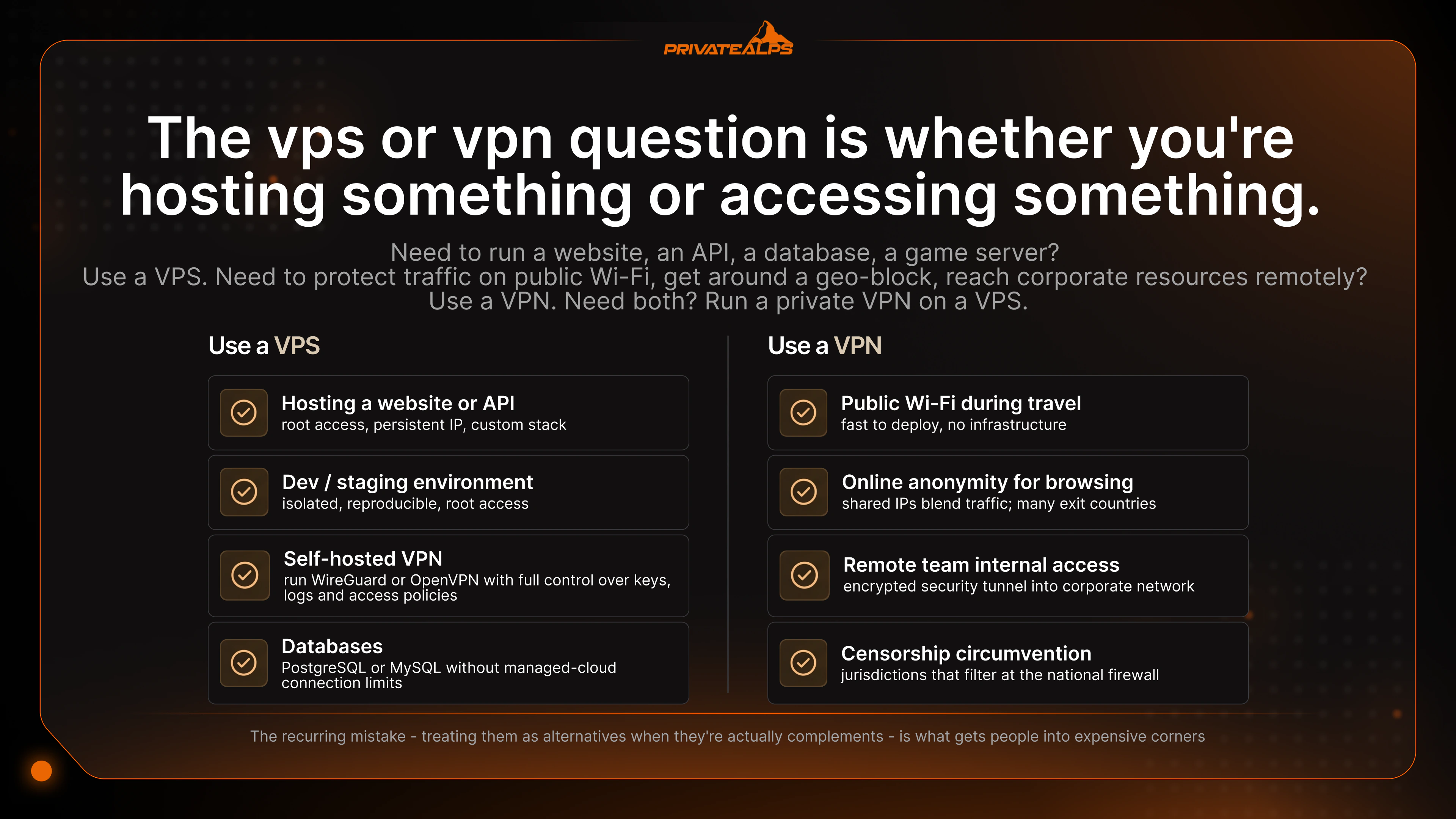
| Scenario | Recommendation | Why |
|---|---|---|
| Hosting a website or API | VPS | Root access, persistent IP, custom stack |
| Online anonymity for browsing | Commercial VPN | Shared IPs blend traffic; many exit countries |
| Remote team internal access | Business VPN or self-hosted WireGuard | Encrypted security tunnel into corporate network |
| Dev / staging environment | VPS | Isolated, reproducible, root access |
| Privacy + full server control | VPS + self-hosted WireGuard | Owned private infrastructure, keys, jurisdiction |
| Microservices with auto-scaling | VPC | Cloud-native networking, elastic compute |
| Public Wi-Fi during travel | Commercial VPN | Fast to deploy, no infrastructure |
A VPC makes sense when an app needs to scale horizontally and use managed cloud services. A VPS is one virtual machine with a fixed footprint - which sounds limiting, but it’s exactly what you want for stable, predictable workloads where cloud elasticity isn’t the priority.
VPS and VPN solve different problems. A VPS gives you a private server, a VPN encrypts your connection. The vpn vs vps decision usually isn’t about budget. It’s about the task. The recurring mistake - treating them as alternatives when they’re actually complements - is what gets people into expensive corners. For teams that need data residency and a security stack they can audit, self-hosting WireGuard on a VPS is usually the cleanest answer.
Need a VPS that supports both production workloads and self-hosted VPN? PrivateAlps runs KVM-based VPS and bare-metal servers with full root access, no platform restrictions, kernel-level tuning, any protocol or port - including WireGuard with full key ownership. Infrastructure is in Switzerland, a privacy-friendly jurisdiction: commercial data is governed by revDSG, while law-enforcement disclosure is handled separately under BÜPF/VÜPF and requires a prosecutorial order with judicial review. Use it as a private cloud platform for hosting, security workloads, or both. See plans at privatealps.net.
FAQ
What is the difference between VPN and VPS?
A VPS is a rented virtual private server with dedicated CPU, RAM and disk for hosting things. A VPN is a networking technology that encrypts traffic and routes it through a remote server, masking your IP. Short version of the difference between vps and vpn: VPS gives you infrastructure to host on, VPN gives you secure access for your traffic.
Can a VPS replace a VPN?
If you want anonymity, no - a VPS comes with a static IP that traces back to your account. If you want full control over the encryption layer, yes - a VPS running self-hosted WireGuard gives more control than any commercial VPN, just less crowd cover. Audit requirements? Self-hosted VPN on a private VPS. Just want to be hard to identify? Commercial VPN.
Is VPS more secure than VPN?
It’s a trick question - they protect different layers. A VPS isolates a server environment. A VPN encrypts network traffic. A VPS with no VPN doesn’t protect the client. A VPN with no VPS doesn’t protect the server. For complete security, you want to use both.
What is the difference between VPS, VPN and VPC?
A VPS is a virtual machine for hosting workloads. A VPN is a private encrypted tunnel for secure connectivity. A VPC is a logically isolated virtual network inside a public cloud (AWS, GCP, Azure), built for cloud-native apps that need auto-scaling and tight integration with managed services. All three play nicely together.
Which is better for a remote team - VPS or VPN?
For remote access to corporate resources, use a business VPN - or self-hosted WireGuard if you want full control over the protocol. A VPS shows up when the team needs to deploy applications or share a development backend. Cleanest combination: a private VPS in a Swiss datacenter running a self-hosted VPN as one auditable security layer.
How do I set up a VPN on a VPS?
On Ubuntu 22.04 LTS, install WireGuard with apt install wireguard and configure /etc/wireguard/wg0.conf with your private key, listen port, and peer entries. For automation with hardened security defaults, use Algo VPN by Trail of Bits. The official WireGuard Quick Start guide covers the manual setup. Either approach gives you a private VPN endpoint you fully control.
Can VPS be traced?
Yes. A VPS has a static, publicly registered IP tied to the account paying for it. It doesn’t anonymise traffic the way a VPN does. Two real options to reduce traceability: use an additional VPN tunnel on top of the VPS (a double-hop), or pick a jurisdiction with strong statutory data protection - Switzerland for example, where commercial data is governed by revDSG and law-enforcement disclosure requires a prosecutorial order with judicial review under BÜPF/VÜPF.