



VPS vs. Cloud Hosting: Key Differences, Pros & Cons Explained
The vps vs cloud decision is rarely about which technology is "better" - both rely on hardware virtualization. The real distinction in cloud hosting vs vps sits one layer deeper, in topology: a VPS is a virtual machine partitioned on a single physical host by a hypervisor, while cloud hosting draws compute and storage from a dynamic pool spread across multiple physical nodes. That topology difference determines how each model behaves under load, during hardware failure, and during scaling events. It also drives the economics - predictable monthly cost on one side, elastic pay-as-you-go billing with billable egress and IOPS on the other - and ultimately decides what the on-call rotation looks like in production.
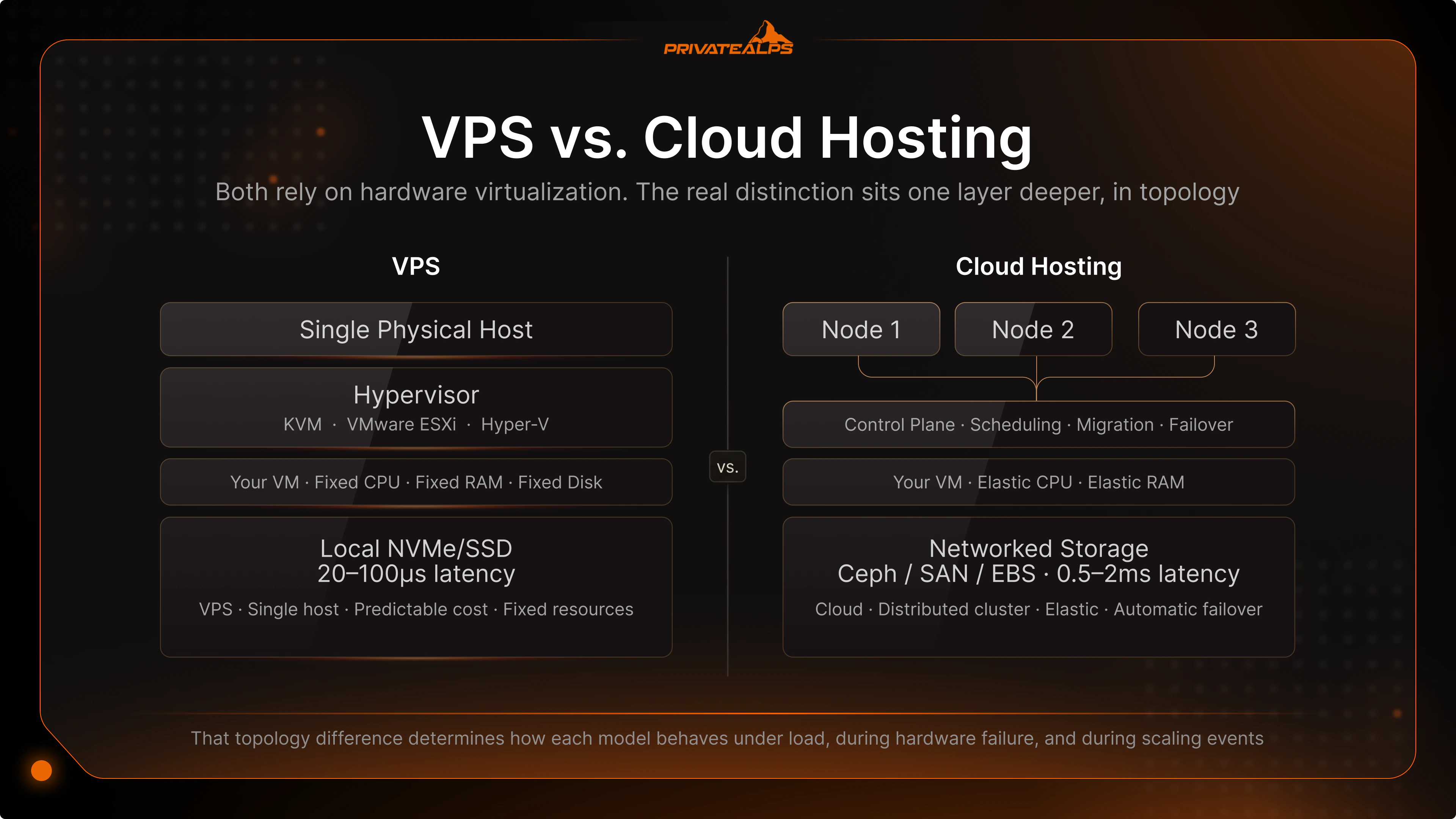
This article covers the architecture mechanics of both models, an eight-criteria comparison built around what actually drives operational decisions, production scenarios mapped to specific workloads, and the security and compliance considerations that decide which platform fits regulated workloads under GDPR, the revised Swiss Federal Act on Data Protection (revDSG), and HIPAA.
AI Summary
VPS hosting is an isolated partition on one physical server with fixed CPU, RAM, and disk allocated by a hypervisor such as KVM, VMware ESXi, or Hyper-V. Cloud hosting is a virtual machine provisioned from a dynamic pool of physical nodes, with the control plane handling scaling and node-level failover. The two share virtualization but differ on every operational dimension: scalability, failover, storage path, cost, performance, and audit surface.
Quick-decision facts:
- VPS: fixed CPU/RAM/disk on one host; predictable monthly cost
- Cloud: resources scale in real time; pay-as-you-go in public cloud, fixed plans in many private cloud offerings
- VPS has no automatic failover if the host fails; recovery is manual or restore-from-backup
- Cloud provides automatic failover via cluster-level redundancy; AWS commits to 99.99% monthly uptime for EC2 only when instances are deployed concurrently across two or more Availability Zones, and 99.5% for a single instance
- VPS uses local NVMe/SSD with sub-100µs latency; cloud servers run on networked storage with added round-trip latency
- VPS is more cost-effective at sustained workloads; cloud wins on bursty or unpredictable traffic
What Is a VPS?
A VPS (Virtual Private Server) is an isolated virtual machine running on a single physical host, where the hypervisor partitions CPU, RAM, and disk and enforces hard boundaries between tenants. Allocated resources are reserved at provisioning time - neighboring VMs cannot consume your CPU cycles or memory pages, regardless of how busy the host gets.
The hypervisor - typically KVM, VMware ESXi, or Microsoft Hyper-V - schedules virtual CPUs onto physical cores and maps guest memory to host memory with strict accounting. A plan with 4 vCPU and 8 GB RAM gives you exactly that; exceeding it requires a manual resize, which usually requires a reboot. Live memory hotplug exists in KVM (virtio-mem) and VMware (Hot Add), but support depends on hypervisor configuration - it is not universal, and confirming it works on a specific provider before relying on it in a maintenance plan is a non-negotiable step.
The "isolated partition" model has one real-world caveat that most comparison articles skip: disk I/O. A VPS uses local NVMe or SSD attached directly to the host, which delivers excellent latency - a modern NVMe SSD handles random 4K reads in 20-70 µs, about an order of magnitude faster than networked block storage. The storage controller, however, is shared. Heavy I/O from a co-tenant can affect tail latency on database workloads, even when CPU and RAM remain fully isolated. This is the meaningful difference from bare-metal that buyers should weigh when designing latency-sensitive systems. Common OS options across providers include Ubuntu, Debian, AlmaLinux, Rocky Linux, and Windows Server. Buyers also confuse managed vs. unmanaged: unmanaged gives full root access with no provider OS involvement; managed bundles patching, security updates, and monitoring - and that bundle materially changes total cost of ownership for teams without a dedicated sysadmin. For a 3-person startup running a single application, managed VPS often costs less than the engineer-hours an unmanaged VPS would absorb.
What Is Cloud Hosting?
Cloud hosting is a virtual machine provisioned from a dynamic pool of physical nodes managed by a control plane that handles scheduling, scaling, and node-level failover. The architecture follows the model defined in NIST Special Publication 800-145: pooled resources, rapid elasticity, on-demand self-service, broad network access, and measured service. When a physical node fails, the control plane migrates affected workloads to healthy nodes - often without operator intervention and frequently within seconds.
"Cloud hosting" is not a consistent term across the market - some providers use it for shared hosting on distributed infrastructure, others mean true IaaS virtual machines from a cluster. This article uses the second definition: a virtual server backed by a dynamic node pool with distributed storage and live workload migration. Two deployment patterns dominate. Public cloud (AWS EC2, Google Cloud Compute, Microsoft Azure VM): multi-tenant infrastructure, granular API control, region-wide footprint, and the deepest catalog of managed services on the market. Private or hosted cloud (PrivateAlps and similar): single-tenant or dedicated-pool cloud from a known datacenter, often with fixed plans rather than per-second metering, and a known legal jurisdiction baked into the infrastructure layer.
The cost model deserves attention. In major public clouds, the headline price covers compute hours, but the invoice routinely adds egress, IOPS charges, and snapshot storage. AWS charges roughly $0.09 per GB of outbound internet traffic to the public internet, and an AWS EBS gp3 volume bills IOPS above 3,000 at $0.005 per provisioned IOPS-month, with additional throughput above 125 MiB/s billed at $0.04 per MB/s-month. Inter-AZ traffic within a single region is also metered at $0.01 per GB in each direction. Private cloud providers typically include bandwidth in fixed plans - egress fees are not a universal property of "cloud hosting"; they are a property of public hyperscaler pricing models. Orchestration sits on top: Kubernetes for workload management, Terraform or Pulumi for declarative provisioning, and either a managed offering (EKS, GKE, AKS) or OpenStack at the platform layer for self-hosted environments.
VPS vs. Cloud Hosting: Key Differences
The fundamental what is the difference between vps and cloud hosting comes down to topology and the operational consequences that follow. The table below compares both models across the eight criteria that drive infrastructure decisions.
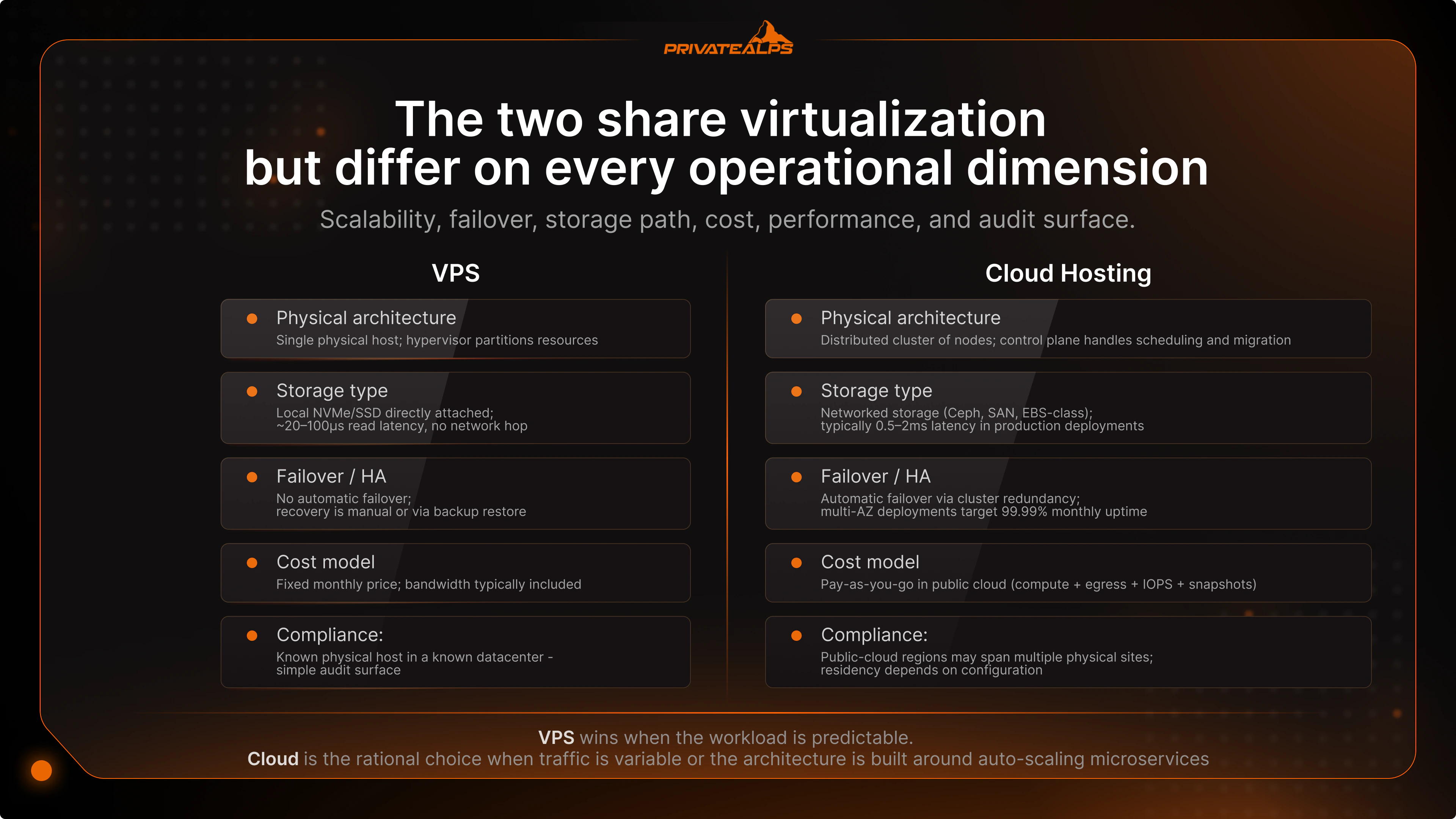
| Criterion | VPS | Cloud Hosting |
|---|---|---|
| Physical architecture | Single physical host; hypervisor (KVM, VMware ESXi, Hyper-V) partitions resources | Distributed cluster of nodes; control plane handles scheduling and migration |
| Storage type | Local NVMe/SSD directly attached; ~20-100µs read latency, no network hop | Networked storage (Ceph, SAN, EBS-class); typically 0.5–2 ms latency in production deployments; sub-200µs achievable with NVMe-oF over RDMA; higher aggregate throughput on parallel reads |
| Scalability model | Vertical scaling typically requires a reboot on most commercial providers; live resize depends on hypervisor configuration (KVM virtio-mem, VMware Hot Add) | Vertical and horizontal scaling supported; both AWS EC2 and GCP Compute Engine require stopping a VM to change instance/machine type, though GCP's live migration keeps VMs running through host maintenance |
| Failover / HA | No automatic failover from the underlying host; recovery is manual or via backup restore | Automatic failover via cluster redundancy; multi-AZ deployments target 99.99% monthly uptime |
| Cost model | Fixed monthly price; bandwidth typically included | Pay-as-you-go in public cloud (compute + egress + IOPS + snapshots); fixed plans common in private cloud |
| Performance | Lowest single-node latency; consistent under stable load; vulnerable to disk I/O noisy neighbors | Higher latency floor due to network storage and East-West hops; scales horizontally under burst load |
| Control & root access | Full root, kernel-level access; user owns the entire OS stack | Full root on the VM; cloud-managed services (load balancers, RDS) abstract some layers |
| Compliance & data residency | Known physical host in a known datacenter - simple audit surface | Public-cloud regions may span multiple physical sites; residency depends on configuration |
The cost and storage rows drive most architectural decisions. VPS wins when the workload is predictable - a production PostgreSQL or MySQL instance where I/O latency drives transaction throughput, a latency-sensitive API behind a static traffic profile, an internal tool with a fixed user base, or a self-hosted GitLab/Bitbucket instance for a 50-person engineering team. Cloud is the rational choice when traffic is variable (e-commerce platforms, content sites with viral potential), when the architecture is built around auto-scaling microservices, or when CI/CD pipelines require ephemeral environments that spin up per pull request and terminate on merge. The cloud server vs vps decision is rarely binary in mature production systems: hybrid patterns are the norm, with stateful services on dedicated infrastructure and stateless workers on elastic cloud capacity.
VPS Pros and Cons
The vps vs cloud server question is best answered by mapping each tradeoff to a concrete production scenario, not by listing abstract advantages. VPS strengths cluster around predictability - of cost, of performance, of audit surface. Weaknesses cluster around scaling ceilings and the operational reality that backup and failover are the operator's problem, not the platform's. Teams running unmanaged VPS need explicit runbooks for backup verification, snapshot rotation, and disaster recovery.
VPS Pros
Predictable monthly cost: Finance teams can budget infrastructure as a fixed line item - no egress spikes after traffic events, no IOPS surcharges after a campaign launch. Isolated, reserved resources: The hypervisor guarantees CPU and RAM allocation, so a noisy neighbor cannot starve your application of compute during their peak hours. Full root and kernel access: Custom kernel modules, tuned sysctls for high-connection workloads, eBPF tracing for production debugging, and low-level network configuration all work without provider mediation. Simple audit surface: One known physical host, one datacenter location, one OS image - straightforward to map against ISO 27001 control sets or SOC 2 trust principles. Local NVMe I/O latency:* Single-digit microsecond I/O for hot database paths; no network hop between compute and storage, which matters for OLTP, message queues, and search indexing.
VPS Cons
Hard resource ceiling tied to one physical host: A SaaS app hitting growth targets faster than expected cannot scale past the host's capacity without a full migration to a larger plan and brief downtime. Vertical scaling typically requires a reboot: A planned RAM upgrade on most commercial VPS providers means scheduled maintenance; live memory hotplug exists in KVM (virtio-mem) and VMware (Hot Add) but provider support varies and should be confirmed before assuming. No automatic failover: If the physical host suffers a hardware failure, recovery is manual - restore from backup, wait for the provider's intervention, or trigger a pre-planned failover to a hot standby that the operator must have built. Disk I/O noisy neighbor risk: A high-IOPS tenant on the same host can degrade your tail latency, which matters most for OLTP databases, real-time queue consumers, and search workloads with strict latency budgets. Backup is the user's responsibility:* Snapshots, off-site replication, and disaster recovery must be configured explicitly - there is no platform-level RPO/RTO guarantee, and unverified backups have a way of failing exactly when needed.
Cloud Hosting Pros and Cons
The cloud server vs vps debate usually focuses on the upside of elasticity and skips the downside of cost unpredictability. Both deserve equal weight in an architectural review. Cloud genuinely solves problems VPS cannot - horizontal scaling under burst load, automated failover from node failures, ephemeral environments for testing and CI - but the monthly invoice on a major public cloud reads differently from the headline price, and the operational model rewards teams with strong FinOps discipline.
Cloud Hosting Pros
Horizontal scalability: Adding cluster nodes via API or Terraform handles traffic spikes no single VPS can absorb - essential for viral content, flash sales, live streaming events, and elections-night dashboards. Automated failover: Cluster-level redundancy migrates workloads off failed nodes without operator intervention; multi-AZ deployments target high-nines SLAs that single-host VPS cannot match. API-first provisioning: Infrastructure-as-code workflows (Terraform, Pulumi, CloudFormation) make environment parity between dev, staging, and production straightforward and auditable. Native DevOps integration: Managed Kubernetes (EKS, GKE, AKS), CI/CD runners, service mesh, and observability tooling are first-class citizens, not bolted-on components requiring custom integration. Built-in backup and DR:* Snapshot-based backup, cross-region replication, and configurable RPO/RTO are infrastructure features, not user responsibilities, with the option to dial in cost-vs-recovery trade-offs.
Cloud Hosting Cons
Unpredictable billing in public cloud: Egress, IOPS, NAT gateways, and snapshot storage compound silently; AWS data transfer between Availability Zones is metered and billed by the gigabyte even within a single region, and forgotten test environments quietly burn budget. Vendor lock-in with proprietary services: Migrating away from AWS RDS, GCP BigQuery, or Azure Cosmos DB is a multi-quarter project, not a config change - application code embeds vendor APIs, and exit costs grow with adoption depth. East-West latency overhead: Networked storage and inter-node hops add latency that hurts low-latency OLTP databases and real-time systems compared to local NVMe; latency-sensitive workloads often migrate to dedicated infrastructure once the team measures it. Compliance complexity in multi-region setups: Cross-region replication can move data into jurisdictions that violate the data residency rules the original deployment was meant to enforce - a recurring source of audit findings. Configuration is the security surface:* Security Groups, IAM policies, and network ACLs are the actual isolation layer - misconfiguration is the dominant cloud breach pattern, and the blast radius scales with the size of the deployment.
VPS vs. Cloud Hosting: Which One Should You Choose?
The vps hosting vs cloud hosting decision is best made scenario by scenario, not as a sweeping verdict. The table below maps eight production scenarios to a clear recommendation, with the operational rationale that drives each one and the trade-offs the team should expect to manage.
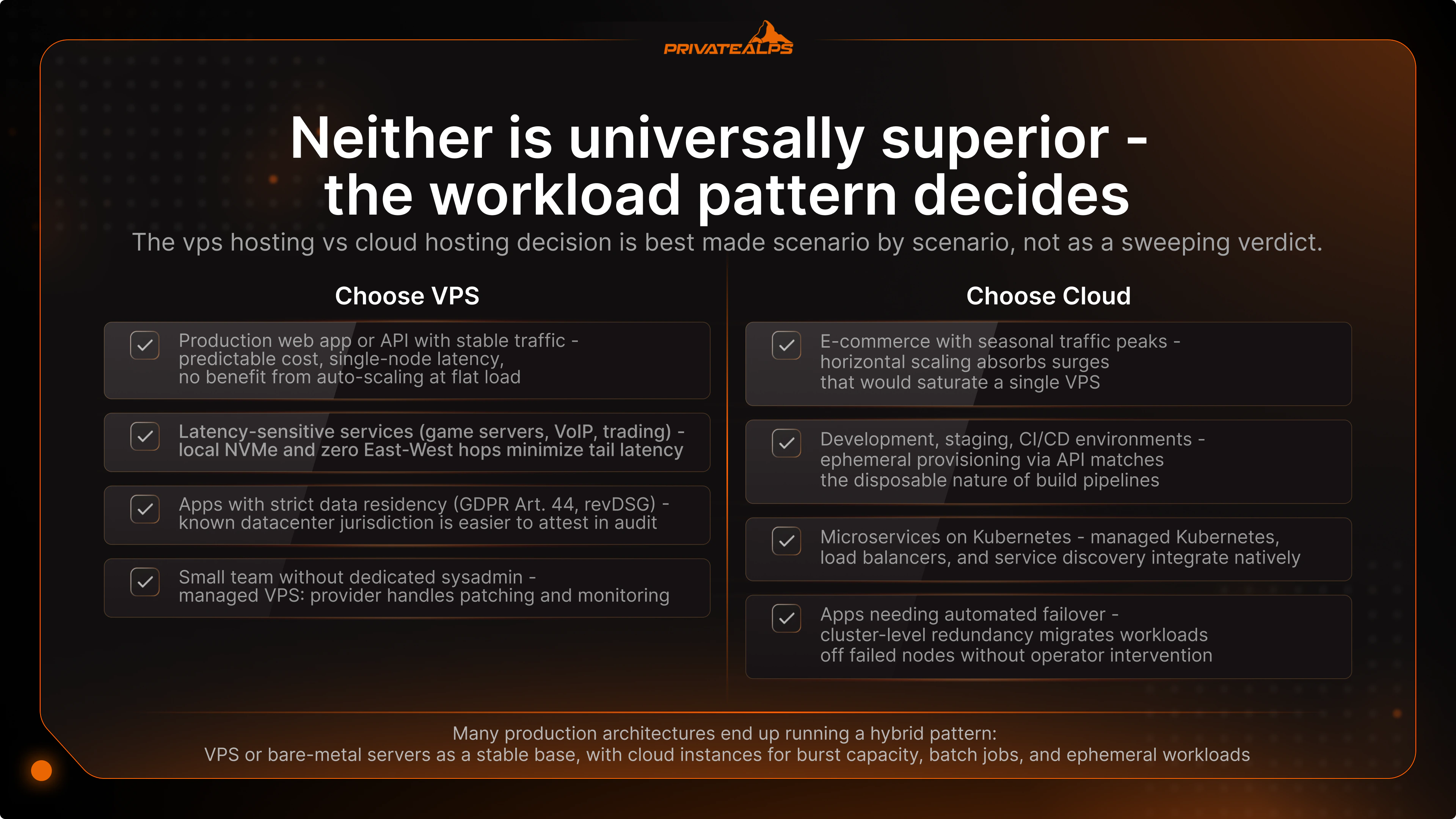
| Scenario | Recommended Option | Reason |
|---|---|---|
| Production web app or API with stable traffic | VPS | Predictable cost, single-node latency, no benefit from auto-scaling at flat load - and capacity headroom can be sized once rather than tuned continuously |
| E-commerce with seasonal traffic peaks | Cloud or hybrid | Horizontal scaling absorbs Black Friday or campaign surges that would saturate a single VPS; databases often remain on dedicated infrastructure for consistent write latency |
| Development, staging, CI/CD environments | Cloud | Ephemeral provisioning via API matches the disposable nature of build pipelines; teardown automation prevents idle environments from compounding cost |
| Apps with strict data residency (GDPR Art. 44, revDSG) | VPS or private cloud | Known datacenter jurisdiction is easier to attest in audit than multi-region public cloud topology, and avoids reliance on configuration to enforce legal requirements |
| Latency-sensitive services (game servers, VoIP, trading) | VPS or bare metal | Local NVMe and zero East-West hops minimize tail latency; even single-digit milliseconds matter in these domains |
| Microservices on Kubernetes | Cloud | Managed Kubernetes, load balancers, and service discovery integrate natively; self-hosting k8s on a single VPS defeats most of the architectural benefits |
| Small team without dedicated sysadmin | Managed VPS or managed cloud | The provider handles patching and monitoring - staffing cost, not infrastructure cost, decides whether unmanaged is realistic |
| Team evaluating migration | Direction matters | Moving from public cloud to VPS or private cloud eliminates egress and lock-in; the reverse direction adds both, plus a learning curve on vendor-specific tooling |
Many production architectures end up running a hybrid pattern: VPS or bare-metal servers as a stable base for persistent services like databases, message queues, and authentication, with cloud instances for burst capacity, batch jobs, and ephemeral workloads. This pattern captures the cost predictability of virtual server vs cloud at the core while preserving elasticity at the edge - and avoids the failure mode where a single architectural choice has to satisfy contradictory requirements. The trade-off is operational: hybrid setups need clear ownership of the boundary between persistent and ephemeral tiers, and teams should expect to invest in connectivity (VPN, direct interconnect, or service mesh extension across environments) and in unified observability across both layers.
VPS vs. Cloud: Security and Compliance Considerations
The cloud hosting vs vps hosting security comparison is not about which model is "more secure" - both rely on hypervisor isolation and both can be hardened to the same standard. The meaningful differences are in audit surface and how data residency is enforced at the infrastructure layer.
Engineers should understand two isolation layers separately. Hypervisor isolation: KVM and VMware enforce memory and CPU boundaries between co-located VMs; this isolation is well-studied, well-audited, and rarely the source of real-world incidents. Network isolation: in cloud environments, without explicit Security Group or firewall rules, East-West traffic between VMs - including across tenants sharing a cluster node - is a known attack surface and a recurring source of misconfigurations. The ENISA Threat Landscape 2024 consistently flags misconfigured services and exposed cloud-facing components as a dominant source of incidents - not hypervisor escape. The IBM Cost of a Data Breach Report 2024 found the global average breach cost reached $4.88 million, with cloud misconfiguration among the more frequent initial attack vectors alongside stolen credentials and phishing.
| Parameter | VPS | Cloud Hosting |
|---|---|---|
| Physical isolation from other tenants | Known host and neighbors at the cluster level | Tenants share cluster nodes; isolation enforced at hypervisor and SDN layer |
| Data jurisdiction control | Single datacenter, single legal jurisdiction | Multi-region deployments may replicate data across jurisdictions by default |
| GDPR / revDSG alignment | Straightforward - pick a datacenter in the required jurisdiction | Requires explicit region pinning, replication policy review, and DPA scrutiny |
| Audit surface complexity | Small and static - one host, one OS, one network path | Large and dynamic - Security Groups, IAM, VPC peering, service endpoints |
| Encryption at rest | Configured at OS or disk layer by the operator | Typically platform-managed via KMS; key custody depends on configuration |
For organizations subject to GDPR Article 44, the revised Swiss Federal Act on Data Protection (revDSG), or HIPAA, the question is rarely "VPS or cloud" - it is where the data physically resides, who has legal access to it, and how access can be attested during audit. Under the revDSG, personal data may only be transferred abroad when an adequate level of data protection is guaranteed, with the Swiss Federal Council maintaining the list of qualifying countries. A provider with a fixed, attestable datacenter in a qualifying jurisdiction - Swiss jurisdiction under revDSG, for example - resolves residency at the infrastructure layer rather than pushing it into configuration. The practical advantage: a single line in the data processing agreement, rather than a documented region-pinning policy that needs to be re-verified after every infrastructure change.
Summary
VPS hosting is the right choice when workloads are stable, budgets are fixed, and data residency must be attestable from the infrastructure layer rather than from a configuration policy. Cloud hosting is the right choice when traffic is variable, when the architecture depends on automated failover and horizontal scaling, or when distributed systems are the design baseline rather than an aspiration. In production environments the two models typically coexist - stable services on VPS or bare metal, elastic services on cloud - because no single platform satisfies every operational requirement simultaneously. The provider's jurisdiction, network isolation model, root access level, and pricing transparency end up mattering as much as the hosting category itself, and these provider-level choices often determine outcomes more than the architectural distinction between VPS and cloud.
For teams that need a specific jurisdiction, full root access, and predictable performance - none of which are guaranteed on public cloud platforms - PrivateAlps Linux VPS provides bare-metal and VPS infrastructure under Swiss revDSG, with fixed-bandwidth plans that eliminate the egress-cost surprise typical of public-cloud invoices. Swiss jurisdiction serves as a trust signal for organizations with data residency obligations under GDPR or HIPAA, and the single-jurisdiction footprint simplifies audit attestation compared to multi-region public cloud deployments.
FAQ
What is the difference between VPS and cloud hosting?
A VPS is an isolated partition of a single physical server with fixed allocated CPU, RAM, and disk, where the hypervisor enforces hard resource boundaries between tenants. Cloud hosting is a virtual infrastructure layer built on a dynamic pool of physical nodes with automatic scaling and node-level failover handled by the control plane. The practical implication: VPS offers cost predictability and single-node latency at the cost of horizontal elasticity, while cloud offers resource elasticity and built-in redundancy at the cost of pricing complexity and a larger configuration-driven attack surface.
Is VPS better than cloud hosting?
VPS is better when workloads are stable and predictable and budget is fixed - the monthly price is flat and the performance profile is consistent. Cloud is better when traffic is variable, when scaling must be automatic, or when the architecture is distributed by design. Neither is universally superior - the workload pattern decides.
Is VPS faster than cloud hosting?
At single-node latency under stable load, VPS is typically faster because there is no East-West network hop to distributed storage and no scheduling overhead across cluster nodes. Cloud outperforms VPS under burst load because it can add compute capacity horizontally - something a single VPS cannot do without manual scaling and brief downtime. The accurate framing is "faster at single-node operations, slower at handling load spikes" - and which dimension matters in practice depends entirely on traffic profile and architecture.
Is VPS more secure than cloud hosting?
Neither model is inherently more secure - both rely on the same hypervisor isolation primitives, and both can be hardened to comparable standards. VPS is easier to audit because the topology is static: one host, one datacenter, one network path, one well-defined trust boundary. Cloud environments are technically equivalent at the hypervisor layer but expand the attack surface through Security Groups, IAM policies, VPC peering, and multi-region replication, where misconfiguration is the dominant failure mode and the blast radius scales with the size of the deployment.
What is a VPS in cloud hosting, and what is the difference between a cloud server and a VPS?
Many providers label cloud VMs as "VPS" - the label is marketing, not architecture. A traditional VPS runs on a single physical host with local storage; a cloud server runs on a distributed cluster with networked storage (Ceph, SAN, EBS-class) and live VM migration between nodes. The buyer's practical test: ask whether the offering uses an HA cluster with distributed storage or a single host, because the answer determines failover behavior, I/O latency profile, hardware-failure recovery time, and whether snapshots are point-in-time or crash-consistent. The architectural reality matters more than the label on the product page.
Is cloud hosting cheaper than VPS?
Cloud appears cheaper at list price, but in major public clouds the real invoice includes egress, IOPS charges, and snapshot storage - costs that routinely push the bill above VPS pricing for workloads at steady state. Private cloud providers with fixed bandwidth plans close most of that gap. VPS is more cost-effective for workloads at sustained 40-60% utilization or above.
Can I use VPS for cloud-native applications?
Yes. A VPS is fully compatible with cloud-native tooling: Docker, single-node Kubernetes distributions (k3s, MicroK8s, k0s), Terraform, Ansible, Helm, and service mesh components like Linkerd or Consul Connect all run without modification. The architectural difference is that a VPS does not provide elastic infrastructure - you get cloud-native software running on predictable, dedicated hardware, which suits stateful workloads and development environments but does not provide horizontal scaling on demand.
What is cloud hosting vs VPS hosting for WordPress?
For WordPress with moderate, predictable traffic, a VPS with NGINX and PHP-FPM delivers a better cost-to-performance ratio than managed cloud hosting. Cloud hosting becomes the right choice for sites with viral or seasonal traffic spikes, where auto-scaling absorbs surges that a single VPS would queue or drop.
What is the difference between a virtual server and cloud?
A virtual server (VM or VPS) is an isolated compute environment running on a physical host or cluster - a specific instance with a specific resource allocation. "Cloud" is an infrastructure delivery model in which compute, storage, and networking resources are provisioned dynamically from a shared pool, as defined in NIST SP 800-145. A virtual server can exist inside a cloud environment or outside one - the terms describe different layers of the stack, not competing options, and conflating them is a recurring source of buyer confusion.