



What is Tor Hosting & How to Set Up a .onion Hidden Service
Search what is Tor and you'll get five paragraphs that all sound alike. Browser. Onion routing. The dark web. Privacy. Done. Helpful if you've never heard of it. Not so helpful if you actually want to run something on Tor, because tor hosting is a different conversation. Your server is the anonymous side now. The visitor is just a visitor. Everything about the setup changes.
A point worth getting out of the way early. Running a .onion hidden service doesn't need a relay. Or an exit node. Or DNS. Or a cert. None of that. You install Tor, drop two lines into a config file, reload, and your server has an address that only resolves inside Tor. This has been possible since the network launched in 2002. Modern v3 onion services go further than just hiding the visitor's IP - they hide yours too, in both directions.
The rest of this is an operator's guide. Protocol mechanics, the torrc you actually need, install commands for Ubuntu and CentOS, vanity addresses, client auth, and the list of dumb mistakes that have unmasked real .onion services over the years.
AI Summary
Tor is an open-source anonymity network built on onion routing. Designed at the US Naval Research Laboratory in the mid-1990s. Released as free software in 2002. Tor hosting means running some service (a site, an API, SSH, IRC, whatever speaks TCP) as a v3 onion service, so the server's IP never gets handed out. A v3 .onion is 56 base32 characters that encode an ed25519 public key. No SSL involved. No exit node in the path.
- What is Tor: The Onion Router. A low-latency anonymity overlay network.
- Origin: US Naval Research Laboratory. Open-sourced 2002. EFF funding from 2004.
- Routing: 3 encryption layers, 3 nodes (entry → middle → exit for clearnet traffic)
- Onion services: 6-hop rendezvous circuit (3 client + 3 service), no exit node
- v3 address: 56-char base32 string encoding an ed25519 public key
- No SSL needed: End-to-end encryption is part of the protocol
- Two torrc lines:
HiddenServiceDirandHiddenServicePort. Nothing else. - v2 deprecated: Disabled October 2021. Any 16-character address is dead.
:::
What Is Tor?
Tor is The Onion Router. It's a free, open-source anonymity network that takes your TCP traffic and bounces it through three randomly picked volunteer relays, peeling off one layer of encryption at each hop. The tor meaning is right there in the picture. Layers of an onion. Each relay only knows what it needs to forward the packet to the next one. No node ever sees both ends of the conversation at the same time. The Tor Project runs the network as a non-profit. Around 2.5 million people use it daily. There are roughly 8,000 active relays running as of 2025.
It didn't come from a hacker collective. It came from a Navy lab. In the mid-1990s, Paul Syverson, Michael Reed, and David Goldschlag at the US Naval Research Laboratory were working on a way to keep intelligence communications safe from traffic analysis. The alpha (written by Syverson with Roger Dingledine and Nick Mathewson) went live on 20 September 2002. The source went under a free licence in 2004. Every circuit uses fresh ephemeral keys, which gives you Perfect Forward Secrecy. Translation: if someone steals a key tomorrow, they still can't decrypt yesterday's traffic.
What is tor network architecture once you strip the marketing language? About 8,000 volunteer relays scattered worldwide, a smaller pool of bridge relays for users behind censorship, plus a hash-ring of Hidden Service Directories so clients can find onion services. Tor Browser is the part most people see. It's a hardened Firefox ESR fork with Tor built in, talking to a local SOCKS5 proxy on 127.0.0.1:9150. WebRTC is disabled. NoScript is bundled. Window dimensions get rounded so fingerprinting gets harder. For hosting, you don't touch any of that. You run the standalone tor daemon. It puts a SOCKS5 listener on 127.0.0.1:9050 and reads its config from torrc.
Tor vs VPN
| Property | Tor | Commercial VPN |
|---|---|---|
| Trusted party | None, decentralised | The VPN provider |
| ISP visibility | ISP sees "Tor traffic" (hidden by Bridges) | ISP sees "VPN traffic" |
| Speed | 3-hop routing, typically 1–5 Mbit/s | Single hop, near-native bandwidth |
| Can host servers anonymously | Yes (onion services) | No |
| Cost | Free | $3–$15 per month |
| Resistance to global passive adversary | Partial, traffic-correlation vulnerable | None, single point of trust |
| SSL certificate needed for hidden service | No, ed25519 keys provide identity | Yes, standard CA chain required |
What Is Tor Browser Used For?
What is tor browser used for, in real life? Anonymous research. Getting around censorship. Opening onion services. Protecting sources for journalists. Plain old private browsing that doesn't follow you around the web. At the protocol level, it routes every request through three encrypted Tor relays, so the destination, the local network, and your ISP can't easily tie the traffic back to a real IP.
The dark web thing is overblown. Only about 1.5 to 3 percent of Tor traffic ever touches it. The other 97 percent of those 2.5 million daily users are on the regular web. What is the tor browser actually doing for them is basically what a VPN promises, except there's no single operator who can read your logs and sell them later. Journalists in countries with hostile press laws file stories. Researchers study how censorship works in different regions. Regular people skip ad-tech profiling.
Plenty of real organisations run verified onion mirrors. The New York Times publishes its journalism through a v3 onion service built on the open-source Enterprise Onion Toolkit (EOTK). Facebook runs facebookwkhpilnemxj7asaniu7vnjjbiltxjqhye3mhbshg7kx5tfyd.onion. BBC, Deutsche Welle, ProPublica, DuckDuckGo, all have their own mirrors. Most newsroom whistleblowing happens through SecureDrop, which only exists on Tor.
Tor Browser Advantages and Disadvantages
The tor browser meaning, for end users, comes down to a trade-off. You get free IP masking, fingerprinting resistance, and access to .onion sites no other browser can open. You pay for it with speed, CAPTCHA fights on sites that block exit nodes, and the fact that your ISP can see you're using Tor unless you turn on Bridges. It's not magic. JavaScript leaks. Account logins leak. Opening downloads outside the browser leaks. Any one of those undoes what Tor did.
A few things Tor isn't. Not a VPN, because no single party is trusted. Not invisible to your ISP without Bridges. Not "the most secure browser by default" the way Reddit threads sometimes claim. The Security Level slider toggles JavaScript behaviour. People forget it exists and stay on Standard, which is more exposed than Safer or Safest.
| Advantage | Disadvantage |
|---|---|
| Free and open-source, audited code | Slow page loads from 3-hop routing |
| Masks your real IP from destination sites | Exit nodes can read unencrypted HTTP traffic |
| Bypasses ISP-level and national censorship | ISP sees Tor usage unless Bridges are enabled |
| No tracking cookies persist across sessions | JavaScript can fingerprint at Standard Security Level |
| Native access to .onion services | Some clearnet sites block all Tor exit nodes |
What Is Tor Hosting?
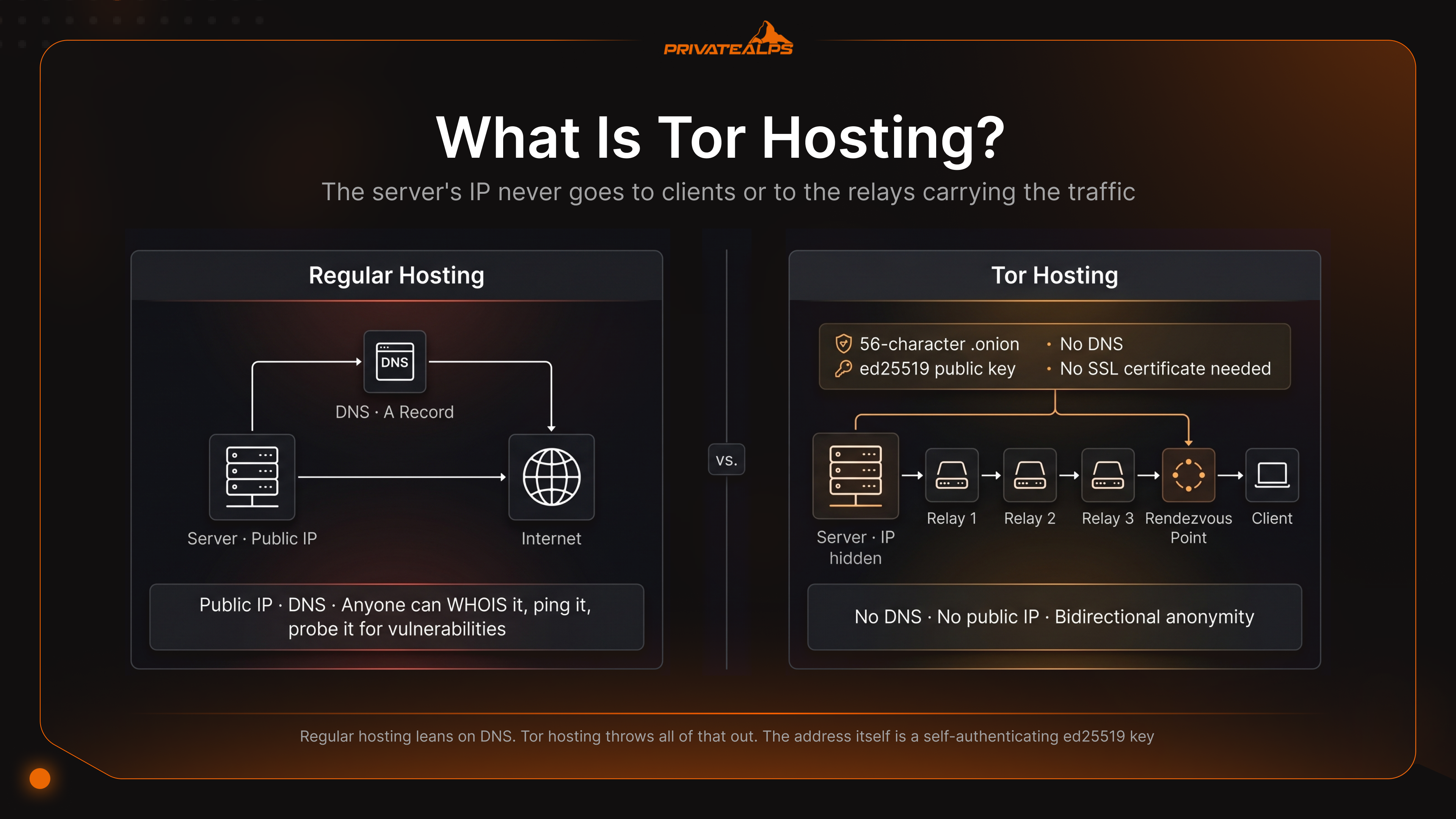
Tor hosting means running a network service inside Tor as an onion service. A site, an API, an SSH server, an IRC daemon, anything speaking TCP. The server's IP never goes to clients or to the relays carrying the traffic. Visitors reach you through a 56-character .onion address. It resolves cryptographically inside Tor. DNS is never involved.
Regular hosting leans on DNS. You have an A record pointing at a public IP. Anyone can WHOIS it, ping it, probe it for vulnerabilities. Tor hosting throws all of that out. The address itself is a self-authenticating ed25519 key. Client and service meet at a random rendezvous point picked on the fly. Neither side learns the other's IP. The identity check isn't a certificate. The address is the identity.
Three deployment patterns cover almost everything operators do in practice. First one is a fully private service, optionally walled off behind client authorization, so only users with the right x25519 key can connect. Second is an onion mirror of a clearnet site, advertised through the Onion-Location header. That's what NYT does. Facebook. DuckDuckGo. Third one is fully isolated infrastructure with no clearnet IP at all. SecureDrop-style. Used wherever the publishing risk is high enough that you don't want a clearnet endpoint sitting around.
| Model | Server anonymity | Client anonymity | Complexity | Typical use case |
|---|---|---|---|---|
| Onion mirror of clearnet site | Low, IP still public | High | Low | NYT, BBC, DuckDuckGo |
| Public onion service (clearnet hidden) | High | High | Medium | Privacy-first product launch |
| Authenticated onion service | High | High + identity-bound | Medium | Internal admin panel, private docs |
| Fully isolated onion-only infrastructure | Maximum | Maximum | High | SecureDrop, whistleblower platforms |
How Does a Tor Hidden Service Work?
It's a six-step rendezvous protocol. The service publishes a signed descriptor to the network. The client uses that descriptor to negotiate a meeting point with the service. Neither side ever learns the other's IP. The full circuit ends up being six hops (three on your side, three on the service's side), which is why hidden services don't need an exit node. That's also how Tor works for normal clearnet traffic: one encryption layer gets stripped at each relay, then the request hits an exit node and goes to the wider internet. Onion services skip the exit because both endpoints stay inside the network the whole time.
- Key generation and address derivation. The Tor daemon produces an ed25519 keypair and writes
hs_ed25519_secret_keyandhs_ed25519_public_keyinto HiddenServiceDir. The 56-character.onionis the public key, base32-encoded, with a checksum and a version byte appended. - Introduction point selection. The service picks three random Tor relays to act as introduction points and builds anonymous circuits to each one. Those relays know they're being used as introduction points. They don't know who the service is.
- Service descriptor publication. The service signs a descriptor listing those introduction points and uploads it to the hash-ring of Hidden Service Directories. Clients fetch it later by computing the same hash from the .onion address.
- Client descriptor fetch and rendezvous selection. Type the .onion into a browser. Your Tor instance pulls the descriptor from an HSDir, then picks a random relay as the rendezvous point. It hands that relay a one-time cookie.
- Introduce message. The client sends an INTRODUCE1 cell through one of the service's introduction points. The message says: here's the rendezvous, here's the cookie.
- End-to-end circuit and data transfer. The service builds its own circuit to the rendezvous point. The rendezvous point splices the two circuits together and from then on just relays cells in both directions. Three client hops, then rendezvous, then three service hops. Six relays between you and the server.
Worth saying out loud, because there are still ancient tutorials floating around: v2 onion services (the old 16-character SHA-1 addresses) got disabled in October 2021 when Tor Browser 11 stable shipped with Tor 0.4.6.x. Any guide still talking about HiddenServiceVersion 2 or 16-character addresses is describing a setup that won't run on any current Tor binary. Throw those guides out.
How to Set Up a .onion Hidden Service

Six steps. Install the tor daemon from the official Tor Project repo. Run a web server on a loopback address or a Unix socket. Drop HiddenServiceDir and HiddenServicePort into /etc/tor/torrc. Reload. Pull the new address out of /var/lib/tor/<service>/hostname. Whole thing takes ten minutes on a fresh server. v3 is the default version in every modern Tor build, so a HiddenServiceVersion line is no longer needed and will just clutter your config.
Prerequisites:
- A Linux server with root access (Ubuntu 22.04+, Debian 11+, RHEL/Rocky/AlmaLinux 9+)
- NGINX or Apache listening on
127.0.0.1:80or a Unix socket - Tor installed from
deb.torproject.orgorrpm.torproject.org(don't use the distro default, it's usually months behind) - The page or app you plan to expose, served locally and already tested
Setup commands by distribution
| Step | Ubuntu / Debian | RHEL / Rocky / AlmaLinux | What it does |
|---|---|---|---|
| Add Tor repo | echo "deb https://deb.torproject.org/torproject.org $(lsb_release -cs) main" | sudo tee /etc/apt/sources.list.d/tor.list | sudo dnf install -y epel-release && sudo dnf config-manager --add-repo https://rpm.torproject.org/centos/9/x86_64 | Adds the official Tor package source |
| Import signing key | wget -qO- https://deb.torproject.org/torproject.org/A3C4F0F979CAA22CDBA8F512EE8CBC9E886DDD89.asc | sudo gpg --dearmor -o /usr/share/keyrings/tor-archive-keyring.gpg | sudo rpm --import https://rpm.torproject.org/centos/public_gpg.key | Verifies package integrity |
| Install | sudo apt update && sudo apt install -y tor deb.torproject.org-keyring nginx | sudo dnf install -y tor nginx | Pulls Tor daemon and web server |
| Enable on boot | sudo systemctl enable --now tor@default | sudo systemctl enable --now tor | Starts Tor as a system service |
| Edit torrc | sudo nano /etc/tor/torrc | sudo nano /etc/tor/torrc | Adds the hidden service directives |
| Reload | sudo systemctl reload tor@default | sudo systemctl reload tor | Applies config without dropping circuits |
| Read address | sudo cat /var/lib/tor/my_site/hostname | sudo cat /var/lib/tor/my_site/hostname | Prints your new .onion |
Minimal torrc
# /etc/tor/torrc
HiddenServiceDir /var/lib/tor/my_site/
HiddenServicePort 80 unix:/var/run/tor/my_site.sock

# Optional: use loopback TCP instead of Unix socket
# HiddenServicePort 80 127.0.0.1:80
The Unix socket option is what the Tor Project itself recommends. Reason is simple. There's no listening TCP port for a misconfigured firewall to expose or a LAN scanner to find. Whatever else is on the local network has nothing to reach.
Minimal NGINX server block
# /etc/nginx/sites-available/my_site
server {
    listen unix:/var/run/tor/my_site.sock;
    server_name myaddress.onion;

    root /var/www/my_site;
    index index.html;

    # Hide identifying response headers
    server_tokens off;
    more_clear_headers Server;

    # Strip Onion-Location loops and force relative links
    location / {
        try_files $uri $uri/ =404;
    }
}
Post-install checklist
- Verify in Tor Browser. Paste the
.onionfrom yourhostnamefile into the address bar. Page should load within 30 to 60 seconds on first publication. - Back up the keys. Copy the whole
HiddenServiceDirto encrypted offline storage. Losehs_ed25519_secret_keyand the address is gone. There's no recovery. - Lock down permissions.
sudo chown -R debian-tor:debian-tor /var/lib/tor/my_site && sudo chmod 700 /var/lib/tor/my_site. - Add client authorization (optional). Drop
descriptor:x25519:<base32-pubkey>files into/var/lib/tor/my_site/authorized_clients/with the.authextension. Watch out for one trap:HiddenServiceAuthorizeClientis a v2-only directive and will break v3 completely if you put it in your torrc. - Monitor uptime.
torsocks curl --silent --max-time 30 http://myaddress.onion/healthzfrom an external host, every five minutes. - Publish the Onion-Location header on your clearnet mirror if you have one:
add_header Onion-Location http://myaddress.onion$request_uri;.
Troubleshooting
| Symptom | Cause | Fix |
|---|---|---|
hostname file not created after reload | Permission denied on HiddenServiceDir | chown debian-tor:debian-tor /var/lib/tor/my_site && chmod 700 |
| Tor logs "Bootstrapped 100%" but onion unreachable | Wrong port mapping in HiddenServicePort | Verify the local service is listening on the target port/socket |
| "Connection refused" in Tor Browser | Web server not running or wrong socket path | systemctl status nginx; check ls -l /var/run/tor/ |
| New address every restart | HiddenServiceDir not persistent (tmpfs) | Move it to a real disk path like /var/lib/tor/ |
| 502 Bad Gateway in browser | NGINX upstream unreachable through socket | Add tor to the NGINX socket group or use 127.0.0.1:port |
How to Generate a Vanity .onion Address
A vanity .onion is a v3 address whose first few characters spell something you picked, like mybrand…onion instead of random gibberish. You make one by brute-forcing ed25519 keypairs until the base32 output starts with the prefix you want. The standard tool is mkp224o, released under CC0 1.0 by a developer who goes by cathugger.
On Debian or Ubuntu: install build dependencies with apt install gcc libc6-dev libsodium-dev make autoconf, then ./autogen.sh && ./configure --enable-amd64-51-30k && make. Run ./mkp224o myprefix -d ./output -t 8 -s and you'll have eight threads chewing through keys, looking for addresses that start with myprefix. Every match drops into its own directory with hostname, hs_ed25519_public_key, and hs_ed25519_secret_key. Copy that directory into HiddenServiceDir. Reload Tor. Done.
Two things will trip you up if you don't know about them. Base32 doesn't have the digits 0, 1, 8, or 9, so prefixes containing those characters are impossible. mkp224o will reject them immediately. Second thing: the search space grows by a factor of 32 per character. So generation time goes exponential, and fast.
| Prefix length | Approximate time on one modern CPU core |
|---|---|
| 4 characters | A few seconds |
| 6 characters | Several minutes to ~1 hour |
| 7 characters | Several hours to a day |
| 8+ characters | Days to weeks; use multi-core or GPU |
A vanity prefix buys you exactly zero cryptographic strength. The whole value is brand recognition. That's it.
Is Tor Safe?
Wrong question. Try this one instead: safe against which threat model? Tor is safe for what it's actually built to do, which is hide your network location. Provided you keep the software current, use the official build, and don't sabotage yourself with behaviour the protocol can't see.
Two real attack vectors actually matter in practice. First one is malicious exit nodes reading unencrypted HTTP traffic. That's irrelevant to onion services (no exit) but matters when Tor Browser users visit clearnet sites without HTTPS. Second one is traffic-correlation by a global passive adversary watching both ends of a circuit. That's a known weakness of any low-latency anonymity network. But here's the part worth holding on to. Almost every real deanonymisation you can name didn't come from breaking Tor. It came from operator OpSec failures. Someone logged in with a personal account. Posted from the same box without Tor. Left EXIF metadata in an uploaded image. The protocol held. The human didn't.
Safe-use checklist:
- Download Tor Browser only from torproject.org and verify the GPG signature
- Keep both the browser and the standalone daemon updated to the current stable
- Use the Security Level slider (Safer or Safest) when you don't need full JavaScript
- For maximum isolation, run Tor Browser inside Tails or Whonix
- Never open downloaded files (PDFs, DOCs) while online or outside the browser
Is Tor Legal?
In almost every democracy, yes. Using Tor isn't a crime in the United States, the European Union, Switzerland, or the UK. The technology was originally funded by DARPA and the US Naval Research Laboratory. It's endorsed for legitimate use by major news organisations, human rights groups, and law enforcement agencies who use it themselves. The illegal part is illegal content. Not the protocol that carries it.
| Region | Status | Notes |
|---|---|---|
| USA / EU / Switzerland / UK | Legal | Tor Browser is publicly distributed and used by journalists, researchers, and governments |
| Russia | Blocked at ISP level | Tor Project domain blocked since December 2021; Bridges and obfs4 still work in practice |
| China | Heavily restricted | Great Firewall blocks public relays; Meek and Snowflake bridges required |
| Iran / Belarus | Restricted | Periodic ISP-level blocking; reachable via Tor Bridges |
| North Korea | Network-level blocked | Civilian internet access itself is severely restricted |
Tor Hosting Security: OpSec and Server Hardening
Tor hides your server's IP at the network layer. That's all. It does nothing about the dozens of other ways an application, a sloppy server config, or a tired operator can leak that same IP through a side channel. Almost every public deanonymisation of an onion service in the past decade came from one of those side channels. Not from breaking the Tor protocol. Below are seven leak classes worth testing for before you announce your address to anyone.
| Threat | Leak mechanism | Mitigation |
|---|---|---|
| IP in response headers | App emits X-Real-IP, Via, or default Server banners containing the host's clearnet IP or hostname | Strip with more_clear_headers in NGINX; set server_tokens off; audit with curl -I over Tor |
| EXIF in uploaded media | Camera/phone images retain GPS, device serial, and original upload timestamps | Run all uploads through exiftool -all= or ImageMagick -strip before publishing |
| DNS leak via outbound app requests | Application loads fonts, analytics, CDN assets from clearnet endpoints, resolved via system DNS | Block outbound traffic by firewall except through Tor; self-host all assets |
| Uptime / timing correlation | Service goes offline at the same wall-clock time as a known clearnet host | Run on a dedicated host with no overlapping maintenance windows |
| Key file compromise | hs_ed25519_secret_key stolen via backup leak or container escape | Restrict to mode 600; encrypted backups only; never commit to version control |
| HTTP behaviour fingerprinting | Default error pages, TLS versions, NGINX module fingerprint match clearnet site | Use distinct configs for the .onion and the clearnet host |
| Tor relay on same host | Operating a public relay alongside the hidden service reduces anonymity | Never run a relay on the same machine as a hidden service |
Server hardening directives:
- Set
HiddenServiceNonAnonymousMode 0(default) - never enable single-hop mode on a production onion - Bind the web server to a Unix socket, not
0.0.0.0-listen unix:/var/run/tor/site.sock - Drop all inbound clearnet traffic at the kernel firewall except SSH (ideally also onion-only)
- Disable
ServerTokens/server_tokensand remove the defaultServerheader entirely - Audit the running service from outside with
OnionScan, an open-source tool that probes for the leak classes above
OnionScan is about as close to a pre-launch checklist as the hidden-service world has. Point it at your .onion before you tell anyone the address exists. It'll flag default Apache pages, exposed .git folders, EXIF leaks, SSH keys reused with clearnet hosts. The kind of stuff that's actually unmasked real services in real incidents.
Summary
Tor hosting is a legitimate infrastructure choice. Not a dark-web shortcut. Set up correctly, a v3 onion service gives you bidirectional anonymity, end-to-end encryption with no certificate authority involved, and no DNS dependency at all. None of that matches what a standard VPS-with-domain setup can offer. The protocol is mature. v3 has been the only supported version since October 2021. The spec is public. The codebase has been audited several times over.
What breaks .onion services in practice is almost never the protocol itself. It's the EXIF tag nobody stripped. The analytics script that quietly phones home over clearnet. The secret key that ended up in an unencrypted backup. The operator who logged in once from a personal IP at 3 a.m. because they were tired. Treat the address the way you'd treat a production secret. Lock the keys down. Harden the application. Run OnionScan. Assume every header, every error page, every outbound request is one bad day away from giving you away.
Tor hosting pays off when the infrastructure under it shares the same philosophy. Full root access. Kernel-level firewall control. Your own NGINX build. No shared-hosting middleware sitting between Tor and your application. PrivateAlps bare-metal is built for exactly that scenario. Full root on Swiss-hosted hardware. Isolated HiddenServiceDir paths. Firewall rules you actually control. Custom NGINX builds that shared and managed hosting can't offer. Add Swiss jurisdiction under the revised Federal Act on Data Protection (revDSG) and crypto payment options on top, and you've got the infrastructure most serious .onion operators end up choosing anyway. Plans and specifications on the Tor hosting page.
FAQ
What is Tor?
Tor is The Onion Router. It's a free, open-source anonymity network that bounces your TCP traffic through three volunteer relays, peeling off one layer of encryption at each hop, so the destination never learns your IP. Unlike a VPN, no single party is trusted, and the same network also supports onion services that hide the server's IP.
What is a Tor browser?
A hardened fork of Firefox ESR with a Tor client built into it, routing every web request through the Tor network. It's one way to use Tor. The network itself is separate infrastructure that any application speaking SOCKS5 to the local tor daemon on port 9050 can reach.
What is Tor hosting?
Tor hosting is running a network service inside Tor as a v3 onion service, so the server's IP stays hidden from clients and from the network itself. Regular hosting puts a public IP behind DNS. Tor hosting replaces DNS with a self-authenticating ed25519 address. No certificate authority involved anywhere in the process.
How does Tor work?
Traffic goes through a 3-node circuit (entry, middle, exit), with each node stripping one layer of nested encryption, so no single node ever sees both source and destination at once. Onion services extend that to a 6-hop rendezvous circuit (3 client + 3 service) with no exit node at all, because both sides of the conversation stay inside Tor the whole time.
How to use Tor?
As a client: download Tor Browser from torproject.org. Launch it. No configuration needed. Paste the .onion from your hostname file into the URL bar to test your own onion service. For hosting, install the tor daemon from the official repo, add HiddenServiceDir and HiddenServicePort to /etc/tor/torrc, reload, then read the new address out of hostname.