



Most people don’t wake up asking: “what is web hosting?” The question comes up after something, like a site loading too slowly, a form that stops submitting, or an update that takes everything down.
The basic idea behind web hosting is simple. Web hosting is the service that stores a website’s files on a server that stays connected to the internet around the clock. When someone loads a page, that server sends the files to their browser.
A web host is simply the company keeping the server up and reachable. It doesn’t sound like a big decision, but it ends up touching everything. Speed, traffic limits, how failures are dealt with. Google has noted that when pages drag on mobile, a lot of users don’t stick around. In most cases, that loss traces back to how the hosting was set up.
So when people ask “What is web hosting and how does it work?”, they’re usually asking something practical. Who’s responsible for speed? Who’s responsible for uptime? Who’s on the hook when something breaks at an inconvenient hour?
A Quick Grounding
- For a website to exist at all, something has to be sitting on a machine that’s connected to the internet day and night. That part is easy to forget.
- Every time someone loads a page, their browser has to find that machine, ask it for files, and wait for an answer. That loop never changes.
- If the answer takes too long, people don’t usually troubleshoot. They close the tab. Plenty of data backs that up.
- Most websites move more data than they used to, even simple ones. Images, scripts, fonts. It adds up quickly.
- Hosting comes in different shapes because not all sites behave the same way once traffic shows up.
- Anything public on the internet attracts noise. Bots, scans, random traffic. Hosting always deals with that, whether you notice it or not.
- In the end, hosting is about responsibility. Who keeps things running. Who fixes them when they don’t.
How Does Web Hosting Work?
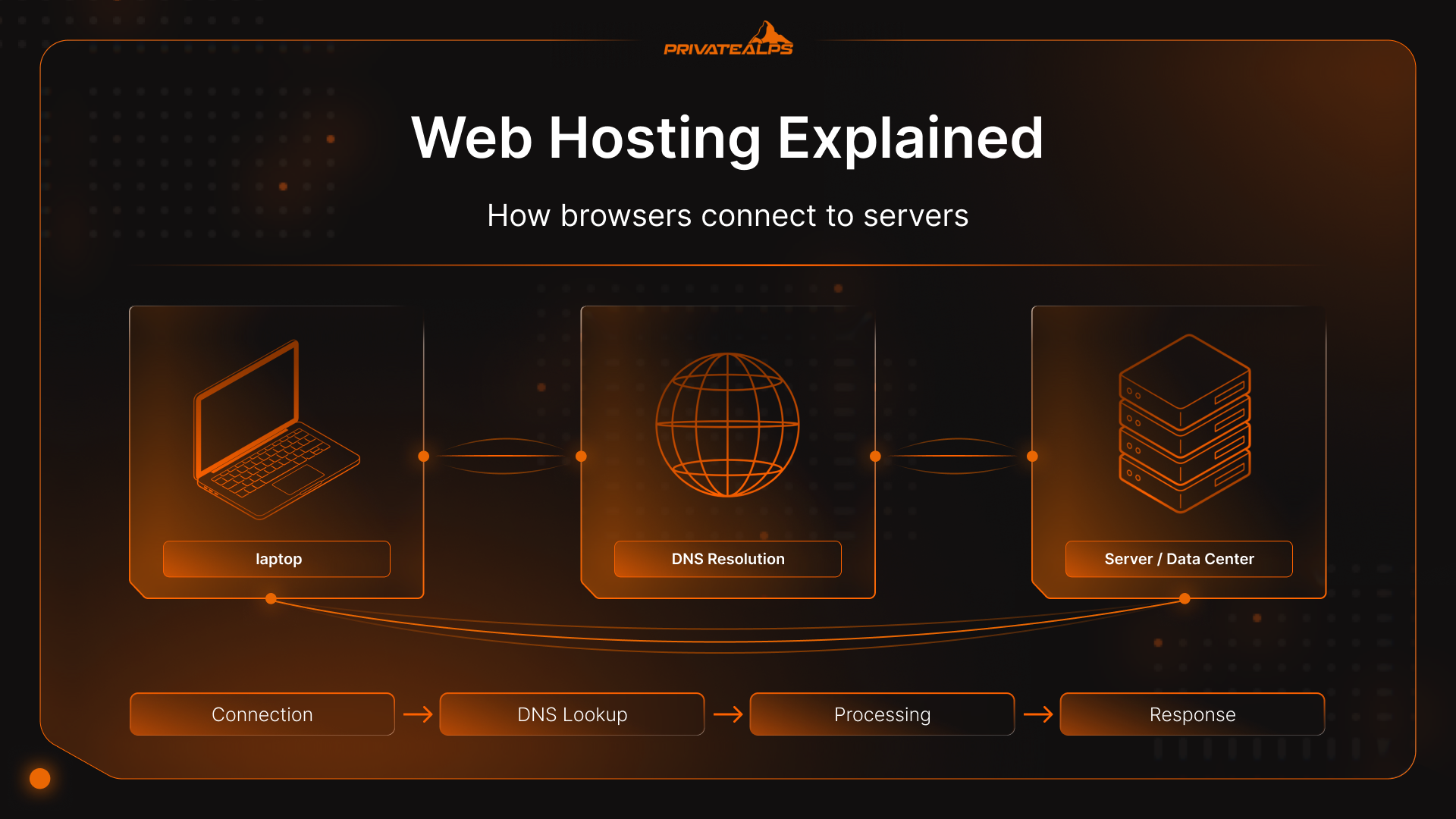
How web hosting works looks the same every time a page loads.
A browser asks for a page. It needs an address first, so it checks DNS. That gives it an IP. The browser connects to that IP and asks for a specific file. The server responds with data. The browser shows something on screen. That’s the loop.
Hosting exists so there’s always a server there to answer.
The Request–Response Cycle
A request usually starts with a domain lookup. The browser asks where the site lives. Once it knows, it opens a connection and sends a request like “give me /”. The server receives that request and checks what should handle it.
Sometimes the server just reads a file from disk and sends it back. Sometimes it has to run code, pull content from a database, and assemble a response first. That extra work adds time. Under load, it adds a lot of time.
What a Web Server Stores
A server almost never has just one thing on it. It’s usually a pile of stuff. Layout files. Images. Stylesheets. Scripts. Fonts. Configuration files. HTML, CSS, JavaScript, media, databases, certificates.
On a lot of sites, the words and data aren’t even in the files themselves, they’re sitting in a database, so the server also has to manage connections and access to that. On a typical CMS site, it’s pulling files from disk, grabbing content from the database, and sending the whole thing back as one response.
Web Server Software
Requests don’t hit files directly. They go through web server software first, things like Apache, Nginx, or LiteSpeed. That layer listens for connections and decides what happens next. Some setups are tuned to handle lots of small requests without much trouble. Others give you more flexibility, but once traffic starts stacking up, they slow down.
Types of Web Hosting: Architectures Compared
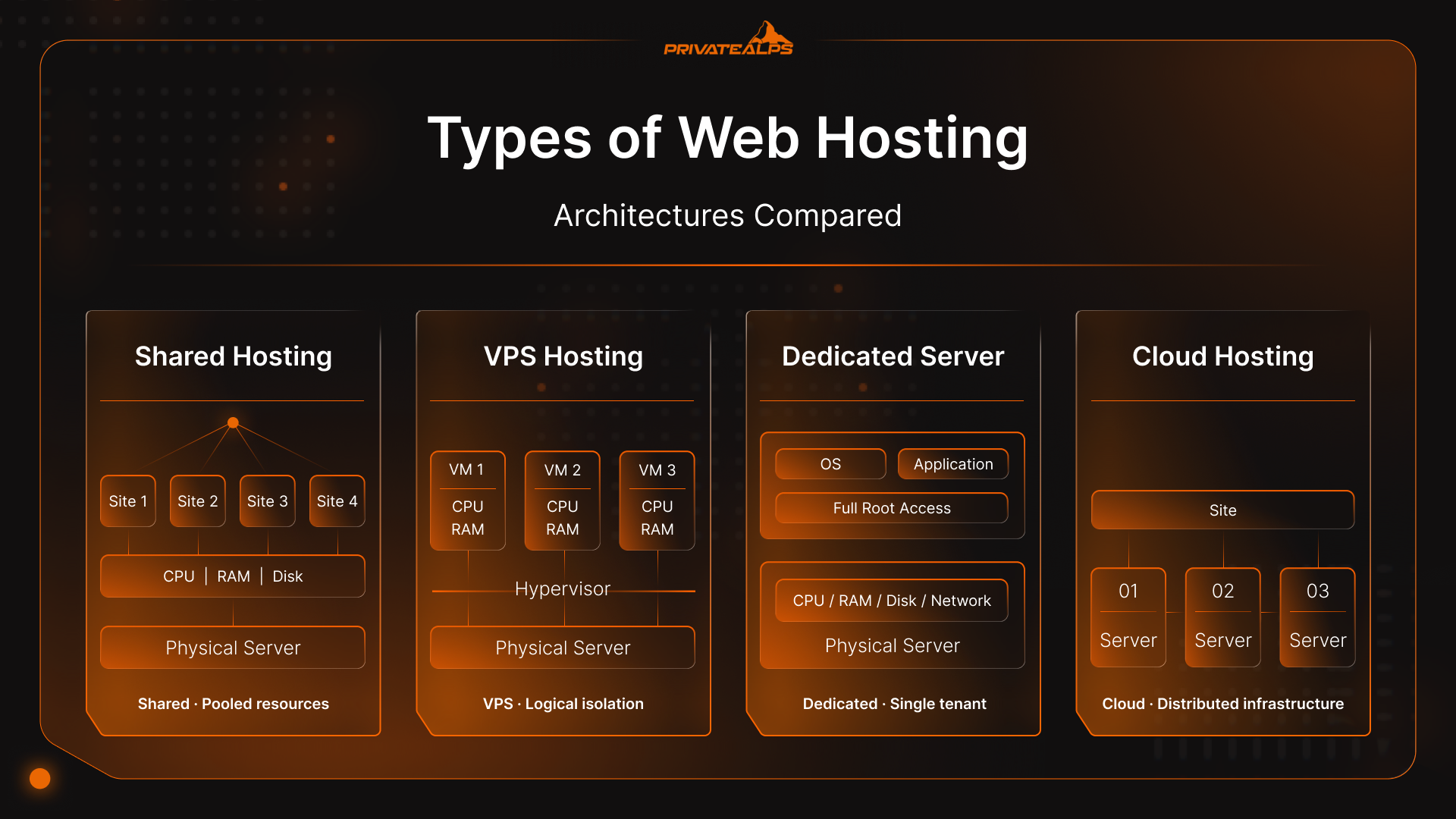
When people first ask “what is website hosting” they’re often surprised by how many types of hosts there are. Most hosting types exist because one server setup doesn’t fit every situation. Same basic job. Different tolerance for stress.
Shared Hosting
Shared hosting is the basic web hosting option many sites land on by default. One server. Many websites. Everyone drawing from the same pool of resources.
Most days, it works. Pages load. Email sends. Nothing feels off. Then traffic increases or another site on the same server starts consuming more than its share, and performance drops without much warning. There’s rarely a clear notice that a limit has been reached. The site just feels slower than it used to.
VPS Hosting
With a VPS, the website hosting definition changes, the server is split into separate sections. Each section gets its own share of memory and processing power.
You’re still on a shared machine, but the walls are thicker. If something else on the server goes sideways, it’s less likely to spill over. You also tend to get more control, which cuts both ways. Things are more predictable, but you’re closer to the machinery now.
A lot of sites land here after shared hosting starts feeling unreliable.
Dedicated Server Hosting
Dedicated hosting is exactly what it sounds like. One physical machine. One customer.
Nothing is shared. That removes a lot of unknowns. It also removes the safety net. If something breaks, it’s yours to fix or pay someone to fix. Updates don’t happen by accident. Monitoring doesn’t exist unless it’s set up. This setup makes sense when consistency matters more than convenience.
Cloud Hosting
Cloud hosting is what you might see championed regularly in a web hosting guide, particularly now that 94% of companies worldwide are using cloud computing. It spreads the work across multiple machines instead of leaning on one.
If traffic spikes, more capacity can be pulled in. If a server fails, another one can take over. That flexibility is the point. The downside is that it’s harder to reason about. Costs move. Architecture choices matter earlier.
Hosting Types Compared
| Hosting type | Resource isolation | Control level | How scaling works | Cost profile | Where it usually fits |
|---|---|---|---|---|---|
| Shared hosting | Very low. Resources are pooled across many sites | Minimal | Fixed limits, little room to grow | Lowest | Small sites, early stages, low traffic |
| VPS hosting | Moderate. Virtual boundaries between users | Medium to high | Can scale up within server limits | Mid-range | Growing sites, multiple projects |
| Dedicated server | High. One server, one customer | Full control | Manual upgrades or new servers | High | High-traffic or resource-heavy sites |
| Cloud hosting | Configurable. Resources abstracted across machines | Varies by setup | Horizontal and on-demand | Variable | Spiky traffic, unpredictable growth |
Web Hosting Infrastructure
Hosting isn’t a single server sitting somewhere. It’s a setup designed to keep that server reachable without interruption.
Providers run data centers. Inside are servers, power equipment, cooling systems, and network hardware. All of it exists for one reason: the machines aren’t allowed to go offline just because something ordinary happens.
Data Centers and Physical Infrastructure
Servers sit in buildings built for constant operation. Power doesn’t come from one source. If the grid drops, batteries take over, then generators. Cooling runs continuously to stop hardware from overheating. Access to the space is restricted and logged.
This is usually how uptime shakes out once you’ve lived with it for a bit. When a host throws out something like 99.9 percent availability, it’s not a promise that nothing goes wrong. It’s more a way of saying that, spread out over time, the problems don’t pile up too badly.
Storage Systems: HDD, SSD, NVMe
Within a web hosting definition, storage matters. Servers read from disk constantly. Older drives do it slowly. SSDs improved that. NVMe improved it again.
The difference shows up when a site needs data from a database or has to read many small files at once. Slow storage doesn’t crash a site. It just drags everything down a little at a time.
Network, Bandwidth, and Distance
Data has to travel. Hosting includes network capacity, routing agreements, and physical distance between users and servers.
If the network is congested or far away, responses take longer. Nothing looks broken. Pages just hesitate. That delay is often the first sign that infrastructure is under strain.
What Affects Web Hosting Performance?
A lot of people end up confused when they ask “What does hosting mean” because even if the definition is consistent, host performance varies.
When a site feels slow, it’s usually because something in the hosting setup is stretched. Maybe the server’s busy. Maybe data has to travel farther than it should. Maybe the same work is getting done over and over. Performance comes from how all of that lines up, not one single setting.
Server Hardware: CPU, Memory, Disk
Every request uses CPU time. Memory keeps frequently used data close. Disk is where everything else lives.
If CPU is busy, requests wait. If memory runs out, the server falls back to disk. When disk access is slow, responses slow down across the board. This happens gradually.
Server Location and Latency
Requests move across the network before anything loads. The farther they travel, the longer that takes. A server close to users responds faster than one far away. That delay exists even when everything else is working correctly.
Software Stack and Caching
Server software decides how much work each request triggers. Some setups generate pages on every visit. Others reuse stored responses until content changes. Caching reduces repeated work. Without it, performance drops as traffic increases.
Performance Factors Summary
| Factor | What it affects | What users experience |
|---|---|---|
| CPU & memory | Request handling | Pages stall under load |
| Storage speed | Data access | Slow dynamic pages |
| Network distance | Initial response | Delayed first load |
| Caching | Repeated work | Speed drops with traffic |
What is Web Host Security?
So, what is a website host doing to keep sites secure? Usually, a lot of different things.
Anything that’s online gets touched. Constantly. Not by people, mostly. By scripts, scanners, and automated traffic looking for weak spots.
Cloudflare has talked about blocking tens of millions of DDoS attacks over the last year or so, and then millions more not long after. That kind of traffic isn’t rare anymore. It’s just there. Hosting security exists so that mess gets dealt with somewhere upstream instead of landing directly on a site.
SSL and Encrypted Traffic
Most browsers expect encryption by default. If a site isn’t using HTTPS, warnings show up. Some traffic never reaches the page at all.
Certificates expire, too. When renewals fail, sites break in a way that looks sudden but isn’t. Let’s Encrypt now issues millions of certificates per day, which tells you how normal automated encryption has become. When it’s missing, it stands out immediately.
Firewalls and Traffic Filtering
A public server receives far more requests than it ever answers. Firewalls and filtering rules exist to drop traffic that does not look legitimate. Rate limits slow repeated requests before they escalate. When these controls are missing, servers usually don’t fail outright. They simply become overwhelmed.
Backups and Recovery
Things go wrong a lot. A bad deploy. A misclick. A plugin update that shouldn’t have been run on a Friday.
Backups only matter if they’re recent and restorable. IBM’s research puts the average cost of a data breach at $4.88 million, but plenty of smaller outages come from simple recovery failures, not attackers. Time lost is usually the real cost.
Access and Basic Hardening
Most incidents don’t start with something sophisticated. Verizon’s DBIR consistently shows stolen credentials as a leading cause of web application breaches.
Limiting access, using keys instead of passwords, and keeping systems patched doesn’t stop everything. It just reduces how far problems spread.
Hosting Management Tools
When people ask “what is a hosting service” they’re usually looking at the extra elements beyond the hosting process itself.
Once a server is live, most problems don’t start with hardware. They start with people touching things. That’s where management tools come in.
This layer exists to reduce how often routine work turns into an incident.
Control Panels and Dashboards
Most hosting setups expose a control panel of some kind. It’s how domains get pointed, files get edited, databases get created, certificates renewed, backups triggered.
This isn’t optional at scale. cPanel alone is still used on well over half of shared hosting environments globally, which tells you how common panel-driven hosting still is. When panels are slow or restricted, people bypass them. That’s when mistakes show up later as outages.
File Access: FTP and SFTP
Files still need to be moved. Fixes get uploaded. Rollbacks happen. Media gets replaced.
Plain FTP is largely gone because credentials travel in clear text. SFTP encrypts the session, which is why most providers disable FTP entirely now. It’s not a performance feature. It’s a damage-reduction one.
Database Management
Most sites depend on a database for content, users, and settings. That database usually becomes the bottleneck before anything else.
Management tools handle user permissions, imports, exports, and basic query access. They also enforce limits. Too many connections or slow queries don’t always crash a site. They just make it feel unstable.
That’s often misdiagnosed as “bad hosting” by people still asking “how do web hosting services work?” when it’s really unmanaged database load.
Automation and Monitoring
The most useful tools are the ones that run without being noticed. Automatic backups. Certificate renewals. Alerts when disk space or memory crosses a threshold.
Uptime Institute reports consistently show human error as a leading contributor to outages, often tied to missed steps or manual repetition. Automation doesn’t remove humans. It removes repetition. That’s where most damage happens.
Web Hosting vs. Related Services
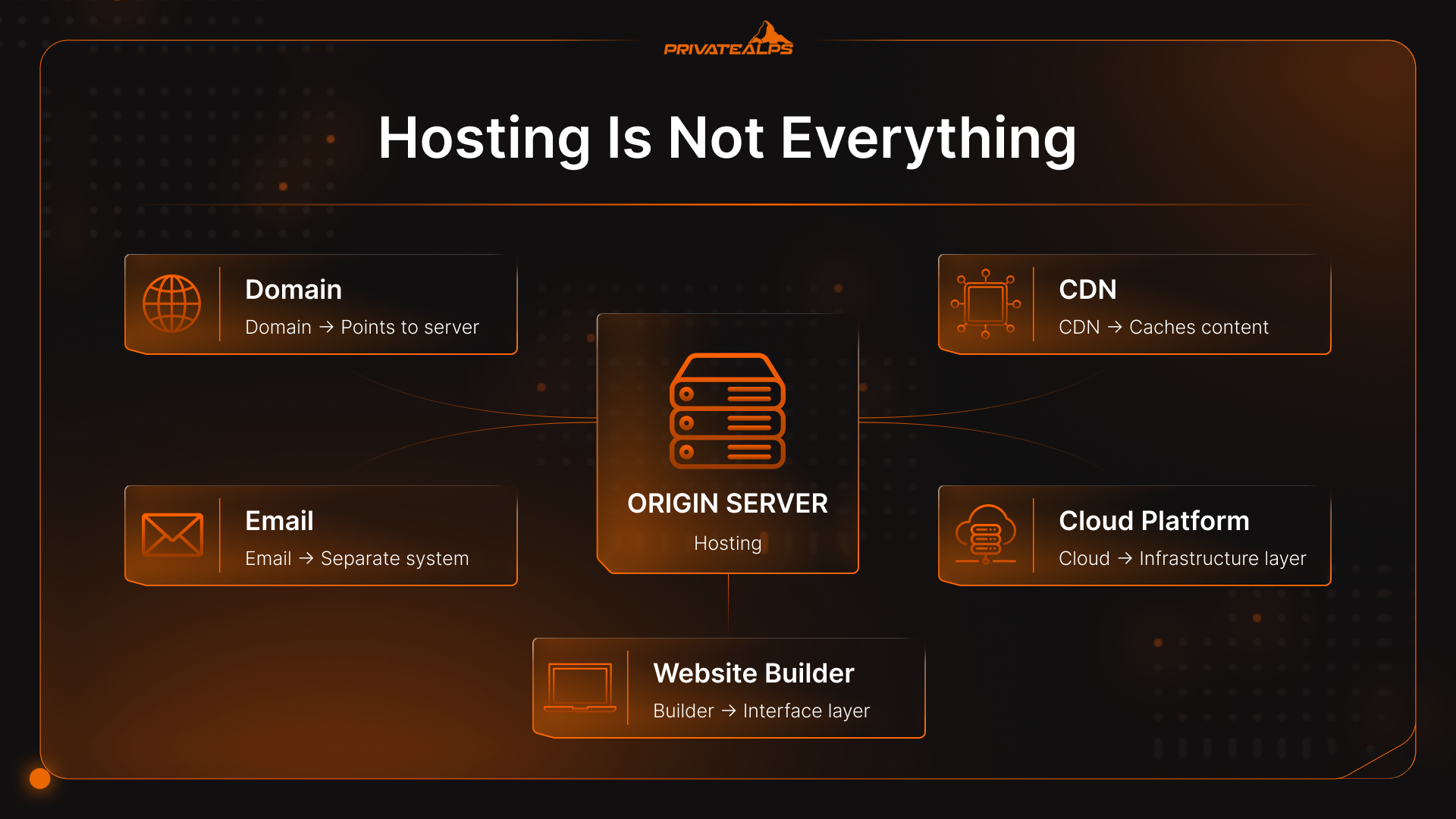
A lot of answers to the question “What does web hosting mean” lump things together under “hosting.” They’re not the same, even if they’re sold together.
Hosting and Domains
A domain isn’t the answer to “what is web hosting”, it’s just a name in a database. It points somewhere.
Hosting is the thing being pointed at. If the pointer is wrong, the site looks broken even when the server is fine. That happens a lot during moves. Nothing dramatic. Just one record pointing at the wrong place.
Hosting and CDNs
Hosting serves pages from one place. A CDN copies parts of those pages and serves them closer to users.
The CDN doesn’t replace the server. It reduces how often the server gets hit. When traffic is low, you barely notice the difference. When traffic jumps, you notice immediately if there’s no cache in front.
Hosting and Cloud Platforms
Traditional hosting gives you something that already works. A server, or part of one.
Cloud platforms give you pieces. Compute. Storage. Networking. You decide how they fit together. That’s powerful, but it also means you can build something fragile without realizing it. Hosting hides those choices. Cloud makes you own them.
Hosting and Website Builders
Builders wrap hosting so you don’t see it. You publish pages, and you don’t have to ask, “what is a hosting provider”, the builder handles the rest.
That’s fine until you need to leave. Files, databases, and URLs don’t always come with you cleanly. The convenience shows up early. The cost shows up later.
Hosting and Email
Email looks like part of hosting because it’s often bundled. Under the hood, it’s a separate system.
Low volume works almost anywhere. Higher volume brings spam filtering, storage limits, and delivery problems. That’s why email is often the first thing people move off a hosting account.
Can You Host a Website for Free?
This is a common question after “what is web hosting”, can you get it for free?
Yes. It’s possible.
Free hosting usually means shared space on a server with tight limits. You get just enough access to upload files and see them in a browser. That’s the deal.
It’s not meant to be stable, flexible, or long-term. Most free hosting setups have the same constraints.
- Storage is small.
- Bandwidth is restricted.
- Traffic is capped or slowed without warning.
- Custom domains may be blocked or partially supported.
- Ads may be added to pages.
- Backups are rare, and restores are usually manual.
- Support is limited or absent. If the site stops responding, there’s no escalation path. You wait or you move.
Free hosting is fine for things that don’t need reliability.
Experiments. Personal tests. Learning how servers behave. Temporary pages that won’t be missed if they disappear.
Once a site is expected to stay up, load consistently, or represent something publicly, free hosting stops fitting. You have to ask “what does hosting a website mean” on a broader scale.
What Determines Web Hosting Cost?
Hosting prices vary based on the web hosting service definition provided by the company you choose. Costs move based on how much strain a setup is expected to handle and how much work the provider takes on for you.
Cheap hosting works because risk is shared. More expensive hosting exists because someone is trying to remove uncertainty.
Resource Allocation and Isolation
The biggest cost driver affecting a web host’s definition of cost is how isolated your site is.
When many sites share the same CPU and memory, costs stay low. When resources are reserved for you alone, prices rise. Dedicated capacity means fewer surprises, but it also means unused capacity still costs money.
Management and Included Services
Unmanaged hosting is cheaper because you’re expected to do the work. When you start asking “what are hosting services?” things change.
Managed hosting costs more because someone else handles updates, monitoring, backups, and basic security. You’re paying for fewer things to think about, not faster hardware by default.
Contract Length and Renewals
Short commitments cost more per month. Longer terms lower the headline price.
Renewals are where people get caught off guard. Introductory pricing ends. The service stays the same. The bill doesn’t. That gap matters more than small differences between providers.
Hidden Costs
Some costs don’t show up until long after you’ve asked, “what is a web hosting provider?”
Extra backup storage. Bandwidth overages. Paid support tiers. Domain renewals. Security add-ons after a trial period ends. None of these are unusual. They’re just easy to miss early on.
Cost Factors at a Glance
| Factor | Lower-cost setup | Higher-cost setup |
|---|---|---|
| Resource isolation | Shared capacity | Dedicated resources |
| Management | Self-managed | Provider-managed |
| Reliability | Basic redundancy | High availability |
| Support | Limited | Priority access |
How to Choose a Web Hosting Provider
Usually, companies debating web hosting meaning are really just in the first stage of comparing providers.
Most hosting problems don’t come from picking the “wrong” technology. They come from unclear expectations. What’s covered. What isn’t. And who’s responsible when something goes wrong.
Choosing a provider is mostly about reducing uncertainty.
Uptime and Track Record
99.9% uptime still allows for nearly nine hours of downtime a year.
What matters more than the percentage is how outages are handled. Is there a public status page? Are incidents documented? Is downtime acknowledged or quietly ignored? A clean history doesn’t mean much if there’s no visibility when things fail.
Technical Support
Some teams answer quickly but can only handle basic requests. Others take longer but can actually diagnose problems. The difference usually shows up during incidents, not during onboarding. Response time matters. So does whether someone can read logs and explain what happened.
Scalability and Migration
Sites change. Traffic grows. Requirements shift.
A good provider makes it possible to move up without rebuilding everything. Upgrades should be predictable. Exports should exist. Data shouldn’t be trapped in proprietary formats.
Compliance and Data Location
For some sites, where data lives matters. You need to ask, “what is a web hosting company doing to keep things safe?”
That includes data protection laws, customer expectations, and internal policies. Providers should be clear about data center locations and certifications. Vague answers here usually mean limitations elsewhere.
Provider Checklist
| Area | What to look for | Red flags |
|---|---|---|
| Uptime | Public history, clear SLAs | No incident transparency |
| Support | Real engineers available | Scripted-only responses |
| Scaling | Clear upgrade paths | Forced migrations |
| Portability | Easy exports | Locked-in formats |
| Compliance | Stated locations, standards | Unclear data handling |
Choose the Right Hosting for Your Project
People start asking questions, like “what is web hosting?” and “why is it important to use a web host?” after something feels off. Pages load slower than expected. Updates feel risky. You’re not sure who to ask when something breaks.
At that point, the details start to matter. How much traffic the site actually gets. Whether usage is steady or spiky. How quickly problems need to be fixed. Whether you’re comfortable logging into servers or would rather not touch them at all.
A small site with a handful of visitors doesn’t need much. Shared resources are usually fine. Limits don’t get tested. Things stay simple.
Once a site has regular traffic, customers, or revenue tied to it, hosting stops being invisible. Downtime costs something. Slow pages show up in metrics. Recovery time matters more than monthly price.
The easiest way to choose hosting is to look at what would hurt most if the site stopped working. Pages loading slowly. Orders failing. Data disappearing. Long outages. Hosting should make those problems less likely, not add new ones. If it fits how the site’s used right now and leaves some room to grow, the rest usually sorts itself out.
FAQs
What is web hosting in simple terms?
It’s where the site actually sits. There’s a machine somewhere that has your files on it and responds when someone tries to load a page. People sometimes think of websites as abstract things, but they’re not. They run on specific machines. If that machine can’t be reached, nothing loads. There isn’t a middle state.
Do I need web hosting to have a website?
If anyone other than you is meant to see it, yes. You can build pages on your own computer and open them locally, but that’s still private. Once other people are involved, the site has to live on a server that stays online.
What is the difference between web hosting and a server?
A server is simply the computer. Hosting is everything that makes that computer usable without constant attention. Stable power. A network address that stays the same. Software that restarts when it should. Someone else handling the routine, unglamorous work.
Can I host a website on my own computer?
People do, usually once. It works until it doesn’t. Internet drops. The IP changes. The computer restarts overnight. Security becomes a concern. Running a server is easy for an hour. Doing it continuously is where it stops being fun.
What happens if my hosting provider goes down?
When a hosting provider goes down, the site disappears for a while. There’s no graceful version of that. Visitors don’t wait. What matters is how often it happens and how quickly things come back, not whether a provider claims outages never happen.
How long does it take to set up web hosting?
It depends on what already exists. A brand-new site can be quick. Moving something that people already use is slower because you spend more time checking than setting things up. Most problems show up after the switch, not during it.