



Public vs. Private IP Address: What's the Difference?
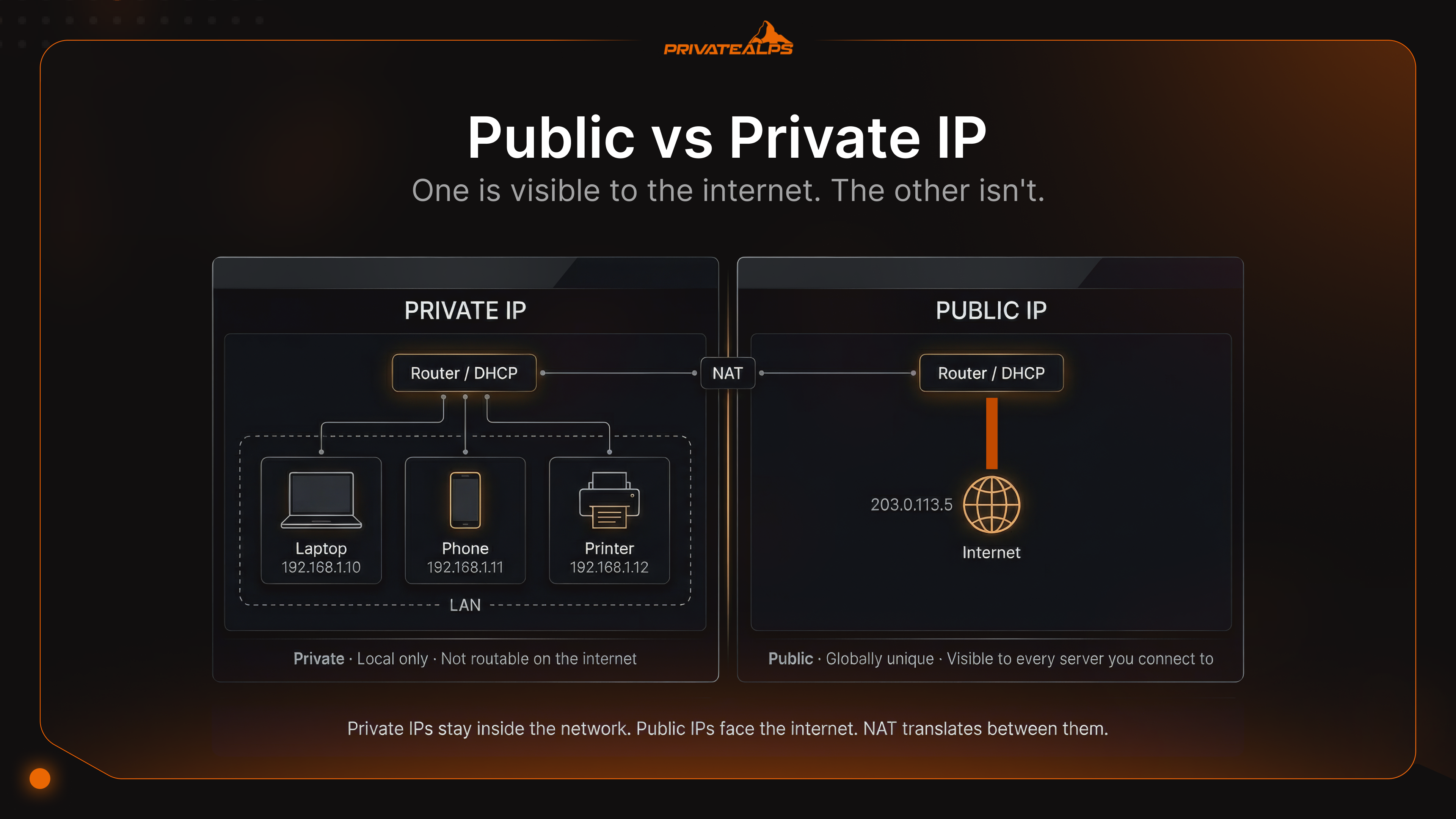
Run ipconfig on any Windows machine and you'll likely see something starting with 192.168. Then check what Google thinks your IP is - totally different number. One's real, one's not fake exactly, just... local. That confusion right there is the whole public and private IP address story. Neither reading is wrong. They're just answering different questions.
The difference between public and private IP addresses matters the moment you try to do anything beyond opening a browser tab. Self-hosted server? Port forwarding rule? VPN endpoint? If you don't understand which type of IP lives where, you'll end up chasing ghosts in a config that was never going to work.
AI Summary
A private IP address is a non-routable address assigned within a local network, drawn from three reserved ranges defined in RFC 1918. A public IP address is a globally routable address assigned by an Internet Service Provider (ISP) from blocks allocated by Regional Internet Registries (RIRs). Network Address Translation (NAT) - specifically Port Address Translation (PAT) - connects the two by mapping multiple private IPs to a single public IP.
The three RFC 1918 private ranges are 10.0.0.0/8, 172.16.0.0/12, and 192.168.0.0/16. The core difference between public IP and private IP is routability: internet routers drop private IP traffic outright. When a public IP and private IP must interact, NAT handles the translation at the boundary.
Key facts:
- Private IPs are reusable across separate networks; public IPs are globally unique
- NAT (PAT) is the dominant mechanism bridging private and public address spaces
- IANA exhausted the central IPv4 pool in February 2011; RIRs continued until 2019 depending on region
- CG-NAT assigns a private IP at the ISP level, silently breaking inbound connections
- IPv6 introduces global unicast addresses (GUA) that eliminate address scarcity - but not security boundaries
What Is a Private IP Address?
Your router dishes out private IPs to everything on the local network - phones, laptops, smart speakers, that printer nobody touches. These addresses are local-only. Step outside the router and they mean nothing; the wider internet has no idea they exist and wouldn't route to them even if it did.
Why not? Because IANA reserved specific ranges under RFC 1918 purely for internal use. Any packet showing up on a public router with a source address from one of those ranges gets discarded on the spot. That's by design. It's also why 192.168.1.x can run simultaneously in your flat, in the office building down the street, and in a data center somewhere in Frankfurt - without any of them conflicting.
The three RFC 1918 ranges:
- 10.0.0.0/8 - 16,777,216 addresses; used heavily in large enterprise and data center environments
- 172.16.0.0/12 - 1,048,576 addresses; common in mid-size setups, often the default for VPN address pools
- 192.168.0.0/16 - 65,536 addresses; the one your home router almost certainly picked without asking you
Devices pick up their private addresses automatically - the router's DHCP server handles it. Four steps: the device shouts out a Discover broadcast, the server answers with an Offer, the device confirms with a Request, and the server locks it in with an Acknowledge. DORA. Takes under a second.
There's a fifth range that almost no tutorial mentions but every sysadmin eventually runs into: APIPA, 169.254.0.0/16, registered as "Link Local" in the IANA Special-Purpose registry and formally defined in RFC 3927. Nobody configures APIPA. It appears when a machine can't reach a DHCP server - pool ran dry, server went down, someone yanked the cable at an inconvenient moment - and the OS falls back to self-assigning from that range. See 169.254.x.x on an interface? DHCP negotiation failed. That machine has no working path to the router.
What Is a Public IP Address?
A public IP is your network's face to the outside world. It travels through the entire internet routing infrastructure - every hop from your ISP's edge to some server in another country uses this address to get packets back to you. Your ISP hands it to your router, pulling from blocks allocated by the Regional Internet Registries: ARIN for the Americas, RIPE NCC for Europe, the Middle East, and Central Asia, APNIC for Asia-Pacific. Two networks can't hold the same one simultaneously. That uniqueness is the whole mechanism.
Most home users get a dynamic IP by default - the ISP pulls it from a shared pool, and it might be different after a modem reboot. Fine for general use, but a problem if you're trying to run something that needs to be consistently findable. Static IPs don't move. They're pre-assigned, permanently associated with your account, and necessary if you're hosting a mail server, running a VPN endpoint, or managing rDNS entries.
Then there's the scenario that catches people completely off guard: Carrier-Grade NAT (CG-NAT). Some ISPs, instead of assigning you an actual public IP, stick you behind a NAT layer on their infrastructure. Your router gets an address from 100.64.0.0/10 - RFC 6598 shared address space - which is private at the ISP level. The difference from a regular private IP? Your router thinks it has a real connection, your firewall rules look correct, your port forwarding config looks right. None of it does anything. Traffic that should come inbound never crosses the ISP's NAT. VPN server gone. Self-hosted service gone. Remote desktop gone. Asking the ISP for a dedicated public IP - a paid add-on at most providers - is the only path out.
Public IP vs. Private IP: Key Differences at a Glance
Strip it down to one question for public IP vs private IP: can an arbitrary machine on the internet send you a packet right now? If yes, that's a public IP. If the answer is "only after NAT translates it," or "that address doesn't exist on the internet," it's private.
| Dimension | Private IP | Public IP |
|---|---|---|
| Routability | Not routable on the public internet | Globally routable |
| Assignment source | DHCP server (router/local server) | ISP, from RIR-allocated blocks |
| Uniqueness scope | Unique within a local network only | Globally unique |
| NAT required | Yes - NAT translates to public IP for internet access | No - directly reachable |
| Typical use | LAN devices, printers, internal servers | Websites, mail servers, VPN endpoints |
| Traceability | Invisible to external parties | ISP, city/region, and ISP name are visible |
| Cost | Free (assigned by router) | Included in ISP plan; static IP typically costs extra |
| Example address | 192.168.1.105, 10.0.0.24 | 203.0.113.1, 1.1.1.1 |
| If missing | Device cannot communicate on the LAN | LAN cannot reach the internet |
How NAT Connects Private and Public IP Addresses
IPv4 never had enough addresses for one-per-device to work globally. Around 4.3 billion total, a number that looked generous in the early 1980s and was obviously going to run short within decades. NAT - Network Address Translation - is the mechanism that stretched those numbers further, and it does it by connecting a private IP and public IP at the router: your internal device sends traffic out, the router rewrites the source address to its own public IP, keeps track of which internal port maps to which device, then reverses the whole thing when the reply comes back.
How a typical outbound connection flows:
Your laptop, sitting at 192.168.1.10, sends a packet to 93.184.216.34 (example.com). Source port: 51200. Packet reaches the router. Router replaces 192.168.1.10:51200 with the public-facing address: 203.0.113.5:41500. Writes that mapping into a translation table. Out it goes, looking to the world like it came from the router's IP. example.com responds to 203.0.113.5:41500. Router looks up port 41500 - finds it maps to 192.168.1.10:51200 - rewrites the destination, and the packet lands on your laptop.
The reason NAT became universal isn't elegance - it's that IANA's central IPv4 pool hit zero on February 3, 2011 (IANA). The regional registries had their own stockpiles and kept going: APNIC ran out in April 2011, RIPE NCC in September 2012 (introducing a final /22 handout policy at that point), LACNIC in June 2014, ARIN in September 2015, AFRINIC started Phase 1 rationing in April 2017, and RIPE NCC hit its actual final allocation in November 2019. NAT kept the whole IPv4 internet functional through all of that.
Three NAT variants - one dominates:
| Type | How it works | Where it runs |
|---|---|---|
| Static NAT | Fixed one-to-one pairing: one private address to one public address | DMZ setups, dedicated public-facing servers |
| Dynamic NAT | Private addresses borrow from a pool of public addresses | Enterprises running multiple public IPs |
| PAT (Port Address Translation) | Many private addresses share a single public IP, distinguished by port numbers | Home routers, enterprise edge gear, CG-NAT infrastructure |
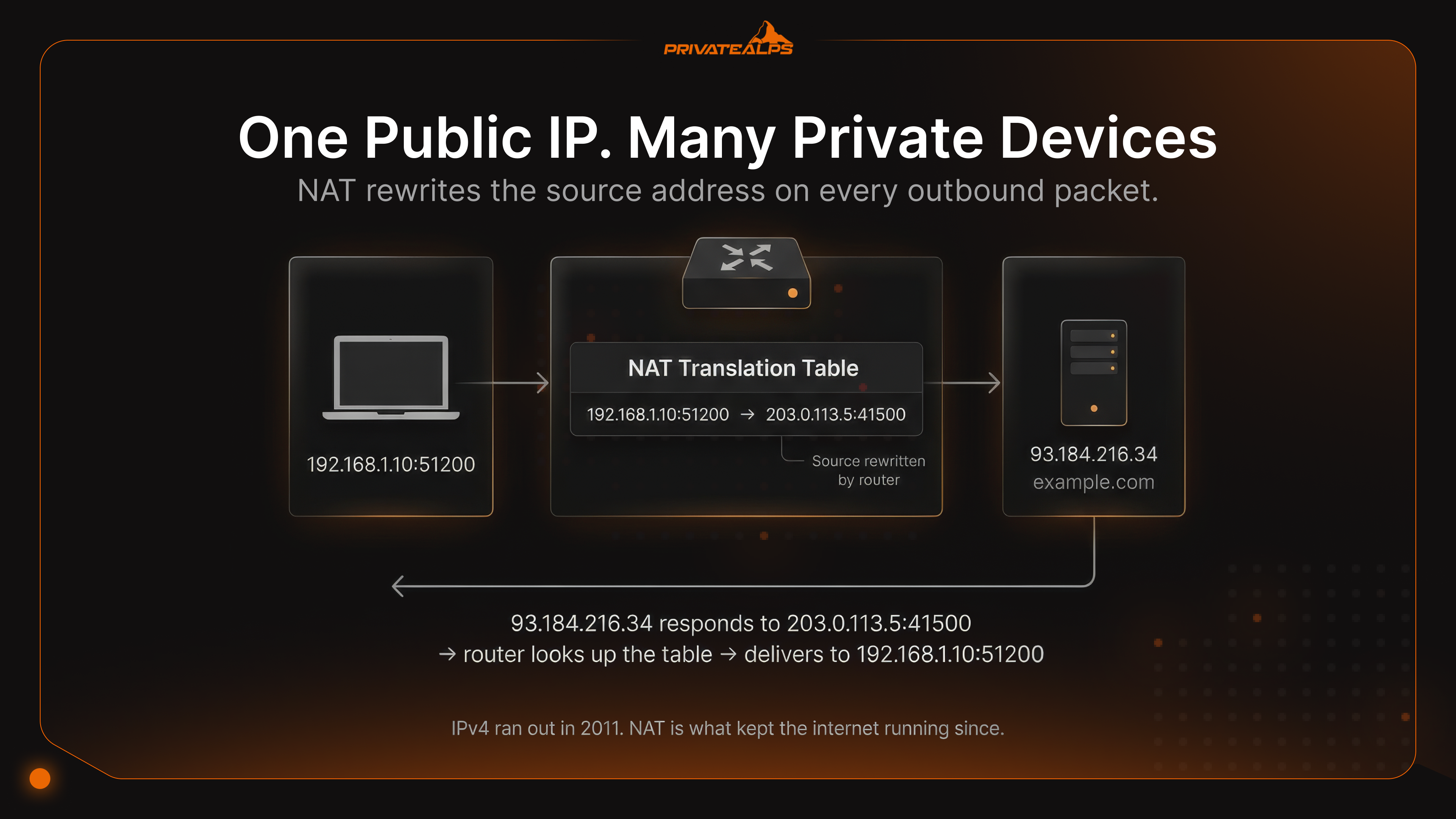
PAT - sometimes written as NAT overload - is what your home router uses and what most enterprise edge equipment runs. One public IP, tens of thousands of concurrent sessions, each identified by a different source port. It works. The friction points: apps that require inbound connections (BitTorrent, SIP-based calls) behave unpredictably. Anything genuinely inbound needs an explicit forwarding rule. And log analysis gets complicated when dozens of hosts all look like the same external address.
One specific failure that comes up constantly and almost never appears in documentation: NAT hairpinning (NAT loopback). You've got a server on your LAN at 192.168.1.20. You try to reach it from another device on the same network using the public IP, 203.0.113.5. On a large number of consumer-grade routers, nothing happens - the connection silently drops. The service is completely reachable from outside; it's just unreachable via the public address from inside.
Solutions: address the server by its local IP internally, configure split-horizon DNS so internal lookups return the private address, or replace the router with one that properly handles NAT loopback.
Private IP Address Ranges - RFC 1918 Reference
Most documentation stops at the three RFC 1918 blocks. Real-world networking adds two more that any engineer working with CG-NAT or diagnosing a broken DHCP situation will encounter. What you need to know upfront: RFC 1918 defines the three standard private blocks. RFC 6598 added a fourth for ISP-level NAT. The fifth - APIPA - is an OS fallback, not something assigned intentionally. All five are flagged as non-globally-reachable in the IANA Special-Purpose Address Registry.
| Range | CIDR | Address Count | Typical Use |
|---|---|---|---|
| 10.0.0.0 - 10.255.255.255 | 10.0.0.0/8 | 16,777,216 | Large enterprise networks, data centers |
| 172.16.0.0 - 172.31.255.255 | 172.16.0.0/12 | 1,048,576 | Mid-size networks, VPN address pools |
| 192.168.0.0 - 192.168.255.255 | 192.168.0.0/16 | 65,536 | Home routers, small offices (default) |
| 100.64.0.0 - 100.127.255.255 | 100.64.0.0/10 | 4,194,304 | CG-NAT (ISP-level NAT, RFC 6598 shared space) |
| 169.254.0.0 - 169.254.255.255 | 169.254.0.0/16 | 65,536 | APIPA / link-local (DHCP failure fallback) |
Security Implications: Private vs. Public IP
Private vs public IP security isn't a simple ranking. "Private is safer" is partly true and mostly misleading. The accurate version: private IPs shrink the attack surface from outside, while doing nothing for threats that are already inside.
What private IPs protect against. The internet can't touch a 192.168.x.x or 10.x.x.x host directly. Scanner traffic, password spray attempts, exploit kits probing open ports - none of that reaches devices sitting behind a NAT. That's a real benefit. It's not a security architecture, though. A phishing email, a USB drive, a compromised laptop on the same Wi-Fi - any of those lands an attacker inside the perimeter, and at that point private addresses offer zero resistance to moving between machines. Shodan doesn't see your internal hosts; a ransomware operator who already has a foothold does. VLANs and internal firewall rules are what actually segment the network, not the IP range.
What public IPs expose. A server on a public IP is visible to the entire internet, immediately. Shodan indexes newly assigned addresses in minutes. Open SSH on port 22 and within hours you have automated login attempts. RDP left accessible is a known ransomware delivery vector.
Every admin interface exposed directly to the internet needs a firewall restricting access, rate limiting on authentication, and TLS where credentials are involved. Anything public-facing in a multi-tier setup belongs in a DMZ - isolated from backend databases and internal services so a compromised frontend doesn't become a gateway to everything else.
The shared vs. dedicated distinction for hosting. If you're running inbound services, the question isn't just public vs. private - it's dedicated vs. shared. A dedicated public IP you actually own means your port forwarding works end-to-end, your rDNS is yours to configure, your IP reputation is yours to manage. Under CG-NAT, the ISP's infrastructure eats inbound traffic before it reaches your router. Your forwarding rules, your firewall config, your open ports - irrelevant. And for mail servers specifically: SPF and DMARC records authenticate against your sending IP. A shared IP contaminated by another tenant's spam doesn't just slow you down - it can land your legitimate mail in spam folders permanently.
When to Use a Public IP vs. a Private IP
Picking the right private vs public IP address isn't complicated once you frame it correctly. The question isn't which type is "better." It's: who needs to initiate contact with this service?
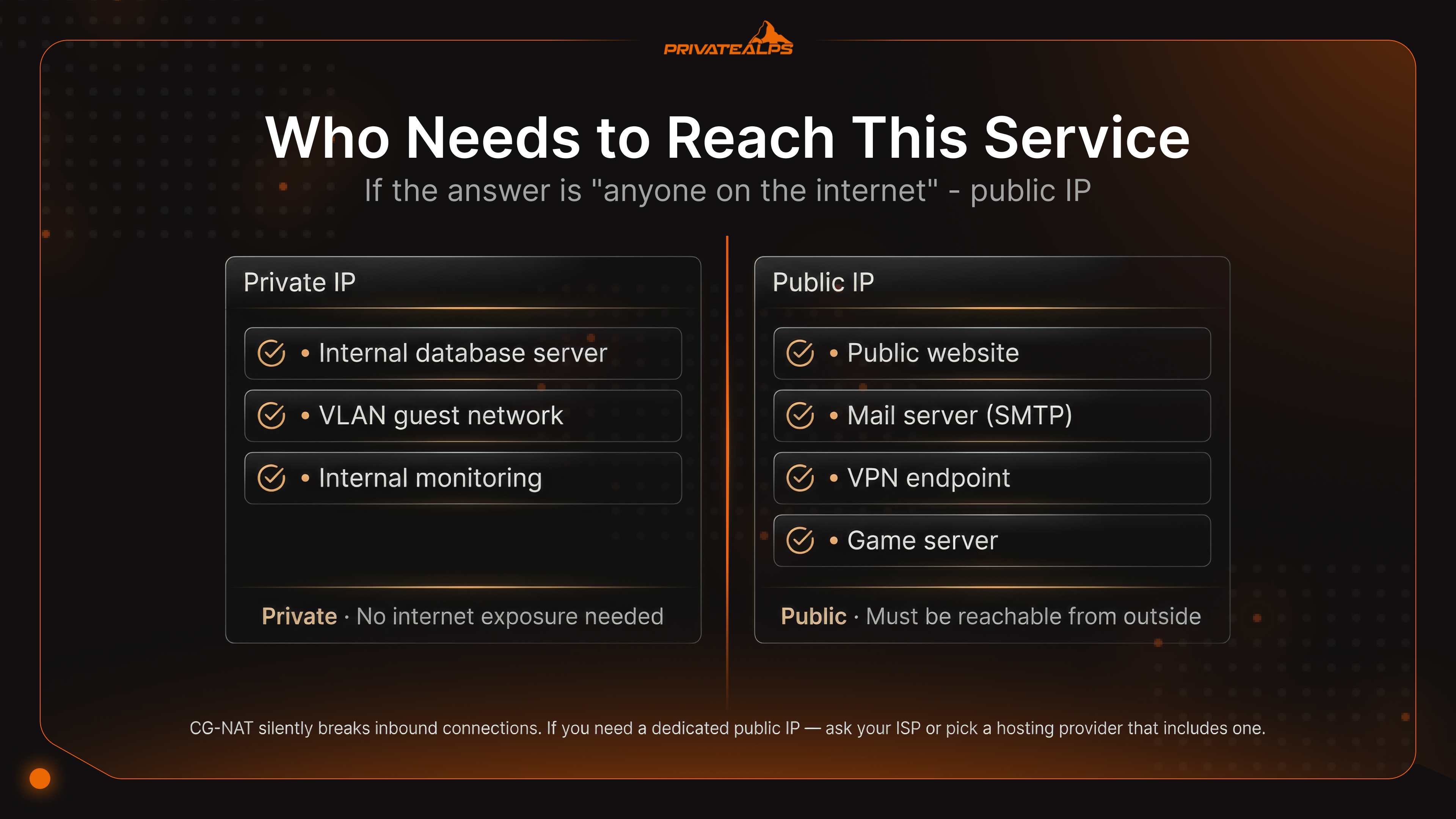
If the answer is "only other devices on the same local network" - private IP, done, leave it there. If any external system needs to reach it unprompted - a browser visiting your site, a client connecting to your VPN, a remote user accessing a NAS - a public IP needs to be somewhere in that path.
Decision rule: Any inbound connection from outside the local network needs a public IP, whether directly on the server or via a forwarding/proxy layer. Pure LAN traffic: private is the right call, and also the more secure one.
| Use Case | Required IP Type | Why |
|---|---|---|
| Public website / web app | Public IP | Must be reachable by external clients |
| Mail server (inbound SMTP) | Dedicated public IP | IP reputation affects deliverability; CG-NAT blocks port 25 |
| VPN server (WireGuard, OpenVPN) | Public IP on VPN endpoint | Clients connect from outside the network |
| VPN tunnel between offices | Private IPs internally, public IP at tunnel endpoint | Only the endpoint needs a public IP |
| Internal database server | Private IP | Should never be reachable from the internet |
| VLAN-segmented guest network | Private IP (separate subnet) | Isolates guests from corporate LAN |
| Home NAS with remote access | Private IP + port forwarding or reverse proxy | Private internally, reachable externally via public IP |
| Game server | Dedicated public IP preferred | CG-NAT breaks UDP port forwarding for most game protocols |
| Internal monitoring / logging | Private IP | No external exposure needed |
Worth noting the hybrid setup that most self-hosted systems use: the server gets a private IP, a reverse proxy sits at the front with the public IP, handles TLS, and passes requests inward.
Nginx, Caddy, Traefik all do this. The backend server never gets a direct connection from the internet - only from the proxy on the same local network. Cleaner from a security standpoint, and it means you can run multiple services on one public IP without conflicts.
IPv6 and the Future of Public vs. Private Addressing
IPv6 changes the private vs public IP addresses situation at a fundamental level - not by making the distinction irrelevant, but by removing the one reason it existed in the first place. IPv4 ran out of addresses. IPv6 doesn't. That changes the math.
GUA vs. ULA. IPv6 uses Global Unicast Addresses (2000::/3) where IPv4 would use public IPs - routable everywhere, handed out by RIRs and ISPs. Unique Local Addresses (fc00::/7) fill the RFC 1918 role - intentionally non-routable, for internal-only use. Because every device on an IPv6 network can receive a GUA directly from the router's ISP prefix, there's no technical reason for NAT. You don't need to translate one address to another when there are enough for everyone. ULA survives for a different reason: sometimes you want a service to stay internal by explicit policy, not just because NAT happens to block it. Pinning an internal service to a ULA and writing firewall rules around that is cleaner than hoping your GUA firewall config never has a gap.
Where adoption stands. Google's IPv6 Statistics show roughly 43% of Google users connecting over IPv6 as of early 2025. France is past 86%. India and Germany are over 70%. US is around 47-50% (Wikipedia, IPv6 deployment). Dual-stack is the norm - devices run IPv4 and IPv6 in parallel, with Happy Eyeballs (RFC 8305) handling which one actually gets used for a given connection.
The privacy wrinkle RFC 4941 solves. Here's one thing IPv6 introduced that IPv4/NAT users never faced: with a globally routable address on every device, the original SLAAC method embedded the device's MAC address directly into the IP. That made the address a permanent hardware-linked identifier - the same device showing up on different networks, tracked across sessions. RFC 4941 (Privacy Extensions for Stateless Address Autoconfiguration in IPv6) fixes this by generating randomized Interface IDs that rotate periodically, breaking the link between the address and the physical device. Under IPv4/NAT this was a non-issue - all your traffic appeared to come from the router's single public IP regardless of which device sent it. IPv6 made individual device tracking possible, and RFC 4941 is what pushed back.
How to Find Your Public and Private IP Address
These are two separate lookups because they're two different things. Your public IP comes from the ISP and lives on the router. Your private IP comes from the router and lives on your device. A website sees the first one. It never sees the second.
Lookup methods:
- Public IP (terminal): curl ifconfig.me or curl api.ipify.org - either returns the public IP of your router
- Public IP (browser): ifconfig.me or ipinfo.io - also shows ISP name and approximate location
- Private IP (Windows): ipconfig in Command Prompt, find "IPv4 Address" under your active adapter
- Private IP (macOS): ifconfig | grep "inet " in Terminal, or System Settings → Network → connection → Details
- Private IP (Linux): ip addr show or hostname -I
- Private IP (router admin): Log into 192.168.0.1 or 192.168.1.1 - the DHCP lease table lists every device and its assigned address
Private IP (mobile): Settings → Wi-Fi → tap the connected network name → IP address shows in the detail screen
What a site actually learns from your IP: your ISP's name, a rough location (the city or region the ISP's infrastructure is registered in - often off by 50-100km), and the ASN. That's what's in public databases. Your home address and identity aren't - those require a legal request to the ISP itself. Connect through a VPN and the site sees the VPN server's IP and location instead. Your private IP never crosses the router.
How to Change Your Public or Private IP Address
The ISP owns your public IP. You can't edit it in a settings menu. What's changeable is which IP the internet sees when your traffic exits - or you can request a different assignment from the ISP directly.
Changing your public IP - what works:
- VPN: Traffic exits from the VPN server's IP rather than yours. Most immediate option, works globally.
- Proxy: Applies to specific application traffic rather than everything on the device. Lighter-weight.
- Tor: Chains through multiple relays; exit node IP is what the destination sees. Slower, but the routing is harder to trace.
- Modem restart: On a dynamic IP, killing the connection may cause the ISP to hand out a different lease on reconnect. Not reliable - some ISPs reassign the same address every time.
- Static IP request: If you need something that won't move, contact the ISP. It's a paid service at most providers, but it's the only permanent fix for hosting.
Changing your private IP - by platform:
- Windows: ipconfig /release then ipconfig /renew in an elevated Command Prompt window
- macOS: System Settings → Network → the adapter → Details → TCP/IP tab → Renew DHCP Lease
- Linux: sudo dhclient -r && sudo dhclient
- Router panel: Log into 192.168.0.1 or 192.168.1.1, find the DHCP reservation or static lease settings, bind a specific address to the device's MAC - it'll always get that same IP going forward
Summary
Private IPs belong to the local network. They come from RFC 1918 blocks, get assigned by DHCP, and are invisible to the internet - the same ranges run in parallel across millions of separate networks without touching each other. Public IPs belong to the internet. Allocated by RIRs, handed out by ISPs, globally unique - one address per network that the entire internet can find. NAT, running on the router as PAT in the vast majority of cases, handles translation between the two. IPv6 removes the address shortage that made NAT necessary - GUA gives every device its own globally reachable address - but ULA and firewalls still handle the boundaries that matter for security. Dual-stack is how most networks actually run right now, and that'll be true for a while yet. Ready for a Dedicated Public IP With Full Inbound Control? CG-NAT, shared IPs, port forwarding that disappears somewhere upstream - those problems don't go away on their own. They go away when you have a dedicated public IP that you actually control.
PrivateAlps VPS and dedicated server plans ship with a dedicated public IP by default. Swiss infrastructure, no CG-NAT in the chain, full port forwarding, rDNS you configure yourself. The IP is yours, the inbound path is clear, and nothing between you and the internet is quietly absorbing your traffic.
FAQ
What Is the Difference Between a Public and Private IP Address?
Private is local. Your router gives it out to every device on the network, it works fine for internal communication, and the internet has no way to address it - packets destined for 192.168.x.x get dropped by routers before they'd ever arrive. Public is external. The ISP assigns it to your router, and it's the address the rest of the internet uses to send traffic back to you. NAT bridges them: devices on private IPs send traffic through the public IP, and the router sorts out which response goes to which device using port numbers.
How Are Private and Public IP Addresses Assigned?
Private addresses come from the DHCP server running on your router. The process: device broadcasts a Discover, router responds with an Offer, device sends a Request confirming which offer it wants, router sends an Acknowledge locking in the address. That's DORA. Takes under a second. Public addresses come from the ISP - on a dynamic account, they're leased from a pool and might change; on a static account, the address is pre-assigned to you and stays fixed. Setting a static public IP manually on a device only works if the ISP has actually reserved that address for your account first.
Can Two Devices Have the Same Private IP Address?
On separate networks, constantly - that's exactly what RFC 1918 was designed for. Your home setup and the company you work for can both run 192.168.1.50 without any overlap, because those addresses never interact outside their respective local networks. On the same network, though, a duplicate causes ARP table conflicts. Both machines end up with unreliable connectivity, sessions drop unexpectedly, and figuring out which device is the duplicate takes longer than it should.
Is a Private IP Address More Secure Than a Public IP?
Not on its own. A private IP means no one on the internet can directly knock on your door - the NAT layer absorbs all uninvited traffic before it reaches the local network. That matters. But it's one layer, not a complete defense. An attacker who's already inside - via malware, a compromised credential, physical access, a rogue device on the network - can move between private-IP machines without restriction. Real segmentation requires VLANs, per-subnet firewall rules, and access controls that don't assume internal traffic is safe just because it didn't come from outside.
Can I Host a Website on a Private IP Address?
Internally, yes. From the internet, no. The public internet has no route to 192.168.x.x - a visitor trying to reach a server on a private IP from outside the local network simply can't get there. For anything external-facing, you need a public IP in the path. Simplest option: port-forwarding rule on the router, pointing a public port to the server's private IP and port. Cleaner option: a reverse proxy (Nginx or Traefik work well for this) that sits at the edge with a public IP, handles TLS, and passes requests inward. The backend server never needs direct internet exposure.
What Is CG-NAT and How Does It Affect Me?
CG-NAT is a NAT layer your ISP runs on their own infrastructure - before traffic reaches your home router. Your router gets an address from 100.64.0.0/10 (RFC 6598 shared space) instead of a real public IP. Everything looks normal until you try something that needs inbound connectivity. Port forwarding rules on your router? They apply to traffic that reaches your router - ISP-level NAT intercepts inbound traffic before that point. Result: self-hosted services, VPN servers, remote desktop, game servers - all broken in ways that aren't obvious to diagnose. The fix is contacting your ISP and requesting a dedicated public IP. Available as a paid add-on at most providers.
What Information Can Someone Get From Your IP Address?
Your ISP's name, the autonomous system number (ASN), and a geographic region - typically the city or region where your ISP has infrastructure registered, which can be 50-100km off from your actual location. That's what public IP geolocation databases contain. Your home address, your name, your exact location - those require a formal legal request to the ISP. A VPN or proxy swaps the visible IP for the server's address, so recipients see that server's location rather than yours.
How Do I Check My Public IP Address?
Browser: ifconfig.me or ipinfo.io. Terminal: curl ifconfig.me. The result is your router's current public IP - not the private address of whatever device you're using to look it up. If you're on a VPN, the result will be the VPN server's public IP rather than the one your ISP assigned.
Does IPv6 Eliminate the Need for Private IP Addresses?
It eliminates the need for NAT - 128-bit addressing means there are enough public addresses for every device, so the workaround stops being necessary. Unique Local Addresses (fc00::/7) still exist for intentional internal-only use, separate from the address space problem. And the security boundary doesn't disappear just because NAT does. IPv6 networks still need a stateful firewall at the perimeter to handle unsolicited inbound connections - NAT was blocking those as a side effect, not as a deliberate security mechanism. Remove it and you need something that does the job on purpose.